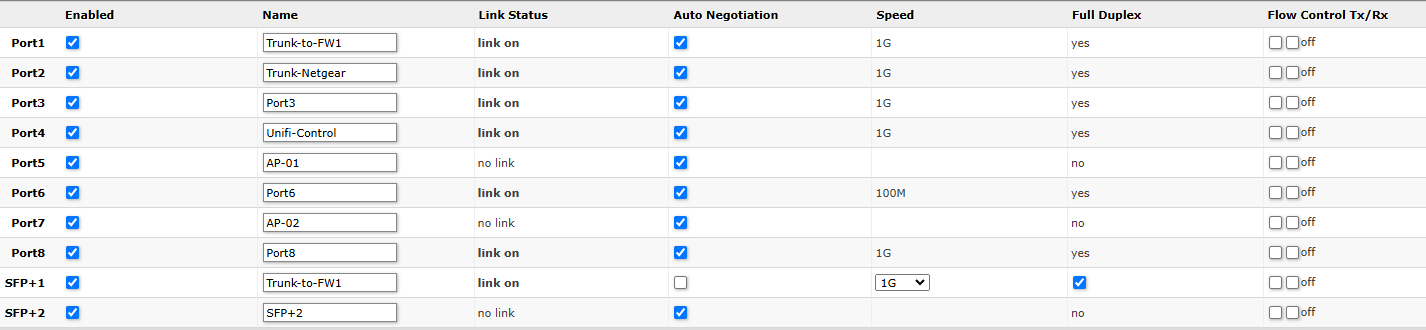
I’m configuring my SFP1 port to operate as a trunk interface rather than ETH8 on my L009 Router. I’ve duplicated the configuration from my existing trunk port to SFP1.
However, the SFP link is up and transmitting traffic but not receiving any. The same behavior is observed on the connected switch—it sends traffic but does not receive any.
Could someone help review the configurations and identify any discrepancies I might have missed?
Thanks in advance!
/interface bridge
add admin-mac=78:9A:18:F8:A2:FB auto-mac=no comment=defconf name=LAN-bridge port-cost-mode=short vlan-filtering=yes
add name=bridge-main
/interface ethernet
set [ find default-name=ether1 ] name=ether1-WAN
set [ find default-name=ether2 ] name=ether2-T-mgt
set [ find default-name=ether4 ] disabled=yes
set [ find default-name=ether5 ] disabled=yes
set [ find default-name=ether6 ] disabled=yes
set [ find default-name=ether7 ] auto-negotiation=no disabled=yes
set [ find default-name=ether8 ] auto-negotiation=no name=ether8-trunk-SW1
set [ find default-name=sfp1 ] auto-negotiation=no speed=1G-baseT-full
/interface wireguard
add listen-port=13231 mtu=1420 name=wg-vpn
/interface vlan
add interface=LAN-bridge name=Default vlan-id=5
add interface=LAN-bridge name=Guest vlan-id=30
add interface=LAN-bridge name=Home-Network vlan-id=50
add interface=LAN-bridge name=IOT-Network vlan-id=20
add interface=LAN-bridge name=Management vlan-id=10
add interface=LAN-bridge name=Trust-Network vlan-id=40
/interface list
add comment=defconf name=WAN
add comment=defconf name=LAN
add comment="all isolated vlans" name=ISOLATED_VLAN
/interface wireless security-profiles
set [ find default=yes ] supplicant-identity=MikroTik
/ip pool
add name=default-dhcp ranges=192.168.88.10-192.168.88.254
add name=temp-pool ranges=10.0.0.100-10.0.0.150
add name=mgt_pool ranges=10.0.10.50-10.0.10.100
add name=trust-pool ranges=10.0.40.100-10.0.40.200
add name=guest_pool ranges=10.0.30.2-10.0.30.254
add name=home_pool ranges=10.0.50.2-10.0.50.254
add name=dhcp_pool10 ranges=10.10.100.2-10.10.100.254
add name=dhcp_pool11 ranges=10.0.0.2-10.0.0.254
add comment=iot-dhcp name=iot-dhcp ranges=192.168.20.2-192.168.20.254
/ip dhcp-server
add address-pool=mgt_pool interface=Management lease-time=1d name=mgt-dhcp
add address-pool=trust-pool interface=Trust-Network lease-time=1d name=trust-dhcp
add address-pool=guest_pool interface=Guest lease-time=12h name=guest-dhcp
add address-pool=home_pool interface=Home-Network lease-time=1d name=home-dhcp
add address-pool=dhcp_pool10 interface=ether2-T-mgt lease-time=8m name=dhcp2
add address-pool=dhcp_pool11 disabled=yes interface=LAN-bridge lease-time=8m name=dhcp3
add address-pool=iot-dhcp interface=IOT-Network lease-time=1d name=iot-dhcp
/port
set 0 name=serial0
/queue type
add cake-diffserv=diffserv4 cake-overhead=18 kind=cake name=cake-down
add cake-diffserv=diffserv4 cake-nat=yes cake-overhead=18 kind=cake name=cake-up
add cake-diffserv=besteffort cake-flowmode=dual-dsthost cake-overhead=18 cake-rtt=10ms kind=cake name=cake-download
add cake-diffserv=besteffort cake-flowmode=dual-srchost cake-nat=yes cake-overhead=18 cake-rtt=10ms kind=cake name=cake-upload
/queue simple
add disabled=yes max-limit=270M/270M name=CAKE-Download queue=cake-up/cake-down target=ether1-WAN
add disabled=yes max-limit=270M/270M name=CAKE-Upload queue=cake-down/cake-up target=ether1-WAN
/system logging action
set 3 remote=10.0.40.10 remote-log-format=syslog syslog-facility=local0
/user group
add name=mktxp_group policy=read,api,!local,!telnet,!ssh,!ftp,!reboot,!write,!policy,!test,!winbox,!password,!web,!sniff,!sensitive,!romon,!rest-api
/interface bridge port
add bridge=LAN-bridge interface=ether3 internal-path-cost=10 path-cost=10
add bridge=LAN-bridge interface=ether4 internal-path-cost=10 path-cost=10
add bridge=LAN-bridge interface=ether5 internal-path-cost=10 path-cost=10
add bridge=LAN-bridge interface=ether6 internal-path-cost=10 path-cost=10
add bridge=LAN-bridge interface=ether8-trunk-SW1 internal-path-cost=10 path-cost=10 pvid=5
add bridge=LAN-bridge interface=sfp1 internal-path-cost=10 path-cost=10 pvid=5
add bridge=LAN-bridge interface=ether7
/ip firewall connection tracking
set udp-timeout=10s
/ip neighbor discovery-settings
set discover-interface-list=LAN lldp-med-net-policy-vlan=1
/ip settings
set max-neighbor-entries=14336
/ipv6 settings
set disable-ipv6=yes max-neighbor-entries=7168
/interface bridge vlan
add bridge=LAN-bridge tagged=ether8-trunk-SW1,LAN-bridge,sfp1 vlan-ids=10
add bridge=LAN-bridge tagged=ether8-trunk-SW1,sfp1,LAN-bridge vlan-ids=20
add bridge=LAN-bridge tagged=ether8-trunk-SW1,LAN-bridge,sfp1 vlan-ids=30
add bridge=LAN-bridge tagged=ether8-trunk-SW1,LAN-bridge,sfp1 vlan-ids=40
add bridge=LAN-bridge tagged=ether8-trunk-SW1,LAN-bridge,sfp1 vlan-ids=50
add bridge=LAN-bridge tagged=ether8-trunk-SW1,sfp1 vlan-ids=5
/interface list member
add comment=defconf interface=LAN-bridge list=LAN
add comment=defconf interface=ether1-WAN list=WAN
add interface=ether2-T-mgt list=LAN
add interface=IOT-Network list=ISOLATED_VLAN
add interface=Home-Network list=ISOLATED_VLAN
add interface=Guest list=ISOLATED_VLAN
add interface=Home-Network list=LAN
add interface=IOT-Network list=LAN
add interface=Guest list=LAN
add interface=Trust-Network list=LAN
/interface ovpn-server server
add mac-address=FE:66:F9:76:63:9D name=ovpn-server1
/interface wireguard peers
add allowed-address=10.0.60.2/32 comment=Keith-Android interface=wg-vpn name=peer1 public-key="X"
add allowed-address=10.0.60.3/32 client-address=10.0.60.3/32 comment=Oracle-VM disabled=yes endpoint-address=X endpoint-port=51820 interface=wg-vpn name=peer2 public-key="X"
/ip address
add address=192.168.88.1/24 comment=defconf disabled=yes interface=LAN-bridge network=192.168.88.0
add address=10.0.10.1/24 interface=Management network=10.0.10.0
add address=192.168.20.1/24 interface=IOT-Network network=192.168.20.0
add address=10.0.0.1/24 interface=LAN-bridge network=10.0.0.0
add address=10.0.30.1/24 interface=Guest network=10.0.30.0
add address=10.0.40.1/24 interface=Trust-Network network=10.0.40.0
add address=10.0.50.1/24 interface=Home-Network network=10.0.50.0
add address=10.10.100.0/24 interface=ether2-T-mgt network=10.10.100.0
add address=10.0.60.1/24 interface=wg-vpn network=10.0.60.0
/ip dhcp-client
add comment=defconf interface=ether1-WAN use-peer-dns=no
/ip dhcp-server lease
add address=192.168.20.247 mac-address=34:60:F9:CA:EE:49 server=iot-dhcp
add address=192.168.20.248 mac-address=9C:A2:F4:0C:8F:FF server=iot-dhcp
/ip dhcp-server network
add address=10.0.0.0/24 comment=Temporary-Network dns-server=9.9.9.9 gateway=10.0.0.1
add address=10.0.10.0/24 comment=Management dns-server=10.0.40.10 gateway=10.0.10.1 netmask=24
add address=10.0.20.0/24 dns-server=10.0.40.10 gateway=10.0.20.1
add address=10.0.30.0/24 dns-server=10.0.40.10 gateway=10.0.30.1
add address=10.0.40.0/24 dns-server=10.0.40.10,9.9.9.9,149.112.112.112 gateway=10.0.40.1
add address=10.0.50.0/24 dns-server=10.0.40.10 gateway=10.0.50.1
add address=10.10.100.0/24 dns-server=9.9.9.9 gateway=10.10.100.1
add address=192.168.20.0/24 dns-server=10.0.40.10 gateway=192.168.20.1
/ip dns
set servers=10.0.40.10,9.9.9.9 verify-doh-cert=yes
/ip dns static
add address=192.168.88.1 comment=defconf name=router.lan type=A
add address=10.0.40.10 comment=Unifi-Controller name=unifi type=A
/ip firewall address-list
add address=0.0.0.0/8 comment=RFC6890 list=not_in_internet
add address=172.16.0.0/12 comment=RFC6890 list=not_in_internet
add address=192.168.0.0/16 comment=RFC6890 list=not_in_internet
add address=10.0.0.0/8 comment=RFC6890 list=not_in_internet
add address=169.254.0.0/16 comment=RFC6890 list=not_in_internet
add address=127.0.0.0/8 comment=RFC6890 list=not_in_internet
add address=224.0.0.0/4 comment=Multicast list=not_in_internet
add address=198.18.0.0/15 comment=RFC6890 list=not_in_internet
add address=192.0.0.0/24 comment=RFC6890 list=not_in_internet
add address=192.0.2.0/24 comment=RFC6890 list=not_in_internet
add address=198.51.100.0/24 comment=RFC6890 list=not_in_internet
add address=203.0.113.0/24 comment=RFC6890 list=not_in_internet
add address=100.64.0.0/10 comment=RFC6890 list=not_in_internet
add address=240.0.0.0/4 comment=RFC6890 list=not_in_internet
add address=192.88.99.0/24 comment="6to4 relay Anycast [RFC 3068]" list=not_in_internet
/ip firewall filter
add action=accept chain=input comment="defconf: accept established,related,untracked" connection-state=established,related,untracked
add action=accept chain=input comment=Trust-Management dst-port=22,80,443,8921 in-interface=Trust-Network protocol=tcp
add action=accept chain=forward comment=allow-dns-tcp dst-address=10.0.40.10 dst-port=53 out-interface=Trust-Network protocol=tcp
add action=accept chain=forward comment=allow-dns-udp dst-address=10.0.40.10 dst-port=53 out-interface=Trust-Network protocol=udp
add action=accept chain=input comment="defconf: accept ICMP" in-interface=all-vlan protocol=icmp
add action=drop chain=input comment="defconf: drop invalid" connection-state=invalid
add action=accept chain=input comment=Allow-Inbound-WG port=13231 protocol=udp
add action=accept chain=input comment="defconf: accept to local loopback (for CAPsMAN)" disabled=yes dst-address=127.0.0.1
add action=drop chain=input comment="defconf: drop all not coming from LAN" in-interface-list=!LAN
add action=accept chain=forward comment="defconf: accept in ipsec policy" ipsec-policy=in,ipsec
add action=accept chain=forward comment="defconf: accept out ipsec policy" ipsec-policy=out,ipsec
add action=fasttrack-connection chain=forward comment="defconf: fasttrack" connection-state=established,related,untracked hw-offload=yes
add action=accept chain=forward comment="defconf: accept established,related, untracked" connection-state=established,related,untracked
add action=accept chain=forward comment=Allow-Outbound-All in-interface-list=LAN out-interface-list=WAN
add action=accept chain=forward comment=Allow-WG-VPN out-interface-list=LAN src-address=10.10.60.0/24
add action=drop chain=forward comment="defconf: drop invalid" connection-state=invalid
add action=drop chain=forward comment="defconf: drop all from WAN not DSTNATed" connection-nat-state=!dstnat connection-state=new in-interface-list=WAN
add action=drop chain=forward comment="block isolated vlan to lan" in-interface-list=ISOLATED_VLAN out-interface-list=LAN
add action=accept chain=input comment="Allow WireGuard tunnel traffic" disabled=yes dst-port=51820 protocol=udp
add action=drop chain=forward comment="Block Oracle VM WireGuard access to LAN" disabled=yes src-address=10.0.60.3
/ip firewall nat
add action=masquerade chain=srcnat comment="defconf: masquerade" ipsec-policy=out,none out-interface-list=WAN
add action=masquerade chain=srcnat src-address=10.0.60.0/24
/ip firewall service-port
set ftp disabled=yes
/ip hotspot profile
set [ find default=yes ] html-directory=hotspot
/ip ipsec profile
set [ find default=yes ] dpd-interval=2m dpd-maximum-failures=5
/ip service
set telnet disabled=yes
set ftp disabled=yes
set www-ssl disabled=no tls-version=only-1.2
/ip smb shares
set [ find default=yes ] directory=pub
/ip ssh
set strong-crypto=yes
/ipv6 firewall address-list
add address=::/128 comment="defconf: unspecified address" list=bad_ipv6
add address=::1/128 comment="defconf: lo" list=bad_ipv6
add address=fec0::/10 comment="defconf: site-local" list=bad_ipv6
add address=::ffff:0.0.0.0/96 comment="defconf: ipv4-mapped" list=bad_ipv6
add address=::/96 comment="defconf: ipv4 compat" list=bad_ipv6
add address=100::/64 comment="defconf: discard only " list=bad_ipv6
add address=2001:db8::/32 comment="defconf: documentation" list=bad_ipv6
add address=2001:10::/28 comment="defconf: ORCHID" list=bad_ipv6
add address=3ffe::/16 comment="defconf: 6bone" list=bad_ipv6
/ipv6 firewall filter
add action=accept chain=input comment="defconf: accept established,related,untracked" connection-state=established,related,untracked
add action=drop chain=input comment="defconf: drop invalid" connection-state=invalid
add action=accept chain=input comment="defconf: accept ICMPv6" protocol=icmpv6
add action=accept chain=input comment="defconf: accept UDP traceroute" port=33434-33534 protocol=udp
add action=accept chain=input comment="defconf: accept DHCPv6-Client prefix delegation." dst-port=546 protocol=udp src-address=fe80::/10
add action=accept chain=input comment="defconf: accept IKE" dst-port=500,4500 protocol=udp
add action=accept chain=input comment="defconf: accept ipsec AH" protocol=ipsec-ah
add action=accept chain=input comment="defconf: accept ipsec ESP" protocol=ipsec-esp
add action=accept chain=input comment="defconf: accept all that matches ipsec policy" ipsec-policy=in,ipsec
add action=drop chain=input comment="defconf: drop everything else not coming from LAN" in-interface-list=!LAN
add action=accept chain=forward comment="defconf: accept established,related,untracked" connection-state=established,related,untracked
add action=drop chain=forward comment="defconf: drop invalid" connection-state=invalid
add action=drop chain=forward comment="defconf: drop packets with bad src ipv6" src-address-list=bad_ipv6
add action=drop chain=forward comment="defconf: drop packets with bad dst ipv6" dst-address-list=bad_ipv6
add action=drop chain=forward comment="defconf: rfc4890 drop hop-limit=1" hop-limit=equal:1 protocol=icmpv6
add action=accept chain=forward comment="defconf: accept ICMPv6" protocol=icmpv6
add action=accept chain=forward comment="defconf: accept HIP" protocol=139
add action=accept chain=forward comment="defconf: accept IKE" dst-port=500,4500 protocol=udp
add action=accept chain=forward comment="defconf: accept ipsec AH" protocol=ipsec-ah
add action=accept chain=forward comment="defconf: accept ipsec ESP" protocol=ipsec-esp
add action=accept chain=forward comment="defconf: accept all that matches ipsec policy" ipsec-policy=in,ipsec
add action=drop chain=forward comment="defconf: drop everything else not coming from LAN" in-interface-list=!LAN
/system clock
set time-zone-name=America/New_York
/system identity
set name=MikroTik-FW1
/system logging
set 0 action=remote prefix=:Info
set 1 action=remote prefix=:Error
set 2 action=remote prefix=:Warning
set 3 action=remote prefix=:Critical
add action=remote prefix=:Firewall topics=firewall
add action=remote prefix=:Account topics=account
add action=remote prefix=:Caps topics=caps
add action=remote prefix=:Wireles topics=wireless
/system note
set show-at-login=no
/system ntp client
set enabled=yes
/system ntp client servers
add address=pool.ntp.org
add address=time-a-g.nist.gov