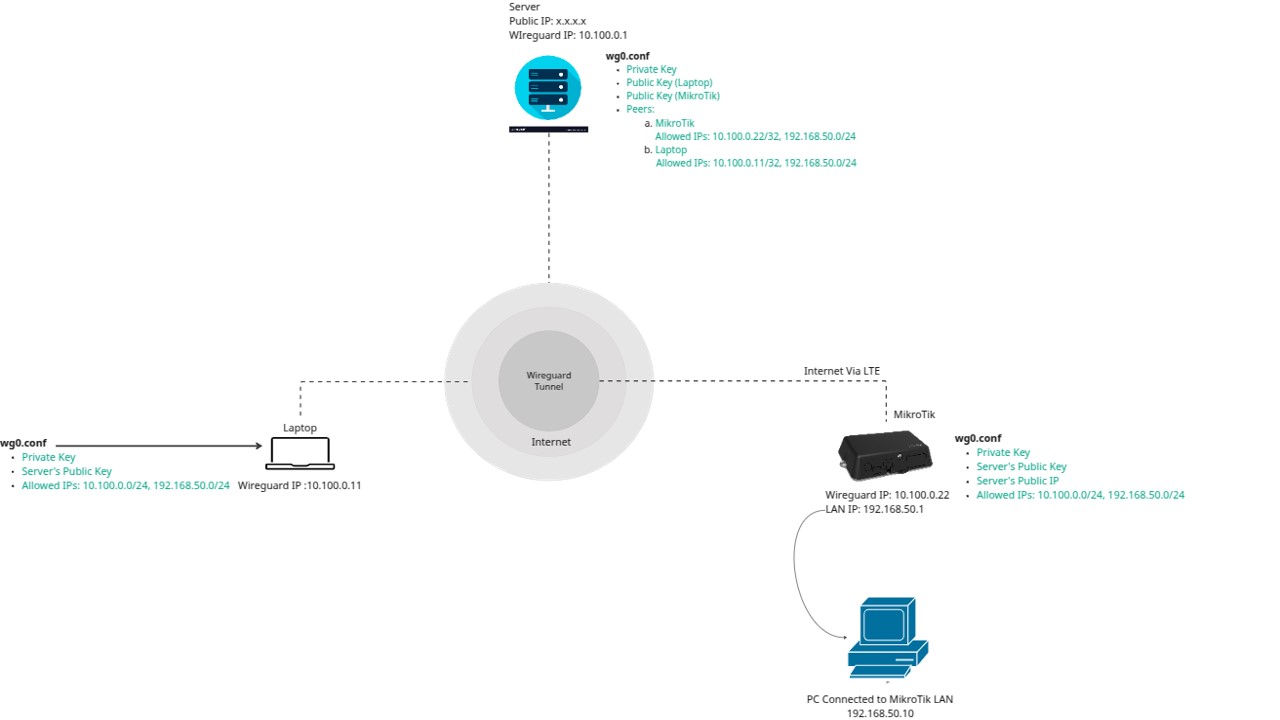
Looking at the diagram it would appear you have three separate networks/locations.
The laptop is a remote device could be anywhere a true remote peer.
The MT device is a fixed remote device.
The Server is the local wireguard in this discussion.
All three are not connected but all three have access to the internet independently and you wish to connect them via VPN wireguard.
The glue is the SERVER to which both laptop and remote router connect to.
The key is the work at the server, it needs to be setup to allow a peer, AKA laptop, with destination of remote router(MT) to arrive at local server, exit tunnel and reenter tunnel for remote router.
In Mikrotik speak it would be something like
add action=accept chain=forward comment=“relay server” in-interface=wireguard1 out-interface=wireguard1
Also at the server, it has to know that the IP address 192.168.50.10 is a known quality which means two things.
PEER SETTING ON SERVER FOR MT
add allowed-address=10.100.0.22/32,192.168.50.0/24 interface=wireguard public-key=“----”
ROUTE for 192.168.50.0/24 exists and if the server was MT it would look like.
/ip route
add dst-address=192.168.50.0/24 gateway=wireguard table=main
+++++++++++++++++++++++++++++++++++++++++++++++++++++++
At the MT end, some work needs to be done too.
You have a basic error. Allowed IPs, does what ???.. if you don’t know you should! it IDENTIFIES remote addresses, NOT LOCAL
a. remote IPs local user may need to reach (outgoing)
b. remote users that may be coming to your device (incoming)
192.168.50.0/24 is local to the MT and has no business on the peer line and it should be removed.
/interface wireguard peers
add allowed-address=10.100.0.0/24,192.168.50.0/24 endpoint-address=
x.x.x.x endpoint-port=51820 interface=wg-client name=peer1
persistent-keepalive=25s public-key=“–±-”
If there is no longer a 192.168.88.0/24 subnet on the MT router then get rid of the default static IP DNS.
/ip dns static
add address=192.168.88.1 comment=defconf name=router.lan type=A
Your firewall rules are incoherent and out of order as well and needs serious rejig.
Your use of masquerade is way overboard as well and needs to be rejigged.
First need to modify interface list member…
/interface list member
add comment=defconf interface=bridge list=LAN
add interface=wg-client list=LAN
add comment=defconf interface=lte1 list=WAN
Second identify which MT lan IPs are used by the admin (wired and wifi and set them as static DHCP leases ) and create a firewall address list.
/ip firewall address-list
add address=192.168.50.X list=Authorized comment=“admin pc”
add address=192.168.50.Y list=Authorized comment=“admin-wifi-laptop”
add address=192.168.50.Z list=Authorized comment=“admin smartphone/ipad wifi”
add address=10.100.0.11 list=Authorized comment=“remote admin”
Firewall rules
/ip firewall filter
{ default rules to keep }
add action=accept chain=input connection-state=established,related,untracked
add action=drop chain=input connection-state=invalid
add action=accept chain=input protocol=icmp
add action=accept chain=input dst-address=127.0.0.1
(admin rules)
add action=accept chain=input comment=“admin to router” in-interface-list=LAN src-address-list=Authorized
add action=accept chain=input comment=“users to services” in-interface-list=LAN dst-port=53 protocol=udp
add action=accept chain=input comment=“users to services” in-interface-list=LAN dst-port=53 protocol=tcp
add action=drop chain=input comment=“drop all else” { insert this rule here, last of all rules so not locked out }
+++++++++++++++++++++++++++++++++
{ default rules to keep }
add action=fasttrack-connection chain=forward connection-state=established,related
add action=accept chain=forward connection-state=established,related,untracked
add action=drop chain=forward connection-state=invalid
(admin rules)
add action=accept chain=forward comment=“internet traffic” in-interface-list=LAN out-interface-list-WAN
add action=accept chain=forward comment=“port forwarding” connection-nat-state=dstnat disabled=yes { enable if required or remove }
add action=accept chain=forward comment=“wireguard to LAN” in-interface=wg-client dst-address=192.168.50.0/24
add action=accept chain=forward comment=“admin to wg” in-interface-list=LAN src-address=Authorized out-interface=wg-client
add action=drop chain=forward comment=“drop all else”
/ip firewall nat
add action=masquerade chain=srcnat comment=“defconf: masquerade”
ipsec-policy=out,none out-interface-list=WAN
If, the wireguard server you are using doesnt recognize the subnet 192.168.50.0/24 then you would need to masquerade the wireguard traffic.
However, since the remote laptop is going to have a destination address of 192.168.50.X, the wireguard server will have to and also know how to route such traffic.