So I have new hAP ax2 and can’t get 2.4GHz wifi working. 5GHz works fine.
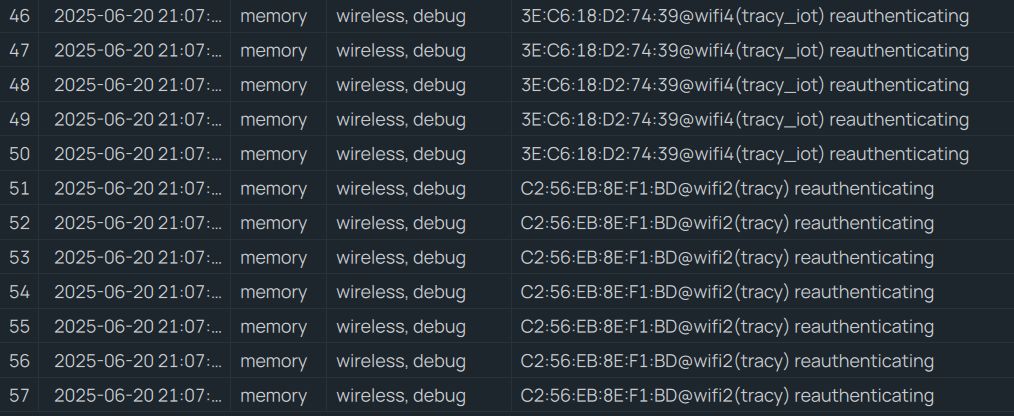
For 2.4 I see SSID but devices can’t connect. The log says “reauthenticating”.
What I treid
- several different client devices (tablet, phone, windows PC)
- remove authentication on 2.4 network (make it open)
- shutdown other 2.4wifis which could interfere
- shutdown 5GHz
No change. Below is my setup and log messages.
Off course I did upgrade to the latest version 7.19.2 (no beta). I did factory reset (no default config) and used even basic simple config or Quick Set by WinBox. No difference, still the same behavior. DHCP setting is fine - tried the Quick Set and also 5GHz works.
I don’t have energy to downgrade to x older versions and try different combinations. I just want it to work as I don’t see any problem in my config.
Any ideas what to try/fix please?
Otherwise I return the thing to the seller. What’s wireless router good for without wireless network?
Config:
[petr@MikroTik] /interface/wifi> export
# 2025-06-20 21:10:02 by RouterOS 7.19.2
# software id = G7RK-0TJA
#
# model = C52iG-5HaxD2HaxD
# serial number = HG309HQS63H
/interface wifi
set [ find default-name=wifi1 ] configuration.country=Czech .mode=ap .ssid=tracy_5g disabled=no
set [ find default-name=wifi2 ] configuration.country=Czech .mode=ap .ssid=tracy disabled=no
add configuration.ssid=tracy_iot disabled=no mac-address=D6:01:C3:20:AF:39 master-interface=wifi2 name=wifi4
[petr@MikroTik] /interface/wifi> print detail
Flags: M - master; D - dynamic; B - bound; X - disabled, I - inactive, R - running
 0 M B  default-name="wifi1" name="wifi1" l2mtu=1560 mac-address=D4:01:C3:20:AF:38 arp-timeout=auto radio-mac=D4:01:C3:20:AF:38
        configuration.mode=ap .ssid="tracy_5g" .country=Czech
        security.passphrase="***"

 1 M B  default-name="wifi2" name="wifi2" l2mtu=1560 mac-address=D4:01:C3:20:AF:39 arp-timeout=auto radio-mac=D4:01:C3:20:AF:39
        configuration.mode=ap .ssid="tracy" .country=Czech
        security.passphrase="***"

 2   B  name="wifi4" l2mtu=1560 mac-address=D6:01:C3:20:AF:39 arp-timeout=auto master-interface=wifi2
        configuration.ssid="tracy_iot"
        security.passphrase="***"