Can't Connect to 450g

I am using a MacBook Pro running Windows XP Sp3 vis Parallel. With using Winbox, it discovers the 450g MAC address;
however, when I select to connect, I get an error claiming “can’t connect with port 20561…time out.”

I would like to setup/configure this bad boy and have it live. Thanks

Try the serial port to set up an IP address. Once you have set that up connecting via layer three shouldn’t be a problem.

Thanks for responding. I would need to get a USB to serial db9 female in order to set up an IP address, which cost $30 and shipping time. If I purchase, what program would I used to set up the IP address? I tried opening Winbox in Darwine but got some connect error as well. I am frustrated.

Winbox through Winebottler (http://wiki.mikrotik.com/wiki/MikroTik_WinBox_for_Mac_StandAlone) works fine for me on Snow Leopard for access via MAC address.

That said a serial adapter is probably worth it in the long run just in case you screw up the router and need low level access. You can use any terminal emulator. Install Kermit from ports, use the built in ‘screen’ (screen /dev/tty.usbserial 115200), or find an OS X terminal client.

Thanks a lot, it did work. However, I am now have what appears to be config problem. I accepted the default setting which gave me 192.168.88.1 but when I ping in Terminal I get a timeout. I did not reboot after setting up; I exited. However, I appeared to have saved the setting because I had to log in with the new password. The only modification I did to settings was to add public DNS: Menu: IP/DNS

What’s happen?

Impossible to say without a lot more information.

Post the output of “/ip address print detail”, “/ip route print detail”, “/interface print”, and “/ip firewall export” as well as the output of “ifconfig” on the client. Wrap those in

 tags so things stay legible.

Huh. Try screenshots for now.

ifconfig is run in the OS X terminal.

Last login: Sun Dec 19 22:44:52 on console
ralston-champagnies-macbook-pro:~ ralston$ ifconfig
lo0: flags=8049<UP,LOOPBACK,RUNNING,MULTICAST> mtu 16384
inet6 ::1 prefixlen 128
inet6 fe80::1%lo0 prefixlen 64 scopeid 0x1
inet 127.0.0.1 netmask 0xff000000
gif0: flags=8010<POINTOPOINT,MULTICAST> mtu 1280
stf0: flags=0<> mtu 1280
en0: flags=8863<UP,BROADCAST,SMART,RUNNING,SIMPLEX,MULTICAST> mtu 1500
ether 00:1b:63:96:5f:44
inet6 fe80::21b:63ff:fe96:5f44%en0 prefixlen 64 scopeid 0x4
inet 192.168.88.1 netmask 0xffffff00 broadcast 192.168.88.255
media: autoselect (1000baseT <full-duplex,flow-control>)
status: active
fw0: flags=8863<UP,BROADCAST,SMART,RUNNING,SIMPLEX,MULTICAST> mtu 4078
lladdr 00:1c:b3:ff:fe:87:05:48
media: autoselect
status: inactive
en1: flags=8863<UP,BROADCAST,SMART,RUNNING,SIMPLEX,MULTICAST> mtu 1500
ether 00:1b:63:cd:4e:3a
inet6 fe80::21b:63ff:fecd:4e3a%en1 prefixlen 64 scopeid 0x6
inet 192.168.2.3 netmask 0xffffff00 broadcast 192.168.2.255
media: autoselect
status: active
en2: flags=8963<UP,BROADCAST,SMART,RUNNING,PROMISC,SIMPLEX,MULTICAST> mtu 1500
ether 00:1c:42:00:00:08
inet6 fe80::21c:42ff:fe00:8%en2 prefixlen 64 scopeid 0x7
inet 10.211.55.2 netmask 0xffffff00 broadcast 10.211.55.255
media: autoselect
status: active
en3: flags=8963<UP,BROADCAST,SMART,RUNNING,PROMISC,SIMPLEX,MULTICAST> mtu 1500
ether 00:1c:42:00:00:09
inet6 fe80::21c:42ff:fe00:9%en3 prefixlen 64 scopeid 0x8
inet 10.37.129.2 netmask 0xffffff00 broadcast 10.37.129.255
media: autoselect
status: active
vboxnet0: flags=8842<BROADCAST,RUNNING,SIMPLEX,MULTICAST> mtu 1500
ether 0a:00:27:00:00:00
ralston-champagnies-macbook-pro:~ ralston$
Last login: Sun Dec 19 22:44:52 on console
ralston-champagnies-macbook-pro:~ ralston$ ifconfig
lo0: flags=8049<UP,LOOPBACK,RUNNING,MULTICAST> mtu 16384
inet6 ::1 prefixlen 128
inet6 fe80::1%lo0 prefixlen 64 scopeid 0x1
inet 127.0.0.1 netmask 0xff000000
gif0: flags=8010<POINTOPOINT,MULTICAST> mtu 1280
stf0: flags=0<> mtu 1280
en0: flags=8863<UP,BROADCAST,SMART,RUNNING,SIMPLEX,MULTICAST> mtu 1500
ether 00:1b:63:96:5f:44
inet6 fe80::21b:63ff:fe96:5f44%en0 prefixlen 64 scopeid 0x4
inet 192.168.88.1 netmask 0xffffff00 broadcast 192.168.88.255
media: autoselect (1000baseT <full-duplex,flow-control>)
status: active
fw0: flags=8863<UP,BROADCAST,SMART,RUNNING,SIMPLEX,MULTICAST> mtu 4078
lladdr 00:1c:b3:ff:fe:87:05:48
media: autoselect
status: inactive
en1: flags=8863<UP,BROADCAST,SMART,RUNNING,SIMPLEX,MULTICAST> mtu 1500
ether 00:1b:63:cd:4e:3a
inet6 fe80::21b:63ff:fecd:4e3a%en1 prefixlen 64 scopeid 0x6
inet 192.168.2.3 netmask 0xffffff00 broadcast 192.168.2.255
media: autoselect
status: active
en2: flags=8963<UP,BROADCAST,SMART,RUNNING,PROMISC,SIMPLEX,MULTICAST> mtu 1500
ether 00:1c:42:00:00:08
inet6 fe80::21c:42ff:fe00:8%en2 prefixlen 64 scopeid 0x7
inet 10.211.55.2 netmask 0xffffff00 broadcast 10.211.55.255
media: autoselect
status: active
en3: flags=8963<UP,BROADCAST,SMART,RUNNING,PROMISC,SIMPLEX,MULTICAST> mtu 1500
ether 00:1c:42:00:00:09
inet6 fe80::21c:42ff:fe00:9%en3 prefixlen 64 scopeid 0x8
inet 10.37.129.2 netmask 0xffffff00 broadcast 10.37.129.255
media: autoselect
status: active
vboxnet0: flags=8842<BROADCAST,RUNNING,SIMPLEX,MULTICAST> mtu 1500
ether 0a:00:27:00:00:00
ralston-champagnies-macbook-pro:~ ralston$
Last login: Sun Dec 19 22:44:52 on console
ralston-champagnies-macbook-pro:~ ralston$ ifconfig
lo0: flags=8049<UP,LOOPBACK,RUNNING,MULTICAST> mtu 16384
inet6 ::1 prefixlen 128
inet6 fe80::1%lo0 prefixlen 64 scopeid 0x1
inet 127.0.0.1 netmask 0xff000000
gif0: flags=8010<POINTOPOINT,MULTICAST> mtu 1280
stf0: flags=0<> mtu 1280
en0: flags=8863<UP,BROADCAST,SMART,RUNNING,SIMPLEX,MULTICAST> mtu 1500
ether 00:1b:63:96:5f:44
inet6 fe80::21b:63ff:fe96:5f44%en0 prefixlen 64 scopeid 0x4
inet 192.168.88.1 netmask 0xffffff00 broadcast 192.168.88.255
media: autoselect (1000baseT <full-duplex,flow-control>)
status: active
fw0: flags=8863<UP,BROADCAST,SMART,RUNNING,SIMPLEX,MULTICAST> mtu 4078
lladdr 00:1c:b3:ff:fe:87:05:48
media: autoselect
status: inactive
en1: flags=8863<UP,BROADCAST,SMART,RUNNING,SIMPLEX,MULTICAST> mtu 1500
ether 00:1b:63:cd:4e:3a
inet6 fe80::21b:63ff:fecd:4e3a%en1 prefixlen 64 scopeid 0x6
inet 192.168.2.3 netmask 0xffffff00 broadcast 192.168.2.255
media: autoselect
status: active
en2: flags=8963<UP,BROADCAST,SMART,RUNNING,PROMISC,SIMPLEX,MULTICAST> mtu 1500
ether 00:1c:42:00:00:08
inet6 fe80::21c:42ff:fe00:8%en2 prefixlen 64 scopeid 0x7
inet 10.211.55.2 netmask 0xffffff00 broadcast 10.211.55.255
media: autoselect
status: active
en3: flags=8963<UP,BROADCAST,SMART,RUNNING,PROMISC,SIMPLEX,MULTICAST> mtu 1500
ether 00:1c:42:00:00:09
inet6 fe80::21c:42ff:fe00:9%en3 prefixlen 64 scopeid 0x8
inet 10.37.129.2 netmask 0xffffff00 broadcast 10.37.129.255
media: autoselect
status: active
vboxnet0: flags=8842<BROADCAST,RUNNING,SIMPLEX,MULTICAST> mtu 1500
ether 0a:00:27:00:00:00
ralston-champagnies-macbook-pro:~ ralston$

en0: flags=8863<UP,BROADCAST,SMART,RUNNING,SIMPLEX,MULTICAST> mtu 1500
ether 00:1b:63:96:5f:44
inet6 fe80::21b:63ff:fe96:5f44%en0 prefixlen 64 scopeid 0x4
inet > 192.168.88.1 > netmask 0xffffff00 broadcast 192.168.88.255
media: autoselect (1000baseT <full-duplex,flow-control>)

According to that you assigned 192.168.88.1 to yourself. That’s the default address of the router, you can’t give yourself the same IP address as the router. You must choose something that starts with 192.168.88 but has a different last octet.

The only thing I was able is to attached an image of the Winbox screen below:
Screenwinbox.tiff (161 KB)

Here is it with me having a different ip address:
Last login: Mon Dec 20 11:17:41 on ttys000
ralston-champagnies-macbook-pro:~ ralston$ ifconfig
lo0: flags=8049<UP,LOOPBACK,RUNNING,MULTICAST> mtu 16384
inet6 ::1 prefixlen 128
inet6 fe80::1%lo0 prefixlen 64 scopeid 0x1
inet 127.0.0.1 netmask 0xff000000
gif0: flags=8010<POINTOPOINT,MULTICAST> mtu 1280
stf0: flags=0<> mtu 1280
en0: flags=8863<UP,BROADCAST,SMART,RUNNING,SIMPLEX,MULTICAST> mtu 1500
ether 00:1b:63:96:5f:44
inet6 fe80::21b:63ff:fe96:5f44%en0 prefixlen 64 scopeid 0x4
inet 192.168.88.36 netmask 0xffffff00 broadcast 192.168.88.255
media: autoselect (1000baseT <full-duplex,flow-control>)
status: active
fw0: flags=8863<UP,BROADCAST,SMART,RUNNING,SIMPLEX,MULTICAST> mtu 4078
lladdr 00:1c:b3:ff:fe:87:05:48
media: autoselect
status: inactive
en1: flags=8863<UP,BROADCAST,SMART,RUNNING,SIMPLEX,MULTICAST> mtu 1500
ether 00:1b:63:cd:4e:3a
inet6 fe80::21b:63ff:fecd:4e3a%en1 prefixlen 64 scopeid 0x6
inet 192.168.2.3 netmask 0xffffff00 broadcast 192.168.2.255
media: autoselect
status: active
en2: flags=8963<UP,BROADCAST,SMART,RUNNING,PROMISC,SIMPLEX,MULTICAST> mtu 1500
ether 00:1c:42:00:00:08
inet6 fe80::21c:42ff:fe00:8%en2 prefixlen 64 scopeid 0x7
inet 10.211.55.2 netmask 0xffffff00 broadcast 10.211.55.255
media: autoselect
status: active
en3: flags=8963<UP,BROADCAST,SMART,RUNNING,PROMISC,SIMPLEX,MULTICAST> mtu 1500
ether 00:1c:42:00:00:09
inet6 fe80::21c:42ff:fe00:9%en3 prefixlen 64 scopeid 0x8
inet 10.37.129.2 netmask 0xffffff00 broadcast 10.37.129.255
media: autoselect
status: active
vboxnet0: flags=8842<BROADCAST,RUNNING,SIMPLEX,MULTICAST> mtu 1500
ether 0a:00:27:00:00:00
ralston-champagnies-macbook-pro:~ ralston$

Some weird things I have notice are I am unable to access the Mikrotik without connecting to the network. I can’t connect with just an ethernet cable connecting laptop to router. The last two digits of the MAC are 77 on the back of the router but 78 in the Winbox loader window. On the router’s back sticker are two MAC address have the same numbers, except the last digits, one with 77 and the other with 7B or unless the eight looks like a B.

So can you ping 192.168.88.1 when you have .36 configured on your wired interface and plug into ether2?

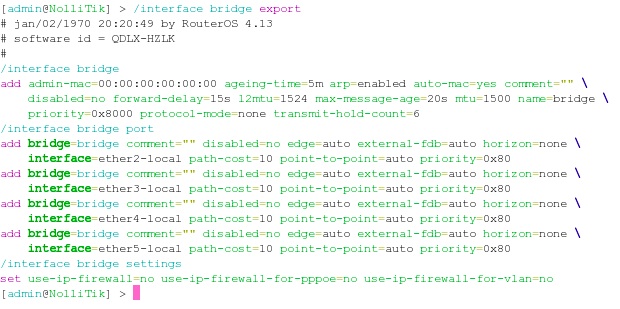
I haven’t worked with 450Gs, there appears to be a bridge configured. Can you also post the output of “/interface bridge export”?

bridge.jpg
I hope this shot is visible. I could ping 192.168.88.1 in the RouterOS (terminal). I get a timeout when I ping 192.168.88.36 form the RouterOS, also when I ping 192.168.88.1 from Apple’s terminal I get timedout.

I notice in the previous post that in the /interface bridge there is no admin MAC address; should that have been the MAC address for my laptop?

No. That would break things something fierce.

I don’t see what’s wrong with your setup, sorry. Maybe someone else will.

Okay it appears the router is now working. I will put online in the morning. I wanted to use Google public DNS but the router is also the DNS server.
In the IP/DNS, it shows the router in # 0 position and Google in 1 and 2 positions. However, when I click on settings, I get my old Belkin router and the ISP as what dishing out domains. When I replaced the Belkin with the Mikrotik 450G, will the 450 have the Google as the DNS servers?

Yes.

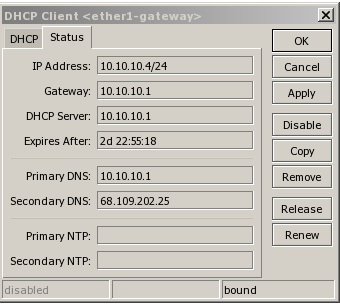
Do those items have a D next to them? That means they’re being picked up by a DHCP client. Edit the client in IP > DHCP Client and uncheck “Use DHP DNS”

1.jpg
Well, my Mikrotik 450G is now online. The above the a shot of my DHCP Client status. It’s showing my ISP’s DNS server. What do I need to do for it to show Google 8.8.8.8 and 8.8.4.4. which I set uo in IP/DNS. Also is it possible to set two public DNS servers, Google and OpenDNS?