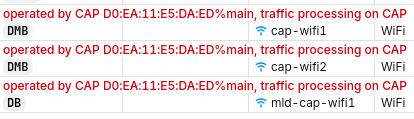
Disclaimer - originally posted here, re-posting for more reach: https://www.reddit.com/r/mikrotik/comments/1vtiggg/cant_get_my_l009_and_hap_be_working_using_capsman/
My main router is L009UiGS-2HaxD (works flawlessly) and I have bought two hAP be lite to extend the range. Both using the latest ROS 7.24. I was following this video by MT: CAPsMAN basics: expand your WiFi network - YouTube
Basically, after enabling CAPsMAN on the router and rebooting the hAP into CAP mode, the signal is very good but I'm just unable to connect to anything via WiFi.
Should something be configured on CAP device manually (I doubt that)? Or could it be related to different drivers on the devices?
My router config:
# 2026-08-20 15:31:26 by RouterOS 7.24
# model = L009UiGS-2HaxD
/interface bridge add name=appliances
/interface bridge add name=guests
/interface bridge add name=main
/interface veth add address=192.168.88.3/24 container-mac-address=12:F5:B4:E3:FC:EB dhcp=no gateway=192.168.88.1 gateway6="" mac-address=12:F5:B4:E3:FC:EA name=veth-containers-hello
/interface list add name=WAN
/interface list add name=LAN
/interface wifi configuration add country=Lithuania datapath.client-isolation=yes disabled=no name=redacted-guests security.authentication-types=wpa2-psk,wpa3-psk ssid=redacted-guests
/interface wifi configuration add country=Lithuania datapath.client-isolation=no disabled=no name=redacted-appliances security.authentication-types=wpa2-psk,wpa3-psk ssid=redacted-appliances
/interface wifi configuration add country=Lithuania datapath.client-isolation=no disabled=no name=redacted-main security.authentication-types=wpa2-psk,wpa3-psk ssid=redacted-main
/interface wifi set [ find default-name=wifi1 ] channel.skip-dfs-channels=10min-cac configuration=redacted-main configuration.country=Lithuania .mode=ap .ssid=redacted-main disabled=no name=redacted-main security.authentication-types=wpa2-psk,wpa3-psk .ft=yes .f
t-over-ds=yes
/interface wifi add configuration=redacted-appliances disabled=no mac-address=7A:9A:18:58:B7:6D master-interface=redacted-main name=redacted-appliances
/interface wifi add configuration=redacted-guests disabled=no mac-address=7A:9A:18:58:B7:6C master-interface=redacted-main name=redacted-guests
/ip pool add name=main ranges=192.168.88.10-192.168.88.254
/ip pool add name=guests ranges=192.168.11.10-192.168.11.254
/ip pool add name=appliances ranges=192.168.22.10-192.168.22.254
/ip dhcp-server add address-pool=main interface=main name=main
/ip dhcp-server add address-pool=guests interface=guests name=guests
/ip dhcp-server add address-pool=appliances interface=appliances name=appliances
/container add interface=veth-containers-hello layer-dir=/usb1/layers logging=yes name=hello remote-image=nginxdemos/hello root-dir=/usb1/containers/hello start-on-boot=yes
/container config set layer-dir=/usb1/layers memory-max=64.0MiB registry-url=https://registry-1.docker.io tmpdir=/usb1/tmp
/interface bridge port add bridge=main interface=redacted-main
/interface bridge port add bridge=main interface=veth-containers-hello
/interface bridge port add bridge=main interface=ether1
/interface bridge port add bridge=main interface=ether2
/interface bridge port add bridge=main interface=ether3
/interface bridge port add bridge=main interface=ether4
/interface bridge port add bridge=guests interface=redacted-guests
/interface bridge port add bridge=appliances interface=redacted-appliances
/interface bridge port add bridge=appliances interface=ether5
/interface bridge port add bridge=appliances interface=ether6
/interface bridge port add bridge=appliances interface=ether7
/interface bridge port add bridge=appliances interface=ether8
/ip neighbor discovery-settings set discover-interface-list=LAN
/interface list member add interface=main list=LAN
/interface list member add interface=sfp1 list=WAN
/interface wifi capsman set enabled=yes
/interface wifi provisioning add action=create-dynamic-enabled disabled=no master-configuration=redacted-main
/ip address add address=192.168.88.1/24 interface=main network=192.168.88.0
/ip address add address=192.168.11.1/24 interface=guests network=192.168.11.0
/ip address add address=192.168.22.1/24 interface=appliances network=192.168.22.0
/ip dhcp-client add interface=sfp1 name=sfp1
/ip dhcp-server network add address=192.168.11.0/24 dns-server=192.168.11.1 gateway=192.168.11.1
/ip dhcp-server network add address=192.168.22.0/24 dns-server=192.168.22.1 gateway=192.168.22.1
/ip dhcp-server network add address=192.168.88.0/24 dns-server=192.168.88.1 gateway=192.168.88.1
/ip dns set allow-remote-requests=yes cache-size=20480KiB servers=9.9.9.9
/ip dns static add address=192.168.88.1 name=router.lan type=A
/ip firewall filter add action=accept chain=input comment="accept established,related,untracked" connection-state=established,related,untracked
/ip firewall filter add action=drop chain=input comment="drop invalid" connection-state=invalid
/ip firewall filter add action=accept chain=input comment="accept ICMP" protocol=icmp
/ip firewall filter add action=accept chain=input comment="accept to local loopback (for CAPsMAN)" dst-address=127.0.0.1 in-interface=lo src-address=127.0.0.1
/ip firewall filter add action=accept chain=input comment="allow DNS from guests so the adlist filters them too" dst-port=53 in-interface=guests protocol=udp
/ip firewall filter add action=accept chain=input comment="allow DNS from guests so the adlist filters them too" dst-port=53 in-interface=guests protocol=tcp
/ip firewall filter add action=accept chain=input comment="allow DNS from appliances so the adlist filters them too" dst-port=53 in-interface=appliances protocol=udp
/ip firewall filter add action=accept chain=input comment="allow DNS from appliances so the adlist filters them too" dst-port=53 in-interface=appliances protocol=tcp
/ip firewall filter add action=drop chain=input comment="drop all not coming from LAN" in-interface-list=!LAN
/ip firewall filter add action=accept chain=forward comment="accept in ipsec policy" ipsec-policy=in,ipsec
/ip firewall filter add action=accept chain=forward comment="accept out ipsec policy" ipsec-policy=out,ipsec
/ip firewall filter add action=fasttrack-connection chain=forward comment=fasttrack connection-state=established,related
/ip firewall filter add action=accept chain=forward comment="accept established,related, untracked" connection-state=established,related,untracked
/ip firewall filter add action=drop chain=forward comment="drop invalid" connection-state=invalid
/ip firewall filter add action=drop chain=forward comment="drop all from WAN not DSTNATed" connection-nat-state=!dstnat in-interface-list=WAN
/ip firewall filter add action=drop chain=forward comment="guest isolation: guests may only reach WAN" in-interface=guests out-interface-list=!WAN
/ip firewall filter add action=drop chain=forward comment="appliance isolation: appliances may only reach WAN (client-isolation=no lets them still reach each other)" in-interface=appliances out-interface-list=!WAN
/ip firewall nat add action=masquerade chain=srcnat comment=masquerade ipsec-policy=out,none out-interface-list=WAN
/ipv6 firewall address-list add address=::/128 comment="unspecified address" list=bad_ipv6
/ipv6 firewall address-list add address=::1/128 comment=lo list=bad_ipv6
/ipv6 firewall address-list add address=fec0::/10 comment=site-local list=bad_ipv6
/ipv6 firewall address-list add address=::ffff:0.0.0.0/96 comment=ipv4-mapped list=bad_ipv6
/ipv6 firewall address-list add address=::/96 comment="ipv4 compat" list=bad_ipv6
/ipv6 firewall address-list add address=100::/64 comment="discard only " list=bad_ipv6
/ipv6 firewall address-list add address=2001:db8::/32 comment=documentation list=bad_ipv6
/ipv6 firewall address-list add address=2001:10::/28 comment=ORCHID list=bad_ipv6
/ipv6 firewall address-list add address=3ffe::/16 comment=6bone list=bad_ipv6
/ipv6 firewall filter add action=accept chain=input comment="accept established,related,untracked" connection-state=established,related,untracked
/ipv6 firewall filter add action=drop chain=input comment="drop invalid" connection-state=invalid
/ipv6 firewall filter add action=accept chain=input comment="accept ICMPv6" protocol=icmpv6
/ipv6 firewall filter add action=accept chain=input comment="accept UDP traceroute" dst-port=33434-33534 protocol=udp
/ipv6 firewall filter add action=accept chain=input comment="accept DHCPv6-Client prefix delegation." dst-port=546 protocol=udp src-address=fe80::/10
/ipv6 firewall filter add action=accept chain=input comment="accept IKE" dst-port=500,4500 protocol=udp
/ipv6 firewall filter add action=accept chain=input comment="accept ipsec AH" protocol=ipsec-ah
/ipv6 firewall filter add action=accept chain=input comment="accept ipsec ESP" protocol=ipsec-esp
/ipv6 firewall filter add action=accept chain=input comment="accept all that matches ipsec policy" ipsec-policy=in,ipsec
/ipv6 firewall filter add action=drop chain=input comment="drop everything else not coming from LAN" in-interface-list=!LAN
/ipv6 firewall filter add action=fasttrack-connection chain=forward comment=fasttrack6 connection-state=established,related
/ipv6 firewall filter add action=accept chain=forward comment="accept established,related,untracked" connection-state=established,related,untracked
/ipv6 firewall filter add action=drop chain=forward comment="drop invalid" connection-state=invalid
/ipv6 firewall filter add action=drop chain=forward comment="drop packets with bad src ipv6" src-address-list=bad_ipv6
/ipv6 firewall filter add action=drop chain=forward comment="drop packets with bad dst ipv6" dst-address-list=bad_ipv6
/ipv6 firewall filter add action=drop chain=forward comment="rfc4890 drop hop-limit=1" hop-limit=equal:1 protocol=icmpv6
/ipv6 firewall filter add action=accept chain=forward comment="accept ICMPv6" protocol=icmpv6
/ipv6 firewall filter add action=accept chain=forward comment="accept HIP" protocol=139
/ipv6 firewall filter add action=accept chain=forward comment="accept IKE" dst-port=500,4500 protocol=udp
/ipv6 firewall filter add action=accept chain=forward comment="accept ipsec AH" protocol=ipsec-ah
/ipv6 firewall filter add action=accept chain=forward comment="accept ipsec ESP" protocol=ipsec-esp
/ipv6 firewall filter add action=accept chain=forward comment="accept all that matches ipsec policy" ipsec-policy=in,ipsec
/ipv6 firewall filter add action=drop chain=forward comment="drop everything else not coming from LAN" in-interface-list=!LAN
/system clock set time-zone-name=Europe/Vilnius
/system routerboard settings set auto-upgrade=yes enter-setup-on=delete-key preferred-architecture=arm64
/tool mac-server set allowed-interface-list=LAN
/tool mac-server mac-winbox set allowed-interface-list=LAN