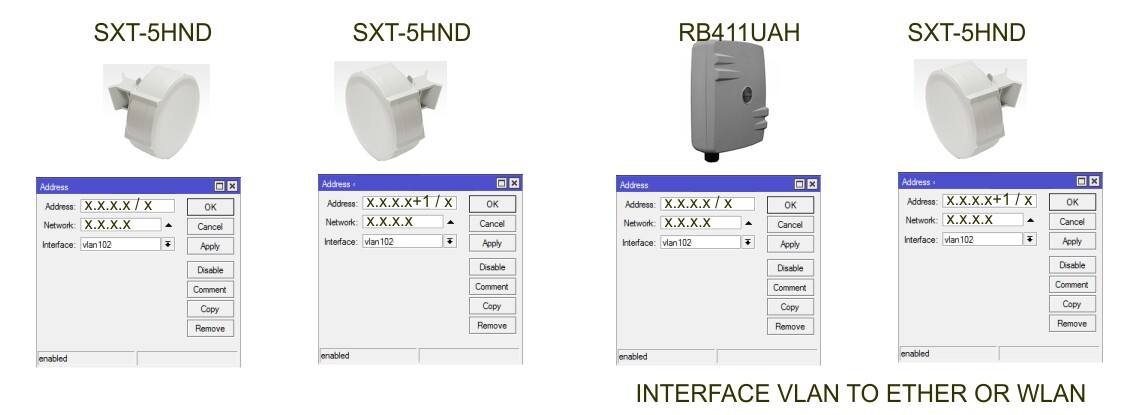
to have VLAN on both ether1 and wlan1 you need to create two VLAN interfaces (like eth1-VLAN102 and wlan1-VLAN102) and bridge them. then put management IP to that bridge
Hi Chupaka, thx for the answer…
Actually, I don’t need/want to have VLAN on ether1 and wlan1 (unless I need to)…
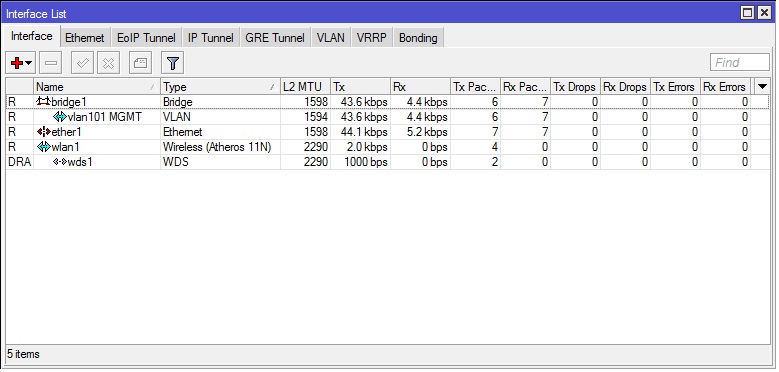
It’s working this way (Here is Interface list of working link) :
But in this case it doesn’t work..
I can ping gateway if I choose VLAN for interface but can’t ping other Mikrotik.
Or I can ping Mikrotik if I choose ether1/wlan1 for interface, but then I can not reach gateway.
Is there some problem because this is SXT/RB411AH combination or I must set them as you describe (if no other way I’ll define all VLAN’s).
The first thing that jumps out to me is you mentioned you can’t connect from a switch. What kind of switch is it?
If it’s an unmanaged switch there’s a good chance it won’t pass VLAN tagged traffic. If it’s a managed switch you may have to configure the port to trunk VLAN traffic.
It’s a Cisco 4948, and it’s managed with trunk port.
Sorry if I confuse you with that. It’s not the point about a switch…
Just add to my first picture switch to the left…
With 2 SXT’s it work as showed (interface VLAN)…
With RB411/SXT I can ping just RB411 (can’t ping after it).
Just when I change interface to ether1 (or wlan1) I can ping from RB411 to SXT (but then I can not reach RB411 from the switch anymore).
Devices are configured as Bridge (411 or left SXT) and Station WDS (client).
On each of the three 711s, wlan1 has two VAPs defined (a hotspot, and another for office use), and ether1 has two VLANs defined. Each VAP is bridged to the corresponding VLAN. Admin traffic is carried on ether1 with no VLAN. Ether1 goes directly to the corresponding SXT, each of which bridges its ether1 and wlan1.
Each SXT connects to the OmniTik, which in turn bridges its wlan1 and ether1, where it arrives at the RB433. Traffic tagged with the hotspot VLAN is bridged to a hotspot interface, traffic tagged with the office VLAN is bridged to a private office LAN, and untagged traffic is handled directly.
This was working when the SXTs and OmniTik were using wds-mode=dynamic-mesh. At some point, I reconfigured it to use wds-mode=dynamic, which led to periodic ARP packet storms that were making the SXTs unreachable. Setting the SXTs to station-wds put an end to the ARP storms, but also seems to have stopped the VLAN traffic from getting through.
It sounds like you are saying that the traffic received by the SXTs cannot be passed between ether1 and wlan1 generically–that the VLANs need to be defined on the SXTs as well as the endpoints (711s and 433). Do I have that right? If so, I’m curious why it was working before. Could this have been due to a change in 5.8? (This wouldn’t be the first time that the interaction of VLANs and bridges changed in a new release and broke something.)
I’m also curious about why the ARP storms started happening (does RSTP not work on the WDS interfaces between the three SXTs?), and why station-wds seems to handle VLAN traffic differently from wds-slave, bridge or ap-bridge. Any insight would be most appreciated.
Sorry, this was a classic case of misdirection. After further investigation, the SXT configuration was fine. The problem was on the 711s all along: the VLANs were assigned to ether1, but ether1 is itself a port on a bridge. Even though it is the only port on that bridge (part of our standard setup), that is evidently enough to strip off the VLAN tags.
I’m having a similar issue with management of my SXTs over a vlan.
I have a large mixed (Mikrotik,Cisco,hp,Motorola,Alvarion) deployment. All devices are managed via a management vlan. This vlan is generally carried to devices on trucked interfaces along with tagged traffic for many other service vlans.
With Mikrotik devices (mostly RB230, RB133/144, I generally have two interfaces bridged together (ether1, wlan1). If necessary I’ll use WDS or seudo-bridge methods with wireless links).
To manage the device, I’ll create a vlan interface on the bridge and then apply an IP address from the management subnet on the vlan interface.
This method works across the board except with SXTs.
I’ve tried various different firmware (currently 5.11) but nothing makes a difference.
I’ve even tried a very simple method - connecting a single SXT device to the network via ether1, adding a vlan interface to ether1 and then addressing that vlan interface on the management vlan.
Do I need to do something different in order to manage an SXT with tagged traffic?