Oh bugger. Just ordered the CAP AC to go with a 3011…
This is to replace a very sketchy consumer grade Netgear ORBI system.
Hoping this is a quick FW fix!
Looking forward to the updates.
Oh bugger. Just ordered the CAP AC to go with a 3011…
This is to replace a very sketchy consumer grade Netgear ORBI system.
Hoping this is a quick FW fix!
Looking forward to the updates.
i questioned support about the worrying performance on this thread. they suggest to try the latest rc. will you guys give it a go?
You mean this?
*) wireless - fixed RTS/CTS option for the ARM based wireless devices;
Hope you are right
Upgrade to 6.42.35 didn’t really help in my case. iperf3 TCP traffic just collapses on regular basis. Hw. protection mode settings didn’t seem to have any effect.
Eh, will write to support tomorrow. And maybe will do some ethernet-to-ethernet bridging/routing tests before that.
This update fixed latency spikes and slow throughput for me. I did have to recreate the “defconfig” dhcp client on bridgeLocal afterwards but that’s all.
EDIT:
this change from a bit earlier might have also helped my case:
*) wireless - improved packet processing on ARM platform devices;
did latest firmware also improve signal strength?
Thanks for the detailed testing @lukoramu. The IPQ4018 platform looks really good so I’m hoping these issues can be resolved with software updates and eventually Wave2 support is added. Please keep us updated!
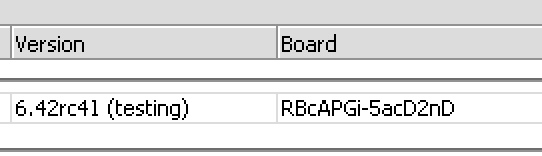
We used a lot of WAP AC in the house and we were very satisfied with its WIFI. When we tested the CAP AC(tested 6.42rc41), we abandoned the purchase. 
We stopped selling to customer too…
Hopefully Mikrotik delivers better driver for Wave 2 Hardware,
until this happens the devices are not sellable.
What problems did you have with the cAP AC?
Sometime no Data Transfer possible, but Client stays connected, speed is really bad if you compare HAPac/WPAac with CAPac
and this could not only be about the 2 chain / 3 chain Hardware difference.
CAPac often is not able to deliver more then 30 Mbit to my clients, WAPac delivers 300Mbit easily
seems like we have to wait for updates…
Did you try latest RC versions? This is a new device, some improvements were added in latest builds. Also, I suggest you make a new topic with the setup description, we would like to solve it for you.
Yes i used RC´s only, no big improvement in feeling and measuring
For all you have trouble with wireless throughput please check if have both chains checked on wifi interfaces.
I found when I configured cAP AC set as follows:
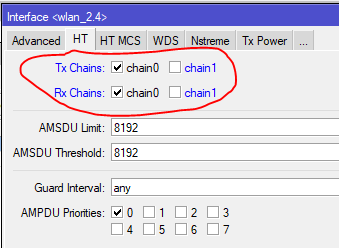
However, with the two chains checked, the speed is smaller than it should. I hope this will improve in future RouterOS versions.
What happens if you make the changes suggested at Problem with mount point Specifically one user reported that #2 and #4 helped.
The config is no hint for me,
I have 1 on my desk for testing everything, and we swapped our company Wifi to CAP for test (15x WAP to 15 CAP)
Speed as Standalone and in CAPsman is bad
We swapped back to WAP, to get back to working.....
Distance is already set “indoors” and, if I try to set Tx Power to “manual” or “card rates” does not work. Only the “all rates fixed” option seems to work.
I have better performance but only in 2.4GHz if I disable the 5GHz interface.
For 5GHz I have no improvement even if I set Tx Power at 17dBm.
In my test environment I got 200-210 Mbps on the 2.4GHz interface when the 5GHz is turned off and ~ 180MBps when the 5GHz interface is turned on.
On the 5GHz interface we have an average of 110Mbps but fluctuates between 90 and 130 Mbps.
I use a Lenovo ThinkPad notebook at a distance of about 2m and connect at 270-300 Mbps - 40MHz / 2S / SGI.
I suspect that the problem is not with antennas but with package management that crosses the wireless interface.
wap ac - antenna gain 2dB
cap ac - antenna gain 2-2.5dB
signal drop by 8dB is ok? omg
I expected you would have a reply to the ubnt unifi but it seems to be wrong again. Again, I will plan to cover buildings using the Unifi. There is no choice.
Today, we replaced CAP AC with WAP AC at our client company. The same settings, the same location, the same users, everything is normal.
I have 3 cAP AC coming tomorrow to start testing.
The wAP AC has been solid… Slow… But solid. Was really hoping that the cAP AC would be the end of UniF–k for us.