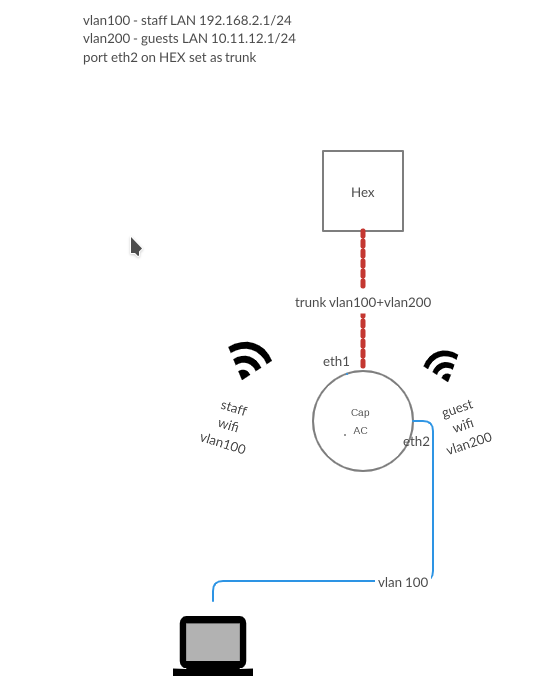
I’m trying to set up a CAP AC to use VLANS, one for private staff WiFi and ethernet LAN and another VLAN for guests WiFI only.
I have a HEX configured with 2 VLANS, vlan100 wich has a DHCP 192.168.2.1/24 and vlan200 wich has DHCP 10.11.12.1/24 both on eth2 port, trunk port.
What I’m trying to do is get eth1 of CAP AC as trunk port, Staff WiFi on VLAN100, Guests WiFi on vlan200 AND eth2 port of the CAP AC as access untagged port with vlan100 so I can connect another device like a PC that the staff uses.
I managed to get almost everything working using this guide, did all steps under R2 section - https://wiki.mikrotik.com/wiki/Manual:VLANs_on_Wireless but I can’t get eth2 port of the CAP AC to act as access port carying vlan100 only.
I’m attaching a diagram
Here is my config:
interface bridge print
Flags: X - disabled, R - running
 0 R name="bridge1" mtu=auto actual-mtu=1500 l2mtu=1598 arp=enabled
     arp-timeout=auto mac-address=C4:AD:34:8D:2C:4A protocol-mode=rstp
     fast-forward=yes igmp-snooping=no auto-mac=yes ageing-time=5m
     priority=0x8000 max-message-age=20s forward-delay=15s
     transmit-hold-count=6 vlan-filtering=yes ether-type=0x8100 pvid=1
     frame-types=admit-all ingress-filtering=no dhcp-snooping=no


interface bridge vlan print
Flags: X - disabled, D - dynamic
 #   BRIDGE           VLAN-IDS  CURRENT-TAGGED          CURRENT-UNTAGGED
 0 D bridge1          1                                 bridge1
                                                        ether1
                                                        ether2
 1   bridge1          100       ether1                  ether2
 2   bridge1          200       ether1


interface bridge port print
Flags: X - disabled, I - inactive, D - dynamic, H - hw-offload
 #     INTERFACE      BRIDGE         HW  PVID PR  PATH-COST INTERNA...    HORIZON
 0     ether1         bridge1        yes    1 0x         10         10       none
 1 I   wlan1          bridge1               1 0x         10         10       none
 2 I   wlan2          bridge1               1 0x         10         10       none
 3     ether2         bridge1        yes    1 0x         10         10       non
I have a similar setup.
MT Router to 24 port Dlink switch to Capac
MT Router to 6 port 260GSP MT switch with port 3(POE) going to capac.
Now my CapaCs each have 3 vlans going into them
upstairs guest 5gh virtual of chain1
houselan 5gh CHAIN1
smartdevices 2ghz CHAIN2
I dont use the second etherport on my CAPACs but it wouldnt be hard simply to add that port to the mix. Since its going to a PC Im assuming an access port.
Let me see if I can dig up a useable config or least one for demo.
/interface bridge
add admin-mac= auto-mac=no comment=defconf name=HomeBridge \
    vlan-filtering=yes

/interface vlan
add interface=HomeBridge name=Guests_cap1_V100 vlan-id=100  (my guest  vlan for guest 5ghz WLAN)
add interface=HomeBridge name=Home-LAN_V110 vlan-id=110   (my homevlan used for wired and wifi)
add interface=HomeBridge name=SmartDev_cap1_V50 vlan-id=50  (my smart devices vlan for smart devices wifi)

/interface bridge port
add bridge=HomeBridge ingress-filtering=yes interface=ether2  (trunk port to my switches, in our case the ether port going to the Capac)

/interface bridge vlan
add bridge=HomeBridge tagged=HomeBridge,ether2 vlan-ids=\
    110,100,50
Hi,
I tried your config but as soon as I apply settings to /interface bridge port I loose connection to the CapAC and can’t get it back either via WiFi, ether1 or ether2. I’m doing something wrong or the order is wrong.
UPDATE:
I managed to make it work in the sense that I had VLAN100 on my wlan1 and eth2 and VLAN200 on wlan2.
Eth1 served as trunk port, connected to a switch BUT I can no longer manage the CapAC using winbox\webfig from either vlan\port, it doesn’t appear in Winbox at all. I’m missing something related to assigning an IP or management interface. I want to be able to config the CapAc from within private LAN wich is vlan100 and assign an IP to it, 192.168.2.3.
I assigned and IP on VLAN100 interface, added a 0.0.0.0 route to 192.168.2.1 (my router) and also DNS to 192.168.2.1 (my router). I can now see the CapAc in winbox
/ip address

add address=192.168.2.3/24 interface=vlan100 network=192.168.2.0

/ip dns

set servers=8.8.8.8

/ip route

add distance=1 gateway=192.168.2.1

/ip service

set winbox address=0.0.0.0/0
I don’t know if this is the optimal way, will tweak it more as I learn more
Maybe I am wrong, but I do not see the needs of VLAN if communication between CAP and CAPsMAN are on L2.
It’s enough to have two bridges in CAPsMAN, first one for LAN, second one for guests, with own dhcp server for each bridge.
You can control traffic between bridges in CAPsMAN with firewall.
Same can be achieved with VLAN’s of course. But more simple config - less head pain
For this application I didn’t use CapsMAN. I use 2 VLANs because there are other TP-Link APs in the LAN with VLANs assigned to each SSID + wired devices for guests and staff. I also needed the eth2 port of the CapAC to serve as access port into private LAN (vlan100). Maybe there is a way to do this CapsMAN. I have a spare AC2 + another CapAC, I’ll set them up this weekend and play with them, it would be great to achive this with CapsMAN as it will allow easy deployment of more future CapACs.
Do you have a sample config?
This is sample only, for lan and for guest. You cannot use this file as script because I have replaced sensitive info (include MAC addresses). CAPsMAN-sample.txt (3.29 KB)
What ports would add to those bridges? Let’s consider a RB960 with eth1 as WAN, eth2-5 as LAN. Guests WiFi should have their own DHCP server in a different subnet. I will then use the firewall to restrict access.
In general - yes.
CAPsMAN by config in ‘data path’ will add cap interfaces to the appropriate bridges.
eth2-5 → bridge-lan, also DHCP server on this bridge for lan IP’s like: 192.168.0.0/24
Then seconds DHCP on bridge-guest like: 192.168.40.0/24
In firewall:
allow DNS requests for guests:
/ip firewall filter add action=accept chain=input comment=“accept DNS for guests” dst-port=53 in-interface=bridge-guest protocol=udp
block access to router from guest
/ip firewall filter add action=drop chain=input comment=“Drop guests to router” in-interface=bridge-guest
drop guests to lan:
/ip firewall filter
add action=drop chain=forward out-interface=bridge-lan in-interface=bridge-guest
Note:
this is the way you have to move, because you still have to understand what are you doing: add router IP for both networks, create ip pools, check routes and etc…