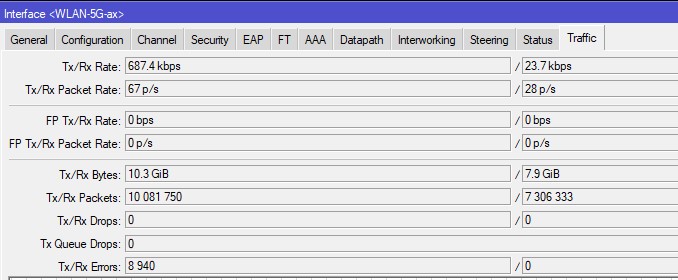
I was wondering if this is normal on ax devices, I seem to have lots of TX errors both on 2G and 5G radios:
Wifi seems stable. I have never seen this on my previous N/AC APs, there were always 0 errors even after months uptime.
The cAP is managed by CAPsMAN, but the same was happening even in bare AP mode. Not caused by a single client, it happens vith various client devices, some seem to generate more errors than others though. Latest stable ROS v7.14.3.
Is this something known and is this happening on every ax device? Or is it some misconfiguration? Or even possibility of faulty HW?
Thank you for the reply. So does it mean that this is sort of normal on ax devices?
I was more curious if other owners of ax APs could chime in, if they get the same erorrs then if would seem to be a “feature”, but if others do not see any errors then something must be wrong with mine.
Because it is no hardware error and not everyone notices these stats.
There could be many causes for these TX errors. Usually not a hardware defect. Most commonly e.g. neighbors wifi overlapping with your wifi channel.
For 2.4ghz wifi many times bluetooth from any other nearby device or interference from household devices like microwave oven, cordless phones can be a massive problem.
What I am not 100% sure if it applies, but I could imagine that even a unstable/low signal connection to a connected client device (e.g. far away, bad signal, etc.) could make this counter rise as well.
And it is a feature. It helps you debugging your wireless environment. But as I already said: 0,89% TX errors is negligible. I can see a similar RX error rate on my Linux notebook wifi statistics as well - without experiencing any issue at all.
After all it is a wireless medium. If you want zero interference and 100% reliable connection, you need to use cables.
Thanks, it is not that, I just wanted to know if it is normal or if I should be looking for a cause, that is all. And as I wrote, I was used to ac wireless giving me 0 errors even after a few months uptime in the same location with the same devices, so that is why I was suprised to see this on ax. The reason can also be the qualcomm drivers on the ax vs. the legacy on the ac, so it is highly probable that the errors were also on the ac, just not reported by the driver.