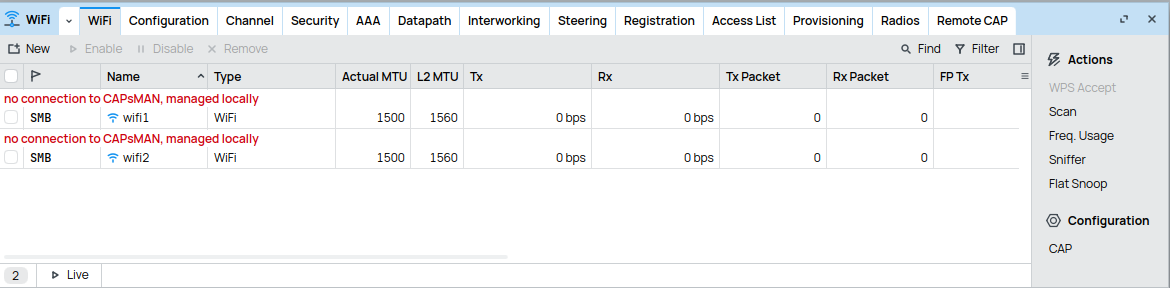
Both can ping each other. Changing the configuration manager does not change anything but the error message. It say now only "no connection to CAPSsMAN".
To be honest I have no idea which part of the config is relevant, but I can give the complete output of export on hAP ax, as far as I see it has no passwords or something like it inside:
# 2025-08-22 17:06:06 by RouterOS 7.19.4
# software id = I2Y0-Q3GK
#
# model = C53UiG+5HPaxD2HPaxD
# serial number = YYYYYYYYYYYYYYYY
/interface bridge
add admin-mac=D4:01:C3:0B:20:6B auto-mac=no comment=defconf name=bridge
/interface list
add comment=defconf name=WAN
add comment=defconf name=LAN
/interface wifi security
add authentication-types=wpa-psk,wpa2-psk disabled=no name=HexenSecurityProfile
/interface wifi
set [ find default-name=wifi1 ] channel.band=5ghz-ax .skip-dfs-channels=disabled .width=20/40/80mhz \
    configuration.country=Germany .mode=ap .ssid=Hexennetz disabled=no security=HexenSecurityProfile \
    security.authentication-types=wpa-psk,wpa2-psk .connect-priority=0 .encryption="" .ft=yes .ft-over-ds=yes \
    .group-key-update=5m
set [ find default-name=wifi2 ] channel.band=2ghz-ax .skip-dfs-channels=disabled .width=20/40mhz configuration.country=\
    Germany .mode=ap .ssid=Hexennetz disabled=no security=HexenSecurityProfile security.authentication-types=\
    wpa-psk,wpa2-psk .connect-priority=0 .ft=yes .ft-over-ds=yes
/interface wifi configuration
add country=Germany name=5ghz security=HexenSecurityProfile ssid=Hexennetz
add country=Germany name=2ghz security=HexenSecurityProfile ssid=Hexennetz
add country=Germany name=5ghz_v security=HexenSecurityProfile ssid=CAPsMAN5_v
/ip pool
add name=default-dhcp ranges=192.168.88.10-192.168.88.254
/interface bridge port
add bridge=bridge comment=defconf interface=ether2
add bridge=bridge comment=defconf interface=ether3
add bridge=bridge comment=defconf interface=ether4
add bridge=bridge comment=defconf interface=ether5
add bridge=bridge comment=defconf interface=wifi1
add bridge=bridge comment=defconf interface=wifi2
add bridge=bridge interface=ether1
/ip firewall connection tracking
set udp-timeout=10s
/ip neighbor discovery-settings
set discover-interface-list=LAN
/interface list member
add comment=defconf interface=bridge list=LAN
add comment=defconf disabled=yes interface=ether1 list=WAN
/interface ovpn-server server
add mac-address=FE:8E:19:92:A1:2A name=ovpn-server1
/interface wifi capsman
set ca-certificate=auto enabled=yes interfaces=all package-path="" require-peer-certificate=no upgrade-policy=none
/interface wifi provisioning
add action=create-dynamic-enabled disabled=no master-configuration=5ghz slave-configurations=5ghz_v supported-bands=\
    5ghz-ac
add action=create-dynamic-enabled disabled=no master-configuration=2ghz supported-bands=2ghz-n
/ip address
add address=192.168.135.3/24 comment=defconf interface=bridge network=192.168.135.0
/ip dhcp-client
# DHCP client can not run on slave or passthrough interface!
add comment=defconf interface=ether1
/ip dhcp-server
add address-pool=default-dhcp disabled=yes interface=bridge lease-time=10m name=defconf
/ip dhcp-server network
add address=192.168.88.0/24 comment=defconf dns-server=192.168.88.1 gateway=192.168.88.1
/ip dns
set allow-remote-requests=yes
/ip dns static
add address=192.168.88.1 comment=defconf name=router.lan type=A
/ip firewall filter
add action=accept chain=input comment="defconf: accept established,related,untracked" connection-state=\
    established,related,untracked
add action=drop chain=input comment="defconf: drop invalid" connection-state=invalid
add action=accept chain=input comment="defconf: accept ICMP" protocol=icmp
add action=accept chain=input comment="defconf: accept to local loopback (for CAPsMAN)" dst-address=127.0.0.1
add action=drop chain=input comment="defconf: drop all not coming from LAN" disabled=yes in-interface-list=!LAN
add action=accept chain=forward comment="defconf: accept in ipsec policy" ipsec-policy=in,ipsec
add action=accept chain=forward comment="defconf: accept out ipsec policy" ipsec-policy=out,ipsec
add action=fasttrack-connection chain=forward comment="defconf: fasttrack" connection-state=established,related \
    hw-offload=yes
add action=accept chain=forward comment="defconf: accept established,related, untracked" connection-state=\
    established,related,untracked
add action=drop chain=forward comment="defconf: drop invalid" connection-state=invalid
add action=drop chain=forward comment="defconf: drop all from WAN not DSTNATed" connection-nat-state=!dstnat \
    connection-state=new in-interface-list=WAN
/ip firewall nat
add action=masquerade chain=srcnat comment="defconf: masquerade" disabled=yes ipsec-policy=out,none out-interface-list=\
    WAN
/ip ipsec profile
set [ find default=yes ] dpd-interval=2m dpd-maximum-failures=5
/ip service
set www-ssl certificate=webfig disabled=no
/ip ssh
set always-allow-password-login=yes
/ipv6 firewall address-list
add address=::/128 comment="defconf: unspecified address" list=bad_ipv6
add address=::1/128 comment="defconf: lo" list=bad_ipv6
add address=fec0::/10 comment="defconf: site-local" list=bad_ipv6
add address=::ffff:0.0.0.0/96 comment="defconf: ipv4-mapped" list=bad_ipv6
add address=::/96 comment="defconf: ipv4 compat" list=bad_ipv6
add address=100::/64 comment="defconf: discard only " list=bad_ipv6
add address=2001:db8::/32 comment="defconf: documentation" list=bad_ipv6
add address=2001:10::/28 comment="defconf: ORCHID" list=bad_ipv6
add address=3ffe::/16 comment="defconf: 6bone" list=bad_ipv6
/ipv6 firewall filter
add action=accept chain=input comment="defconf: accept established,related,untracked" connection-state=\
    established,related,untracked
add action=drop chain=input comment="defconf: drop invalid" connection-state=invalid
add action=accept chain=input comment="defconf: accept ICMPv6" protocol=icmpv6
add action=accept chain=input comment="defconf: accept UDP traceroute" port=33434-33534 protocol=udp
add action=accept chain=input comment="defconf: accept DHCPv6-Client prefix delegation." dst-port=546 protocol=udp \
    src-address=fe80::/10
add action=accept chain=input comment="defconf: accept IKE" dst-port=500,4500 protocol=udp
add action=accept chain=input comment="defconf: accept ipsec AH" protocol=ipsec-ah
add action=accept chain=input comment="defconf: accept ipsec ESP" protocol=ipsec-esp
add action=accept chain=input comment="defconf: accept all that matches ipsec policy" ipsec-policy=in,ipsec
add action=drop chain=input comment="defconf: drop everything else not coming from LAN" in-interface-list=!LAN
add action=accept chain=forward comment="defconf: accept established,related,untracked" connection-state=\
    established,related,untracked
add action=drop chain=forward comment="defconf: drop invalid" connection-state=invalid
add action=drop chain=forward comment="defconf: drop packets with bad src ipv6" src-address-list=bad_ipv6
add action=drop chain=forward comment="defconf: drop packets with bad dst ipv6" dst-address-list=bad_ipv6
add action=drop chain=forward comment="defconf: rfc4890 drop hop-limit=1" hop-limit=equal:1 protocol=icmpv6
add action=accept chain=forward comment="defconf: accept ICMPv6" protocol=icmpv6
add action=accept chain=forward comment="defconf: accept HIP" protocol=139
add action=accept chain=forward comment="defconf: accept IKE" dst-port=500,4500 protocol=udp
add action=accept chain=forward comment="defconf: accept ipsec AH" protocol=ipsec-ah
add action=accept chain=forward comment="defconf: accept ipsec ESP" protocol=ipsec-esp
add action=accept chain=forward comment="defconf: accept all that matches ipsec policy" ipsec-policy=in,ipsec
add action=drop chain=forward comment="defconf: drop everything else not coming from LAN" in-interface-list=!LAN
/system clock
set time-zone-name=Europe/Berlin
/system identity
set name=AP2
/system ntp client
set enabled=yes
/system ntp server
set enabled=yes
/system ntp client servers
add address=de.pool.ntp.org
/tool mac-server
set allowed-interface-list=LAN
/tool mac-server mac-winbox
set allowed-interface-list=LAN
And for the cAP ax:
# 2025-08-22 16:53:26 by RouterOS 7.19.4
# software id = YRYJ-RKDM
#
# model = wAPG-5HaxD2HaxD
# serial number = YYYYYYYYYYYYYYY
/interface bridge
add admin-mac=04:F4:1C:08:71:D1 auto-mac=no comment=defconf name=bridge
/interface wifi
# no connection to CAPsMAN
set [ find default-name=wifi1 ] channel.band=2ghz-ax .skip-dfs-channels=\
    10min-cac .width=20/40mhz configuration.manager=capsman .mode=ap .ssid=\
    MikroTik-0871D2 disabled=no security.authentication-types=\
    wpa2-psk,wpa3-psk .ft=yes .ft-over-ds=yes
# no connection to CAPsMAN
set [ find default-name=wifi2 ] channel.band=5ghz-ax .skip-dfs-channels=\
    10min-cac .width=20/40/80mhz configuration.manager=capsman .mode=ap .ssid=\
    MikroTik-0871D2 disabled=no security.authentication-types=\
    wpa2-psk,wpa3-psk .ft=yes .ft-over-ds=yes
/interface list
add comment=defconf name=WAN
add comment=defconf name=LAN
/ip pool
add name=default-dhcp ranges=192.168.88.10-192.168.88.254
/ip dhcp-server
add address-pool=default-dhcp disabled=yes interface=bridge name=defconf
/interface bridge port
add bridge=bridge comment=defconf interface=ether2
add bridge=bridge comment=defconf interface=wifi1
add bridge=bridge comment=defconf interface=wifi2
add bridge=bridge interface=ether1
/ip neighbor discovery-settings
set discover-interface-list=LAN
/interface list member
add comment=defconf interface=bridge list=LAN
add comment=defconf disabled=yes interface=ether1 list=WAN
/interface ovpn-server server
add mac-address=FE:45:BB:A0:B1:F9 name=ovpn-server1
/interface wifi cap
set caps-man-addresses=192.168.168.3 enabled=yes
/ip address
add address=192.168.135.4 comment=defconf interface=bridge network=\
    192.168.135.0
/ip dhcp-client
# DHCP client can not run on slave or passthrough interface!
add comment=defconf interface=ether1
/ip dhcp-server network
add address=192.168.88.0/24 comment=defconf dns-server=192.168.88.1 gateway=\
    192.168.88.1
/ip dns
set allow-remote-requests=yes
/ip dns static
add address=192.168.88.1 comment=defconf name=router.lan type=A
/ip firewall filter
add action=accept chain=input comment=\
    "defconf: accept established,related,untracked" connection-state=\
    established,related,untracked
add action=drop chain=input comment="defconf: drop invalid" connection-state=\
    invalid
add action=accept chain=input comment="defconf: accept ICMP" protocol=icmp
add action=accept chain=input comment=\
    "defconf: accept to local loopback (for CAPsMAN)" dst-address=127.0.0.1
add action=drop chain=input comment="defconf: drop all not coming from LAN" \
    disabled=yes in-interface-list=!LAN
add action=accept chain=forward comment="defconf: accept in ipsec policy" \
    ipsec-policy=in,ipsec
add action=accept chain=forward comment="defconf: accept out ipsec policy" \
    ipsec-policy=out,ipsec
add action=fasttrack-connection chain=forward comment="defconf: fasttrack" \
    connection-state=established,related hw-offload=yes
add action=accept chain=forward comment=\
    "defconf: accept established,related, untracked" connection-state=\
    established,related,untracked
add action=drop chain=forward comment="defconf: drop invalid" \
    connection-state=invalid
add action=drop chain=forward comment=\
    "defconf: drop all from WAN not DSTNATed" connection-nat-state=!dstnat \
    connection-state=new in-interface-list=WAN
/ip firewall nat
add action=masquerade chain=srcnat comment="defconf: masquerade" ipsec-policy=\
    out,none out-interface-list=WAN
/ipv6 firewall address-list
add address=::/128 comment="defconf: unspecified address" list=bad_ipv6
add address=::1/128 comment="defconf: lo" list=bad_ipv6
add address=fec0::/10 comment="defconf: site-local" list=bad_ipv6
add address=::ffff:0.0.0.0/96 comment="defconf: ipv4-mapped" list=bad_ipv6
add address=::/96 comment="defconf: ipv4 compat" list=bad_ipv6
add address=100::/64 comment="defconf: discard only " list=bad_ipv6
add address=2001:db8::/32 comment="defconf: documentation" list=bad_ipv6
add address=2001:10::/28 comment="defconf: ORCHID" list=bad_ipv6
add address=3ffe::/16 comment="defconf: 6bone" list=bad_ipv6
/ipv6 firewall filter
add action=accept chain=input comment=\
    "defconf: accept established,related,untracked" connection-state=\
    established,related,untracked
add action=drop chain=input comment="defconf: drop invalid" connection-state=\
    invalid
add action=accept chain=input comment="defconf: accept ICMPv6" protocol=icmpv6
add action=accept chain=input comment="defconf: accept UDP traceroute" \
    dst-port=33434-33534 protocol=udp
add action=accept chain=input comment=\
    "defconf: accept DHCPv6-Client prefix delegation." dst-port=546 protocol=\
    udp src-address=fe80::/10
add action=accept chain=input comment="defconf: accept IKE" dst-port=500,4500 \
    protocol=udp
add action=accept chain=input comment="defconf: accept ipsec AH" protocol=\
    ipsec-ah
add action=accept chain=input comment="defconf: accept ipsec ESP" protocol=\
    ipsec-esp
add action=accept chain=input comment=\
    "defconf: accept all that matches ipsec policy" ipsec-policy=in,ipsec
add action=drop chain=input comment=\
    "defconf: drop everything else not coming from LAN" in-interface-list=!LAN
add action=accept chain=forward comment=\
    "defconf: accept established,related,untracked" connection-state=\
    established,related,untracked
add action=drop chain=forward comment="defconf: drop invalid" \
    connection-state=invalid
add action=drop chain=forward comment=\
    "defconf: drop packets with bad src ipv6" src-address-list=bad_ipv6
add action=drop chain=forward comment=\
    "defconf: drop packets with bad dst ipv6" dst-address-list=bad_ipv6
add action=drop chain=forward comment="defconf: rfc4890 drop hop-limit=1" \
    hop-limit=equal:1 protocol=icmpv6
add action=accept chain=forward comment="defconf: accept ICMPv6" protocol=\
    icmpv6
add action=accept chain=forward comment="defconf: accept HIP" protocol=139
add action=accept chain=forward comment="defconf: accept IKE" dst-port=\
    500,4500 protocol=udp
add action=accept chain=forward comment="defconf: accept ipsec AH" protocol=\
    ipsec-ah
add action=accept chain=forward comment="defconf: accept ipsec ESP" protocol=\
    ipsec-esp
add action=accept chain=forward comment=\
    "defconf: accept all that matches ipsec policy" ipsec-policy=in,ipsec
add action=drop chain=forward comment=\
    "defconf: drop everything else not coming from LAN" in-interface-list=!LAN
/system clock
set time-zone-name=Europe/Berlin
/system identity
set name=ap-outdoor-no
/tool mac-server
set allowed-interface-list=LAN
/tool mac-server mac-winbox
set allowed-interface-list=LAN
Please tell me if I can filter the output a bit to make it easier for you...
 It was relative cheap. Now I book it as apprenticeship premium...