Hello holvoetn,
thank you for the quick reply. I’m sorry for replying so late, but I did not receive a notification.
Here are the configs in compact view. If something is missing, please let me know.
Regards Sascha
Router_LAN_1 Capsman and Cap
[admin@Router_LAN_1] > export compact
# 2023-10-21 17:49:47 by RouterOS 7.10.2
# software id = 967W-UF2V
#
# model = CRS109-8G-1S-2HnD
# serial number = edit1
/caps-man channel
add band=2ghz-b/g/n control-channel-width=20mhz name=ch-2.4g
/interface bridge
add ingress-filtering=no name=bridge_local vlan-filtering=yes
/interface ethernet
set [ find default-name=ether1 ] comment= mac-address=B8:69:F4:DD:6B:13
set [ find default-name=ether2 ] comment= mac-address=B8:69:F4:DD:6B:14
set [ find default-name=ether3 ] comment= mac-address=B8:69:F4:DD:6B:15
set [ find default-name=ether4 ] comment= mac-address=B8:69:F4:DD:6B:16
set [ find default-name=ether5 ] comment="Trunk HAP_1" mac-address=B8:69:F4:DD:6B:17
set [ find default-name=ether6 ] comment= mac-address=B8:69:F4:DD:6B:18
set [ find default-name=ether7 ] comment="bonding1 Router_LAN_2" mac-address=B8:69:F4:DD:6B:19
set [ find default-name=ether8 ] comment="bonding1 Router_LAN_2" mac-address=B8:69:F4:DD:6B:1A
set [ find default-name=sfp1 ] mac-address=B8:69:F4:DD:6B:1B
/interface wireless
# managed by CAPsMAN
# channel: 2412/20-Ce/gn(16dBm), SSID: HomeWLAN, CAPsMAN forwarding
set [ find default-name=wlan1 ] name=wlan2 ssid=MikroTik
/interface vlan
add interface=bridge_local name=vlan21_lan_intern vlan-id=21
add interface=bridge_local name=vlan22_wlan_intern vlan-id=22
add interface=bridge_local name=vlan31_wlan_guest vlan-id=31
/interface bonding
add comment="Connection Router_LAN_1 and Router_LAN_2" mode=802.3ad name=bonding1 slaves=ether7,ether8
/caps-man datapath
add bridge=bridge_local client-to-client-forwarding=no name=dp_wlan_intern vlan-id=22 vlan-mode=use-tag
add bridge=bridge_local client-to-client-forwarding=no name=dp_wlan_guest vlan-id=31 vlan-mode=use-tag
/caps-man security
add authentication-types=wpa2-psk encryption=aes-ccm group-encryption=aes-ccm group-key-update=5m name=sec_home
add authentication-types=wpa-psk,wpa2-psk encryption=aes-ccm group-encryption=aes-ccm group-key-update=5m name=sec_guest
/caps-man configuration
add channel=ch-2.4g country=germany datapath=dp_wlan_intern mode=ap name=cfg_wlan_home security=sec_home ssid=HomeWLAN
add channel=ch-2.4g country=germany datapath=dp_wlan_guest mode=ap name=cfg_wlan_guest security=sec_guest ssid=GUESTWLAN
/caps-man interface
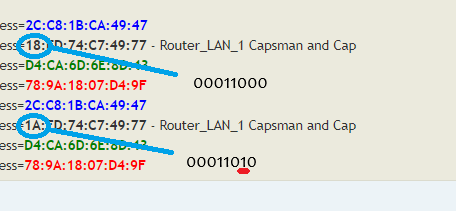
add configuration=cfg_wlan_home disabled=no l2mtu=1600 mac-address=2C:C8:1B:CA:49:47 master-interface=none name=HAP1_Home radio-mac=2C:C8:1B:CA:49:47 radio-name=HAP1_Home
add configuration=cfg_wlan_home disabled=no l2mtu=1600 mac-address=18:FD:74:C7:49:77 master-interface=none name=Router_Lan1_Home radio-mac=18:FD:74:C7:49:77 radio-name=Router_Lan1_Home
add configuration=cfg_wlan_home disabled=no l2mtu=1600 mac-address=D4:CA:6D:6E:8D:43 master-interface=none name=Router_Lan2_Home radio-mac=D4:CA:6D:6E:8D:43 radio-name=Router_Lan2_Home
add configuration=cfg_wlan_home disabled=no l2mtu=1600 mac-address=78:9A:18:07:D4:9F master-interface=none name=WAP1_Home radio-mac=78:9A:18:07:D4:9F radio-name=WAP1_Home
add configuration=cfg_wlan_guest disabled=no l2mtu=1600 mac-address=2C:C8:1B:CA:49:47 master-interface=HAP1_Home name=HAP1_Guest radio-mac=00:00:00:00:00:00 radio-name=HAP1_Guest
add configuration=cfg_wlan_guest disabled=no l2mtu=1600 mac-address=1A:FD:74:C7:49:77 master-interface=Router_Lan1_Home name=Router_Lan1_Guest radio-mac=00:00:00:00:00:00 radio-name=Router_Lan1_Guest
add configuration=cfg_wlan_guest disabled=no l2mtu=1600 mac-address=D4:CA:6D:6E:8D:43 master-interface=Router_Lan2_Home name=Router_Lan2_Guest radio-mac=00:00:00:00:00:00 radio-name=Router_Lan2_Guest
add configuration=cfg_wlan_guest disabled=no l2mtu=1600 mac-address=78:9A:18:07:D4:9F master-interface=WAP1_Home name=WAP1_Guest radio-mac=00:00:00:00:00:00 radio-name=WAP1_Guest
/interface lte apn
set [ find default=yes ] ip-type=ipv4 use-network-apn=no
/interface wireless security-profiles
set [ find default=yes ] authentication-types=wpa2-psk eap-methods="" supplicant-identity=MikroTik
/ip pool
add name=dhcp_pool_wlan_home ranges=192.168.2.230-192.168.2.254
add name=dhcp_pool_wlan_guest ranges=192.168.3.10-192.168.3.30
add name=dhcp_pool_lan_intern ranges=192.168.2.45-192.168.2.62
/ip dhcp-server
add address-pool=dhcp_pool_wlan_home authoritative=after-2sec-delay interface=vlan22_wlan_intern lease-time=1d name=dhcp_wlan_home
add address-pool=dhcp_pool_wlan_guest authoritative=after-2sec-delay interface=vlan31_wlan_guest lease-time=10m name=dhcp_wlan_guest
add address-pool=dhcp_pool_lan_intern interface=vlan21_lan_intern lease-time=1d name=dhcp_lan_intern
/port
set 0 name=serial0
/routing bgp template
set default disabled=no output.network=bgp-networks
/routing ospf instance
add disabled=no name=default-v2
/routing ospf area
add disabled=yes instance=default-v2 name=backbone-v2
/caps-man access-list
###### Snip - My Home WLAN devices with action accept ######

add action=accept allow-signal-out-of-range=10s disabled=no interface=Router_Lan1_Guest signal-range=-70..120 ssid-regexp=""
add action=accept allow-signal-out-of-range=10s disabled=no interface=Router_Lan2_Guest signal-range=-120..120 ssid-regexp="" time=0s-1d,sun,mon,tue,wed,thu,fri,sat
add action=accept allow-signal-out-of-range=10s disabled=no interface=HAP1_Guest signal-range=-70..120 ssid-regexp="" time=0s-1d,sun,mon,tue,wed,thu,fri,sat
add action=accept allow-signal-out-of-range=10s disabled=no interface=WAP1_Guest signal-range=-70..120 ssid-regexp="" time=0s-1d,sun,mon,tue,wed,thu,fri,sat
add action=reject allow-signal-out-of-range=10s disabled=no interface=any ssid-regexp=""
/caps-man manager
set ca-certificate=auto certificate=auto enabled=yes
/caps-man provisioning
add action=create-dynamic-enabled master-configuration=cfg_wlan_home name-format=identity slave-configurations=cfg_wlan_guest
/interface bridge port
add bridge=bridge_local ingress-filtering=no interface=ether1 pvid=21
add bridge=bridge_local ingress-filtering=no interface=ether2 pvid=21
add bridge=bridge_local ingress-filtering=no interface=ether3 pvid=21
add bridge=bridge_local ingress-filtering=no interface=ether4 pvid=21
add bridge=bridge_local frame-types=admit-only-vlan-tagged ingress-filtering=no interface=bonding1
add bridge=bridge_local frame-types=admit-only-vlan-tagged ingress-filtering=no interface=vlan31_wlan_guest pvid=31
add bridge=bridge_local frame-types=admit-only-vlan-tagged ingress-filtering=no interface=vlan21_lan_intern pvid=21
add bridge=bridge_local frame-types=admit-only-vlan-tagged ingress-filtering=no interface=vlan22_wlan_intern pvid=22
add bridge=bridge_local frame-types=admit-only-vlan-tagged ingress-filtering=no interface=ether5
/ip neighbor discovery-settings
set discover-interface-list=!dynamic
/ip settings
set max-neighbor-entries=8192
/ipv6 settings
set disable-ipv6=yes max-neighbor-entries=8192
/interface bridge vlan
add bridge=bridge_local tagged=bridge_local,bonding1,vlan21_lan_intern,ether5 untagged=ether1,ether2,ether3,ether4 vlan-ids=21
add bridge=bridge_local tagged=bridge_local,bonding1,vlan22_wlan_intern,Router_Lan1_Home,Router_Lan2_Home,HAP1_Home,WAP1_Home vlan-ids=22
add bridge=bridge_local tagged=bridge_local,bonding1,vlan31_wlan_guest,Router_Lan1_Guest,Router_Lan2_Guest,HAP1_Guest,WAP1_Guest vlan-ids=31
/interface ovpn-server server
set auth=sha1,md5
/interface wireless cap
#
set certificate=request discovery-interfaces=vlan21_lan_intern enabled=yes interfaces=wlan2 lock-to-caps-man=yes
/ip address
add address=192.168.2.1/26 interface=vlan21_lan_intern network=192.168.2.0
add address=192.168.2.193/26 comment=IP_WLAN_HOME interface=vlan22_wlan_intern network=192.168.2.192
add address=192.168.3.1/24 comment=IP_WLAN_GUEST interface=vlan31_wlan_guest network=192.168.3.0
add address=172.16.1.1/29 interface=ether6 network=172.16.1.0
add address=192.168.0.4/29 disabled=yes interface=ether6 network=192.168.0.0
/ip cloud
set update-time=no
/ip dhcp-server lease
###### dhcp-server entries ######
/ip dns
set allow-remote-requests=yes servers=1.1.1.1,1.0.0.1
/ip dns static

/ip firewall address-list
###### Snip ######
/ip firewall filter
###### Snip my rules ######

/ip firewall nat
add action=masquerade chain=srcnat out-interface=ether6 src-address-list=internal_networks
/ip firewall service-port
set ftp disabled=yes
/ip route
add disabled=no dst-address=192.168.0.1/32 gateway=192.168.2.2
add disabled=no dst-address=0.0.0.0/0 gateway=172.16.1.2
add disabled=yes dst-address=0.0.0.0/0 gateway=192.168.0.1
/ip service
set telnet disabled=yes
set ftp disabled=yes
set api disabled=yes
/lcd interface pages
set 0 interfaces=*1,ether1,ether2,ether3,ether4,ether5,ether6,ether7,ether8,sfp1
/system clock
set time-zone-autodetect=no time-zone-name=Europe/Berlin
/system identity
set name=Router_LAN_1
/system note
set show-at-login=no
/system ntp client
set enabled=yes
/system ntp client servers
add address=192.53.103.108
add address=192.53.103.104
add address=ptbtime1.ptb.de
add address=ptbtime2.ptb.de
/system scheduler
add name=reboot on-event="system reboot" policy=ftp,reboot,read,write,policy,test,password,sniff,sensitive,romon start-date=2022-03-07 start-time=21:05:00
Router_LAN_2 Cap
[admin@Router_LAN_2] > export compact
# 2023-10-21 18:10:35 by RouterOS 7.11
# software id = TKVZ-2XF8
#
# model = RB2011UAS-2HnD
# serial number = edit2
/interface bridge
add admin-mac=D4:CA:6D:6E:8D:3A auto-mac=no ingress-filtering=no mtu=1500 name=bridge-local vlan-filtering=yes
/interface ethernet
set [ find default-name=ether1 ] name=ether1-gateway
set [ find default-name=ether5 ] mac-address=D4:CA:6D:6E:8D:3C
set [ find default-name=ether6 ] advertise=10M-half,10M-full,100M-half,100M-full,1000M-half,1000M-full
set [ find default-name=ether7 ] advertise=10M-half,10M-full,100M-half,100M-full,1000M-half,1000M-full
set [ find default-name=ether8 ] advertise=10M-half,10M-full,100M-half,100M-full,1000M-half,1000M-full
set [ find default-name=ether9 ] advertise=10M-half,10M-full,100M-half,100M-full,1000M-half,1000M-full
set [ find default-name=ether10 ] advertise=10M-half,10M-full,100M-half,100M-full,1000M-half,1000M-full
set [ find default-name=sfp1 ] name=sfp1-gateway
/interface wireless
# managed by CAPsMAN
# channel: 2452/20-Ce/gn(20dBm), SSID: HomeWLAN, CAPsMAN forwarding
set [ find default-name=wlan1 ] antenna-gain=0 band=2ghz-b/g/n channel-width=20/40mhz-Ce country=no_country_set distance=indoors frequency-mode=manual-txpower mode=ap-bridge radio-name=HomeWLAN ssid=\
    HomeWLAN station-roaming=enabled wps-mode=push-button-virtual-only
/interface vlan
add interface=bridge-local name=vlan21_lan_intern vlan-id=21
add interface=bridge-local name=vlan22_wlan_intern vlan-id=22
add interface=bridge-local name=vlan31_wlan_guest vlan-id=31
/interface bonding
add mode=802.3ad name=bonding1 slaves=ether4,ether5
/interface ethernet switch port
set 5 default-vlan-id=1
/interface list
add exclude=dynamic name=discover
add name=mactel
add name=mac-winbox
/interface lte apn
set [ find default=yes ] ip-type=ipv4 use-network-apn=no
/interface wireless security-profiles
set [ find default=yes ] authentication-types=wpa2-psk mode=dynamic-keys supplicant-identity=MikroTik
/ip ipsec proposal
set [ find default=yes ] enc-algorithms=3des
/port
set 0 name=serial0
/routing bgp template
set default disabled=no output.network=bgp-networks
/routing ospf instance
add disabled=no name=default-v2
/routing ospf area
add disabled=yes instance=default-v2 name=backbone-v2
/system logging action
set 0 memory-lines=100
set 1 disk-lines-per-file=100
/interface bridge port
add bridge=bridge-local ingress-filtering=no interface=ether2 pvid=21
add bridge=bridge-local ingress-filtering=no interface=ether7 pvid=21
add bridge=bridge-local ingress-filtering=no interface=ether8 pvid=21
add bridge=bridge-local ingress-filtering=no interface=ether9 pvid=21
add bridge=bridge-local ingress-filtering=no interface=ether10
add bridge=bridge-local ingress-filtering=no interface=ether6 pvid=21
add bridge=bridge-local frame-types=admit-only-vlan-tagged ingress-filtering=no interface=bonding1
add bridge=bridge-local frame-types=admit-only-vlan-tagged ingress-filtering=no interface=ether3
add bridge=bridge-local frame-types=admit-only-vlan-tagged ingress-filtering=no interface=vlan21_lan_intern pvid=21
add bridge=bridge-local frame-types=admit-only-vlan-tagged ingress-filtering=no interface=vlan22_wlan_intern pvid=22
add bridge=bridge-local frame-types=admit-only-vlan-tagged ingress-filtering=no interface=vlan31_wlan_guest pvid=31
/ip neighbor discovery-settings
set discover-interface-list=!dynamic
/ip settings
set max-neighbor-entries=8192
/ipv6 settings
set disable-ipv6=yes max-neighbor-entries=8192
/interface bridge vlan
# ether4 not a bridge port
add bridge=bridge-local tagged=bridge-local,bonding1,vlan21_lan_intern,ether3 untagged=ether2,ether4,ether6,ether7,ether8,ether9 vlan-ids=21
add bridge=bridge-local tagged=bridge-local,bonding1,vlan22_wlan_intern vlan-ids=22
add bridge=bridge-local tagged=bridge-local,vlan31_wlan_guest vlan-ids=31
/interface list member
add interface=sfp1-gateway list=discover
add interface=ether1-gateway list=discover
add interface=ether2 list=discover
add interface=ether3 list=discover
add interface=ether4 list=discover
add interface=ether5 list=discover
add interface=*7 list=discover
add interface=ether7 list=discover
add interface=ether8 list=discover
add interface=ether9 list=discover
add interface=ether10 list=discover
add interface=bridge-local list=discover
add interface=*11 list=discover
add interface=ether2 list=mactel
add interface=ether3 list=mactel
add interface=ether2 list=mac-winbox
add interface=ether4 list=mactel
add interface=ether3 list=mac-winbox
add interface=ether5 list=mactel
add interface=ether4 list=mac-winbox
add interface=*7 list=mactel
add interface=ether5 list=mac-winbox
add interface=ether7 list=mactel
add interface=*7 list=mac-winbox
add interface=ether8 list=mactel
add interface=ether7 list=mac-winbox
add interface=ether9 list=mactel
add interface=ether8 list=mac-winbox
add interface=wlan1 list=mactel
add interface=bridge-local list=mactel
add interface=ether9 list=mac-winbox
add interface=wlan1 list=mac-winbox
add interface=bridge-local list=mac-winbox
/interface ovpn-server server
set auth=sha1,md5
/interface wireless cap
#
set bridge=bridge-local certificate=request discovery-interfaces=vlan21_lan_intern enabled=yes interfaces=wlan1 lock-to-caps-man=yes
/ip address
add address=192.168.2.2/26 comment="Adresse Router-Interface" interface=vlan21_lan_intern network=192.168.2.0
/ip cloud
set update-time=no
/ip dns
set allow-remote-requests=yes max-concurrent-tcp-sessions=30 servers=192.168.2.1
/ip firewall service-port
set ftp disabled=yes
/ip proxy
set cache-path=web-proxy1 max-cache-size=none parent-proxy=0.0.0.0
/ip route
add disabled=no dst-address=0.0.0.0/0 gateway=192.168.0.1
add disabled=yes dst-address=192.168.2.192/26 gateway=vlan22_wlan_intern
add disabled=yes dst-address=192.168.3.0/24 gateway=vlan31_wlan_guest
/ip service
set api disabled=yes
/ip ssh
set allow-none-crypto=yes forwarding-enabled=remote
/lcd
set time-interval=hour
/lcd interface
add interface=*11
/routing bfd configuration
add disabled=no interfaces=all min-rx=200us min-tx=200us multiplier=5
/system clock
set time-zone-autodetect=no time-zone-name=Europe/Berlin
/system identity
set name=Router_LAN_2
/system note
set show-at-login=no
/system ntp client
set enabled=yes
/system ntp client servers
add address=192.53.103.108
add address=192.53.103.104
add address=ptbtime1.ptb.de
add address=ptbtime2.ptb.de
/tool graphing interface
add
/tool mac-server
set allowed-interface-list=mactel
/tool mac-server mac-winbox
set allowed-interface-list=mac-winbox
/tool sniffer
set filter-ip-address=192.168.2.5/32
HAP_1 Cap
[admin@HAP_1] > export compact
# 2023-10-21 18:31:39 by RouterOS 7.11
# software id = DQIA-BXLZ
#
# model = RBD52G-5HacD2HnD
# serial number = serial3
/interface bridge
add ingress-filtering=no name=bridge_local vlan-filtering=yes
/interface ethernet
set [ find default-name=ether1 ] comment="Trunk Router_LAN_1"
set [ find default-name=ether2 ]
set [ find default-name=ether3 ]
set [ find default-name=ether5 ] comment="Trunk WAP_1"
/interface wireless
# managed by CAPsMAN
# channel: 2452/20-Ce/gn(17dBm), SSID: HomeWLAN, CAPsMAN forwarding
set [ find default-name=wlan1 ] ssid=MikroTik
set [ find default-name=wlan2 ] ssid=MikroTik
/interface vlan
add interface=bridge_local name=vlan21_lan_intern vlan-id=21
add interface=bridge_local name=vlan22_wlan_intern vlan-id=22
add interface=bridge_local name=vlan31_wlan_guest vlan-id=31
/interface lte apn
set [ find default=yes ] ip-type=ipv4 use-network-apn=no
/interface wireless security-profiles
set [ find default=yes ] supplicant-identity=MikroTik
/interface bridge port
add bridge=bridge_local frame-types=admit-only-vlan-tagged ingress-filtering=no interface=ether1
add bridge=bridge_local ingress-filtering=no interface=ether2 pvid=21
add bridge=bridge_local ingress-filtering=no interface=ether3 pvid=21
add bridge=bridge_local frame-types=admit-only-vlan-tagged interface=ether5 trusted=yes
/ip firewall connection tracking
set enabled=no
/ip settings
set max-neighbor-entries=8192
/ipv6 settings
set disable-ipv6=yes max-neighbor-entries=8192
/interface bridge vlan
# vlan21_lan_intern not a bridge port
add bridge=bridge_local tagged=bridge_local,vlan21_lan_intern,ether1,ether5 untagged=ether2,ether3 vlan-ids=21
# vlan22_wlan_intern not a bridge port
add bridge=bridge_local tagged=bridge_local,vlan22_wlan_intern,ether1,ether5 vlan-ids=22
# vlan31_wlan_guest not a bridge port
add bridge=bridge_local tagged=bridge_local,vlan31_wlan_guest,ether1,ether5 vlan-ids=31
/interface ovpn-server server
set auth=sha1,md5
/interface wireless cap
#
set certificate=request discovery-interfaces=vlan21_lan_intern enabled=yes interfaces=wlan1 lock-to-caps-man=yes
/ip address
add address=192.168.2.4/26 interface=vlan21_lan_intern network=192.168.2.0
/ip cloud
set update-time=no
/ip dns
set servers=192.168.2.1
/ip route
add disabled=no dst-address=0.0.0.0/0 gateway=192.168.2.1
/ip ssh
set forwarding-enabled=remote
/system clock
set time-zone-autodetect=no time-zone-name=Europe/Berlin
/system identity
set name=HAP_1
/system note
set note="Access Point\r\
    \nHAP_1" show-at-login=no
/system ntp client
set enabled=yes
/system ntp client servers
add address=192.53.103.108
add address=192.53.103.104
add address=ptbtime1.ptb.de
add address=ptbtime2.ptb.de
WAP_1 Cap
[admin@WAP_1] > export compact
# 2023-10-21 18:34:12 by RouterOS 7.11.2
# software id = JRI6-2ZKY
#
# model = RBwAPG-5HacD2HnD
# serial number = serial4
/interface bridge
add ingress-filtering=no name=bridge_local vlan-filtering=yes
/interface ethernet
set [ find default-name=ether1 ] comment="Trunk HAP_1"
/interface wireless
# managed by CAPsMAN
# channel: 2462/20-eC/gn(17dBm), SSID: HomeWLAN, CAPsMAN forwarding
set [ find default-name=wlan1 ] ssid=MikroTik
set [ find default-name=wlan2 ] ssid=MikroTik
/interface vlan
add interface=bridge_local name=vlan21_lan_intern vlan-id=21
add interface=bridge_local name=vlan22_wlan_intern vlan-id=22
add interface=bridge_local name=vlan31_wlan_guest vlan-id=31
/interface lte apn
set [ find default=yes ] ip-type=ipv4 use-network-apn=no
/interface wireless security-profiles
set [ find default=yes ] supplicant-identity=MikroTik
/interface bridge port
add bridge=bridge_local ingress-filtering=no interface=ether2 pvid=21
add bridge=bridge_local frame-types=admit-only-vlan-tagged ingress-filtering=no interface=ether1
/ip neighbor discovery-settings
set discover-interface-list=!dynamic
/ip settings
set max-neighbor-entries=8192
/ipv6 settings
set disable-ipv6=yes max-neighbor-entries=8192
/interface bridge vlan
# vlan21_lan_intern not a bridge port
add bridge=bridge_local tagged=bridge_local,vlan21_lan_intern,ether1 untagged=ether2 vlan-ids=21
# vlan22_wlan_intern not a bridge port
add bridge=bridge_local tagged=bridge_local,vlan22_wlan_intern,ether1 vlan-ids=22
# vlan31_wlan_guest not a bridge port
add bridge=bridge_local tagged=bridge_local,vlan31_wlan_guest,ether1 vlan-ids=31
/interface ovpn-server server
set auth=sha1,md5
/interface wireless cap
#
set certificate=request discovery-interfaces=vlan21_lan_intern enabled=yes interfaces=wlan1 lock-to-caps-man=yes
/ip address
add address=192.168.2.6/26 interface=vlan21_lan_intern network=192.168.2.0
/ip cloud
set update-time=no
/ip dns
set servers=192.168.2.1
/ip route
add disabled=no dst-address=0.0.0.0/0 gateway=192.168.2.1
/routing bfd configuration
add disabled=no interfaces=all min-rx=200ms min-tx=200ms multiplier=5
/system clock
set time-zone-autodetect=no time-zone-name=Europe/Berlin
/system identity
set name=WAP_1
/system note
set note="Access Point\r\
    \nHAP_1" show-at-login=no
/system ntp client
set enabled=yes
/system ntp client servers
add address=192.53.103.108
add address=192.53.103.104
add address=ptbtime1.ptb.de
add address=ptbtime2.ptb.de