CAPsMAN config CAP how to use a "Channel List"

Hello,

I carefully followed several tutorials on how CAPsMAN works.
I think I have made a good configuration.

But, as soon as I connect to the wifi, nothing works and the Winbox disconnects from the CAP with ethernet, why ??


Here is the configuration of the CAPsMAN

# apr/12/2020 18:12:46 by RouterOS 6.46.5
# software id = SFTV-GEM3
#
# model = CCR1009-7G-1C-1S+

/caps-man channel
add band=2ghz-g/n control-channel-width=20mhz frequency=2412 name="2Ghz-g/n 2412/20"
add control-channel-width=20mhz frequency=2437 name="2Ghz-g/n 2437/20"
add control-channel-width=20mhz frequency=2462 name="2Ghz-g/n 2462/20"
add control-channel-width=20mhz frequency=5180 name="5Ghz-a/n/ac 5180/20"
/interface bridge
add arp=proxy-arp name=bridge
/ip address
add address=10.10.10.254/24 interface=bridge network=10.10.10.0
/caps-man datapath
add bridge=bridge name=datapath
/caps-man rates
add basic=6Mbps name="GN Only - No B rates" supported=6Mbps,9Mbps,12Mbps,18Mbps,24Mbps,36Mbps,48Mbps,54Mbps
/caps-man security
add authentication-types=wpa-psk,wpa2-psk disable-pmkid=yes encryption=aes-ccm group-encryption=aes-ccm group-key-update=1h name=Security passphrase=12345678
/caps-man configuration
add channel="2Ghz-g/n 2412/20" datapath=datapath mode=ap name="HB 2Ghz" rates="GN Only - No B rates" rates.basic="" rates.supported="" security=Security ssid=TEST2GHZ
add channel="5Ghz-a/n/ac 5180/20" datapath=datapath mode=ap name="HB 5Ghz" rates="GN Only - No B rates" rates.basic="" rates.supported="" rates.vht-basic-mcs="" security=Security ssid=TEST5GHZ
/caps-man interface
add configuration="HB 2Ghz" disabled=no l2mtu=1600 mac-address=74:4D:28:12:84:B5 master-interface=none name=2Ghz-MikroTikcSRP-1 radio-mac=74:4D:28:12:84:B5 radio-name=744D281284B5
add configuration="HB 5Ghz" disabled=no l2mtu=1600 mac-address=74:4D:28:12:84:B6 master-interface=none name=5Ghz-MikroTikcSRP-1 radio-mac=74:4D:28:12:84:B6 radio-name=744D281284B6

/caps-man manager
set ca-certificate=CAPsMAN-CA-64D154E8E763 certificate=CAPsMAN-64D154E8E763 enabled=yes require-peer-certificate=yes
/caps-man manager interface
add disabled=no interface=bridge
/caps-man provisioning
add action=create-enabled hw-supported-modes=g master-configuration="HB 2Ghz" name-format=prefix-identity name-prefix=2Ghz
add action=create-enabled hw-supported-modes=ac master-configuration="HB 5Ghz" name-format=prefix-identity name-prefix=5Ghz

And the configuration of the CAP.

# apr/12/2020 18:22:03 by RouterOS 6.46.5
# software id = RB94-B7IP
#
# model = RouterBOARD cAP Gi-5acD2nD

/interface bridge
add name=bridge1
/interface wireless
# managed by CAPsMAN
# channel: 2412/20-Ce/gn(28dBm), SSID: TEST2GHZ, CAPsMAN forwarding
set [ find default-name=wlan1 ] ssid=MikroTik
# managed by CAPsMAN
# channel: 5180/20-Ceee/ac(14dBm), SSID: TEST5GHZ, CAPsMAN forwarding
set [ find default-name=wlan2 ] ssid=MikroTik
/interface list
add name=WAN
add name=LAN
/interface wireless security-profiles
set [ find default=yes ] supplicant-identity=MikroTik
/ip hotspot profile
set [ find default=yes ] html-directory=flash/hotspot
/interface bridge port
add bridge=bridge1 interface=ether1
add bridge=bridge1 interface=ether2
add bridge=bridge1 interface=wlan2
add bridge=bridge1 interface=wlan1
/interface list member
add interface=ether1 list=WAN
add interface=ether2 list=LAN
add interface=wlan2 list=LAN
add interface=wlan1 list=LAN
/interface wireless cap
# 
set bridge=bridge1 caps-man-addresses=10.10.10.254 certificate=CAP-744D281284B3 discovery-interfaces=bridge1 enabled=yes interfaces=wlan1,wlan2 lock-to-caps-man=yes
/ip dhcp-client
add disabled=no interface=bridge1
/system clock
set time-zone-name=Europe/Paris
/system identity
set name=MikroTikcSRP


If you have an idea or saw a big mistake, I’m interested,

Thank you so much

To begin with, since the mode used is “CapsMan forwarding”, under wireless - > cap you must not set a bridge interface… The wlan interface will be dynamically added to your Capsman’s Bridge… You have already configured that by selecting the Bridge in your Datapath…
So on your CAP let Bridge to “none”
Remove from The cap the Wlan interfaces from your Bridge. As i indicated above, the wlan interfaces provisioned by capsman will be added to it’s Bridge… you don’t have to do anything
Set an IP address to your CAP…

Correct the above and let me know…

Thanks for your feedback,
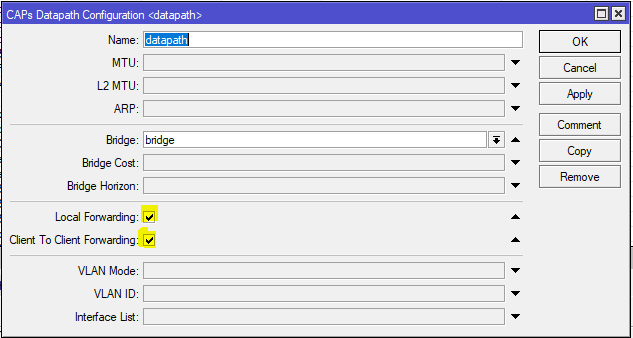
Here is my error, I did not select the “Local Forwarding” and “Client to Client Forwarding”
Capture.PNG
Now I have this new problem.
I currently have 2 CAPs,
I think in the end, to have 4 in all the house, especially to cover properly in 5Ghz.

But I would like the CAPs to use the frequencies that I have listed, like a “Channel list”
As soon as I select a channel, the 2 CAPs will take the same frequencies …

# apr/15/2020 10:29:14 by RouterOS 6.46.5
# software id = SFTV-GEM3
#
# model = CCR1009-7G-1C-1S+
/caps-man channel
add band=2ghz-g/n control-channel-width=20mhz frequency=2437 name="2Ghz-g/n 2437/20"
add band=2ghz-g/n control-channel-width=20mhz frequency=2462 name="2Ghz-g/n 2462/20"
add band=5ghz-onlyac control-channel-width=20mhz frequency=5180 name="5Ghz-ac 5180/20"
add band=5ghz-onlyac control-channel-width=20mhz frequency=5260 name="5Ghz-ac 5260/20"
/caps-man datapath
add bridge=bridge client-to-client-forwarding=yes local-forwarding=yes name=datapath
/caps-man rates
add basic=6Mbps name="GN Only - No B rates" supported=6Mbps,9Mbps,12Mbps,18Mbps,24Mbps,36Mbps,48Mbps,54Mbps
/caps-man security
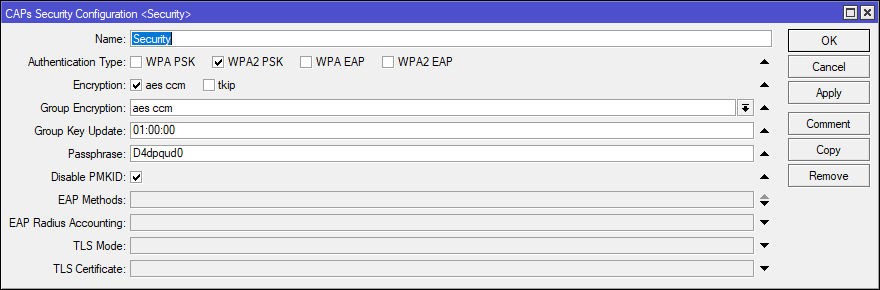
add authentication-types=wpa2-psk disable-pmkid=yes encryption=aes-ccm group-encryption=aes-ccm group-key-update=1h name=Security passphrase=00000000
/caps-man configuration
add datapath=datapath mode=ap name=Wifi-2HB rates="GN Only - No B rates" security=Security ssid=Wifi-2HB
add datapath=datapath mode=ap name=Wifi-5HB rates="GN Only - No B rates" rates.vht-basic-mcs="" security=Security ssid=Wifi-5HB
/caps-man manager
set ca-certificate=CAPsMAN-CA-64D154E8E763 certificate=CAPsMAN-64D154E8E763 enabled=yes require-peer-certificate=yes
/caps-man manager interface
add disabled=no interface=bridge
/caps-man provisioning
add action=create-dynamic-enabled hw-supported-modes=g master-configuration=Wifi-2HB name-format=prefix-identity name-prefix=2Ghz
add action=create-dynamic-enabled hw-supported-modes=ac master-configuration=Wifi-5HB name-format=prefix-identity name-prefix=5Ghz

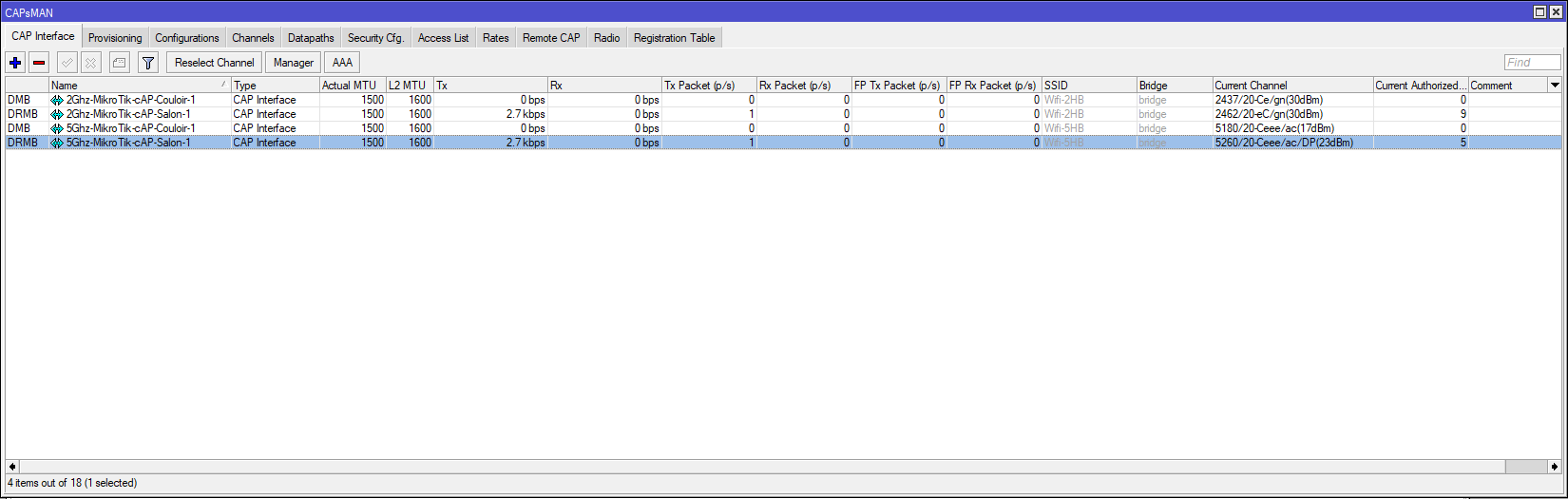
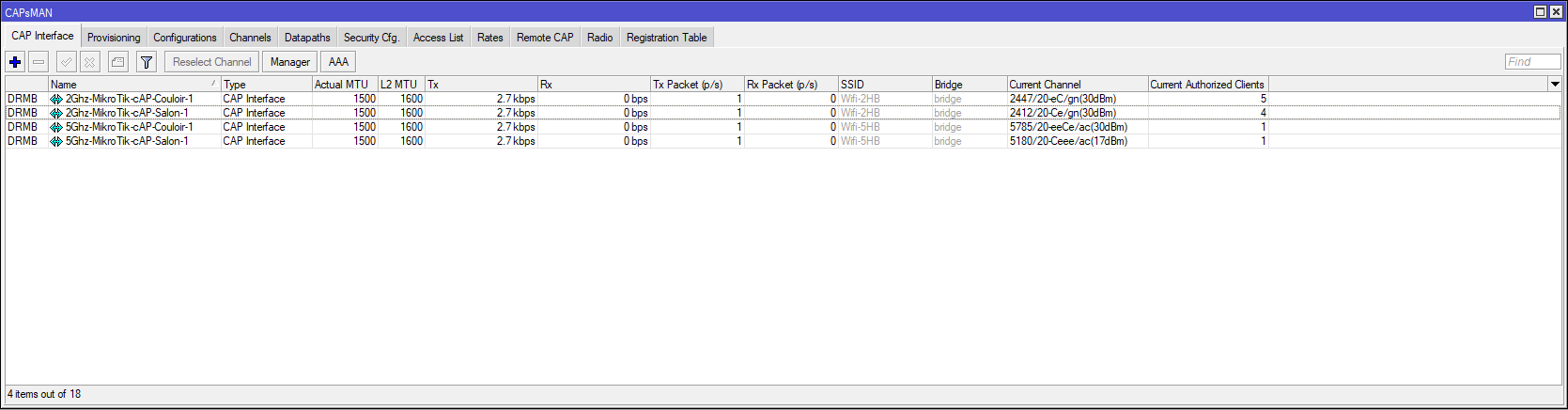
Here are the frequencies that the CAPs use, I think they are selected automatically. and the distribution of my devices works well ..
But not with my frequencies.
capsman interface.PNG
capsman regis.PNG
Thanks for your help.

Hi,
I would like to use this list.

/caps-man channel
add band=2ghz-g/n control-channel-width=20mhz frequency=2437 name="2Ghz-g/n 2437/20"
add band=2ghz-g/n control-channel-width=20mhz frequency=2462 name="2Ghz-g/n 2462/20"
add band=5ghz-onlyac control-channel-width=20mhz frequency=5180 name="5Ghz-ac 5180/20"
add band=5ghz-onlyac control-channel-width=20mhz frequency=5260 name="5Ghz-ac 5260/20"

But when I use this configuration,
CAPs use the same frequency.

Even if I do several configurations with different frequencies, the CAPs always use the first one. and therefore the same frequency.

Is there a possibility to make a usable Channel List?

Frequency lists are done like this:

/caps-man channel
add band=2ghz-g/n control-channel-width=20mhz extension-channel=XX frequency=2412,2432 name=channels24-lower
add band=2ghz-g/n control-channel-width=20mhz extension-channel=XX frequency=2452,2472 name=channels24-upper

CAP will auto-select frequency to use from the list of frequencies in frequency= clause.

Then you use the lists in

/caps-man configuration
add channel=channels24-lower name=net-2.4G-lower <the rest of settings, e.g. SSID>
add channel=channels24-upper name=net-2.4G-upper <the rest of settings, e.g. SSID>
/caps-man provisioning
add action=create-dynamic-enabled master-configuration=net-2.4G-lower radio-mac=E6:8D:8C:49:EE:4A <optional slave-configurations=>
add action=create-dynamic-enabled master-configuration=net-2.4G-upper

So you have to create different configurations that you can assign to different CAPs (in provisioning …mind that order of lines in provisioning matters, the default one has to be the last).


For sure you can simplify setup to use single frequency list for all CAPs … I can envision case when CAPsMAN device restarts and all CAPs get provisioned at the same time. As they all check the spectrum for free frequencies at the same time (while none of them ate transmitting yet) they all might decide to use the same channel.

Thanks for your feedback,

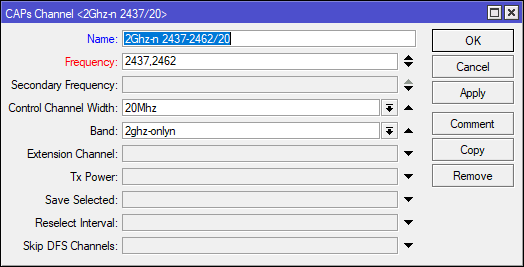
But except, error on my part, impossible to list the frequencies by a comma “,”
Capturex.PNG

The comma was created because it is an export…
Just click the down arrow on your right, a new text box will appear, there you can type your second frequency

Also, it would be best to make use of the reselect interval and save selected values… Otherwise after the initial scan no other scan will be performed again… Unless capsman is rebooted etc…

Hello,

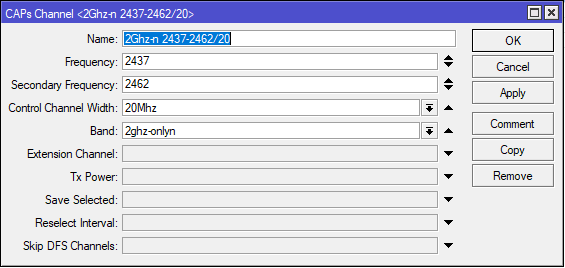
I just took the test,
1.PNG
With Export


/caps-man channel
add band=2ghz-onlyn control-channel-width=20mhz frequency=2437 name="2Ghz-n 2437-2462/20" secondary-frequency=2462
add band=2ghz-onlyn control-channel-width=20mhz frequency=2462 name="2Ghz-n 2462/20"
add band=5ghz-onlyac control-channel-width=20mhz frequency=5180 name="5Ghz-ac 5180/20"
add band=5ghz-onlyac control-channel-width=20mhz frequency=5260 name="5Ghz-ac 5260/20"

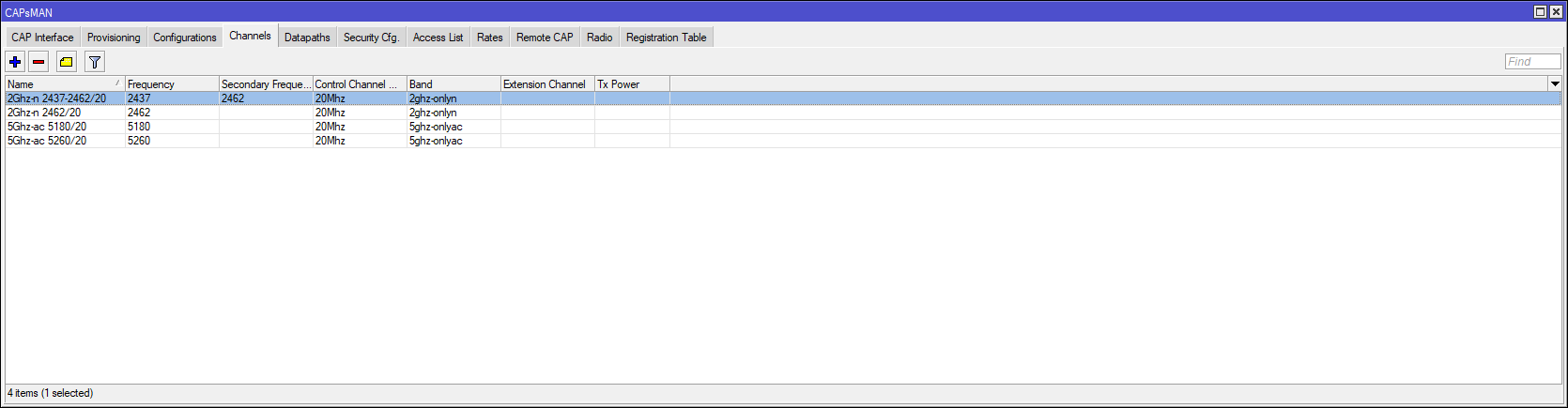
Screenshot
2.PNG
3.PNG
do you have another method?
Thx for your help

No answer to your initial question, but one thing you have to change:

/caps-man security
add authentication-types=wpa-psk,wpa2-psk disable-pmkid=yes encryption=aes-ccm group-encryption=aes-ccm group-key-update=1h name=Security passphrase=12345678

Really really don’t use wpa-psk! Just use wpa2-psk as the only option.

Yes indeed,
it was a test phase,
today it’s good without WPA, very good note!
4.PNG

Otherwise,
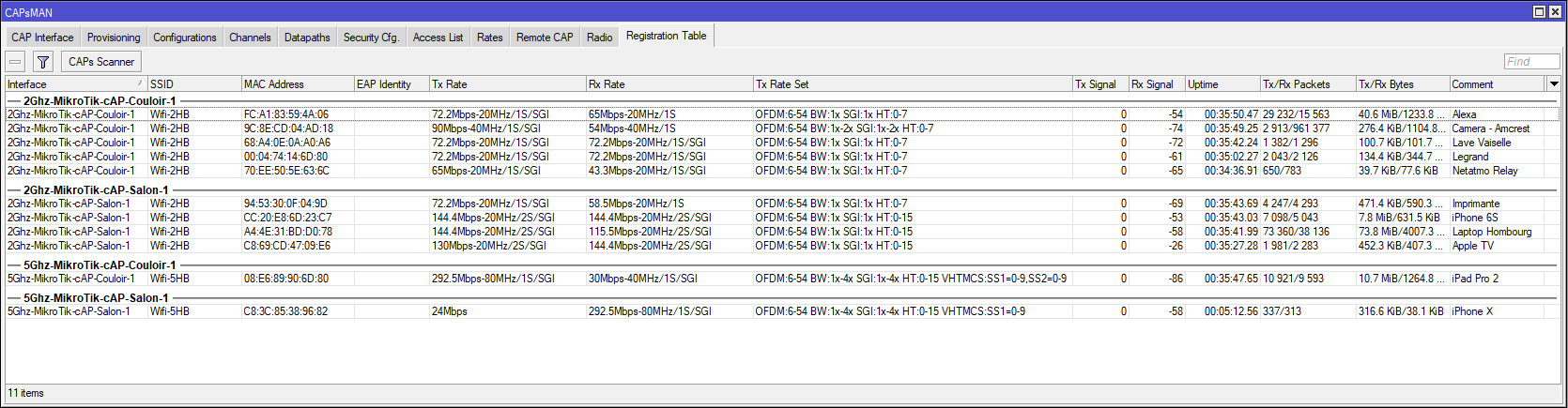
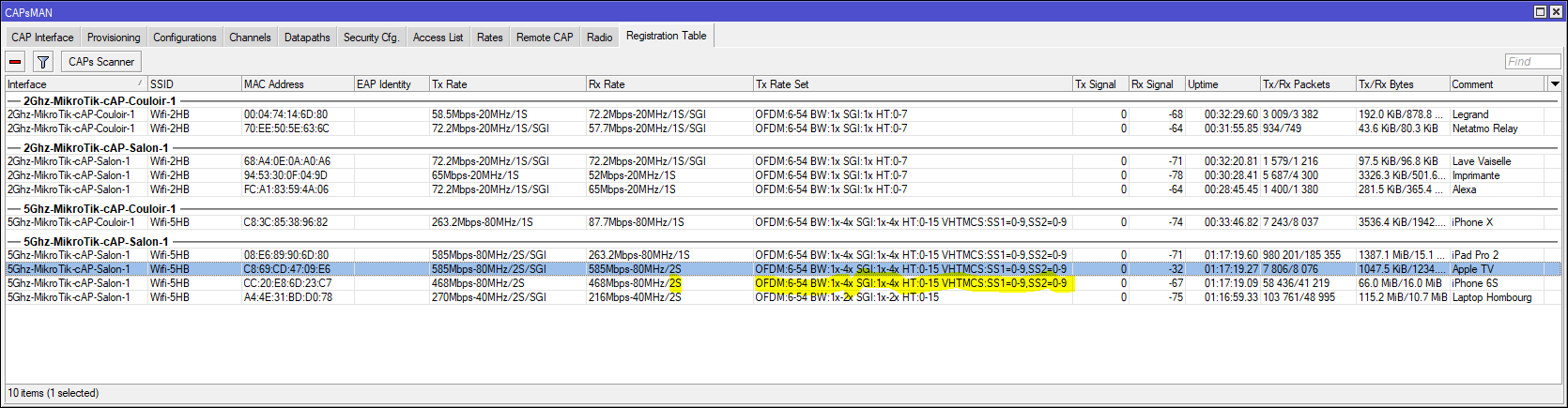
if someone knows the Rate sets well,

I would like to understand each indication

1S or 2S ==> ??
OFDM:6-54 ==> OK, supported rate
BW:1x-4x ==> ??
SGI:1x-4x ==> ??
HT:0-15 ==> ??
VHTMCS:SS1=0-9,SS2=0-9 ==> ??

5.PNG

do you have another method?

On the frequency text box, on your right, there is an up/down arrow… press the down arrow and a new text box will appear… There you should put the Frequency 2462 and not on the Secondary Frequency Tab
Hi Zacharias,

Ok, thx, my fault, yes it works correctly.
Do you know what the DP means?
1.PNG