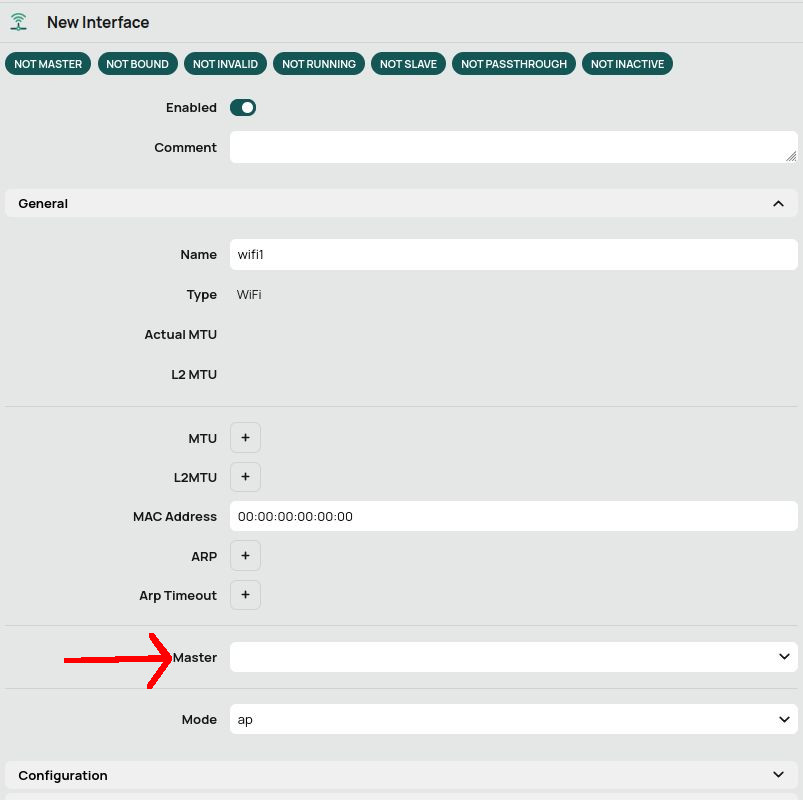
Following along and all is well until 2:45. When he goes to step 4 in the wifi tab - I fill out the same things he does and when I hit OK I get “Invalid value in Master”. Scroll up and I have a Master field that he does not have. It’s a drop down field with nothing in it. And I can’t add anything to it. From my reading it looks like it wants an interface here, but I’m not entirely sure.
I’m using a CRS310-8G+2S+ that I plan on adding a CAP AX to very soon. Right now I’m just trying to learn and pre-configure everything so that when I do plug it in - “it just works”.
Since the video doesn’t seem to cover this Master field - can someone help me out on what I’m missing please?
It might help to specify the exact config which is shown and what you used.
But most likely a difference in ROS version is playing here ?
What version does the video use, what version do you have ?
And what tab are you referring to ?
I am not going to watch that video to find out … others might.
That’s fair I suppose. I mean it is an official MikroTik tutorial video so I would hope someone has seen it.
Step 1: connect to the device. Navigate to wifi → Remote CAP tab. Click on Capsman settings then enable.
Step 2: Wifi → Configuration to add a new profile. Basic settings: ssid, country, auth types, and Passphrase
Step 3: Wifi → Provisioning tab to add provisioning rule. Add a new one, action = create dynamic enabled, set master configuration to the preset profile in step 2.
Step 4: Wifi -. Wifi tab, create new - configuration: select the preset profile.
And that’s pretty much all he does. Except, when I do it there is a Master drop down, which as I said is blank. And when I click ok I get an error.
You’re doing it wrong. He mentions APPLY configuration to current wifi interfaces.
Not “create new”.
Step 4 - in the Wifi - Wifi tab, apply the same preset profile to your current Wifi interfaces.
So double click those interfaces, make sure they are enabled, then move down to configuration and select configuration profile which you made earlier.
Videos are nice but you have to follow what they do and say.
And that’s why I prefer proper documentation A LOT more then videos… for me videos are a waste of time. I learn a lot faster and more efficient using documentation (and you can search too …).
Caps-man menu is legacy wireless.
Not applicable to ax devices.
Obviously you did not create configuration then.
Retrace your steps.
Put on subtitles and stop video on each step, closely watching what shows on the screen.
Instead of creating new, he’s editing. That’s the only thing I can find rewatching the video again. And the video doesn’t show where he creates it. I did watch the video he references to setting up the first wifi configuration. But this switch doesn’t have onboard wifi and he still doesn’t explain wth is supposed to populate this Master value.
You said you prefer written documentation - if you know of a better documentation source which covers how a complete newb is supposed to set this up, I’d really like to see it. I’m not finding it on mikotik’s documentation…
On that CRS you do not create any interface since, as you already mention, it doesn’t have a radio.
But you do have to create master configurations and slave configurations.
Which then are applied when provisioning to your CAP device.
I suggest to first follow this as-is so you first get it to work (only thing to change from the beginning is country setting or you might run into trouble with the frequencies). Then adjust as needed.
Other approach:
Can you post config of the device you’re struggling with ?
Then we can work from there.
Open Terminal
/export file=anynameyouwish
Move file to PC
Open in editor and remove sensitive info (serial number, public WAN IP if any, private keys, …)
Post contents back here between [__code] [/__code] quotes for easier readability.
Greetings,
Thanks for that link. I’m going through it now to figure out where I went wrong. If the shipping estimations are correct, I’ll have a CAP AX wireless later this afternoon to plug into my switch. I was hoping to get this all configured before it showed up but maybe it will be easier and/or better once it does. shrug.
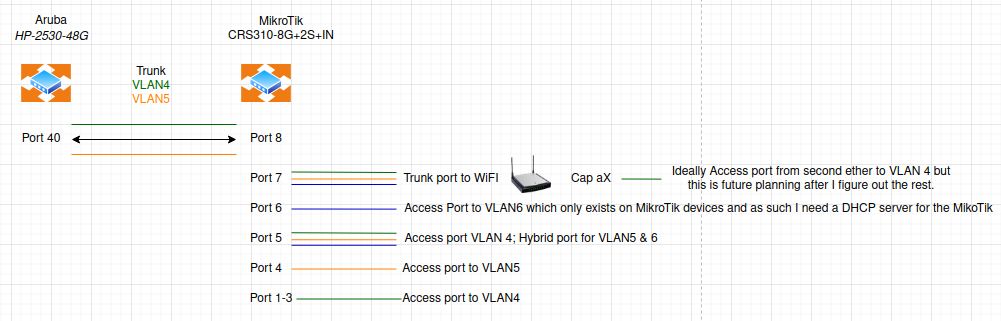
I attached the diagram of my network. I’m actually hoping to get another MikroTik switch next month or so to replace the old HP but that’s a future learning project… for now I really would like to figure out the wifi so I can replace a really old wireless router. But, this is all a learning experience so I’m not in a rush per-se - just excited.
I’m trying to start with Test wifi network on the VLAN4 network. But ultimately I’m going to want an SSID on VLAN 5 and another on VLAN 6. Once I get these tested and working the way I want to, ultimately I want to shut down two other routers in my house and replace them with other MikroTik wireless devices. Hence why I want to learn and configure CAPsMAN.
[edit] Going through the doc I’ve noticed a number of things different in this document vs the video. For example: setting the password via /interface wifi security vs /interface wifi configuration for the SSID. Hrm. Interesting… I’m wondering if I should remove all the changes I made from the video before I start too far down this path or not…
Horray! I have a CAP AX now. Plugged it in, followed the ten second button press and plugged a cable in… and nothing. Well, nearly nothing. I can see that there is something on the port but I can’t seem to find the device anywhere and I certainly don’t have anything broadcasting the two ssid’s. But my config is really close to the example config. What am I missing? Do note that I configured the VLAN settings and matched it as close as I could to the documentation. The one exception is that I only want 2.4Ghz on the Isolated network, and there are some defaults settings that seem to show up that I haven’t figured out how to turn off that are different then the docs, but it’s really close…
[Edit] Oh! Oh! No changes at all to the config below. Just restarted the CAP AX and now the Isolated wifi is up! But it puts me on the VLAN 4 network… Huh? scratches head
So yeah… I don’t know how this thing is working (if that wasn’t completely obvious by now )…
The MAC on the booklet has never asked for an IP from my DHCP server. It doesn’t show up in any nmap/fping scans whatsoever. MikroTik neighbors can’t even find it (not even from the switch it is plugged into!). Only one wifi network is showing up but it’s on the wrong VLAN but the configs look right to me. And yes, this laptop does have a wifi 6E 802.11ax card in it so I should be able to see the 5gh ssid if it was there.
Just to verify - I swapped the networks: 5ghz for isolated and 2Ghz for test. Then I did a physical reset on the CAP AX (since I can’t get to it via software). The isolated came up again on the wrong VLAN. No sign of the test network… very confusing…
I have been playing with these settings. This is the current iteration.
Not sure which example you used for your config but you are making things mighty complicated putting everything together learning capsman and then putting VLAN into the mix as well.
You combine now a full VLAN aware switch with a caps device in pure caps mode, that will not work as expected.
And I was missing that router somewhere… until I saw this thread again on my computer.
When I look at your config (latest version ?)
you specify 2 VLANs but there is only 1 set of router services for that VLAN (no DHCP on MGMT vlan). Is that intentional ? Other router taking care of the missing parts ? Do you specify the IP addresss for MGMT vlan manually on your caps device ? Since it’s in CAPS mode, I guess not …
where does pvid=5 come from on some of the ports on bridge ? It’s nowhere defined on your CRS ? Is there another router handling that part ?
your vlan6 is nowhere defined in interface list. Trusted ? LAN? … whatever. Not that it matters, there is no firewall on that device. Even better to remove those interface lists completely since they make no sense on that CRS as it is configured now.
capsman is enabled but you connect it to bridge. Might be better to use vlan4 there.
In short: your mixing quite some things making it quite confusing and since it doesn’t work …
First decide where you want to have the router services handled. Personally (and it’s more logical), since you have a separate router, let that one take care of things.
Unless you can not change that router config ?
Decide what will be your MGMT layer to control CAPS devices (I assume VLAN 4).
On that caps device, you will also have to add a VLAN to bridge with pvid=4, add dhcp client to that interface and caps discovery interface as well.
No need to enable VLAN filtering on that caps (it works in hybrid mode). Any wifi interfaces added later on will be added dynamically with the correct vlan id.
you specify 2 VLANs but there is only 1 set of router services for that VLAN (no DHCP on MGMT vlan). Is that intentional ? Other router taking care of the missing parts ? Do you specify the IP addresss for MGMT vlan manually on your caps device ? Since it’s in CAPS mode, I guess not …
It is intentional. I handle IP’s from my pihole on the MGMT vlan. I generally statically assign IPs to make sense to me logically (I know I’m weird but that works for me and in my small home-lab it’s not too difficult to do) but I did enable DHCP for a range of IPs for something else I’m playing with so in theory the CAP AX could/should have been able to request an IP on vlan4.
where does pvid=5 come from on some of the ports on bridge ? It’s nowhere defined on your CRS ? Is there another router handling that part ?
Correct. Another device handles that. I just haven’t gotten around to working with it in CAPsMAN as it is lower priority (and I’m seriously considering re-doing/replacing/scratching that project anyway…)
your vlan6 is nowhere defined in interface list. Trusted ? LAN? … whatever. Not that it matters, there is no firewall on that device. Even better to remove those interface lists completely since they make no sense on that CRS as it is configured now.
capsman is enabled but you connect it to bridge. Might be better to use vlan4 there.
Vlan6 is for a future project that I want to start working on soon. I’m just laying the groundwork for it now. But ideally it will be a self-contained-to-only-Mikrotik-devices network. Hence why it goes no where but MikroTik devices and has it’s own DHCP server on the MikroTik switch.
As for the rest, I hope to tinker with this more this afternoon and will report back. Thanks for asking clarifying questions and helping me out!
I had some time to tinker but I’m not sure I fully understand so let me ask some follow up questions please.
Decide what will be your MGMT layer to control CAPS devices (I assume VLAN 4).
That is correct.
On that caps device, you will also have to add a VLAN to bridge with pvid=4, add dhcp client to that interface and caps discovery interface as well.
Sorry for spelling it out, but I want to be clear. On the Ceiling Access Point, you want me to add a VLAN to bridge with pvid=4 - except, I can’t access the Ceiling Access Point. That’s part of my problem. I know it’s there, but I have yet to figure out how to connect to it. Do you want me to reset the device and set it up manually without using CAPsMAN? Right now, if it asks for DHCP it should get it (I have tested that) but it doesn’t seem to have asked for DHCP IP since I added it via CAPsMAN.
And if you are speaking of the switch where I’m configuring CAPsMAN, then I thought I had configured the pvid=4 bridge. Is that not this in my export?
[edit] Did some doc reading tonight. I think I am going to wipe the CAP and set it up manually first before using CAPsMAN. Probably tomorrow night. Thanks.
Some progress I suppose. Remember how I said the one wifi was coming up on the wrong vlan - well, I can’t replicate that anymore, so I guess that’s good. Anyway. A short recap of where I’m at.
Did a factory reset and put the CAP AX on port 2. It got an DHCP IP. Huzzah. The firmware was crazy old, so I updated it hoping that would make a difference. It didn’t.
The trunk port for the cap ax - I changed it around to allow vlan4. Not what I wanted, but obviously I want something working so I loosened that up. shrug Anyway, the CAP AX is back on port 7, it gets a DHCP IP.
On the CAP AX using the Quick Set mode I can set a wifi access configuration and it works. I didn’t mess around with vlans, just a single wifi which I assume was bridging over vlan4. So horray I suppose - the CAP AX is capable of putting out a wifi network.
I have now tried 4 different guides on how to get CAPsMAN working. Not a single one of them works and it’s probably because my configuration is a bit of a mess now. I’ve run out of time to poke at this tonight. If you have any ideas, I would really appreciate it.
Why use Quickset when you want CAPS mode and capsman setup ?
Who asked you to use Quickset ? Nobody here, I guess.
Excuse me for saying but it is quite clear you don't understand yet (that will come with time, hopefully) how all pieces fall together so why do you keep picking things left and right and then think something will make it work?
Sorry if this came over a bit harsh but sometimes it is needed to make someone aware of his/her mistakes, enthousiasm, ... whatever.
Step by step.
First learn to walk, then jog, then run.
Quickset is only for initial setup after clean reset and only to be used when you never changed anything yourself. It can completely lock you out if you do no know what you are doing.
Most seasoned users here rarely use it, if ever. There is a reason for that.
In Quickset you can set some default configs e.g. standalone AP config which should be good enough to get most users started. But you do not want standalone AP ?
Capsman is a controller on a central router (whatever device, can even be a cap device itself) which is intended to control multiple AP devices from a central point as far as wifi settings etc. are concerned.
Quickset and capsman do not mix.
I repeat: don’t use Quickset if you want to move to capsman setup.
But you may have to ask yourself WHY you want capsman setup ? If it’s only for controlling 2 to 3 devices, don’t bother. Unless you consider it a learning process for something later/larger ?
Let’s assume we move forward with capsman setup:
Retrace your steps.
Reset to caps mode on CAP AX.
Add vlan4 as interface port.
Change DHCP client to VLAN4
I think we have to revise the “it’s only sensible to bother with CAPsMAN if there are 4 or more APs in game” stance. Ever since we got wifi (qcom / qcom-ac) with 802.11 r/k/v support, it does make sense to bother with CAPsMAN even for 2 APs.




 )…
)…