Hi there,
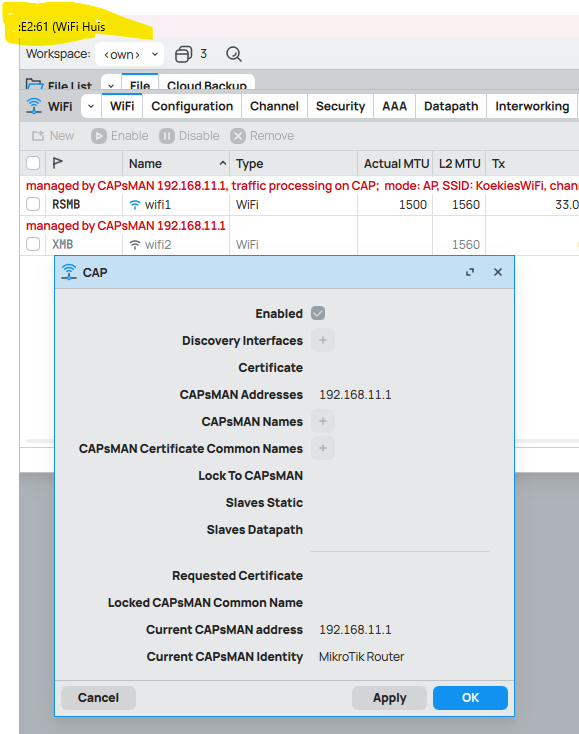
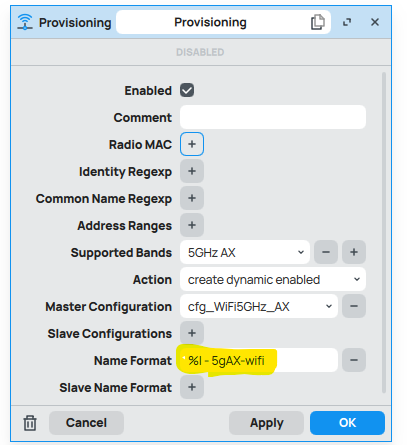
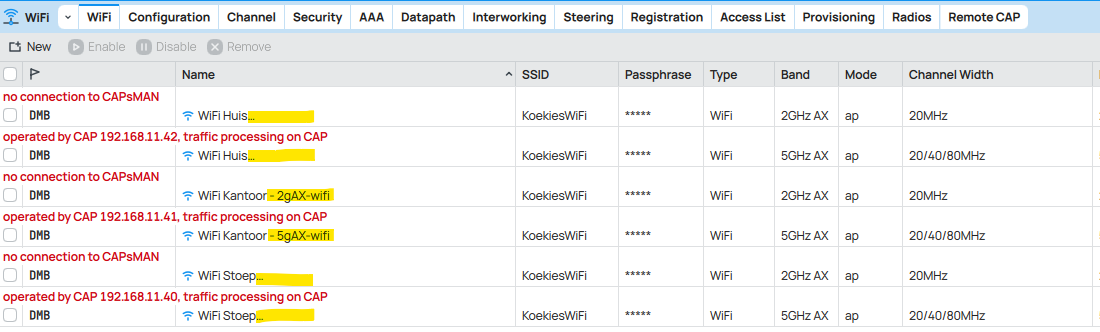
I have added a "Name Format" on my provisioning settings. The nameformat is applied only to one AP wifi and not to the rest, why would this be? See the settings and the result:
current scripts of the router set as the CAPsMAN
2025-02-20 08:29:16 by RouterOS 7.17.2
software id = FC9Z-1KWF
model = RB5009UPr+S+
serial number = *******
/interface bridge
add name=bridge1
/interface ethernet
poe-out status: voltage_too_high
set [ find default-name=ether1 ] comment=WAN name="ether1[internet]"
/interface wifi channel
add band=2ghz-ax disabled=no frequency=2412,2432,2472 name="2.4Ghz AX" width=
20mhz
add band=5ghz-ax disabled=no frequency=5130-5850 name="5Ghz AX" width=
20/40/80mhz
/interface wifi datapath
add bridge=bridge1 disabled=no name=datapath1
/interface wifi security
add authentication-types=wpa2-psk disabled=no name=secKoekWiFi
/interface wifi configuration
add channel="2.4Ghz AX" country="South Africa" datapath=datapath1 disabled=no
manager=capsman mode=ap name=cfg_WiFi2GHz_AX security=secKoekWiFi ssid=
KoekiesWiFi
add channel="5Ghz AX" country="South Africa" datapath=datapath1 disabled=no
mode=ap name=cfg_WiFi5GHz_AX security=secKoekWiFi security.connect-group=
"" ssid=KoekiesWiFi
/ip pool
add name=dhcp_pool0 ranges=192.168.11.100-192.168.11.199
/ip dhcp-server
add address-pool=dhcp_pool0 interface=bridge1 lease-time=8h name=dhcp1
/interface bridge port
add bridge=bridge1 interface=ether2
add bridge=bridge1 interface=ether3
add bridge=bridge1 interface=ether4
add bridge=bridge1 interface=ether5
add bridge=bridge1 interface=ether6
add bridge=bridge1 interface=ether7
add bridge=bridge1 interface=ether8
add bridge=bridge1 interface=sfp-sfpplus1
/ip firewall connection tracking
set udp-timeout=10s
/ip neighbor discovery-settings
set discover-interface-list=!dynamic
/interface ovpn-server server
add mac-address=::::: name=ovpn-server1
/interface wifi capsman
set ca-certificate=none certificate=auto enabled=yes interfaces=all
package-path="" require-peer-certificate=no upgrade-policy=none
/interface wifi provisioning
add action=create-dynamic-enabled disabled=no master-configuration=
cfg_WiFi5GHz_AX name-format="%I - 5gAX-wifi" supported-bands=5ghz-ax
add action=create-dynamic-enabled disabled=no master-configuration=
cfg_WiFi2GHz_AX name-format="%I - 2gAX-wifi" supported-bands=2ghz-ax
/ip address
add address=192.168.11.1/24 comment="LAN IP" interface=bridge1 network=
192.168.11.0
/ip dhcp-client
add comment="Internet WAN" interface="ether1[internet]"
/ip dhcp-server network
add address=192.168.11.0/24 gateway=192.168.11.1
/ip firewall filter
add action=fasttrack-connection chain=forward connection-state=
established,related hw-offload=yes
add action=accept chain=forward connection-state=established,related
add action=drop chain=forward connection-nat-state="" connection-state=
invalid
add action=drop chain=forward connection-mark="" connection-nat-state=!dstnat
connection-state=new in-interface="ether1[internet]"
/ip firewall nat
add action=masquerade chain=srcnat comment="Internet Connection Rule"
out-interface="ether1[internet]"
/ip ipsec profile
set [ find default=yes ] dpd-interval=2m dpd-maximum-failures=5
/ip kid-control
add name=Mariska
/ip service
set telnet disabled=yes
set ftp disabled=yes
set www disabled=yes
set api disabled=yes
set api-ssl disabled=yes
/system clock
set time-zone-name=Africa/Johannesburg
/system identity
set name="MikroTik Router"
/system note
set show-at-login=no