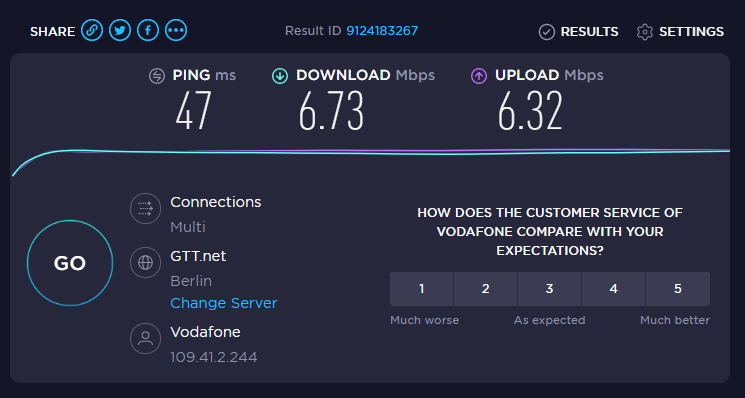
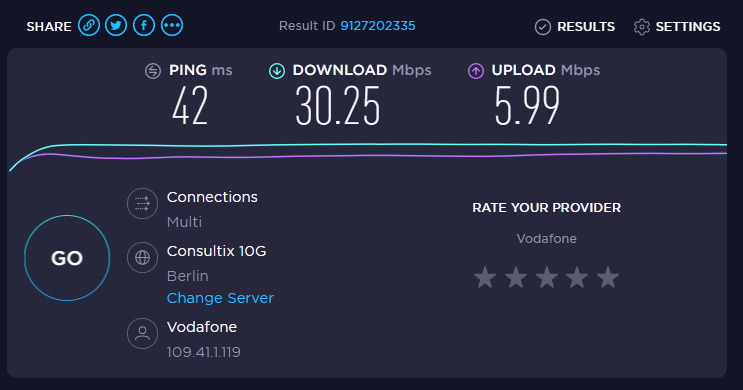
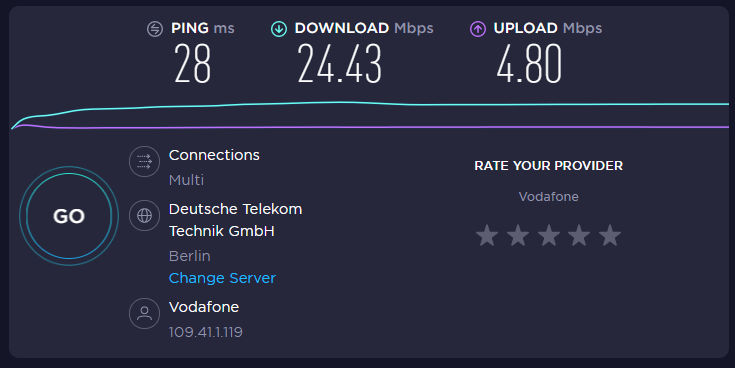
Basic fact is that cell max throughput is proportional to the cell frequency bandwidth. In Europe it usually like this:
B20 / 800MHz: 10MHz bandwidth (new LTE band, 30MHz total divided among 3 operators) = 100Mbps cell throughput
B8 / 900MHz: 5MHz bandwidth (traditional GSM band, some operators using it for 3G/UMTS) = 50Mbps
B3 / 1800MHz: 20MHz bandwidth (traditionally low used GSM, many operators started off with broadband LTE on this band) = 200Mbps
B1 / 2100MHz: 10MHz bandwidth (traditional UMTS band, some operators re-used part of spectrum for LTE while still offering UMTS, can as well be only 5MHz) = 100Mbps
B7 / 2600MHz: 20MHz+ … the first new high-capacity band for LTE. Many operators have more than 20MHz spectrum … as max cell bandwidth is 20MHz as per standard, using more than 20MHz means intra-band CA (B7+B7). = 200Mbps+
Then it comes to the number of users sharing cell throughout. Cell range is inversely proportional to the frequency, meaning B20 cell covers around 5-6 times larger area than B7 cell. If users are spread evenly, this means 5-6 times more users sharing same 100Mbps of a B20 cell than users sharing a 200Mbps+ B7+B7 cell. Making it obvious why B20 cell might seem to be some 10-times slower than B7 cell.
Things are not this simple though: if cell signal strength is low (RSRP below -105dBm or something) then throughput drops and it’s still better to stick to lower-frequency cell, keeping in mind that uplink suffers because of air path-loss even more due to lower Tx power … CA with high-frequency cell might still work nicely though (due to higher Tx power by cell tower). Using narrow-bandwidth cell in low-signal case is benefitial as well (low Tx power gets spread over narrower frequency bandwidth, making RF higher amplitude and better SINR).
And then to peculiralities: I’ve heard that A1 Austria is the only “in class” who actually has 20MHz in B20, making their B20 cells untypically fast (200Mbps cell throughput).
.
Guess there is enough processing power in such an LTE-pop to force me to whatever channel / config they want, if I do not fit into the “for-the-greater-good-QoS-shaping-policy”.
And most of the time I’m not in the mood to wardrive the best spot for a high-perf LTE-link around.
Good Old G. generally and Berlin in particular may not be the best spot to try such stunts.
Thing I’m interested in, is what would be the max.bandwidth possible, in LTE-shangri-la ?
Generally eNodeB has plenty processing power to handle a few hundred connected users per LTE cell. To do it intelligently, it needs some feedback from users’ terminals - terminals do some measurements as instructed to give eNodeB feedback on quality of carriers. Unfortunately some terminals are brain-dead enough that the measurement feedback is not valid making eNodeB take wrong decissions. Unfortunately some users think of their LTE knowledge too high by forcing some things or other (most notably forcing terminal to particular PCI - cell whereas there might exist more optimum cell in the same frequency band) causing radio conditions worse for themselves and other adjacent users.
The maximum bandwidth possible in LTE? Most of devices support 10Mbps/MHz of bandwidth, which assumes MIMO 2x2 and use of 256QAM modulation. Support of higher MIMO order is limited to a few device types and higher frequency bands and TDD in particular (e.g. bands 40-43). Then it comes to amount of available frequency bandwidth (e.g. 3CC CA with total bandwidth of 60MHz yields around 600Mbps cell throughput: possible example would be B3+B7+B7. OTOH in some extremely god-forsaken places it could be only 5MHz giving 50Mbps throughput in ideal radio conditions … which might still be improvement over UMTS/3G with its maximum 21Mbps using same 5MHz spectrum in B8 or B1).
The biggest impact on achievable throughput at user’s equipment has RF attenuation (LoS distance between eNodeB and terminal, any obstacles inside Fresnel zones) … if RSRP drops below around -70dBm, max throughput is not possible any more. If RSRP drops below -100dBm, only around 10% of max throughput is still achievable … slightly depends on eNodeB Tx power (some MNOs tend to set it high which helps with DL slightly but hurts UL). This is where use of quality directional antenae helps (mind that even though some antennae have nice directional diagrams, their gain is suboptimal for some frequency bands).
Also big impact comes due to multiple users sharing resources of single eNodeB. It’s not as simple as this (but not much more complicated either): users share air-time. The higher number of users, the lower air time and thus lower throughput each gets.
MU-MIMO helps here (effectively multiplies available air-time), but requires support from terminals … and is, again, limited to higher frequency bands due to need for larger antenna arrays at the eNodeB (antenna array dimension is directly proportional to the wavelength or inversely proportional to frequency).
It’s not as simple as this (but not much more complicated either): users share air-time. The higher number of users, the lower air time and thus lower throughput each gets.
.
guess this is a verry sensefull statement !
cause good old air is a very democratic medium - shared by all of us.
you wanna see exeptional LTE-performance … go for a spot where many people are expected, at a time nobody’s there.
.
a couple of colleagues tried to bring WiFi-perfomance to a storehouse of a beverage-distributor … after they failed multiple times epically, they asked for advice:
I said: ‘The power of water is so tremendous, not the strongest men can hold it back !’
.
.
and the main problem … results are totally erratic … in the middle of the effin night, no lights on in the hood !!
… same config I’ve used before … performance is unexplainable like “my ass”
.
… who has the guts to explain such B-sheet to a paying customer ?
… are they scrubbing the antennas ? … is this kinda power-saving mode ? … or is there a new porn-serial everyone is torrenting in the moment ?
.
man ! … better polish your wires … all this shared-over-the-air-thing is a lot of maybe …
.
One phenomenon we observed in our MNO (LTE accounted for majority of traffic, 3G contributed some): the peak hour for data usage by users lasted between roughly 8PM and 3AM. It really died off only at 4AM and started to pick up again at 6AM. Then it was more or less constant during business hours to ease only slightly before evening rush hour again.
My explanation: just before going to bed at 1AM everybody added a few torrents to download and it takes an hour or three to finish the download.
And that was network-wide, some eNodeBs showed very different usage patterns.
And yes, some network equipment vendors implemented power-saving features… which include switching off cells operating on higher frequency bands which reduces capacity but doesn’t affect coverage. And it does take minutes (rather than miliseconds) for system to enable disabled cell again (because it monitors average load on related cells and averaging, well, takes time).
.
just found the solution: https://mikrotik.com/product/intercell_10_b38_b39
: )
power up your own cell … out in the middle … no interference and with your own iperf-server !!
That stops all the yodeling and tells you whats behind that door !!
Maybe that beast is excatly intended for that purpose … gives back healthy sleep at night to you … you never have to worry again “is my access-router really capable ?!”
3500 bucks for the peace of mind ! … why not ! … think !
The corona-tion-thing gets your little booty next month … you can’t take your money with you … now or never !
: )
.
some toilet-paperroll-hunters returned to aerie ? … or power-saving mode … keeping the shores of kreuzberg-mountain green ?
we know only a little !
plz remember … floaty is YOUR performance leader in tha moment (actual results in post above) …
… so far … good night and good luck !
.
.
This is a nice thing … but I have to admit my company plan is not an unlimited one, so while I normally in “the zone” every month, I want avoid any BW-kinkyness.
But the test-router is intended as custumers mgmt-backup-line ( F L A T R A T E !) … then I’m definitly able to flood some statistics
So to wade in my 6 eggs worth (very english expression).
I have been deploying SXT LTE and only a few LHG LTE units to customers and have seen huge variations between the 2 devices side by side connecting to the same network provider. Only in very rural locations and then mounted high up does the LHG unit achieve better results than an SXT LTE unit. I mainly connect the units to either EE or 3 and before the CAT6 modem and CA arrived was setting the frequency to band 3 for both providers and found the speeds to be okay. Now with CA here, i configure these on providers to band 3 + 20 but am not seeing too much of an increase.
A recent installation at a farm which is only 1.6km (1 Mile) from the EE mast saw the LHG unit struggle to achieve more than 5Mbps down with 2Mbps with it mounted high up (12 mts). When i replaced the device with a SXT LTE the speed increased massively to between 35 - 40 Mbps down and 15 - 20 Mbps up. This does defy logic as i would have guessed that the LHG unit had a more powerful antenna so should have had a better connection but was actually slower. All my installations are configured to point directly to the mast and this is sometimes helped by using the OpenSignal Mobile App which shows the tower information and the direction of the connection. Whilst this works 75% of the time, always experiment with the antenna alignment as this week i installed both a SXT and LHG unit at the same site location and the Opensignal APP on my phone pointed to a mast due East which gave me 30 - 40Mbps but i actually ended going North East to another mast that locked in at 60 - 70Mpbs.
My limited experience (i’ve only installed maybe 30 SXT/LHG units) has taught me to test the location on Band 3 first, then on Band 20 and finally the 2 bands together. The best results have all been using Band 3.
To answer hgb, i haven’t found a 4G Router with an external high gain antenna attached that can get anywhere near the Mikrotik equipment in terms of stability and speed. My frustrations with the equipment is my lack of knowledge and the problems i have trying to run the devices using POE + WAN from port 5 on the hAP Routers. I have tried a wAP LTE unit and was very dissapointed with the performance of the connection, unless you are on top of the mast it has a very limited range so probably good for urban but bad for country side. I even modified it to use a Poynting Omni-directional antenna which was just as bad (i had much better results with the same antenna and an old Huawei 4G router).
I sent the report below to Microtik support just last night:
I have a RBLHGR&R11e-LTE6 that I am using with AT&T.
I also have a R11e-LTE-US miniPCI-e card.
With the R11e-LTE6 card installed in the RBLHGR I am getting data rates of around 3-5Mb down and 13Mb up.
With the R11e-LTE-US card installed in the RBLHGR of around 13-15 Mb down and 13Mb up.
With both cards the connection parameters appear to be the same, i.e. the same cell tower, sector, band (band 2), and similar signal strength numbers.
I have tried setting a band lock on the R11e-LTE6 to make sure CA isn’t causing a problem but it has no effect (although I don’t think I’ve ever CA get activated).
Today I did a bunch more testing in various locations and the only place the R11e-LTE6 card even matched the R11e-LTE-US card was in an urban location less than 1 mile from a tower.
I’m pretty new to Mikrotik routers and modems so there could be something I’m missing here but it really doesn’t not make sense to me that the CAT4 modem would out perform the CAT6 modem by such a wide margin with all other parameters being equal.
unless this isn’t a hardware-related issue … I see the same odds here on the other side of the pond.
.
[R11e-LTE-US 13-15 Mb] ??
.
This is (my oppinion !) a very sorry performance for the capabilities the standard should be able to serve.
so.. (for me very) obviously the providers classify the hardware … you can easily read the identifiers, so sub-providers-hardware is ‘degraded’.
.
Maybe if I were a power-greedy, stock-exchange-driven tech-fuck-up ? … I would do the same.
.
example ?
served: https://keivan.io/the-day-appget-died/
.
Ill chip in my experiance. I have two RBLtAP-2HnD here in the UK. Using both O2 and Vodafone sims. One is currenty in London and one out in the country side.
The 4 tests we have seen are as follows:
Iphone test 50-60Mbps+, In london sometimes 90Mbps
Huawei e3272 dongle 50-60 Mbps
RBLtAP-2HnD 10Mbps or worst
Huawei e3272 dongle IN RBLtAP-2HnD USB Port 50-60Mbps
There is defo something wrong with this LTE modem in this unit. I have two, two different locations. Also the Iphone is the best, the Huawei in a laptop second, Huawri in MK third and the MK with inbuilt LTE last, and proper last at that.
If its a regional thing thats fine, stop selling it in those countrys. There must be a solution.I have a site where ethernet broadband is still a montha way because of delays, I should be able to offering them 50Mbps 4G and I cant.
Probably R11e-LTE is not connecting to that Band what other devices and thats why you have that situation. USB Doungle have good speed, this measn it’s not a antenna problem.
Looks like band 20 is the only one I can use with the R11e-LTE, I cant unfortunately tell what band the dongle is running on, the 3372(might have previous stated wrong model) is cat 4 same as the R11e-LTE
Ive upgraded the firmware on the R11e-LTE and also set the suggested tether setting in case it was that. No difference, Dongle thrashes the MK hands down.
So I’ve started to deploy LHG LTE6, LHG cat4 and tried the SXTLTE6. I can definitely say the LTE6 hardware is just a lot more money for no reason. the cat4 does exactly the same job and provides the same speed
In my install process, I now just use the LTE6 on a tester rig to cell-monitor the available cells and then program them in (cell-locking) to the best cell that had the best speed. I use maps to find the tower directions in an attempt to be more efficient and reduce the install time. However, after over 10 now installed, I effortlessly get far greater speeds on my Samsung S21 Ultra than the modem in any of the above-named devices. I too would love to know if it’s just a setting or tweak that is needed to unlock the rest of these speeds that are clearly available.
Why is the speed available for consumer handheld devices but not on HIGH GAIN DIRECTIONAL purpose-built antennas is beyond me.
Also, a side note, some customers complain that there could be a 1-hour gap of downtime on random days and times and I’m wondering if anyone has a self-heal script to offer up that when internet isn’t available it performs a reboot or something similar and then my startup scripts for cell lock will run. At the moment I believe it only attempts to self-heal after 60minutes.