today i tryed to replace out x86 mikrotik pppoe server with CCR router, but there was few problems.
I am running v6rc6 (yes beta) but dont have any other option (downgrade to 5.xx ?)
system running cca 60 eoip tunnels, 60 pppoe servers, cca 1000 pppoe sessions with dynamic (with help of radius) 1000 simple queus (pfifo)
after moving cca first 600 pppoe sessions dissapeared every interface in winbox (web too) - ethernet, vlan, eoip. When i looked in pppoe servers all 60 servers lost theis interfaces (eoip tunnels) and had unknown interface, so same in queue.
after migrating users back to x86 server, interfaces are visible again, just cpu counter shows still 9%(freezed), while when i look in system/resources/cpu there now 0
in x86 server is cpu at 30 - 35% (running 4.17 routeros), hitting 200mbit traffic
in CCR it was about 10% cpu (6rc6) traffic i was not able to see when interfaces dissapeared.
I have tried to run PPPoE concentrator on CCR 1036. Configuration running on 6.0rc6 have 40 PPPoE server, 40 EoIP tunnels about 450 sessions with dynamic simple queues and 50 Mbit total traffic. But I had to move back to x86 system.
There was problem that load was not balanced to all cores. One core was overloaded and many of them unused. The overall performance was not well, some customers have not delivered full throughput of their service.
Normuds at MikroTik support have told me that currently CCR is delivered to distributors as “pre-release test” and RouterOS RC release is lacking in some CPU optimizations for PPP. So we have to wait for one of the next software release.
about “dissapeared every interface” I read somewhere on the forum ask for rc7 from support
But lets be real krtko about performance
from x86 to x86 there is a big difference
it can be Xeon, i7,i5, Core to Duo …
so what kind of x86 it is?
My network Topology is as follows:
Approx 50 APs in a fully routed network
Every customer sector wlan interface is bridged with a separate EOIP tunnel to the CCR1036 edge router, ROS 6.10.
In the CCR all the EOIP tunnels are bridged together, PPPoE server on the bridge.
This way I have a large L2 network all the way from each customer’s wlan interface to the PPPoE server.
150 customers connect via PPPoE and get IPs from an IP Pool.
Simple queues are created dynamically as customers log in.
I have trouble getting total traffic above approx 50-60Mbps.
All links are tested and can run much more bandwith than I achieve.
I have started to investigate what might be the bottleneck. Is it the EOIP, the PPPoE or the dynamic queues?
Total CPU and total bandwidth available is not the issue, neither is the capacity of the links.
CPU of the CCR is about 3-4% at the most.
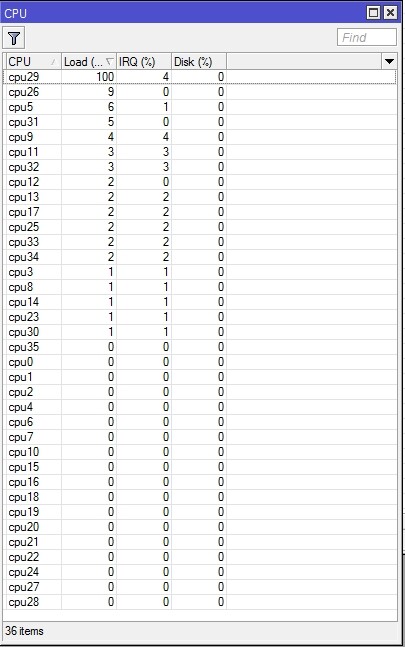
In system/resources/cpu I can see that most of the cores are 0 or 1%, but a few go higher.
Most of the time one single core CPU usage is very high, and reaches close to 100% every few seconds.
The number of this core is not the same, it moves around all the time.
Can this be the cause of my problem, i.e. one heavy task is assigned to a single core, which skyrockets its CPU and therefore slows down the execution?
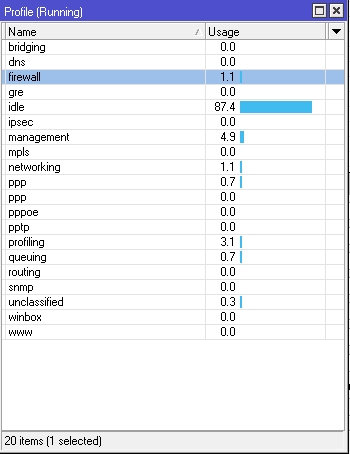
What kind of task can this be? The simple queues? PPPoE?
Here is my tools/profile:
Tried some speedtests now from my office.
Total traffic was about 60-70 Mbps before test.
When running through PPPoE over EOIP I got no more than 7 Mbps.
When running directly over purely routed network I got over 20 Mbps.
(Speed is restricted by poor antenna/last mile link, with proper link I would probably achieve more)
Fiber connection to CCR is 200 Mbps.
This confirms that something related to the PPPoE or EOIP restricts speed. But what?
Update:
This morning I ran a few tests from my office.
-Added address 10.0.100.1/30 on the bridge in the CCR (The one where all EOIP tunnels are joined)
-Added 10.0.100.2/30 to the EOIP tunnel in my CPE
-Set 10.0.100.1 as default gateway
This gave a download speed about twice as high as when running through the PPPoE tunnel, and somewhat lower than running with pure routing.
Each speedtest was ran several times with each route , enabling/disabling routes, to ensure correct results were recorded.
Results (average of tests):
Pure routing: 21Mbps
EOIP with addresses: 15 Mbps
PPPoE over EOIP: 7Mbps
So what dis this tell me?
Intermediately, my conclusion was that both EOIP and PPPoE slow things down, and that PPPoE is the worst.
After doing this, I realized that test 1) and 2) are ran without any queue employed, while 3) has a simple queue of 100M/100M
Then I removed the rate-limit setting from the PPP profile and ran a few more tests through PPPoE, enabling/disabling the rate-limit every second time.
Results:
PPPoE with rate-limit:8Mbps
PPPoE without rate-limit: 20 Mbps
This makes me suspect the simple queues, or the way the CCR handles these as the guilty part.
Is the problem that the CCR assigns the queue handling to only one CPU core, slowing things down?
A typical profile for my customers look like this, this is for 6M/1.5M:
Is there anything that can be done to the profiles that will make the CCR handle the queues in a more efficient way?
Am I left with creating static simple queues instead?
Or is queue trees with PCQs a better option? Downside is that then I will not see status of the queue of one single customer.
(Now I see that this thread is in the Beta forum. Normis, is it possible to move it to the Routerboard Hardware or the General forum?)
After my previous post this morning I tried to create a static queue, also with 100M/100M and the performance was equally poor.
Spoke to my distributor’s technician and he recommended me to try queue type default, this works much better.
Now I get same speed over PPPoE/EOIP with dynamic simple queue as with pure routing without queues
Explanation:
Customers run PPPoE clients on the WLAN interface of their CPEs.
Customer sector interfaces on APs are bridged with EOIP tunnels to the main router / PPPoE access concentrator.
And how do I get an “evidence” that my packets are not fragmented along the way?