Good question.
In my opinion such a device should have LEDs which are indicating the status of each PSU. Additionally this information should also be available via SNMP. The latter is especially important for ISPs. I don’t visit all of our sites on a daily basis to check LEDs. 
if swapped FANs are of good quality and does not damage fan controller you are fine. So, when choosing FANs check if power usage of new ones is in the same ballpark as ones supplied from us. Also note that different fans can report RPM and starting voltage can be different so reading in RouterOS can be different from reality after the swap.
OK i mean:
I dream to see model like:
RB2011UiAS-2HnD-IN but on CPU: TLR4-00980CG-10CE
(sfp \ 1g Ethernet ports 10-12 (PoE on 2 ports of them) \ usb \802.11b/g/n \ LCD )
and price 250-350$
and CRS mast have only CPU: TLR4-00980CG-10CE and more
Ok, I understand, but I don’t think this is the right topic to discuss such a thing. The CCR1009 is a perfect device suited for a lot of tasks as it is right now. But it certainly isn’t a “one size fits all” device, which is impossible anyway in my opinion.
The nice thing about routerboard’s is that you can either go the x86 route and build it yourself, or, what I would advise, buy several routerboards which each excels in their specific task (routing, VPN, switching, wireless, etc.) and use a combination of boards of which often one can be used for multiple roles!
The CCR1009 cannot do wireless for instance, but it does make an excellent firewall, router and switch! Please state your desired device and it’s features in a “desired hardware” topic or something like that. I’m willing to bet that if you can make a compelling business case, mikrotik/routerboard will listen and produce the device.
So now back to the (so far) excellent CCR1009! Any questions regarding it or things you might want to see or have me test?
@Quindor, thank you again for the detailed reply regarding the fan settings.
Any chance you have the specs of the fans ? Mainly Voltage and Amp (eg. 12VDC, 0.11A). I’m thinking of replacing them with quality fans either from Delta, Sanyo-Denki or NMB.
Also, from the pictures, the fans look like they are 40x40x20mm. I believe Noctua only has 40x40x10mm so the 10mm gap could be an issue.
Best regards.
Thnx’s! I always value other people sharing information about new products so when I get a first, I’m happy to oblige! Karma is always appreciated. 
If I can find the time tommorow I will give removing the fan shroud a go. If it’s indeed just a plastic shroud with the heatsink underneath it, there should be no harm in removing it and looking around. I would rather not remove it if the heatsink is attached because of thermal paste and such.
I actually should have the Noctua fan model lying around here somewhere so I can compare the size and see if they are 10mm or 20mm thick. I actually don’t know and it’s a good point! I will also see if there is a sticker on the fans listing their specs.
Funny you mention Detra, although they make great datacenter server fans, they are insanely loud, or at least that is how I know them. I go with Noctua when I can, otherwise papst for specialist applications. Sanyo-Denki is used by some PSU manufactorers (seasonic for instance I believe) and they also make great smooth fans!
Ok, I’ve taken the beast apart and made lots of photo’s again. I have added them to the existing album so you should be able to find them.
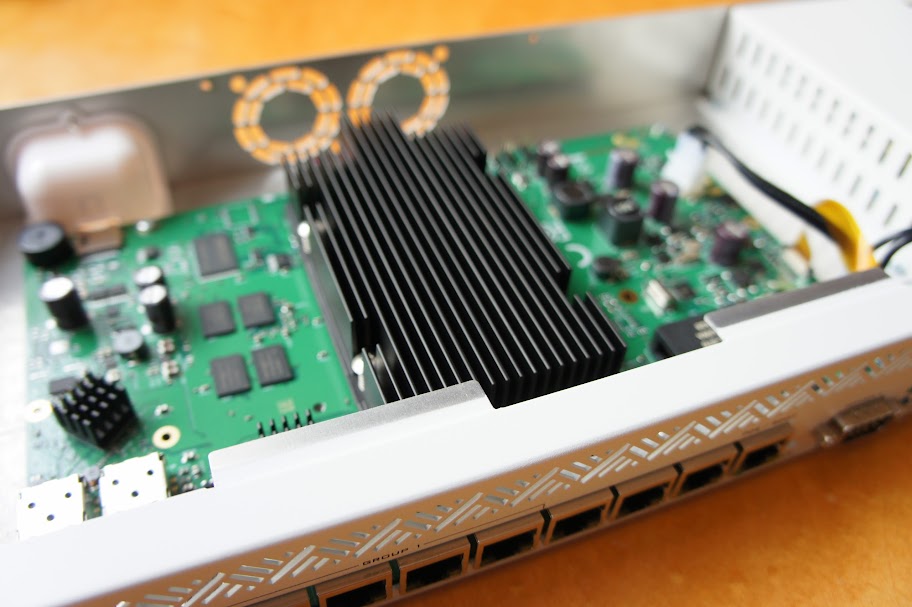
Shroud and fans removed
You where correct that the Noctua fans where 10mm versions and you need a 20mm version! For that reason I have included photo’s of the measurements of the fans using a caliper so that it can hopefully help in selecting new ones.
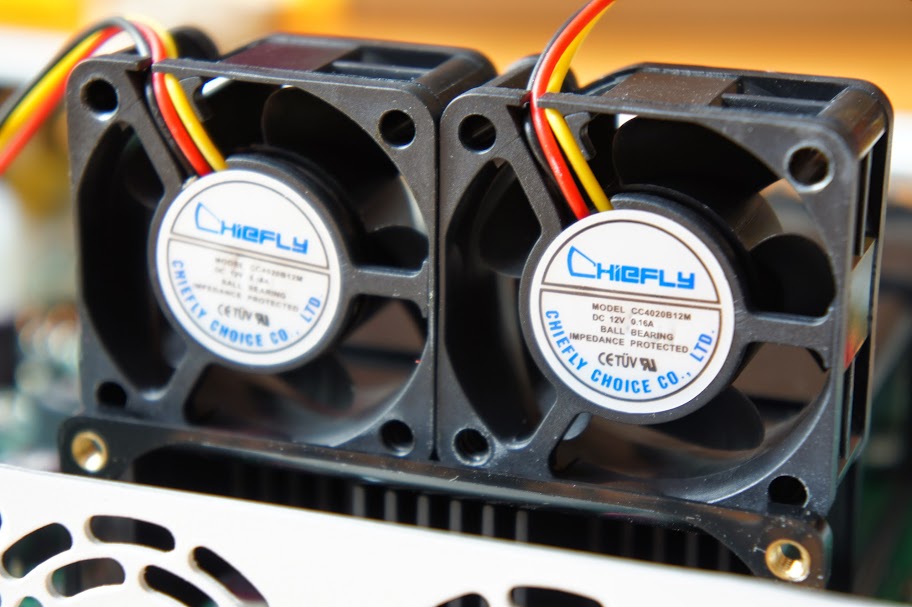
The fans upclose
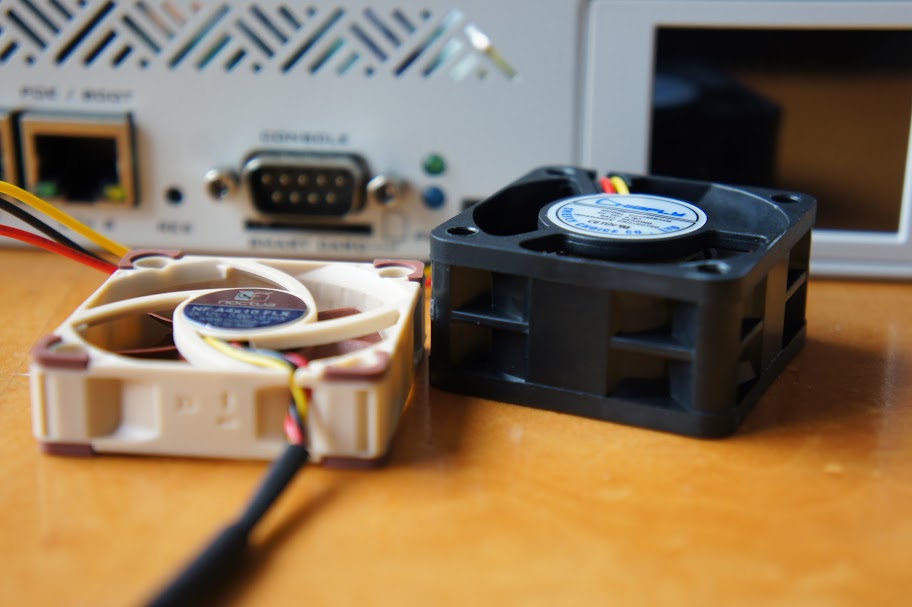
Difference in height of the fans
Fans and shrouds removed
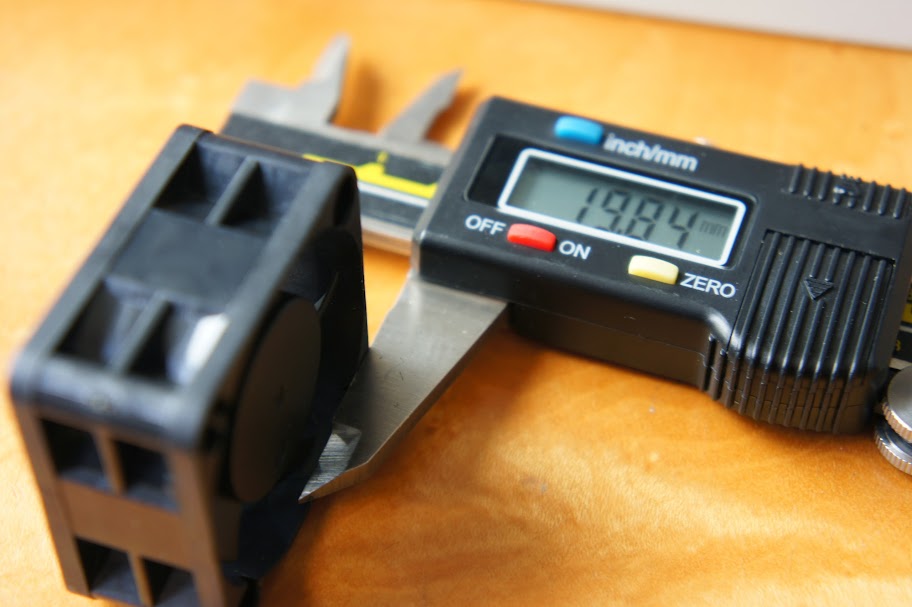
Thickness of the fans used. Because of the forced airflow shroud system a tight fit will be required!
I have also made a video (And audio) recording to try and capture what kind of noise the fans actually make. I think it succeeded pretty well actually. Mind you, this video will feature the sounds exaggerated because the camera was literally 10cm away of the exhaust. In reality you would not put your ear that close, but it did enable me to capture the sounds pretty well.
https://www.youtube.com/watch?v=UHHypc8aYZg
At first you hear me flicking the switch of the extension cord, then some faint beeping and a louder beep which is the routerboard booting. After that you hear a digital beep sound/coil whine of voltage being applied to the fan but it does not start up yet. At that point the routerboard is booted and I do a 1Gbit/sec NAT test using the switched ports to simulate CPU load and the fans spring to life, when the test is done the fans spindown and the ‘idle’ noise is clearly noticeable. I do another test so you can hear the fans spin up and after that the spindown again. Hopefully this illustrates the “noise” I tried to describe before.
I am also now convinced that this is in part because of the way the fans are regulated (voltage controller with no lower level for instance). But it’s mostly the fans which just make this noise, even when spinning faster. So replacing them for a better/lower mechanical noise fan should certainly help.
Looking up the fans I have made a PDF which lists their specifications: http://www.chiefly-choice.com/fans/uploads/1229392650lyg44f.pdf . If you wish to replace the fans they most important factors are airflow, static pressure and size of course.
12v (Voltage
8.60 CFM (Airflow)
Current 0.08A (Amps)
0.96 Watt
7000 RPM (max)
28.50dBa (noise)
The problem with these fans, although their dBa seems to be ok, the rattling noise makes for an irritating pattern. If you can find a fan with a smoother noise profile, I believe the CCR1009 can be placed in a fairly quiet environment.
ps. Maybe I should not have put the camera in front of the exhaust. There is a lot of wind noise. The squealing and rattling is still audible though, so this should do. Remember, the microphone was very close to capture the noise so the recording is very much exaggerated.
Also, I would like to re-state that although these fans make more noise then they maybe need to, in a datacenter they are perfectly fine. People would also complain if they added $20 to the price to buy silent fans. And as stated before, people can do that themselves if they wish. Replacing them with a same-size model is trivial.
Thank you very much.
The stock fan does sound really noisy (for a home environment at least).
I searched around on eBay and found this SanyoDenki 40x40x20mm :
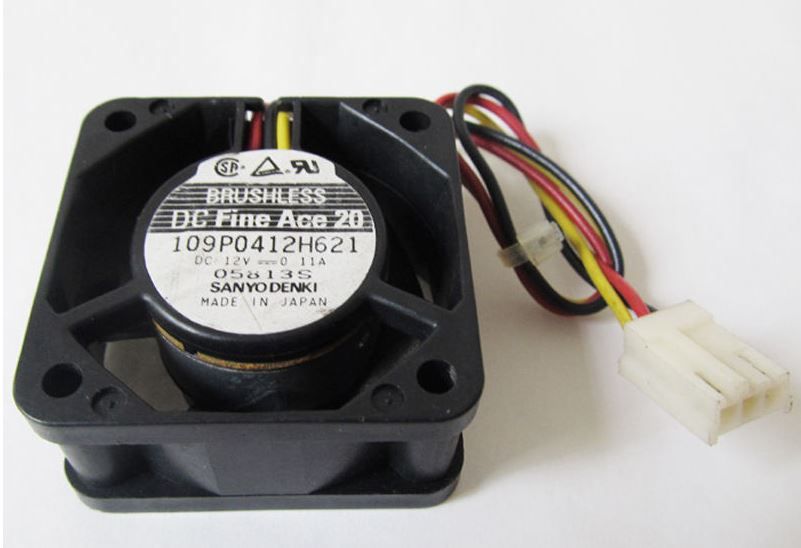
Link : http://www.ebay.com/itm/251084457182
I believe it should be a good replacement for the stock fans.
An LED indication at the very least would be useful. I mean you don’t imagine you’re going to have 2 PSU’s fail straight away and it’s useful to be able to connect the router up to independant power rails (and PoE which is cool), but some sort of monitoring integration would be excellent in any future revisions of the 1036 and 1072’s hint hint
Thanks for the awesome post Qunidor!
+1 thank you for this excellent overview. Much appreciated. So then, it does not route over 1 gigabit over a single upstream port? What is the 10 gigabit SFP+ port for then?
(sorry I have not updated myself since the Routerboard 450g series)
What about inter-vlan routing on the 10g port? 
- Can the dual PSU be monitored?
No, the PSU module is only connected using power connectors to the mainboard. The routerboard monitors the voltage that it is receiving, but it cannot determine or monitor if 1, 2 or 3 power sources are connected. In theory the power source with the highest voltage will be used first and fail-over will happen automatically if that source fails.
starting from RouterOS 6.13 PSU monitoring will be possible. Due to some technical difficulties this feature was delayed. Same will be true for CCR1016-12S-1S+
I think I might have explained it wrongly then. I believe it certainly can achieve much more speed then 1Gbit.
For a single SESSION it won’t be able to achieve more then 1Gbps (with the current software) but if you are using multiple sessions they get neatly balanced over the available CPU’s thus should deliver maximum performance all the cores are capable of, not just 1. I did notice some odd behavior using the switched ports instead of the CPU connected ports, but hopefully that will be fixed in the future. I don’t have a block diagram to go on, but from what I understand from the TileGX CPU the 10Gbit port is directly CPU connected, not through the switch, so no problems there.
The CCR1009 is definitely able to transfer more then 1Gbps!
What about inter-vlan routing on the 10g port? >
Sadly I have no 10Gbit equipment so I am unable to test that at this time. I do believe they have fixed some inter-vlan routing issues over a single port since one of the latest versions of RouterOS so it should be okay?
starting from RouterOS 6.13 PSU monitoring will be possible. Due to some technical difficulties this feature was delayed. Same will be true for CCR1016-12S-1S+
That would be awesome! I guess it’s able to monitor all the voltages separately and thus determine how many PSU’s are connected. Would be awesome! When the feature arrives I will test it and then change my information post!
for these routers you will only be able to see that PSU is OK of FAILed.
can come one post
architecture diagram of 1009?
None is available yet but it isn’t too hard to puzzle together.
SFP port : Direct CPU
SFP+ port : Direct CPU
Port 1-4: Switch with 1Gbps CPU uplink to CPU (Basically a 5 port switch chip with one port internally connected)
Port 5-8: Direct CPU
Did you need to know anything else? Looking at other CCR block diagram’s and how the TileGX CPU is built and what kind of buses it has can also be helpful!
What is the US availability date, I see it available for pre-order only?
SFP port seems to be part of the switch group according to the wiki :
According to Baltic Networks, shipment is expected to arrive within these couple of days.
We already received our unit from one of the US resellers (roc-noc.com). They are now sold out of the CCR1009-8G-1S-1S+model, but do have some of the CCR1009-8G-1S-1S.