Hi,
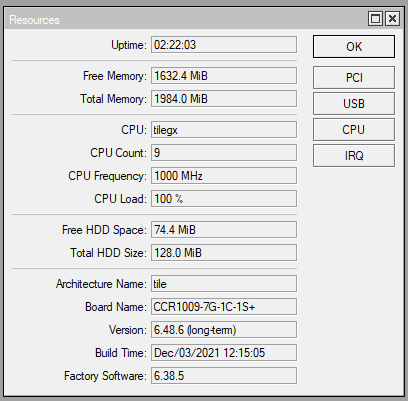
In approximately two hours after reboot of router CPU load rises to 100%.
Note, that CPU load rises quite a slowly:
just after reboot 3-4%
in a first hour after reboot from 4 to 20%,
in the next hour, from 20 to 100%.
Situation ends up with “kernel failure in previous boot“. Tools → profile points to the firewall.
One month ago we had first time of this issue. From yesterday router could survive max 2-2,5 hrs without reboot.
Could you please help us to find out what’s wrong?
If you can’t post the export you should deal with mikrotik support only. Since this is a user forum we can only help if we have actual examples/exports to look at.
An insecure router can remain that way until it is compromised.
If load has not changed going to or through the server, outside of a hardware failure(which this does not seem too be the case) then you should really start to closely look at the config.
[quote=MtHoodlum post_id=906747 time=1642606199 user_id=55480]
I agree with the other posts insofar as that is very difficult to remotely troubleshoot this type of problem in a forum absent the config. You can look in “/tool profile” to see what process category is causing the CPU spike. RouterOS does not list out the individual processes but only the categories.
[/quote]
/Tool -> Profile pointing to firewall.
For me it's quite a difficult to understand why load are rising slowly. In any case kernel failure should not happen.
We are going to do an experiment, will transfer same config to old CCR1036, if behavior still will be same - definitely problems in config.
Also, it is possible problems occurred in flash/NAND.
Situation update:
It appeared that router was affected by attack to UDP port 53. Attack rate 200-800packets per second. Two firewall rules, mentioned below, initially was in filter table. After moving those rules to raw table - problem gone. output of “/ip firewall raw print”