CCR1016-12G as PPPoE server bottleneck

Dear Mikrotik Support Team,

I am experiencing a throughput limitation on my CCR1016-12G router with the following setup:

3 WANs input, each with a 1Gb capacity
1 LAN output to clients
The output I’m getting is 600MBPS only!
I have checked the following without finding any issues:

CPU and memory usage (All ok)
Firewall rules for load balancing and mangle
Interface speed and negotiation (set to 1000M)
Bandwidth test before entering the router (all OK, full speed)
MTU settings (OK at 1500)
Queues limitation (none)
Packet drops (none)
I would appreciate any assistance you can provide to help me resolve this issue. Thank you in advance for your time and attention to this matter.

Best regards,
Mohanad

I found this at https://mikrotik.com/product/CCR1016-12G#fndtn-testresults

The test results show that 25 Ip filter rules may reduce the performance to 673,8 Mbps throughput, is there a way I can use the fast-track rule to increase the throughput? I appreciate your suggestion

https://help.mikrotik.com/servicedesk/servicedesk/customershim/secure/attachment/182562/182562_image.png?fromIssue=134253

It’s not possible to fast-track PPPoE … a d PPPoE encapsulation/decapsulation is a real performance hog on some device modeld (much more that expected). It is possible to fast track firewall rules.

You can try to run CPU profiler (while router is under load) to see which process uses most of CPU resources.

you have too much features on a single router

If you want more performance you must separate the wan load balance duties from PPPoE Router to a separate Router

When you had the PPPoE router only doing that task you can run it on fast-path mode without connection-tracking, in that way you can obtain the maximum performance as PPPoE Router

fast path help
https://wiki.mikrotik.com/wiki/Manual:Fast_Path
https://help.mikrotik.com/docs/display/ROS/Packet+Flow+in+RouterOS#PacketFlowinRouterOS-FastPath

cpu.jpg
Dear mkx,
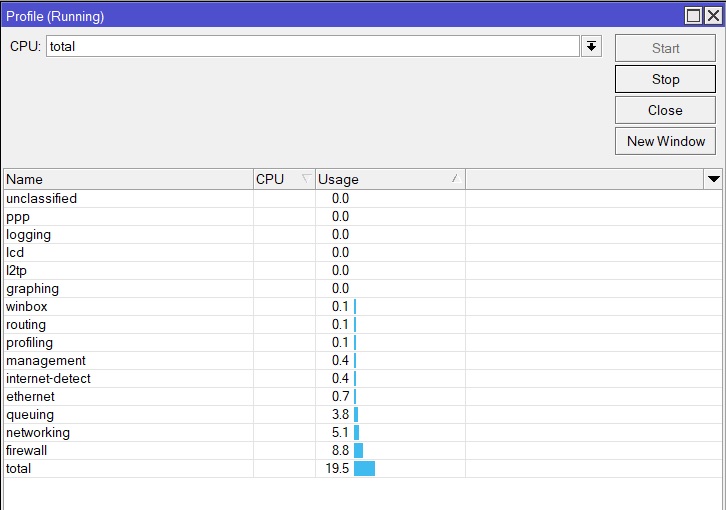
As you see the CPU is not even 25% utilized but still the throughput is so much limited!

The CPU profile is inconclusive … your router has 16 CPU cores. The output you showed can mean that either all cores are utilized 20% (and should indeed be able to handle much more than they do during running profiler) or that 3 CPU cores are at 100% (and the rest are virtually idle) … or anything in between.

If it’s the later, then router is hitting the ceiling and without some drastic changes (one might be splitting duties between two devices) you will not be able to improve things.

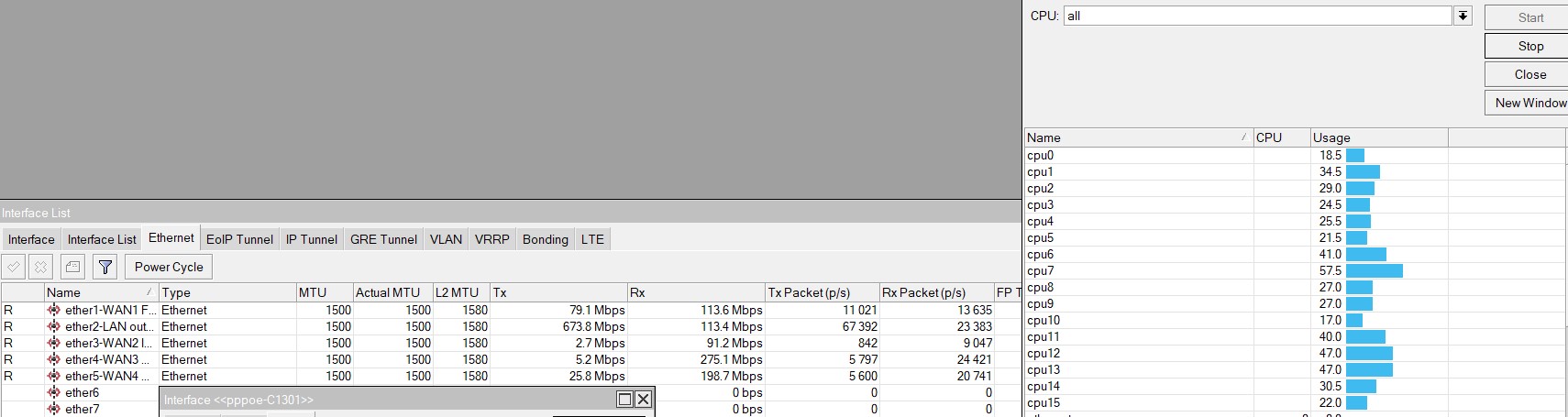
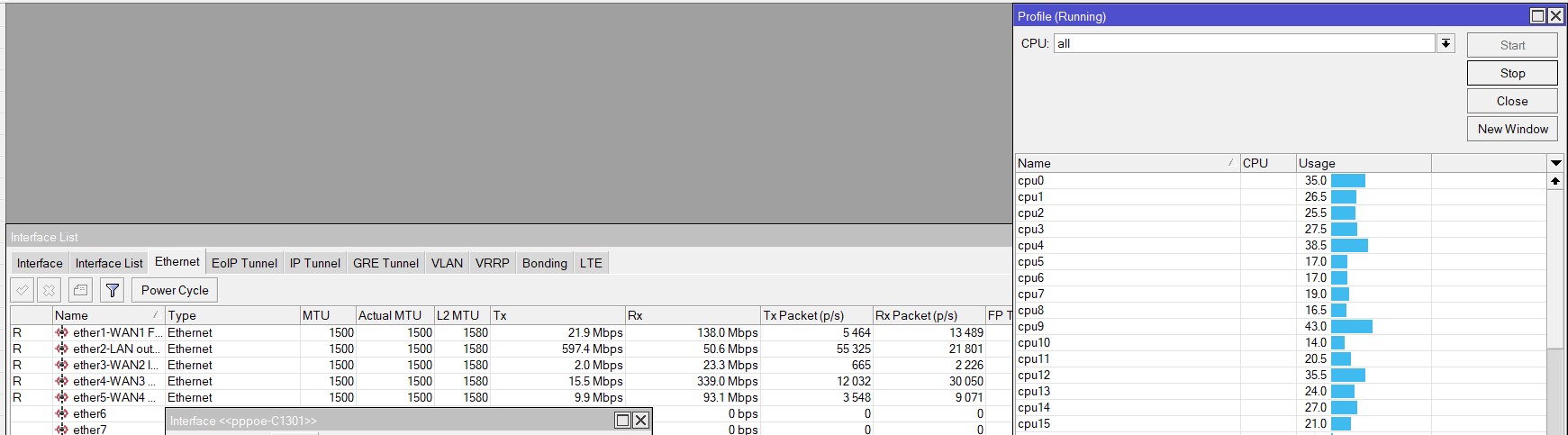
So repeat profiling, but this time select “all” in CPU drop-down selector.

Here you go the CPU load
Screenshot 2023-04-13 234418.jpg
Screenshot 2023-04-13 234202.jpg

maybe your ccr1016 does not have a bottleneck although you have stated that

maybe a miss-configuration specially on load balancing, maybe some internal network problem, maybe a some provider or providers problem

Dear chechito,
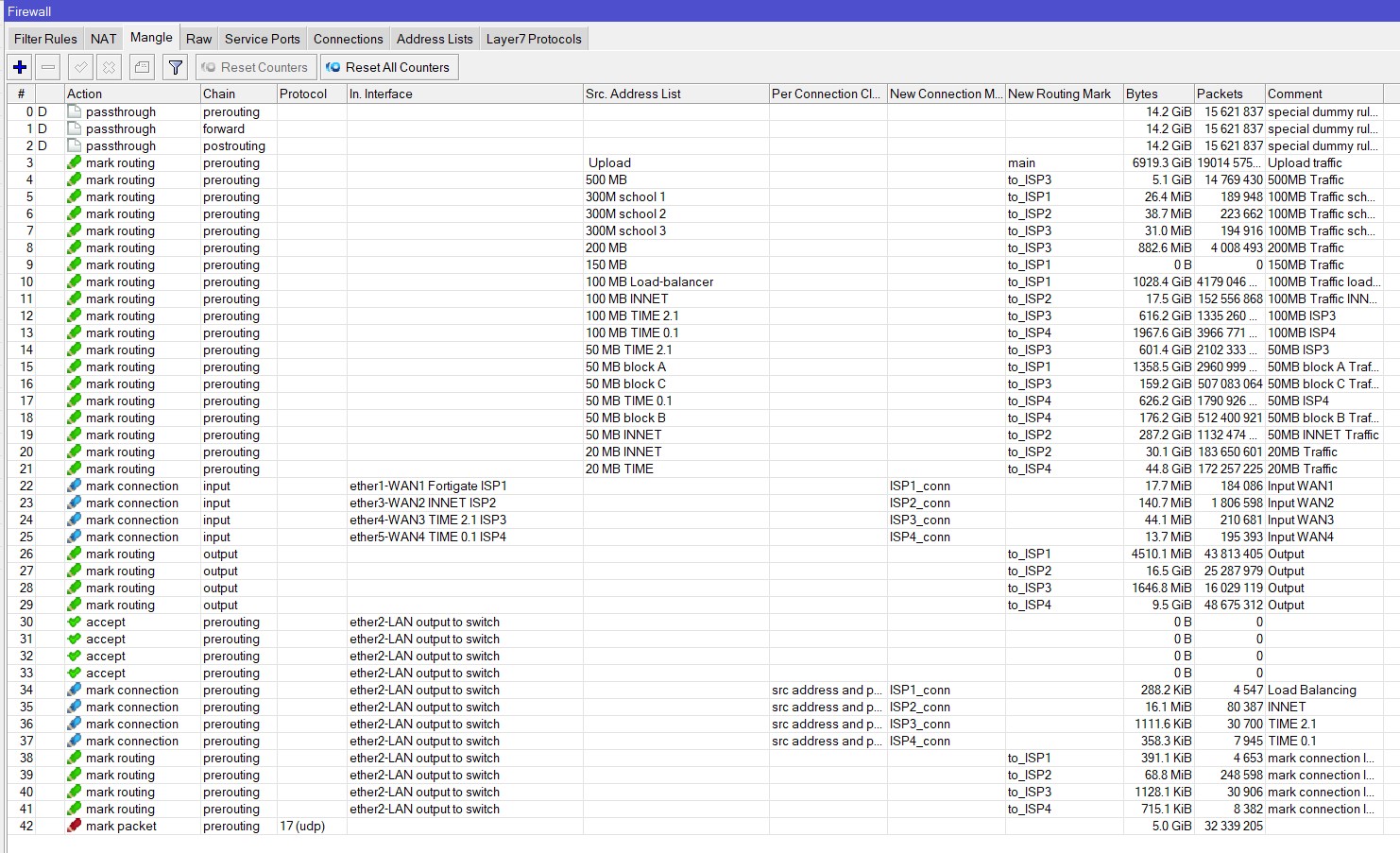
Would you like to check my firewall configuration? maybe you can find the problem for me in the load-balancing

/ip firewall mangle
add action=mark-routing chain=prerouting comment=“Upload traffic”
new-routing-mark=main passthrough=yes src-address-list=" Upload"
add action=mark-routing chain=prerouting comment=“500MB Traffic”
new-routing-mark=to_ISP3 passthrough=yes src-address-list=“500 MB”
add action=mark-routing chain=prerouting comment=“100MB Traffic school”
new-routing-mark=to_ISP1 passthrough=yes src-address-list=“300M school 1”
add action=mark-routing chain=prerouting comment=“100MB Traffic school”
new-routing-mark=to_ISP2 passthrough=yes src-address-list=“300M school 2”
add action=mark-routing chain=prerouting comment=“100MB Traffic school”
new-routing-mark=to_ISP3 passthrough=yes src-address-list=“300M school 3”
add action=mark-routing chain=prerouting comment=“200MB Traffic”
new-routing-mark=to_ISP3 passthrough=yes src-address-list=“200 MB”
add action=mark-routing chain=prerouting comment=“150MB Traffic”
new-routing-mark=to_ISP1 passthrough=yes src-address-list=“150 MB”
add action=mark-routing chain=prerouting comment=“100MB Traffic loadbalancer”
new-routing-mark=to_ISP1 passthrough=yes src-address-list=
“100 MB Load-balancer”
add action=mark-routing chain=prerouting comment=“100MB Traffic INNET”
new-routing-mark=to_ISP2 passthrough=yes src-address-list=“100 MB INNET”
add action=mark-routing chain=prerouting comment=“100MB ISP3” new-routing-mark=
to_ISP3 passthrough=yes src-address-list=“100 MB TIME 2.1”
add action=mark-routing chain=prerouting comment=“100MB ISP4” new-routing-mark=
to_ISP4 passthrough=yes src-address-list=“100 MB TIME 0.1”
add action=mark-routing chain=prerouting comment=“50MB ISP3” new-routing-mark=
to_ISP3 passthrough=yes src-address-list=“50 MB TIME 2.1”
add action=mark-routing chain=prerouting comment=“50MB block A Traffic”
new-routing-mark=to_ISP1 passthrough=yes src-address-list=“50 MB block A”
add action=mark-routing chain=prerouting comment=“50MB block C Traffic”
new-routing-mark=to_ISP3 passthrough=yes src-address-list=“50 MB block C”
add action=mark-routing chain=prerouting comment=“50MB ISP4” new-routing-mark=
to_ISP4 passthrough=yes src-address-list=“50 MB TIME 0.1”
add action=mark-routing chain=prerouting comment=“50MB block B Traffic”
new-routing-mark=to_ISP4 passthrough=yes src-address-list=“50 MB block B”
add action=mark-routing chain=prerouting comment=“50MB INNET Traffic”
new-routing-mark=to_ISP2 passthrough=yes src-address-list=“50 MB INNET”
add action=mark-routing chain=prerouting comment=“20MB Traffic”
new-routing-mark=to_ISP2 passthrough=yes src-address-list=“20 MB INNET”
add action=mark-routing chain=prerouting comment=“20MB Traffic”
new-routing-mark=to_ISP4 passthrough=yes src-address-list=“20 MB TIME”
add action=mark-connection chain=input comment=“Input WAN1” connection-mark=
no-mark in-interface=“ether1-WAN1 Fortigate ISP1” new-connection-mark=
ISP1_conn passthrough=yes
add action=mark-connection chain=input comment=“Input WAN2” connection-mark=
no-mark in-interface=“ether3-WAN2 INNET ISP2” new-connection-mark=ISP2_conn
passthrough=yes
add action=mark-connection chain=input comment=“Input WAN3” connection-mark=
no-mark in-interface=“ether4-WAN3 TIME 2.1 ISP3” new-connection-mark=
ISP3_conn passthrough=yes
add action=mark-connection chain=input comment=“Input WAN4” connection-mark=
no-mark in-interface=“ether5-WAN4 TIME 0.1 ISP4” new-connection-mark=
ISP4_conn passthrough=yes
add action=mark-routing chain=output comment=Output connection-mark=ISP1_conn
new-routing-mark=to_ISP1 passthrough=yes
add action=mark-routing chain=output comment=Output connection-mark=ISP2_conn
new-routing-mark=to_ISP2 passthrough=yes
add action=mark-routing chain=output comment=Output connection-mark=ISP3_conn
new-routing-mark=to_ISP3 passthrough=yes
add action=mark-routing chain=output comment=Output connection-mark=ISP4_conn
new-routing-mark=to_ISP4 passthrough=yes
add action=accept chain=prerouting dst-address=101.78.16.129 in-interface=
“ether2-LAN output to switch”
add action=accept chain=prerouting dst-address=192.168.99.0/24 in-interface=
“ether2-LAN output to switch”
add action=accept chain=prerouting dst-address=192.168.2.0/24 in-interface=
“ether2-LAN output to switch”
add action=accept chain=prerouting dst-address=192.168.0.0/24 in-interface=
“ether2-LAN output to switch”
add action=mark-connection chain=prerouting comment=“Load Balancing”
connection-mark=no-mark dst-address-type=!local in-interface=
“ether2-LAN output to switch” new-connection-mark=ISP1_conn passthrough=yes
per-connection-classifier=src-address-and-port:4/0
add action=mark-connection chain=prerouting comment=INNET connection-mark=
no-mark dst-address-type=!local in-interface=“ether2-LAN output to switch”
new-connection-mark=ISP2_conn passthrough=yes per-connection-classifier=
src-address-and-port:4/1
add action=mark-connection chain=prerouting comment=“TIME 2.1” connection-mark=
no-mark dst-address-type=!local in-interface=“ether2-LAN output to switch”
new-connection-mark=ISP3_conn passthrough=yes per-connection-classifier=
src-address-and-port:4/2
add action=mark-connection chain=prerouting comment=“TIME 0.1” connection-mark=
no-mark dst-address-type=!local in-interface=“ether2-LAN output to switch”
new-connection-mark=ISP4_conn passthrough=yes per-connection-classifier=
src-address-and-port:4/3
add action=mark-routing chain=prerouting comment=“mark connection ISP1”
connection-mark=ISP1_conn in-interface=“ether2-LAN output to switch”
new-routing-mark=to_ISP1 passthrough=no
add action=mark-routing chain=prerouting comment=“mark connection ISP2”
connection-mark=ISP2_conn in-interface=“ether2-LAN output to switch”
new-routing-mark=to_ISP2 passthrough=no
add action=mark-routing chain=prerouting comment=“mark connection ISP2”
connection-mark=ISP3_conn in-interface=“ether2-LAN output to switch”
new-routing-mark=to_ISP3 passthrough=no
add action=mark-routing chain=prerouting comment=“mark connection ISP2”
connection-mark=ISP4_conn in-interface=“ether2-LAN output to switch”
new-routing-mark=to_ISP4 passthrough=no
add action=mark-packet chain=prerouting connection-mark=VOIP new-packet-mark=
VOIP passthrough=no protocol=udp
[admin@MikroTik CoG Server] /ip firewall mangle>
Screenshot 2023-04-14 000635.jpg

i think you can try disabling fast-track, that combined with mangle does not work well

if you already disabled it please reboot to remove fast-track dummy rules

Is there a way to load-balance without firewall rules? if yes can you share please
I want to route different ppp profiles to specific WAN

you can try some sort of load outbound balancing without using mangle rules using Route Rules

Can you give me an example? how I route ppp profile to a certain gateway? I’m using Router OS v6.49 so I don’t have the routing table option
WAN1 192.168.0.1
WAN2 192.168.2.1
PPP pool 10.20.0.1/24