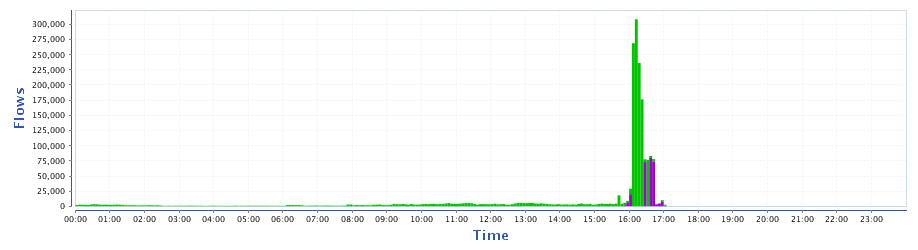
our CCR1036-8G-2S+EM (ROS 6.11, Connection tracking enabled) was taken down by 200kpps DDoS in a role of a firewall yesterday. Some details about incoming traffic: target was IP address of our SMTP relay server, traffic came from different IPs and random port. Type UDP packets, size from 128 to 255B. Destination ports also random. CCR was congested up to 100% and became unresponsive. So we cut of our upstream, setup deadhole routing at the edge of our AS, rebooted CCR and connect our upstream again.
I’m not sure why but the CCR routers seem hopelessly inadequate dealing with DDoS, MikroTik’s performance figures boast 15 mpps but under DDoS they will fall over with only 200 or so kpps.
I’ve tested the 1036-12G-4S using the hping3 tool and been able to lock up the router with less than 100 mbit of traffic.
I’m hoping ROS V7 will come with an optimised and improved routing engine but until then I created some firewall rules to add the dst IP to an address list with a 5 minute timeout if pps exceeds 150 kpps, once in the address list all traffic to that IP is dropped but there are a few exceptions if say it’s a web server then port 80 is kept open but limited to 1 kpps.
I’ve also written a script that adds a real time blackhole to our upstreams BGP blackhole server if the attack is sustained and over a certain threshold.
If you’re doing simple queuing on the CCR, you’ll have better performance out of v6.19 and newer; MT made optimizations to the process that balances queue handling across the multiple cores.
Colleagues good time.
There is a BGP router to mikrotike Cloud Core Router 1036-8G-2S + EM
To test the use 10Gigabitny port SFP +
BGP runs fine.
Decided to test the router.
From another data center generates a flood on the order of 500 megabits and packages about 300kpps
DDoS test server which is behind mikrotik.
That eventually got to download all 36 cores in the regiment and through 3-5minut router falls, tears bgp.
The router management interface is configured on another port while the management interface also
stops responding.
Here’s a picture with a 10G port
then the router dies.
Colleagues good time.
There is a BGP router to mikrotike Cloud Core Router 1036-8G-2S + EM
To test the use 10Gigabitny port SFP +
BGP runs fine.
Decided to test the router.
From another data center generates a flood on the order of 500 megabits and packages about 300kpps
DDoS test server which is behind mikrotik.
That eventually got to download all 36 cores in the regiment and through 3-5minut router falls, tears bgp.
The router management interface is configured on another port while the management interface also
stops responding.
Here’s a picture with a 10G port
then the router dies.
Colleagues good time.
There is a BGP router to mikrotike Cloud Core Router 1036-8G-2S + EM
To test the use 10Gigabitny port SFP +
BGP runs fine.
Decided to test the router.
From another data center generates a flood on the order of 500 megabits and packages about 300kpps
DDoS test server which is behind mikrotik.
That eventually got to download all 36 cores in the regiment and through 3-5minut router falls, tears bgp.
The router management interface is configured on another port while the management interface also
stops responding.
Here’s a picture with a 10G port
then the router dies.
Colleagues good time.
There is a BGP router to mikrotike Cloud Core Router 1036-8G-2S + EM
To test the use 10Gigabitny port SFP +
BGP runs fine.
Decided to test the router.
From another data center generates a flood on the order of 500 megabits and packages about 300kpps
DDoS test server which is behind mikrotik.
That eventually got to download all 36 cores in the regiment and through 3-5minut router falls, tears bgp.
The router management interface is configured on another port while the management interface also
stops responding.
Here’s a picture with a 10G port
then the router dies.
One of your best tools will be to implement a solution that identifies the malicious traffic in a way that it can be blocked at layer three via routing. One of the earlier posters talked about their solution with scripts.
I’ve seen all nature of solutions on a detailed scale. To get it working that’s what they all do. Identify traffic behind a main router and then distribute and manage black hole routes in the network in front of the more performance sensitive inspection devices.
Additionally you may see better performance with rules in the RAW table. I can’t remember if that tracks PPS though.