I have finally got my hands on the CCR1036-8G-2S+ and started testing it in our network. But suddenly I have fallen in troubles with Direct Attach Cables which are connecting CCR to Extreme Networks X670.
First of all I X670 was unable to establish a link with CCR, but on the side of CCR port was running, but no link or activity signalized by LEDs. This was fixed by disabling auto-negotiation on X670 and forcing 10GbE full-duplex.
At this point data goes trough at 10Gbps but link and activity LEDs still don’t have a light. I gave chance to a few other DA cables but behavior is same. Actually I don’t have SM/MM SFP+ modules available for testing.
Yes, it seems to be some problem with DA cables at the side of CCR. I tested more different cables with no difference in behavior. Some SR/LR will arrive on Monday, so I plan to do more testing.
I finally did some more test fit SR/LR SFP+ modules instead of DAC and noticed no problem with LEDs. So it look like support for DAC in CCR is somehow unfinished.
Does any body else runs CCR with DAC? I have a DAC only from one vendor, so I’m just curious if it is problem of brand or DAC in general.
[admin@felk-fw] /system leds> set 0 disabled=no interface=te1 leds=eth0-led1 type=interface-speed
no such item

[admin@felk-fw] /system leds> set 2 disabled=no interface=te1 leds=eth0-led2 type=interface-activity
no such item

[admin@felk-fw] /system leds> set 3 disabled=no interface=te2 leds=eth1-led1 type=interface-speed
no such item
In that case it would be good to upgrade this unit to v6.11. And check leds there, if they are not working there and leds are not avaialble for configuration then we would like to get supout file from this device.
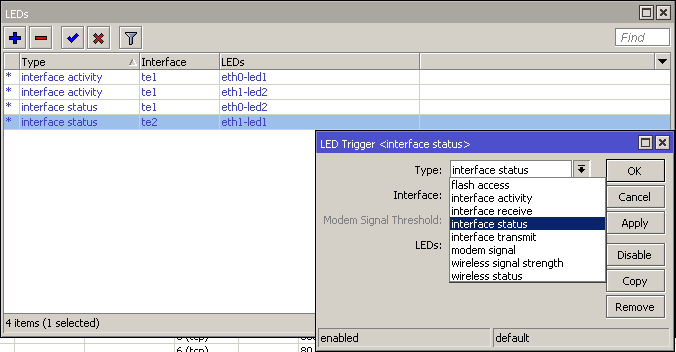
So, I upgraded to the ROS 6.11, but attempts to restore default LED config in console still fails with: no such item, but i was able to add configuration in the Winbox dialog LEDs.
[admin@felk-fw] /system leds> set 1 disabled=no interface=te2 leds=eth1-led2 type=interface-speed
no such item
There is also some inconsistence between Winbox dialog and the console. Console offers type=interface-speed, but there is no such option in the Winbox LEDs dialog. When configuration is created in Winbox it after a while becomes “default” (changes color) and I’m unable to change it anymore.