I purchased the CCR2004-16G-2S+PC from getic a few months back and the day before yesterday my router went dark ... the power brick is cold so my assumption is that the brick must be replaced ... I have not used the 2 pin. Just very surprised that the brick failed this fast ... If you are a home consumer and decide to purchase the CCR2004-16G-2S+PC for your home needs and YOU are not a data center tech beware that the supplied power brick is dirt cheap and not at all robust ... I suggest that Mikrotik consider providing a much more robust power brick with this model of router.
Despites the fact, that model designation includes "PC" which stands for "Passive Cooled" and hence it's not implied that it's not rack-mountable, one can conclude it's not rack-mountable due to dimensions (width of 272mm is far from 443mm, standard for rack-mountable equipment). And IMO "data center" implies rack-mountable gear.
[sarcasm on]
So despites device being a CCR this implies it's a SoHo hardware and hence power adapter can fail at will ... On the up side, you should be able to source replacement power adapter at Loblaws (or whatever your favourite local grocery store).
[sarcasm off]
A few months is indeed disappointing.
My first go-to when installing Mikrotiks for a permanent position is to replace the external power block/wall wart with a better one. These fail at a much higher rate than the devices themselves. Think e.g. Meanwell.
The ones Mikrotik supplies are generic power supplies from the usual manufacturers. I see that they try to select ones that are not too shoddy, and they tend to over-spec them, but quality obviously varies.
Of course when it would be for a rack one should choose the rack-mounted version, it comes with 2 hotswappable powersupplies.
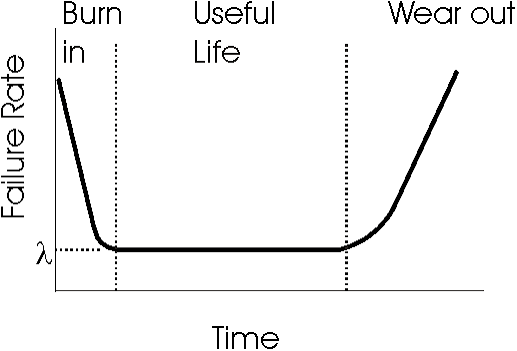
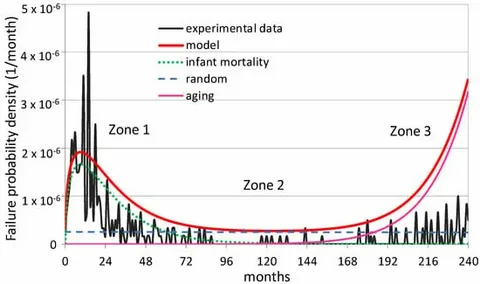
Probably it was for home use. The powersupplies, as others wrote, have a much higher failure rate than the router hardware itself. This one failed much too soon, but that is all part of the normal bathtub curve and MTBF of such devices.
Sound like you did get unlucky.
Failure rate is statistically higher during 1st year of operation.
It flattens out at a fairly low rate, during lifetime of the products and ncreases again at the end of usefull ife of the product as it ages.
This is why the standard warranty is 1 year. In other words if the product survives the burn-in period it is expected to live a long life. It is also expected to break down eventually.
I run dual warts on the core switches that I have that will support them . . . I just wish that the switch could report failures . . . Most are pretty cheap, so for things that are critical, I just keep a spare.
I have been very preoccupied with family matters and i totally forgot to get my spare backup brick ... it was a priority at first <> but I was overcome with fast moving family issues ... Time and family changes one perspective when one gets to be my age 82 going to be 83 very shortly 
/system/routerboard/print
routerboard: yes
model: CCR2004-16G-2S+
/system/health/print
Columns: NAME, VALUE, TYPE

NAME                VALUE  TYPE

0  cpu-temperature     54     C
1  fan-state           ok
2  fan1-speed          4440   RPM
3  fan2-speed          4350   RPM
4  board-temperature1  34     C
5  board-temperature2  42     C
6  psu1-state          ok
7  psu2-state          ok
Those are onboard . . . I was more thinking of devices that have dual brick inputs, like the CRS305 . . .
[admin@TPC 10G Server] > /system/routerboard/print
routerboard: yes
model: CRS305-1G-4S+
revision: r2
serial-number: HG509YDJ9EB
firmware-type: dx3230L
factory-firmware: 7.11.3
current-firmware: 7.23.6
upgrade-firmware: 7.23.6
[admin@TPC 10G Server] > /system/health/print
Columns: NAME, VALUE, TYPE
#  NAME             VALUE  TYPE
0  cpu-temperature     44  C
RB5009 has multiple power inputs and shows their state.
Where? I have a RB5009U, and again, all that /system/health/print shows is the temp. Perhaps different on the POE variant?
[admin@TPC Core Router] /system/routerboard> print
routerboard: yes
model: RB5009UG+S+
serial-number: HM70B1QBE2R
firmware-type: 70x0
factory-firmware: 7.19.6
current-firmware: 7.23.6
upgrade-firmware: 7.23.6
[admin@TPC Core Router] /system/routerboard> /system/health/print
Columns: NAME, VALUE, TYPE
# NAME VALUE TYPE
0 cpu-temperature 47 C
pe1chl

10h

RB5009 has multiple power inputs and shows their state.
Not in that comment (which is what I responded to) he didn't . . . So feel free to direct your pointless OT whining at him . . .
Actually you did ... in your reply to his post with output from CCR2004:
and then he went further away by mentioning RB5009 (which is yet another class of devices).
Other than that, I was directing my whining at general public. Not only due to discussion in this thread. But I did not exactly say "OT" ... I mentioned "swaying away from original topic" which is not exactly the same (at least in my mind).
Which was clearly an errant response to my comment about dual bricks/warts, which that clearly does not have.
Again, following the topic, if you bother to read it . . . .
And the topic was a dead brick/wart, which moved to having a spare, then the ability for dual supplies, and logically followed by my thought that it would be nice if they were monitored . . . It was then stated that a device I have did monitor, so I showed that it did not. Seems pretty on-topic from here . . .
It seems that the PoE variant is different then, this is what I get from it:
/system/routerboard/print
       routerboard: yes
             model: RB5009UPr+S+
/system/health/print
Columns: NAME, VALUE, TYPE
#  NAME                 VALUE  TYPE
0  poe-out-consumption  31.9   W
1  cpu-temperature      48     C
2  jack-voltage         48.9   V
3  2pin-voltage         0      V
4  poe-in-voltage       0      V
Well the original topic was a useless remark. "my powersupply has failed so these powersupplies are dirt cheap garbage". Not something the community can do any useful followup to other than "contact your supplier for a replacement".
A useful discussion is "how can we prevent outage due to something like this" and several ways have been discussed, including having a spare supply (which will not prevent all outage when your router has only one supply connection), having a router model with multiple supplies, and having a router with more than one input so you can connect a redundant supply all the time. But in that case it is useful when you can somehow monitor the supplies, or else it could happen that one dies and you don't notice until the other one dies at well.
In general it can be said that bringing up that a reply is "offtopic" causes way more damage to any discussion thread than to just ignore it when you don't like it.
Its not the power brick ... the actual internal power supply died... I guess I'll have to contact getic and see what the next step is ... not pleased ...
Two weeks and you didn't send it in warranty yet?
I have become very lazy at this stage of my life
no one in my family knows how to operate my Tik Network so I'm seriously considering reverting to the ISP default gateway so that when I pass away they will still have a easy network to service when a problem arises ...