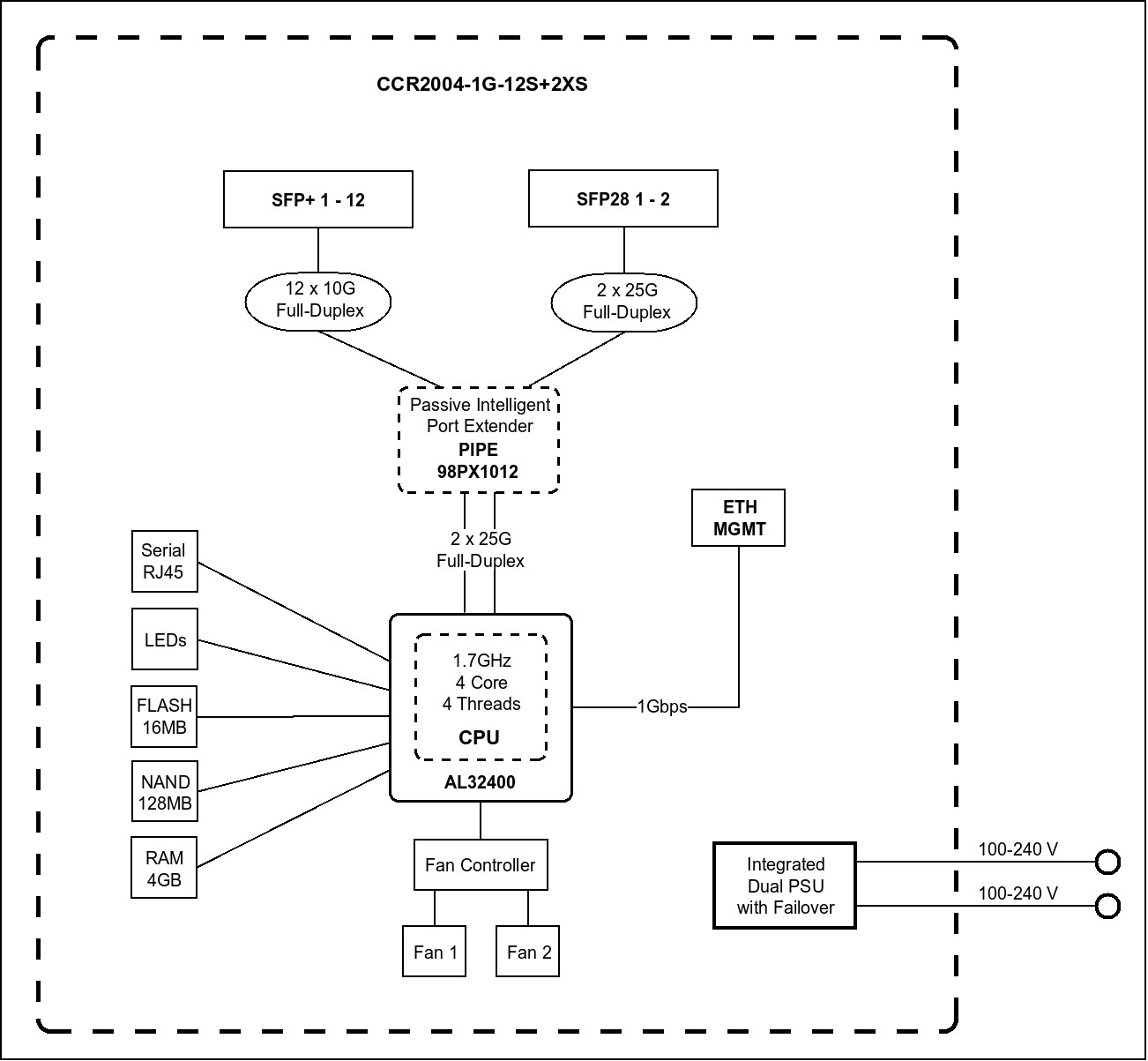
I have a seriuos problem with all my CCR2004 when traffic pass from giga interface to 10 giga interface and viceversa I have a packet loss aorund 1% or little less.
Do you experience packet loss in both directions equllky or is one direction distinctively worse?
I’d expect problems in packet direction 10G->1G where quite some buffering occurs and enabled flow control should help a lot (another matter is whether flow control actually works).
We have mainly packet loss pinging from the remote end to ccr2004 gigabit interface, the problem probably occurs when the upstream traffic from the 10G->1G fullfill the ethernet..
buffer memory issue? I.e not enough buffer space when going from 10Gbps to 1Gbps and vice versa. Not sure how to get the stats from a Mikrotik on this.
No when the giga interface receive data from 10 giga interface: the slower port sometimes has to keep in pause the faster one before to receive new packets because the buffer is full or not have the buffer.
The problem is how fast the data arrive on the giga port from the 10 giga port, you can loose packet also whit 100kb or less. If the number of packets arriving exeeds tha capibility of gigaport to send it you will lose packet.
Generally is around 1% or littble bit less. This is a big hardware poblem for ccr2004 and it is not usable to mix different speed ports.
The 1G port is for management (winbox, ssh to the router), as it’s also labeled on the front panel. This port is somewhat limited, and is meant for what it says. The diagram also gives a clue to this.
Sincerely I am very disappointed for CCR2004’s performance.
We replaced a CCR1036 + 10G switch (with trunks) to a CCR2004 with directly put in DACs cables 10G.
We do about 4.5gb traffic through it.
20 firewall rules, most in RAW for “simple” packet filter at the border.
fasttrack enabled.
4x99% cpu, one 100%.
I tried disabling everything, just fastpath, 80% cpu.
even with 2g traffic the voip was chopping.
Replaced back the 1036, and we are with it now. I could consider the 1072 but I fear the watchdog issues that are on the forum. Till now the 1036 is 2+ years working solid.
we use the long-term ROS.
A router where you can’t mix different sfp ports speeds it’s not usable in production, if I deploy fiber I need to have 0% packets loss and no 1% like now.
I opened a ticket [SUP-30387] but for now no solution to the issue
Where can I find precise documentation about queue types?
Well I read the wiki… but I have not found any REAL example of WHERE to use wich queue type or interface type
Yes, the 2004 is faster with pure fastpath and big packets, but only in this situation. Everything else, and the 1036 wipes the floor with it. It isn’t meant as a direct substitute to the 1036 - it is more something above 1009 and just below 1016.
Yes, each one of its 4 cores is much faster than the 10XX ones - but not enough to offset 4 cores versus 36 cores. It will outperform the CCR10XX series in single threaded activities, but not in firewalling.
Hello Paternot, I have read carefully the performance figures, but sincerely I expected a lot more.
I did not expect a 100% cpu load !!!
However I am planning to replace the 1036 witha 1072 because I need the pure 10G ports for each link.
I have some fear to get a 1072 that has issues as in the threads about “watchdog and 1072”.
I use conntrack, I use Fasttrack, it is one of my border router.
Well, I can’t speak for the usage model on You network - but if it was taxing one CCR1036, I find remarkable that one CCR2004 can barely cope with the load. I mean, take a look at the results for 512 bytes and 25 ip rules: it’s about 1/3 of the 1036 speed!