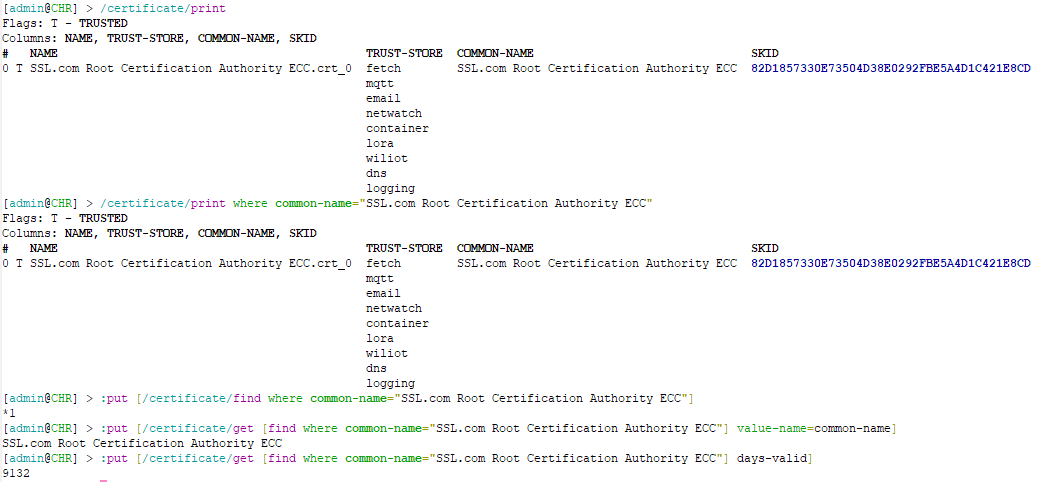
Did you really expect to just enter the find or get command on the command line and be able to see some output? Those are functions that return a value to be used in other parts of the script, not interactive commands that display something to the terminal. If you want to see stuffs in the terminal, use something like :put, or you can also use :log info to see the values those functions return in the log.
find only returns an array of IDs (in the screenshot above, you can see the array with only one element *1). If there are multiple results, you'll need something like a :foreach loop to iterate over the IDs and do something with each of them. Or if you know that only an array with one element is returned, then you can use the result of find directly in commands like get (that expects a single ID or item number).
Not sure why it necessary to be rude and insulting. People do come here to learn. The difference between "functions" that return, and commands that output is confusing.
OP has something like: /certificate/get 0 value-name=common-name
This is wrong obviously on several. And find is more "helper" in OTHER commands, since that how you avoid using "numbers" like 0,1,2 when there they actually have an internal .id field that find returns.
OP is closer with /certificate/get value-name=common-name [/certificate/find common-name=example.com]
Since get, like find, is also function that return (and does not "print" anything), thus you need a :put if you want to see the value from the CLI.
So this work: :put [/certificate/get [/certificate/find common-name=example.com] common-name]
(or replace the value of common-name with field from a certificate you want).
Or just :put [/certificate/get [/certificate/find common-name=example.com]
should show a "array" of all attribute.
Now a general matter using printwithwhere and/or other options like proplist=/detail is used when want to "see" results at terminal and likely better than some :put [/certificate/get [find ...]]... for example:
/certificate/print detail where common-name=example.com (all attributes for matching certificate(s) or /certificate/print proplist=name,common-name where common-name=example.com (to control what column are output).
The get/find is more useful in /system/script than at the CLI). get/find is often used when you want to store intermediate results or use loops like :foreach mentioned above. e.g. a /system/script like this:
:local exampleCertId [/certificate/find common-name=example.com]
:foreach e in $exampleCertId do={
   :log info "found certificate with common name of $[/certificate/get $e common-name]"
}
Read DISCLAIMER on my previous post.
Here for blame RouterOS for "not working properly" or "bug", at first.
So first of all they pretend that what they write is correct.
It's not the attitude of a person who wants to learn something...
@CGGXANNX, @Amm0, thank you for the constructive responses.
Indeed, I did not realise that the function return value is not output in the console without the explicit :put command.
Both get and find are used in the script, but when I got "no such item" error in it I started debugging in console expecting to see some output.
Now with :put I managed to find the error - it was a stupid typo .
Now it's time to figure out how to import the full LE certificate chain automatically to make StrongSwan happy.
@rextended, while rudeness is a rather subjective quality, I honestly do not see anything in my post that could be considered rude towards MikroTik products or the community.
If you had read my post more carefully, you would see that I was neither stating that there is a bug nor blaming RouterOS for anything. I was asking:
Is it a bug or should I use some different commands or syntax?
i.e. assumed that it might be me doing something wrong.
I don't see how your disclaimer is applicable to my post and how such a response could be warranted.
 .
.