is it possible to change all password or username of all devices somehow or must be manual?
What devices do you mean? MikroTik routers?
Yes
The section is The Dude, but your question is too vague.
You talk about The Dude Device Settings or the remote devices displayed on The Dude?
If you ask that question, your knowledge can be valued and the reply can be:
All manual or pasting something on CLI, but still device-by-device.
But if your question is how change all the password or username (by group or all togheter) on The Dude Device Settings,
simply on Devices select one or more devices and after selecting “Device Settings” you can change the various field.
The unchanged are keep like before, and the changed are aplyed on all Dude Device Settings selected on that way.
But are set only on Dude Devce Settings, not on remote routerboards
i disabled admin user on my routers and wanted to somehow change it automation on dude, instead of change all 500+ devices manualy, but it seems dude dont have that kind of option
Your reply is vague…
Again:
You want change inside The Dude the saved username and/or password on displayed Devices
OR
you want change username and/or password on the remote devices displayed on The Dude?
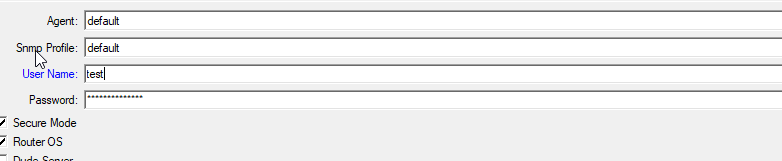
when i click tools-winbox to open me with new credentials...
I already changed username/password on remote routers via some scripts.
So when support want to open now router from dude, they cant, cause stored username for all routers was admin, i can change it, double click and on the right change username...But why i cant do it auto
On post # 4 I have already provided the instruction for do that, read and understand:
http://forum.mikrotik.com/t/change-passwords-of-the-devices/150701/1
yes yes understand for changing user and pass, tny
what about port?
If I change to some different instead of default? How can i change it in dude when open winbox to add that another port to address
Can not be defined on device property,
add more tools / WinBox Function for each port required
call it WinBox, WinBox 48291, etc.
Original:
winbox.exe [Device.FirstAddress] [Device.UserName] [Device.Password]
Modified for use port 48291:
winbox.exe [Device.FirstAddress]:48291 [Device.UserName] [Device.Password]
where can i add those funcionts? where you enter this
winbox.exe [Device.FirstAddress]:48291 [Device.UserName] [Device.Password]