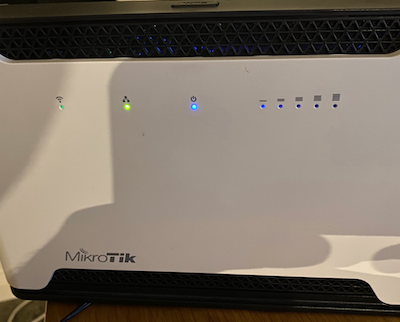
Chateau LTE12 turned off all LED's now power LED won't stay on

I had set routerOS (7.2.1) to run a script on startup to turn off all LED’s.

I now want the LED’s to be on including the power LED.

I have enabled with

/system leds settings set all-leds-off=never

but only WIFI, Ethernet and LTE LED’s illuminate. The power LED does not turn on.

If I power cycle router the blue power LED does turn on but turns off soon afterwards.

[admin@MikroTik] /system> leds/print
Flags: X - DISABLED; * - DEFAULT
Columns: TYPE, INTERFACE, LEDS
#    TYPE          INTERFACE  LEDS
0 X* modem-signal  lte1       led1
                              led2
                              led3
                              led4
                              led5
[admin@MikroTik] /system> leds/
settings  add  disable  edit  enable  export  find  print  remove  reset  set
[admin@MikroTik] /system> leds/settings/print
  all-leds-off: never
[admin@MikroTik] /system>

I would netinstall with default configuration if you cannot get the LEDs working.

Which version of ROS are you running ?
There was a fix specifically for LED usage on Audience in 7.2

Sorry, I should have mentioned that it’s running 7.2.1

what is the output of:

/system leds export

(do not post the serial number)


[admin@MikroTik] > /system/leds/export
# dec/30/2021 00:09:26 by RouterOS 7.2.1
# software id = 8DD5-P647
#
# model = RBD53G-5HacD2HnD
# serial number = xxx
/system leds
set 0 disabled=yes
[admin@MikroTik] >

Your soluction, paste this…

/system leds
set 0 disabled=no

Thanks, I'll check later.

So I made the change and rebooted, as before I got the power LED on boot but turns off after approx 15s.

[admin@MikroTik] > /system/leds/export
# dec/29/2021 23:33:49 by RouterOS 7.2.1
# software id = 8DD5-P647
#
# model = RBD53G-5HacD2HnD
# serial number = xxx
[admin@MikroTik] >

Sorry, but I do not have any idea at the moment, and I do not have a chateau to test.
Check the full /export (but do not post it on forum) if some other parameters are “off” on /system routerboard or other places.

I did a factory config reset and manually entered config again and no power LED. Again, it comes on during start and then turns off. Ethernet and WiFi LED’s are working.

Best to file a report to support@mikrotik.com then.

Will do

until is resetted and not configured the led is on as wanted?
you have scheduled some script to disalbe led at startup?

After a factory reset (and running 7.2.1) the power LED comes on briefly during boot and then turns off. No scripts, nothing. Factory reset.

thank you, it was to exclude these possibilities as well

All good. I have raised a support request and attached a support.rif file.

I’m not sure what I’m doing wrong but I can’t recreate this on any of my chateau.

I have factory reset twice and the power LED remains off. It comes on during boot and turns off soon after.

My config:

# may/02/2022 14:09:39 by RouterOS 7.2.1
# software id = 8DD5-P647
#
# model = RBD53G-5HacD2HnD
# serial number = xxxx
/interface bridge
add admin-mac=48:8F:5A:11:24:D8 auto-mac=no comment=defconf name=bridge \
    protocol-mode=stp
/interface lte
# SIM not present
set [ find ] allow-roaming=no band="" disabled=yes name=lte1
/interface list
add comment=defconf name=WAN
add comment=defconf name=LAN
/interface wireless security-profiles
set [ find default=yes ] supplicant-identity=MikroTik
add authentication-types=wpa2-psk eap-methods="" group-key-update=1h mode=\
    dynamic-keys name=xxxx supplicant-identity=""
/interface wireless
set [ find default-name=wlan1 ] band=2ghz-g/n channel-width=20/40mhz-Ce \
    country=australia disabled=no distance=indoors frequency=auto \
    installation=indoor keepalive-frames=disabled mode=ap-bridge \
    multicast-buffering=disabled multicast-helper=full preamble-mode=long \
    scan-list=2412,2437,2463 security-profile=xxxx ssid=xxxx tx-power=\
    10 tx-power-mode=all-rates-fixed wireless-protocol=802.11 wmm-support=\
    enabled wps-mode=disabled
set [ find default-name=wlan2 ] antenna-gain=2 band=5ghz-a/n/ac \
    channel-width=20/40/80mhz-Ceee country=australia default-forwarding=no \
    disabled=no distance=indoors frequency=auto installation=indoor \
    keepalive-frames=disabled mode=ap-bridge multicast-buffering=disabled \
    multicast-helper=full preamble-mode=long security-profile=xxxx ssid=\
    xxxx tx-power=20 tx-power-mode=all-rates-fixed wireless-protocol=\
    802.11 wmm-support=enabled wps-mode=disabled
/interface wireless nstreme
set wlan1 disable-csma=yes enable-polling=no
/ip pool
add name=default-dhcp ranges=192.168.10.50-192.168.10.254
/ip dhcp-server
add address-pool=default-dhcp interface=bridge lease-time=8h name=defconf
/zerotier
set zt1 comment="ZeroTier Central controller - https://my.zerotier.com/" \
    identity="xxxx" name=zt1 \
    port=9993
/zerotier interface
add allow-default=no allow-global=no allow-managed=yes disabled=no instance=\
    zt1 name=zerotier1 network=xxxx
/interface bridge port
add bridge=bridge comment=defconf interface=ether2
add bridge=bridge comment=defconf interface=ether3
add bridge=bridge comment=defconf interface=ether4
add bridge=bridge comment=defconf interface=ether5
add bridge=bridge comment=defconf interface=wlan1
add bridge=bridge comment=defconf interface=wlan2
/ip neighbor discovery-settings
set discover-interface-list=LAN protocol=""
/ipv6 settings
set accept-redirects=no accept-router-advertisements=no disable-ipv6=yes \
    forward=no
/interface detect-internet
set detect-interface-list=WAN internet-interface-list=WAN lan-interface-list=\
    LAN wan-interface-list=WAN
/interface list member
add comment=defconf interface=bridge list=LAN
add comment=defconf interface=ether1 list=WAN
/ip address
add address=192.168.10.1/24 interface=bridge network=192.168.10.0
/ip dhcp-client
add interface=ether1 use-peer-dns=no
/ip dhcp-server network
add address=192.168.10.0/24 dns-server=192.168.10.45 domain=home gateway=\
    192.168.10.1 netmask=24
/ip dns
set allow-remote-requests=yes servers=1.1.1.1,1.0.0.1
/ip dns static
add address=192.168.10.1 comment=defconf name=router.home
/ip firewall filter
add action=accept chain=forward comment=zerotier in-interface=zerotier1
add action=accept chain=input in-interface=zerotier1
add action=accept chain=input comment=\
    "defconf: accept established,related,untracked" connection-state=\
    established,related,untracked
add action=drop chain=input comment="defconf: drop invalid" connection-state=\
    invalid
add action=accept chain=input comment="defconf: accept ICMP" protocol=icmp
add action=accept chain=input comment=\
    "defconf: accept to local loopback (for CAPsMAN)" dst-address=127.0.0.1
add action=drop chain=input comment="defconf: drop all not coming from LAN" \
    in-interface-list=!LAN
add action=accept chain=forward comment="defconf: accept in ipsec policy" \
    ipsec-policy=in,ipsec
add action=accept chain=forward comment="defconf: accept out ipsec policy" \
    ipsec-policy=out,ipsec
add action=fasttrack-connection chain=forward comment="defconf: fasttrack" \
    connection-state=established,related hw-offload=yes
add action=accept chain=forward comment=\
    "defconf: accept established,related, untracked" connection-state=\
    established,related,untracked
add action=drop chain=forward comment="defconf: drop invalid" \
    connection-state=invalid
add action=drop chain=forward comment=\
    "defconf: drop all from WAN not DSTNATed" connection-nat-state=!dstnat \
    connection-state=new in-interface-list=WAN
/ip firewall mangle
add action=set-priority chain=postrouting comment="Set priority for WMM" \
    new-priority=from-dscp-high-3-bits passthrough=yes
/ip firewall nat
add action=masquerade chain=srcnat comment="defconf: masquerade" \
    ipsec-policy=out,none out-interface-list=WAN
/ipv6 firewall address-list
add address=::/128 comment="defconf: unspecified address" list=bad_ipv6
add address=::1/128 comment="defconf: lo" list=bad_ipv6
add address=fec0::/10 comment="defconf: site-local" list=bad_ipv6
add address=::ffff:0.0.0.0/96 comment="defconf: ipv4-mapped" list=bad_ipv6
add address=::/96 comment="defconf: ipv4 compat" list=bad_ipv6
add address=100::/64 comment="defconf: discard only " list=bad_ipv6
add address=2001:db8::/32 comment="defconf: documentation" list=bad_ipv6
add address=2001:10::/28 comment="defconf: ORCHID" list=bad_ipv6
add address=3ffe::/16 comment="defconf: 6bone" list=bad_ipv6
/ipv6 firewall filter
add action=accept chain=input comment=\
    "defconf: accept established,related,untracked" connection-state=\
    established,related,untracked
add action=drop chain=input comment="defconf: drop invalid" connection-state=\
    invalid
add action=accept chain=input comment="defconf: accept ICMPv6" protocol=\
    icmpv6
add action=accept chain=input comment="defconf: accept UDP traceroute" port=\
    33434-33534 protocol=udp
add action=accept chain=input comment=\
    "defconf: accept DHCPv6-Client prefix delegation." dst-port=546 protocol=\
    udp src-address=fe80::/10
add action=accept chain=input comment="defconf: accept IKE" dst-port=500,4500 \
    protocol=udp
add action=accept chain=input comment="defconf: accept ipsec AH" protocol=\
    ipsec-ah
add action=accept chain=input comment="defconf: accept ipsec ESP" protocol=\
    ipsec-esp
add action=accept chain=input comment=\
    "defconf: accept all that matches ipsec policy" ipsec-policy=in,ipsec
add action=drop chain=input comment=\
    "defconf: drop everything else not coming from LAN" in-interface-list=\
    !LAN
add action=accept chain=forward comment=\
    "defconf: accept established,related,untracked" connection-state=\
    established,related,untracked
add action=drop chain=forward comment="defconf: drop invalid" \
    connection-state=invalid
add action=drop chain=forward comment=\
    "defconf: drop packets with bad src ipv6" src-address-list=bad_ipv6
add action=drop chain=forward comment=\
    "defconf: drop packets with bad dst ipv6" dst-address-list=bad_ipv6
add action=drop chain=forward comment="defconf: rfc4890 drop hop-limit=1" \
    hop-limit=equal:1 protocol=icmpv6
add action=accept chain=forward comment="defconf: accept ICMPv6" protocol=\
    icmpv6
add action=accept chain=forward comment="defconf: accept HIP" protocol=139
add action=accept chain=forward comment="defconf: accept IKE" dst-port=\
    500,4500 protocol=udp
add action=accept chain=forward comment="defconf: accept ipsec AH" protocol=\
    ipsec-ah
add action=accept chain=forward comment="defconf: accept ipsec ESP" protocol=\
    ipsec-esp
add action=accept chain=forward comment=\
    "defconf: accept all that matches ipsec policy" ipsec-policy=in,ipsec
add action=drop chain=forward comment=\
    "defconf: drop everything else not coming from LAN" in-interface-list=\
    !LAN
/system clock
set time-zone-name=Australia/Sydney
/system leds
set 0 disabled=yes
/system logging
add disabled=yes topics=lte,!raw
/system ntp client
set enabled=yes
/system ntp client servers
add address=au.pool.ntp.org
/system routerboard settings
set auto-upgrade=yes
/system routerboard mode-button
set enabled=yes on-event=dark-mode
/system scheduler
add interval=30s name=dhcp2dns on-event=dhcp2dns policy=\
    ftp,reboot,read,write,policy,test,password,sniff,sensitive,romon \
    start-time=startup
/system script
add comment=defconf dont-require-permissions=no name=dark-mode owner=*sys \
    policy=ftp,reboot,read,write,policy,test,password,sniff,sensitive,romon \
    source="\r\
    \n   :if ([system leds settings get all-leds-off] = \"never\") do={\r\
    \n     /system leds settings set all-leds-off=immediate \r\
    \n   } else={\r\
    \n     /system leds settings set all-leds-off=never \r\
    \n   }\r\
    \n "
add dont-require-permissions=no name=dhcp2dns owner=admin policy=\
    ftp,reboot,read,write,policy,test,password,sniff,sensitive,romon source=":\
    local domains [:toarray \"home\"]\
    \n:local dnsttl \"15m\"\
    \n\
    \n:local magiccomment \"automatic-from-dhcp (magic comment)\"\
    \n:local activehosts [:toarray \"\"]\
    \n\
    \n:foreach lease in [/ip dhcp-server lease find] do={\
    \n  :local hostname [/ip dhcp-server lease get value-name=host-name \$leas\
    e]\
    \n  :local hostaddr [/ip dhcp-server lease get value-name=address \$lease]\
    \n\
    \n  :if ([:len \$hostname] > 0) do={\
    \n    :foreach domain in \$domains do={\
    \n      :local regdomain \"\$hostname.\$domain\"\
    \n      :set activehosts (\$activehosts, \$regdomain)\
    \n\
    \n      :if ([:len [/ip dns static find where name=\$regdomain]] = 0) do={\
    \n        /ip dns static add name=\$regdomain address=\$hostaddr comment=\
    \$magiccomment ttl=\$dnsttl\
    \n      } else={\
    \n        :if ([:len [/ip dns static find where name=\$regdomain comment=\
    \$magiccomment]] = 1) do={\
    \n          /ip dns static set address=\$hostaddr [/ip dns static find nam\
    e=\$regdomain comment=\$magiccomment]\
    \n        }\
    \n      }\
    \n    }\
    \n  }\
    \n}\
    \n\
    \n:foreach dnsentry in [/ip dns static find where comment=\$magiccomment] \
    do={\
    \n  :local hostname [/ip dns static get value-name=name \$dnsentry]\
    \n  :if ([:type [:find \$activehosts \$hostname]] = \"nil\") do={\
    \n    /ip dns static remove \$dnsentry\
    \n  }\
    \n}"
/tool mac-server
set allowed-interface-list=LAN
/tool mac-server mac-winbox
set allowed-interface-list=LAN
/tool sniffer
set filter-interface=zerotier1 filter-stream=yes streaming-enabled=yes \
    streaming-server=192.168.10.249

Logged a support ticket with Mikrotik and get the following response:

Hello,

By checking your supout rif file, the led are disabled, please recheck the configuration and reset/ reinstall the device.

MikroTik support offers assistance if there is a problem or bug with RouterOS or other MikroTik products.

If you require assistance with configuration, we ask you to contact the company from which you did purchase this product:

https://mikrotik.com/buy

If you require premium support, then you can contact our consultants in order to get assistance with network planning and/or configuration:

https://mikrotik.com/consultants

You can also try to ask for help on our user forum:
forum.mikrotik.com

Or you can learn from our software manuals:
https://wiki.mikrotik.com/wiki/Main_Page
https://help.mikrotik.com/docs/

Best regards

So pretty much out of luck with their support. I had already preformed a configuration reset and there was nothing ‘disabled’. They took the time to look at the supout file but couldn’t tell me where the LED is evidently ‘disabled’ (it isn’t). I performed a RouterOS upgrade to 7.2.3 tonight, wiped configuration and didn’t apply the default config so a blank slate… still no power LED. Its not hardware because it comes on at boot and then turns off.

Reset to default config again and still no LED. The ‘dark-mode’ script is default config. I tried disabling the /system routerboard mode-button and rebooting but it made no difference.

❯ ssh admin@192.168.88.1
Warning: Permanently added '192.168.88.1' (RSA) to the list of known hosts.
admin@192.168.88.1's password:


  MMM      MMM       KKK                          TTTTTTTTTTT      KKK
  MMMM    MMMM       KKK                          TTTTTTTTTTT      KKK
  MMM MMMM MMM  III  KKK  KKK  RRRRRR     OOOOOO      TTT     III  KKK  KKK
  MMM  MM  MMM  III  KKKKK     RRR  RRR  OOO  OOO     TTT     III  KKKKK
  MMM      MMM  III  KKK KKK   RRRRRR    OOO  OOO     TTT     III  KKK KKK
  MMM      MMM  III  KKK  KKK  RRR  RRR   OOOOOO      TTT     III  KKK  KKK

  MikroTik RouterOS 7.2.3 (c) 1999-2022       https://www.mikrotik.com/

Press F1 for help

-------------------------------------------------------------------------------
The following default configuration has been installed on your router:

Welcome to RouterOS!
   1) Set a strong router password in the System > Users menu
   2) Upgrade the software in the System > Packages menu
   3) Enable firewall on untrusted networks
   4) Set your country name to observe wireless regulations
   --------------------------------------------------------------------------                                                                                                                            TE CPE Router with wireless AP:


    IP address 192.168.88.1/24 is set on bridge (LAN port)
    DHCP Server: enabled;
    DNS: enabled;
wlan1 Configuration:
    mode:                ap-bridge;
    band:                2ghz-b/g/n;
    tx-chains:           0;1;
    rx-chains:           0;1;
    installation:        indoor;
    wpa2:      no;
    ht-extension:        20/40mhz-XX;
wlan2 Configuration:
    mode:                ap-bridge;
    band:                5ghz-a/n/ac;
    tx-chains:           0;1;
    rx-chains:           0;1;
    installation:        indoor;
    wpa2:      no;
    ht-extension:        20/40/80mhz-XXXX;
WAN (gateway) Configuration:
    gateway:  lte1 ;
    ip4 firewall:  enabled;
    ip6 firewall:  enabled;
    NAT:   enabled;
Login
    admin user protected by password

-------------------------------------------------------------------------------
You can type "v" to see the exact commands that are used to add and remove
this default configuration, or you can view them later with
'/system default-configuration print' command.
To remove this default configuration type "r" or hit any other key to continue.
If you are connected using the above IP and you remove it, you will be disconnected.

Confirming configuration
jan/02/1970 00:00:17 system,error,critical router rebooted without proper shutdown, probably power outage
jan/02/1970 00:00:18 system,error,critical router rebooted without proper shutdown, probably power outage
jan/02/1970 00:01:06 system,error,critical login failure for user  from 38:C9:86:36:87:04 via winbox
jan/02/1970 00:00:18 system,error,critical router rebooted without proper shutdown, probably power outage
jan/02/1970 00:01:07 system,error,critical login failure for user admin from 192.168.88.2 via winbox
jan/02/1970 00:01:09 system,error,critical login failure for user  from 192.168.88.2 via winbox

[admin@MikroTik] >
[admin@MikroTik] > export show-sensitive
# jan/02/1970 00:05:32 by RouterOS 7.2.3
# software id = 8DD5-P647
#
# model = RBD53G-5HacD2HnD
# serial number = C8CA0CB0B626
/interface bridge
add admin-mac=48:8F:5A:11:24:D8 auto-mac=no comment=defconf name=bridge
/interface lte
# SIM not present
set [ find ] allow-roaming=no band="" name=lte1
/interface wireless
set [ find default-name=wlan1 ] band=2ghz-b/g/n channel-width=20/40mhz-XX disabled=no distance=indoors frequency=auto installation=indoor mode=ap-bridge ssid=MikroTik-1124DD wireless-protocol=\
    802.11
set [ find default-name=wlan2 ] band=5ghz-a/n/ac channel-width=20/40/80mhz-XXXX disabled=no distance=indoors frequency=auto installation=indoor mode=ap-bridge ssid=MikroTik-1124DE \
    wireless-protocol=802.11
/interface list
add comment=defconf name=WAN
add comment=defconf name=LAN
/interface wireless security-profiles
set [ find default=yes ] supplicant-identity=MikroTik
/ip hotspot profile
set [ find default=yes ] html-directory=hotspot
/ip pool
add name=default-dhcp ranges=192.168.88.10-192.168.88.254
/ip dhcp-server
add address-pool=default-dhcp interface=bridge name=defconf
/interface bridge port
add bridge=bridge comment=defconf interface=ether1
add bridge=bridge comment=defconf interface=ether2
add bridge=bridge comment=defconf interface=ether3
add bridge=bridge comment=defconf interface=ether4
add bridge=bridge comment=defconf interface=ether5
add bridge=bridge comment=defconf interface=wlan1
add bridge=bridge comment=defconf interface=wlan2
/ip neighbor discovery-settings
set discover-interface-list=LAN
/interface list member
add comment=defconf interface=bridge list=LAN
add comment=defconf interface=lte1 list=WAN
/ip address
add address=192.168.88.1/24 comment=defconf interface=bridge network=192.168.88.0
/ip dhcp-server network
add address=192.168.88.0/24 comment=defconf dns-server=192.168.88.1 gateway=192.168.88.1
/ip dns
set allow-remote-requests=yes
/ip dns static
add address=192.168.88.1 comment=defconf name=router.lan
/ip firewall filter
add action=accept chain=input comment="defconf: accept established,related,untracked" connection-state=established,related,untracked
add action=drop chain=input comment="defconf: drop invalid" connection-state=invalid
add action=accept chain=input comment="defconf: accept ICMP" protocol=icmp
add action=accept chain=input comment="defconf: accept to local loopback (for CAPsMAN)" dst-address=127.0.0.1
add action=drop chain=input comment="defconf: drop all not coming from LAN" in-interface-list=!LAN
add action=accept chain=forward comment="defconf: accept in ipsec policy" ipsec-policy=in,ipsec
add action=accept chain=forward comment="defconf: accept out ipsec policy" ipsec-policy=out,ipsec
add action=fasttrack-connection chain=forward comment="defconf: fasttrack" connection-state=established,related hw-offload=yes
add action=accept chain=forward comment="defconf: accept established,related, untracked" connection-state=established,related,untracked
add action=drop chain=forward comment="defconf: drop invalid" connection-state=invalid
add action=drop chain=forward comment="defconf: drop all from WAN not DSTNATed" connection-nat-state=!dstnat connection-state=new in-interface-list=WAN
/ip firewall nat
add action=masquerade chain=srcnat comment="defconf: masquerade" ipsec-policy=out,none out-interface-list=WAN
/ipv6 firewall address-list
add address=::/128 comment="defconf: unspecified address" list=bad_ipv6
add address=::1/128 comment="defconf: lo" list=bad_ipv6
add address=fec0::/10 comment="defconf: site-local" list=bad_ipv6
add address=::ffff:0.0.0.0/96 comment="defconf: ipv4-mapped" list=bad_ipv6
add address=::/96 comment="defconf: ipv4 compat" list=bad_ipv6
add address=100::/64 comment="defconf: discard only " list=bad_ipv6
add address=2001:db8::/32 comment="defconf: documentation" list=bad_ipv6
add address=2001:10::/28 comment="defconf: ORCHID" list=bad_ipv6
add address=3ffe::/16 comment="defconf: 6bone" list=bad_ipv6
/ipv6 firewall filter
add action=accept chain=input comment="defconf: accept established,related,untracked" connection-state=established,related,untracked
add action=drop chain=input comment="defconf: drop invalid" connection-state=invalid
add action=accept chain=input comment="defconf: accept ICMPv6" protocol=icmpv6
add action=accept chain=input comment="defconf: accept UDP traceroute" port=33434-33534 protocol=udp
add action=accept chain=input comment="defconf: accept DHCPv6-Client prefix delegation." dst-port=546 protocol=udp src-address=fe80::/10
add action=accept chain=input comment="defconf: accept IKE" dst-port=500,4500 protocol=udp
add action=accept chain=input comment="defconf: accept ipsec AH" protocol=ipsec-ah
add action=accept chain=input comment="defconf: accept ipsec ESP" protocol=ipsec-esp
add action=accept chain=input comment="defconf: accept all that matches ipsec policy" ipsec-policy=in,ipsec
add action=drop chain=input comment="defconf: drop everything else not coming from LAN" in-interface-list=!LAN
add action=accept chain=forward comment="defconf: accept established,related,untracked" connection-state=established,related,untracked
add action=drop chain=forward comment="defconf: drop invalid" connection-state=invalid
add action=drop chain=forward comment="defconf: drop packets with bad src ipv6" src-address-list=bad_ipv6
add action=drop chain=forward comment="defconf: drop packets with bad dst ipv6" dst-address-list=bad_ipv6
add action=drop chain=forward comment="defconf: rfc4890 drop hop-limit=1" hop-limit=equal:1 protocol=icmpv6
add action=accept chain=forward comment="defconf: accept ICMPv6" protocol=icmpv6
add action=accept chain=forward comment="defconf: accept HIP" protocol=139
add action=accept chain=forward comment="defconf: accept IKE" dst-port=500,4500 protocol=udp
add action=accept chain=forward comment="defconf: accept ipsec AH" protocol=ipsec-ah
add action=accept chain=forward comment="defconf: accept ipsec ESP" protocol=ipsec-esp
add action=accept chain=forward comment="defconf: accept all that matches ipsec policy" ipsec-policy=in,ipsec
add action=drop chain=forward comment="defconf: drop everything else not coming from LAN" in-interface-list=!LAN
/system routerboard settings
set auto-upgrade=yes
/system routerboard mode-button
set enabled=yes on-event=dark-mode
/system script
add comment=defconf dont-require-permissions=no name=dark-mode owner=*sys policy=ftp,reboot,read,write,policy,test,password,sniff,sensitive,romon source="\r\
    \n   :if ([system leds settings get all-leds-off] = \"never\") do={\r\
    \n     /system leds settings set all-leds-off=immediate \r\
    \n   } else={\r\
    \n     /system leds settings set all-leds-off=never \r\
    \n   }\r\
    \n "
/tool mac-server
set allowed-interface-list=LAN
/tool mac-server mac-winbox
set allowed-interface-list=LAN
[admin@MikroTik] >

Is there way to wipe NVRAM completely and recovery from netinstall? Not sure if there is some setting that is not being wiped when performing the /system/reset-configuration no-defaults=yes

The power led comes on at boot and then turns off. Interestingly that factory dark-mode script will turn off the lte, ethernet and wifi LED’s and turn them back on again, it has no effect on the power led.
Screen Shot 2022-05-04 at 8.35.37 pm.png