CHR on Hyper-V – VMMQ requested but not enabled, VMQ falls back to single queue

I am trying to optimize the networking performance of a MikroTik CHR running as a production BGP router on Microsoft Hyper-V.

The main issue is that Hyper-V does not activate VMMQ for the CHR virtual network adapter, although VMMQ is requested and the physical NIC supports multiple VMQ queues.

Environment

  • MikroTik CHR

  • RouterOS 7.24.4 stable

  • Hyper-V host: Dell PowerEdge R440

  • Physical NIC: Broadcom NetXtreme E-Series Advanced Dual-port 10Gb SFP+ Ethernet LOM

    External Hyper-V vSwitch

  • CHR has 14 vCPUs

  • CHR is used mainly as a BGP router

  • approximately 2.2 million routes in the routing table

  • production traffic is typically around 3–6 Gbit/s

  • packet rate can reach approximately 500–750 kpps

  • CHR virtual NIC is configured as an 802.1Q trunk carrying several VLANs

The physical Broadcom NIC reports VMQ enabled and 64 receive queues:


Get-NetAdapterVmq -Name "MEZZ 1 Port 1"

Enabled               : True
BaseProcessorNumber   : 4
MaxProcessors         : 16
NumberOfReceiveQueues : 64

The Hyper-V virtual switch also has VMMQ/vRSS enabled.

However, for the CHR virtual NIC Hyper-V reports:


VmmqEnabled             : False
VmmqEnabledRequested    : True
VmmqQueuePairs          : 4
VmmqQueuePairsRequested : 4
VMQWeight               : 100
VmqUsage                : 0
VrssEnabled             : True

Interestingly, another Linux VM connected to the same physical NIC and the same Hyper-V virtual switch reports:


VmmqEnabled             : True
VmmqEnabledRequested    : True
VmmqQueuePairs          : 4
VmqUsage                : 1

There is one notable difference between these VMs:

  • linux VM uses an Access VLAN (VLAN 10)
  • MikroTik CHR uses a Hyper-V VLAN trunk:

OperationMode           : Trunk
AllowedVlanIdListString : 9-10,400,992,2139,2375,3640

The physical NIC does allocate a VMQ queue to CHR:


QueueID               : 0
State                 : 1
VmFriendlyName        : BGP_NT_mt_01
ProcessorAffinityMask : 16
ProcessorGroup        : 0
NumFilters            : 1

So it appears that normal VMQ is allocated to the CHR, but Hyper-V does not enable VMMQ/multiple queues for this particular virtual adapter.

Things already tested

I manually requested VMMQ:


Set-VMNetworkAdapter -VMName "BGP_NT_mt_01" `
    -VmmqEnabled $true `
    -VmmqQueuePairs 4

Hyper-V accepts the configuration (VmmqEnabledRequested=True) but the actual state remains:


VmmqEnabled : False

I also:

  • completely shut down and restarted the CHR VM;
  • updated the Broadcom NIC driver;
  • rebooted the complete Hyper-V host after the driver update;
  • tested 8 VMMQ queue pairs instead of 4.

The result is always the same: VmmqEnabledRequested=True, but VmmqEnabled=False.

This is especially interesting because another VM on exactly the same vSwitch successfully gets VMMQ.

On RouterOS the Ethernet interface currently uses:


only-hardware-queue

I have found some reports suggesting changing the CHR interface queue type to:


multi-queue-ethernet-default

but I am not sure whether this has any relationship with Hyper-V VMMQ/vRSS or whether it only affects the RouterOS TX queue implementation.

I would therefore like to understand how multiqueue networking is actually supported by CHR on Hyper-V.

Questions

  1. Does MikroTik CHR currently support Hyper-V VMMQ/vRSS with multiple receive queues?
  2. Should Hyper-V normally report VmmqEnabled=True for a CHR virtual NIC?
  3. Is multi-queue-ethernet-default required on the RouterOS interface for Hyper-V VMMQ to operate?
  4. Can a Hyper-V VLAN trunk prevent VMMQ from being activated for a VM?
  5. Is there any RouterOS command that can show how many RX/TX queues are actually exposed by the Hyper-V synthetic NIC to CHR?
  6. Has anyone successfully used CHR on Hyper-V with VMMQ and several queue pairs?

Any experience with CHR + Hyper-V + VMMQ would be appreciated.

Hi, a couple of things stand out that I would check before blaming CHR.

  1. You probably don't have a dedicated VMQ at all.

    QueueID 0 is normally the default queue, and VmqUsage : 0 means no VMQ offload is being used for that vNIC. Your Linux VM shows 1. VMMQ can't be enabled on top of a VMQ that was never allocated, so configuring 4 or 8 queue pairs doesn't make any difference.

  2. "Single queue" isn't proven yet.

    The CHR adapter shows VrssEnabled : True, which means vRSS is active. VmmqEnabled : False only means that the NIC isn't doing the distribution in hardware, i.e. the host may still be doing it in software. The only way to know what CHR is actually getting is to measure it inside CHR under real load.

  3. My best guess is that trunk mode is the main suspect.

    There is a reported case where VMQ allocation fails in trunk mode but works in access mode. The log showed VMQ conflicts with the VLAN setting. It was reproduced on both Intel 82599 and Mellanox CX-3:
    https://learn.microsoft.com/en-us/answers/questions/707893/hyper-v-vm-netadapter-in-trunk-mode-and-vmq.
    Note that the vSwitch in that case was a SET team, so it's not an exact match to your setup, but the symptom looks very similar.

Also keep in mind that you have actually changed two things at the same time, i.e. the guest OS and access vs trunk. Test them separately.

Other stuff:

  • CHR has had Hyper-V vRSS support since 6.43.
  • multi-queue-ethernet-default only affects TX queues inside ROS, i.e. it has nothing to do with Hyper-V VMMQ.
  • In ROS v7, FastPath is only supported on vmxnet3 and virtio-net, not on Hyper-V's synthetic network adapter itself:
    CHR: Installation | RouterOS Manual. At 500–750 kpps that may matter more than VMMQ depending on the CPU.

A few troubleshooting tips and ideas:

1. Compare both VMs side by side. Run the same commands below for the Linux VM:

Get-VMNetworkAdapter -VMName "BGP_NT_mt_01" | fl *Vrss*,*Vmmq*,*Vmq*
Get-VMNetworkAdapterVlan -VMName "BGP_NT_mt_01" | fl *
Get-NetAdapterVmqQueue -Name "MEZZ 1 Port 1" | ft VmFriendlyName,QueueID,State,NumFilters,ProcessorGroup,ProcessorAffinityMask,QueueName -Auto

Include NativeVlanId, because two otherwise "identical" trunks can still differ there.

2. Check the Windows Server event logs right after CHR has started with something similar to:

Get-WinEvent -FilterHashtable @{LogName=@('System','Microsoft-Windows-Hyper-V-VmSwitch-Operational'); `
ProviderName='Microsoft-Windows-Hyper-V-VmSwitch'; `
StartTime=(Get-Date).AddMinutes(-15)} -ErrorAction SilentlyContinue | `
Sort-Object TimeCreated | `
fl TimeCreated,Id,LevelDisplayName,Message

It shows Hyper-V virtual switch events from the last 15 minutes from both the System and VmSwitch Operational logs in one chronological list, including warnings/errors related to VMQ, VMMQ, VLANs and adapter offload.

3. Set up an A/B test on test VMs and change only the VLAN mode:

  • access VLAN 10
  • trunk with only VLAN 10 allowed
  • trunk with the full production VLAN list

Run the tests above for both CHR and Linux. That separates trunk mode from the number of VLANs and from the guest OS.

4. Check the vSwitch and NIC with something like:

Get-VMSwitch | fl DefaultQueueV*
Get-NetAdapterAdvancedProperty -Name "MEZZ 1 Port 1" -AllProperties | ? RegistryKeyword -match 'VMQ|VLAN|RssOnHostVPorts'

If the vNIC really is on the default queue, Set-VMSwitch -Name "<vSwitch name>" -DefaultQueueVmmqEnabled $true -DefaultQueueVmmqQueuePairs 4 may spread the load on the host side.

5. Measure inside CHR under real load with multiple flows. A single iperf stream will not be spread across RSS queues. Check inside CHR with for example:

/system resource irq print detail
/system resource cpu print
/tool profile cpu=all

If one core is maxed out while the others are mostly idle, that's evidence of a single-queue RX path.

6. Also check the Windows Server build, Broadcom driver and firmware versions, and whether the driver comes from Dell or Broadcom. There can sometimes actually be pretty significant differences.


You're right; the problem is with the trunk. The solution is to create an access-mode interface for each VLAN. This means multiple access interfaces will appear on the CHR. I'll try modifying the configuration tonight and let you know how it works.

This might work even better than multi-queues for a single trunk interface. Here, each VLAN access interface will have its own multi-queues.

Thanks

# ============================================================
# Hyper-V - Create Access VLAN vNICs
#
# Features:
# - select VM from a list
# - select vSwitch from a list
# - enter multiple VLAN IDs separated by commas
# - vNIC name is equal to the VLAN ID
# - static MAC address contains the VLAN ID in decimal form
# - displays created interfaces and VMMQ status
# - generates RouterOS commands for CHR interface renaming
#
# Examples:
# VLAN 9    -> 02:24:00:00:00:09
# VLAN 99   -> 02:24:00:00:00:99
# VLAN 400  -> 02:24:00:00:04:00
# VLAN 992  -> 02:24:00:00:09:92
# VLAN 2139 -> 02:24:00:00:21:39
# ============================================================

Clear-Host


# ------------------------------------------------------------
# 1. SELECT VM
# ------------------------------------------------------------

$VMs = @(Get-VM | Sort-Object Name)

if ($VMs.Count -eq 0) {
    Write-Host "ERROR: No virtual machines were found."
    exit
}

Write-Host ""
Write-Host "========== VIRTUAL MACHINES =========="
Write-Host ""

for ($i = 0; $i -lt $VMs.Count; $i++) {
    Write-Host ("[{0}] {1} ({2})" -f `
        ($i + 1),
        $VMs[$i].Name,
        $VMs[$i].State)
}

Write-Host ""

$Choice = Read-Host "Select VM number"

[int]$VMNumber = 0

if (-not [int]::TryParse($Choice, [ref]$VMNumber) -or
    $VMNumber -lt 1 -or
    $VMNumber -gt $VMs.Count) {

    Write-Host "ERROR: Invalid VM number."
    exit
}

$VMName = $VMs[$VMNumber - 1].Name


# ------------------------------------------------------------
# 2. SELECT vSWITCH
# ------------------------------------------------------------

$Switches = @(Get-VMSwitch | Sort-Object Name)

if ($Switches.Count -eq 0) {
    Write-Host "ERROR: No Hyper-V virtual switches were found."
    exit
}

Write-Host ""
Write-Host "========== VIRTUAL SWITCHES =========="
Write-Host ""

for ($i = 0; $i -lt $Switches.Count; $i++) {

    Write-Host ("[{0}] {1} ({2})" -f `
        ($i + 1),
        $Switches[$i].Name,
        $Switches[$i].SwitchType)
}

Write-Host ""

$Choice = Read-Host "Select vSwitch number"

[int]$SwitchNumber = 0

if (-not [int]::TryParse($Choice, [ref]$SwitchNumber) -or
    $SwitchNumber -lt 1 -or
    $SwitchNumber -gt $Switches.Count) {

    Write-Host "ERROR: Invalid vSwitch number."
    exit
}

$SwitchName = $Switches[$SwitchNumber - 1].Name


# ------------------------------------------------------------
# 3. VLAN IDs
# ------------------------------------------------------------

Write-Host ""
Write-Host "Enter VLAN IDs separated by commas."
Write-Host "Example: 400,992,2139,2375"
Write-Host ""

$VlanInput = Read-Host "VLAN IDs"

try {

    $Vlans = @(
        $VlanInput.Split(",") |
        ForEach-Object {
            $_.Trim()
        } |
        Where-Object {
            $_ -ne ""
        } |
        ForEach-Object {

            $Value = 0

            if (-not [int]::TryParse($_, [ref]$Value)) {
                throw "Invalid VLAN ID: $_"
            }

            if ($Value -lt 1 -or $Value -gt 4094) {
                throw "VLAN ID outside the valid range 1-4094: $Value"
            }

            $Value
        } |
        Sort-Object -Unique
    )

}
catch {

    Write-Host ""
    Write-Host "ERROR: $($_.Exception.Message)"
    exit
}

if ($Vlans.Count -eq 0) {
    Write-Host "ERROR: No VLAN IDs were specified."
    exit
}


# ------------------------------------------------------------
# Function for generating a static MAC address
#
# VLAN 400  -> 0400 -> 04:00
# VLAN 2139 -> 2139 -> 21:39
# ------------------------------------------------------------

function Get-VlanMac {

    param (
        [int]$VlanId
    )

    $VlanString = $VlanId.ToString("0000")

    $Part1 = $VlanString.Substring(0,2)
    $Part2 = $VlanString.Substring(2,2)

    return "02240000$Part1$Part2"
}


# ------------------------------------------------------------
# 4. CONFIGURATION SUMMARY
# ------------------------------------------------------------

Write-Host ""
Write-Host "================================================"
Write-Host " PLANNED CONFIGURATION"
Write-Host "================================================"
Write-Host ""
Write-Host "VM:       $VMName"
Write-Host "vSwitch:  $SwitchName"
Write-Host ""

foreach ($VlanId in $Vlans) {

    $AdapterName = "$VlanId"
    $MacAddress  = Get-VlanMac $VlanId

    $MacDisplay = (
        $MacAddress -replace
        '(.{2})(.{2})(.{2})(.{2})(.{2})(.{2})',
        '$1:$2:$3:$4:$5:$6'
    )

    Write-Host ("{0,-15} Access VLAN {1,-5} MAC {2}" -f `
        $AdapterName,
        $VlanId,
        $MacDisplay)
}

Write-Host ""
Write-Host "================================================"
Write-Host ""

$Confirm = Read-Host "Create the above interfaces? (Y/N)"

if ($Confirm -notmatch '^[Yy]$') {
    Write-Host "Operation cancelled."
    exit
}


# ------------------------------------------------------------
# 5. CREATE INTERFACES
# ------------------------------------------------------------

foreach ($VlanId in $Vlans) {

    $AdapterName = "$VlanId"
    $MacAddress  = Get-VlanMac $VlanId

    Write-Host ""
    Write-Host "----------------------------------------"
    Write-Host "Creating $AdapterName / VLAN $VlanId"
    Write-Host "----------------------------------------"

    # --------------------------------------------------------
    # Check whether an adapter with this name already exists
    # --------------------------------------------------------

    $ExistingAdapter = Get-VMNetworkAdapter `
        -VMName $VMName `
        -Name $AdapterName `
        -ErrorAction SilentlyContinue

    if ($ExistingAdapter) {

        Write-Host "SKIPPED: Adapter '$AdapterName' already exists."
        continue
    }


    # --------------------------------------------------------
    # Check whether the MAC address is already in use
    # --------------------------------------------------------

    $ExistingMac = Get-VMNetworkAdapter -All |
        Where-Object {
            $_.MacAddress -eq $MacAddress
        }

    if ($ExistingMac) {

        Write-Host "SKIPPED: MAC address $MacAddress is already in use."
        continue
    }


    # --------------------------------------------------------
    # Create vNIC
    # --------------------------------------------------------

    try {

        Add-VMNetworkAdapter `
            -VMName $VMName `
            -SwitchName $SwitchName `
            -Name $AdapterName `
            -StaticMacAddress $MacAddress `
            -ErrorAction Stop


        Set-VMNetworkAdapterVlan `
            -VMName $VMName `
            -VMNetworkAdapterName $AdapterName `
            -Access `
            -VlanId $VlanId `
            -ErrorAction Stop


        Write-Host "OK: $AdapterName -> Access VLAN $VlanId"
    }

    catch {

        Write-Host "ERROR while creating $AdapterName"
        Write-Host $_.Exception.Message
    }
}


# ------------------------------------------------------------
# 6. RESULTS
# ------------------------------------------------------------

Write-Host ""
Write-Host "================================================"
Write-Host " CONFIGURED INTERFACES"
Write-Host "================================================"
Write-Host ""

$Results = @()

foreach ($VlanId in $Vlans) {

    # Interface name = VLAN ID
    $AdapterName = "$VlanId"

    $Adapter = Get-VMNetworkAdapter `
        -VMName $VMName `
        -Name $AdapterName `
        -ErrorAction SilentlyContinue

    if ($Adapter) {

        $Vlan = Get-VMNetworkAdapterVlan `
            -VMName $VMName `
            -VMNetworkAdapterName $AdapterName

        $Results += [PSCustomObject]@{
            Name       = $Adapter.Name
            MAC        = $Adapter.MacAddress
            vSwitch    = $Adapter.SwitchName
            Mode       = $Vlan.OperationMode
            VLAN       = $Vlan.AccessVlanId
            VMMQ       = $Adapter.VmmqEnabled
            QueuePairs = $Adapter.VmmqQueuePairs
            VmqUsage   = $Adapter.VmqUsage
        }
    }
}

$Results | Format-Table -AutoSize


# ------------------------------------------------------------
# 7. GENERATE MIKROTIK CHR COMMANDS
# ------------------------------------------------------------

Write-Host ""
Write-Host "================================================"
Write-Host " MIKROTIK CHR COMMANDS"
Write-Host "================================================"
Write-Host ""
Write-Host "Copy the following block and paste it into the RouterOS terminal:"
Write-Host ""

Write-Host "/interface ethernet"

foreach ($VlanId in $Vlans) {

    $AdapterName = "$VlanId"

    # Retrieve the adapter that actually exists
    $Adapter = Get-VMNetworkAdapter `
        -VMName $VMName `
        -Name $AdapterName `
        -ErrorAction SilentlyContinue

    if ($Adapter) {

        $Mac = $Adapter.MacAddress

        # Hyper-V:
        # 022400000400
        #
        # RouterOS:
        # 02:24:00:00:04:00

        $MacRouterOS = (
            $Mac -replace
            '(.{2})(.{2})(.{2})(.{2})(.{2})(.{2})',
            '$1:$2:$3:$4:$5:$6'
        )

        Write-Host ('set [find where mac-address="{0}"] name="{1}"' -f `
            $MacRouterOS,
            $VlanId)
    }
}

Write-Host ""
Write-Host "================================================"

Looks like a good plan and a well-written script.

Good input validation, duplicate checks, locally administered MAC addresses and renaming by MAC in RouterOS instead of relying only on the ether order, which is smart. I assume you're running this in a dedicated test environment first, so here are a few things I noticed before you consider running it in prod:

  1. Start with a single access vNIC.
    Power off the VM, add one access vNIC, start it and confirm VmmqEnabled : True and VmqUsage : 1. This confirms trunk mode before you spend time on the full setup.

  2. CHR is Gen 1, so unfortunately no hot-add.
    Hot-add of network adapters only works on Gen 2 VMs, so the VM must be powered off before running the script, otherwise Add-VMNetworkAdapter will fail.

  3. Check the vNIC limit.
    I believe Hyper-V has a limit of 8 synthetic network adapters per VM, so with 7 VLANs plus any existing adapters you might hit the ceiling. (worth checking)

  4. VMMQ isn't set on the new vNICs.
    The settings from the trunk vNIC are not inherited. Add something like this for each new adapter:
    Set-VMNetworkAdapter -VMName $VMName -Name $AdapterName -VmmqEnabled $true -VmmqQueuePairs 4

  5. The result table will be misleading.
    When the VM is off, VmmqEnabled and VmqUsage show False and 0 right after the adapters are created. Important to check the status after the VM has started.

  6. A few minor things that might be important:
    - The MAC scheme has no VM identifier, so the same VLAN on a second CHR could end up with the same MAC.
    - Purely numeric interface names, e.g. 400, can be mistaken for item numbers in the ROS CLI. It's better to use something like vlan400.

When you move this to production, keep in mind that IP addresses, BGP sessions, firewall rules and interface lists currently point to the VLAN interfaces on the trunk port, i.e. everything needs to be moved.

Each VLAN gets its own queues, but a single busy VLAN (e.g. upstream transit) is still limited to its own queue pairs. Worth load testing in your test environment.
--

Let me know how it went!

it works.


For VLANs with higher traffic, I configured 4 VMMQ queues; for lower traffic, I set up 2.


Is it not possible to set more than 4 queues per interface?


You can get the VHDX images that are compatible with Gen 2 from @Amm0:

Releases · tikoci/fat-chr

Future upgrades work normally from within RouterOS.

Glad it worked out!

More than 4 might be possible but the limit is set by the NIC driver itself (i.e. not CHR or Hyper-V), which advertises a max number of queue pairs per VPort, but Hyper-V seems to cap that info.

You can check the setting against what you actually got:

Get-VMNetworkAdapter -VMName "BGP_NT_mt_01" | ft Name,VmmqQueuePairsRequested,VmmqQueuePairs -Auto
Get-NetAdapterAdvancedProperty -Name "MEZZ 1 Port 1" -AllProperties | ? RegistryKeyword -match 'MaxRssProcessors|NumRSSQueues'

If you go over the limit, you should be able to see a Windows Event 280: "QueuePairs adjusted from requested number (X) to actual (Y). Reason: The number requested exceeds the maximum QPs per VPort supported by physical NIC." (or similar).

I think the Broadcom NetXtreme-E BCM57504 gives 8 per VPort, so your card family might go higher, but as mentioned it entirely depends on the model, driver and settings.


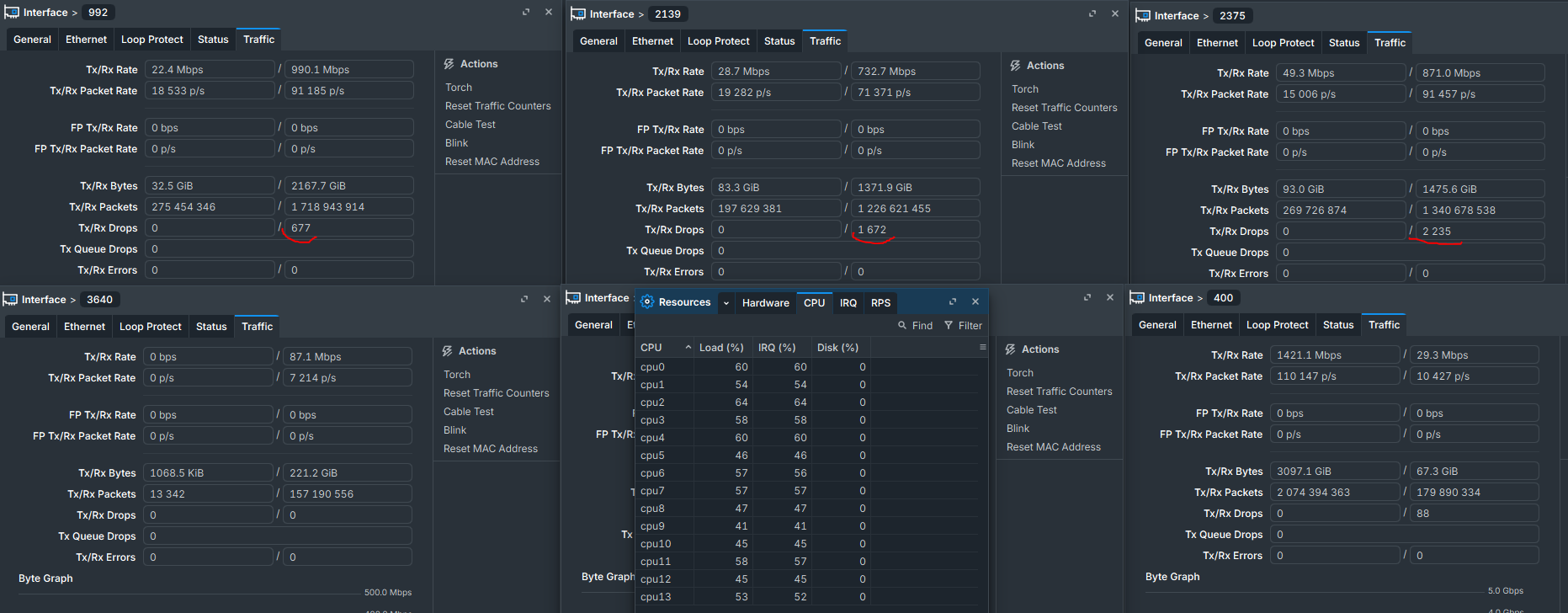
Multi-queues are working. CPU load is fairly balanced. There is one more issue, though: packet drops occur when traffic volume spikes. These drops do not appear on the physical interface; they only occur between the CHR and the virtual interfaces.

Great, the CPU load looks pretty well balanced now.

Keep in mind that the the drop counters are cumulative since the interfaces were created. At your current rate, 1.7 billion packets on 992 is only about 5 hours of traffic, so the drops could just as well be from the VM starting up or BGP converging with the full table, rather than traffic spikes. Reset the counters once BGP has fully converged and then see if the drops really line up with the spikes.

Also, the drops are really tiny: roughly 0.4 to 1.7 per million received packets. For example, interface 2375 has 2,235 drops out of 1.34 billion received packets. They only show up on RX on the busiest interfaces, Tx drops and Tx queue drops are 0, and 3640 at 7k pps has none at all.

Just a side note: ”FP Tx/Rx Rate" being 0 everywhere is expected, not a misconfiguration. In ROS v7, FastPath only works with vmxnet3 and virtio-net, not with the Hyper-V synthetic NIC, so every packet takes the slow path. That's also why IRQ% is basically the same as Load% on all cores. Perfectly normal for a router that spends most of its CPU time on packet processing, so nothing to worry about.

If the drops do line up with the spikes, here are a few things you could check:

  1. What the counter actually counts.
    In Linux, rx_dropped also covers packets dropped for things like unknown protocols or unwanted VLAN tags, not just buffer overruns. Check ROS /interface ethernet print stats to see if the driver level counters show them separately.

  2. Where the drops might happen.
    Compare with the counters on the host:

    # List the available drop counters
    (Get-Counter -ListSet "Hyper-V Virtual Network Adapter").Paths | ? { $_ -match 'Dropped' }
    
    # Sample drops per vNIC for 30 seconds, showing only non-zero values
    Get-Counter "\Hyper-V Virtual Network Adapter(*)\Dropped Packets Incoming/sec" -SampleInterval 1 -MaxSamples 30 | % CounterSamples | ? CookedValue -gt 0 | ft Timestamp,InstanceName,CookedValue -Auto
    
  3. RSC in the vSwitch.
    It's on by default since Server 2019. It rarely helps a router VM, and you can turn it off on the fly. Reason to check: coalesced segments have to be split up again when CHR forwards them, which can cost extra CPU without FastPath.

    Get-VMSwitch | fl Name,*Rsc*
    Set-VMSwitch -Name "<vSwitch name>" -EnableSoftwareRsc $false
    
  4. Dynamic VMMQ.
    It moves queues between CPUs as the load changes, and that can lag behind sudden spikes. Check for Event 260 ("Failed to move RSS queue") and try static queue mapping on the busiest vNICs. If the host counters in step 2 also show drops, this is a possible suspect. If only CHR drops, it's less likely.

    Set-VMNetworkAdapter -VMName "BGP_NT_mt_01" -Name "2375" -VrssQueueSchedulingMode StaticVrss
    

Thanks, that makes sense. I did some more testing after increasing VMMQ to 8 queue pairs per vNIC.

I reset the RouterOS interface counters after BGP had fully converged. Since then, the RX drops are not increasing continuously. They seem to occur only occasionally/in bursts.

For example, VLAN 992 currently has about 384 RX drops after hundreds of millions of received packets, but the counter has remained at 384 for hours even while the interface is doing around 80–90 kpps / ~900 Mbps RX. So this doesn't look like sustained RX queue exhaustion.

I also checked the points you suggested:

  • /interface ethernet print stats detail on CHR with the Hyper-V synthetic NIC does not expose any additional driver-level drop/error counters. It only shows the interface names.
  • All six data vNICs are already running StaticVrss, not Dynamic:

VLAN   VMMQ   QP   vRSS   Scheduling
9      True    8   True   StaticVrss
400    True    8   True   StaticVrss
992    True    8   True   StaticVrss
2139   True    8   True   StaticVrss
2375   True    8   True   StaticVrss
3640   True    8   True   StaticVrss
  • There are no Hyper-V vSwitch Event ID 260 entries during the last 7 days.
  • Software RSC is enabled on the vSwitch:

SoftwareRscEnabled : True
RscOffloadEnabled  : False

I haven't disabled Software RSC yet because I want to keep the current configuration as a baseline and change one thing at a time.

I also sampled the Hyper-V Virtual Network Adapter VRSS counters. This confirmed that all 8 VMMQ queue pairs are actually being used. For example, VLAN 992 is currently distributed across:


CPU: 0, 2, 4, 6, 8, 12, 22, 28

with roughly 7–17 kpps per CPU during the sample. There is no single RX queue carrying most of the traffic.

The other busy vNICs also have different CPU sets, for example:


VLAN 9:    4,6,8,10,12,14,18,24
VLAN 992:  0,2,4,6,8,12,22,28
VLAN 2139: 2,14,16,18,22,24,26,30
VLAN 2375: 0,2,8,18,22,24,26,28

So StaticVrss seems to be spreading the vPorts reasonably well.

One interesting detail is that the physical Broadcom NIC is using the NUMAStatic RSS profile and reports NUMA node 0. Its RSS processor array contains:


0,2,4,6,8,10,12,14     PreferenceIndex 0
16,18,20,22,24,26,28,30 PreferenceIndex 32767

yet some VMMQ queues are placed on CPUs from the second group.

At this point I'm inclined to leave the CPU/VMMQ configuration alone and wait for another RX-drop burst. Then I can correlate the exact time with host/vRSS counters.

Do you think disabling Software RSC would be the next useful A/B test if the drops occur again, or would you investigate the NUMA/vRSS CPU placement first?

EDIT!!!!!
I did some more measurements while the RX drops were actively increasing, and I think we now have a much better picture of the problem.

VMMQ is working correctly in the sense that all six data vNICs have 8 active queue pairs. The issue does not appear to be a simple lack of total host CPU capacity either.

I captured 60 seconds of Windows Performance Monitor data during the period when RouterOS RX drops were increasing.

The whole Hyper-V host averaged only about 20% CPU, but the network/DPC workload was distributed very unevenly across the logical processors.

Some examples of average DPC load during the capture:


CPU20   DPC avg   2.2%
CPU22   DPC avg  45.2%   max 59.2%
CPU24   DPC avg  48.6%   max 71.7%
CPU26   DPC avg  42.7%   max 51.4%
CPU28   DPC avg  19.1%
CPU30   DPC avg  13.1%

The same pattern exists on NUMA0 as well, for example CPU6 averaged about 41% DPC, so at this point I don't think this can simply be described as a "NUMA1 problem".

The physical NIC is on NUMA0 and uses NUMAStatic. Its RSS processor array contains the even logical processors from both NUMA nodes, with NUMA0 CPUs having PreferenceIndex=0 and NUMA1 CPUs PreferenceIndex=32767.

The interesting part is how Hyper-V assigned the VMMQ/vRSS processing for individual vNICs.

For example VLAN 2139 currently uses:


2, 14, 16, 18, 22, 24, 26, 30

So this vNIC uses CPU22/24/26, which are also among the most heavily loaded DPC processors.

VLAN 2375 also uses CPU22/24/26, and VLAN 992 uses CPU22 plus heavily loaded CPU6.

At the same time CPU20 is almost idle from the DPC perspective and was not present in the vRSS processor maps of the six main data vNICs.

During the same high-load period RouterOS showed approximately 60–90% CPU on its 14 vCPUs, with IRQ accounting for almost all of the load.

The RouterOS interface counters are also interesting because the problem is RX-only:


VLAN 9      RX drops:  477
VLAN 400    RX drops:  178
VLAN 992    RX drops: 3705
VLAN 2139   RX drops: 7145
VLAN 2375   RX drops: 2996
VLAN 3640   RX drops:    0

TX drops: 0 on all interfaces

The counters had previously been reset after moving the data vNICs to 8 queue pairs, so these are new drops accumulated during normal operation.

Therefore my current working hypothesis is not simply "the host is overloaded", "VMMQ is disabled", or "there are too few queue pairs".

What I seem to have is an RX processing distribution / scheduling problem somewhere in the Hyper-V VMMQ/vRSS → VMBus → CHR path. The host has plenty of total CPU capacity, but RX/DPC processing is concentrated on selected logical processors while other eligible processors remain lightly loaded. At the same time CHR IRQ load becomes high and RX drops accumulate.

I am not claiming yet that the uneven DPC distribution is the direct cause of the RX drops — only that there is now a clear correlation worth testing.

The effective vRSS settings are also interesting:


VrssQueueSchedulingMode          : StaticVrss
VrssQueueSchedulingModeRequested : Dynamic

VrssIndependentHostSpreading          : False
VrssIndependentHostSpreadingRequested : False

VrssVmbusChannelAffinityPolicy          : Strong
VrssVmbusChannelAffinityPolicyRequested : Strong

NumaAwarePlacement : False

I have a separate test CHR VM, so before changing anything on the production BGP router I would like to test whether changing the vRSS scheduling/spreading behavior actually changes the processor mapping.

If I can redistribute the RX workload away from the heavily loaded DPC CPUs and then reproduce similar traffic, it should give us a clean A/B test: does better vRSS/VMMQ distribution also reduce RouterOS RX drops?

Have you seen this kind of VMMQ/vRSS behavior on Hyper-V before, especially where total host CPU usage is low but selected LPs carry very high DPC load while other eligible LPs remain almost idle?