CHR P10 - Latency creep to disconnect

Hi,

I’m not a server administrator, so I’m not sure whether this is a server-side issue or something related to MikroTik CHR.

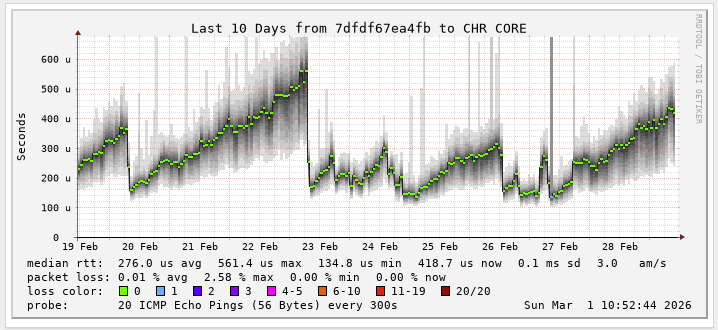
I have a SmokePing VM running to monitor latency to my CHR core gateway. From boot, the CHR shows about 100 µs latency (SmokePing → CHR, both hosted on the same Proxmox server). After a few hours, I see the latency gradually increase to 500 µs, and sometimes up to 1.2 ms.

After this gradual increase in latency, the CHR eventually appears to drop all traffic. I lose access to the router, and all traffic through it stops. The only way to recover is to reboot the CHR VM, after which everything works normally again and latency returns to ~100 µs.


Hardware and Software

  • Proxmox VE: 9.1.2

  • MikroTik CHR: 7.21.3 (P10 license)

  • CHR Resources:

    • 6 vCPUs

    • 8 GB RAM

    • ~11 GB disk

  • Host Server:

    • Dual socket

    • 12 cores / 24 threads per CPU (48 usable cores total)

    • 128 GB RAM


Proxmox VM Configuration (CHR – RAW disk)

balloon: 0
boot: order=scsi0
cores: 6
cpu: host
cpuunits: 2048
memory: 8192
name: core.con.gateway
net0: virtio=BC:24:11:48:00:A9,bridge=vmbr0,firewall=1,queues=6
net1: virtio=BC:24:11:CC:70:CF,bridge=chrbond,firewall=1,queues=6
numa: 0
ostype: l26
scsi0: local-lvm:vm-101-disk-0,iothread=1,size=10368M
scsihw: virtio-scsi-single
sockets: 1

Troubleshooting Already Done

I have tried extensively adjusting VM settings, including:

  • CPU units / weighting

  • VirtIO multiqueue (enabled and disabled)

  • Socket and core layouts

  • NUMA on/off

  • Memory ballooning

I have also:

  • Run CHR as both x86 install and RAW CHR image

  • Rebuilt the CHR multiple times

  • Purchased new P10 licenses to start fresh


Additional Context

This CHR is used as a core router, handling all internal routing and VPN connectivity to our sites. (average 22k pps in and also 22K pps out)

When I first deployed this setup about three months ago, everything worked perfectly. As far as I know, nothing significant has changed, but these issues started appearing around two weeks ago.

At this point, I have exhausted all available options on my side. My next step is to ask the community here and, if necessary, escalate to MikroTik support.

Any help or guidance would be greatly appreciated
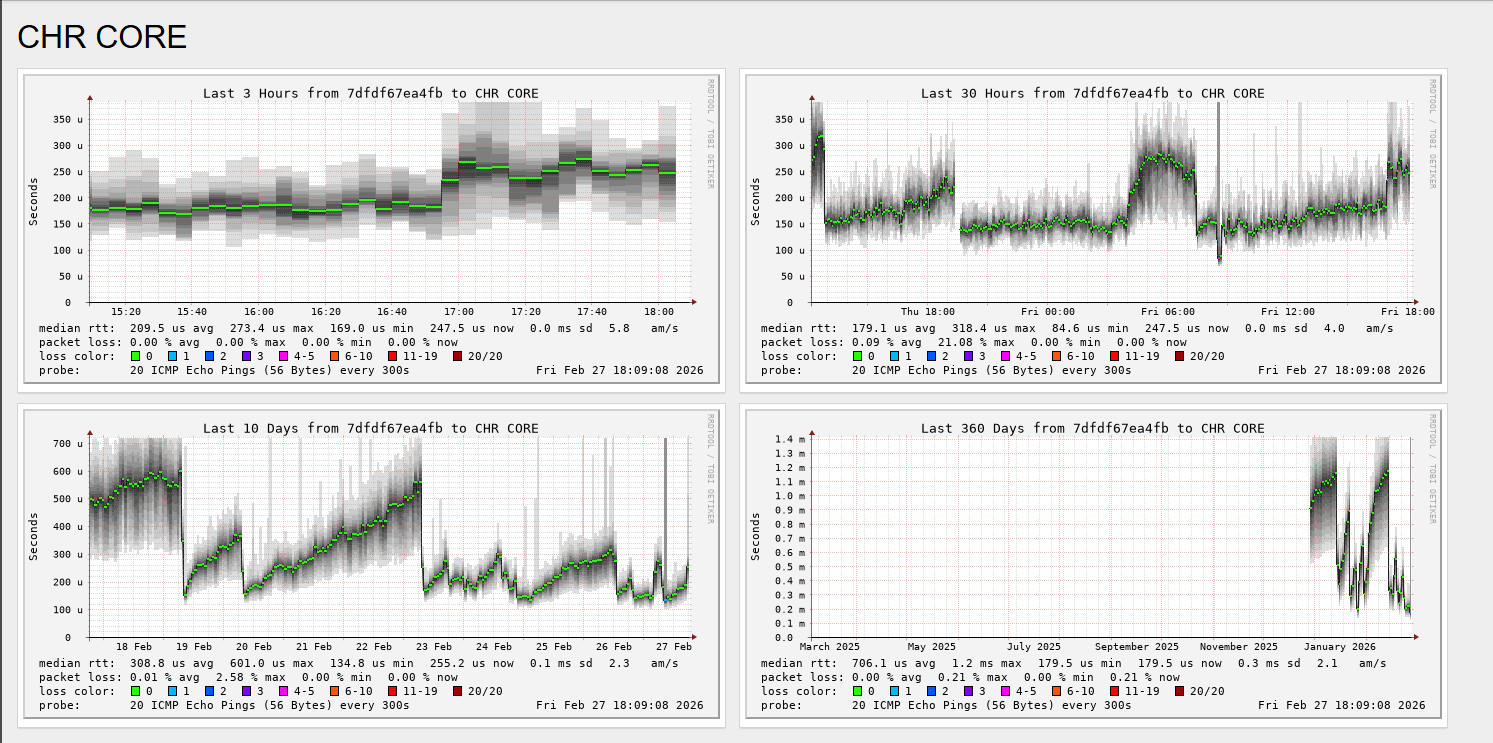
where it maxes on the graph - I have to reboot CHR, thats the drops you see then it starts climbing again

Interesting. I’ve never tried monitoring latency from two vms on the same box.

My CHR is setup similar, but I have not played with the cpuunits value and I don’t enable the firewall on my virtual network interfaces or change queue settings there.

Also I am just using a typical bridge on the two ports my chr has. It looks like you have some kind of bond running underneath as well.

If it were me I’d turn off the firewall on the virtio interfaces and see if that makes any difference first. If not I would look at maybe getting rid of the bond to simplify things next. It seems like those would be the most likely culprits in my mind not having any first hand experience with this particular issue.

ok, by bond, you mean the bridge on the interfaces?

That's just there to show what interfaces are LAN and what are WAN. It's not a real bond of multiple interfaces. Just named dumb with the person who set up the server at first.

I’ll check the firewall option when it dies again.

After starting a new CHR instance - the issue persists (Latency creep), but it has not dropped / failed yet.

you can see on the graph, the last climb is when I redid the CHR (27th on graph)

Failure happened again - made the changes and busy sending a support.rif to mik.

Hi all,

I was on a week’s leave, so I’m returning to this thread.

Support provided a few suggestions and I made the recommended changes. However, after a couple of days the VM crashed again with the same latency creep.

What we tried based on MikroTik’s feedback:

“From your provided supout with crash we see that the virtio_net driver has crashed due to an unexpected PCI hotplug event. RouterOS does not expect PCI hotplug events. Please disable ACPI hotplug for PCI and Network in your Proxmox VM settings. Also change the machine type from i440FX to q35.”

Unfortunately, this did not resolve the issue.

I have sent additional .rif files to support and will keep you updated.

Still no feedback yet from Mikrotik. Have had multiple crashes, and each time I haven’t sent new rif files.

Mikrotik has send feedback and looks like there is a problem with Virtio_Net drivers for CHR. which will be fixed in 7.23. I will update to 7.23 and test it.

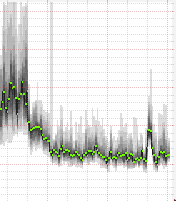
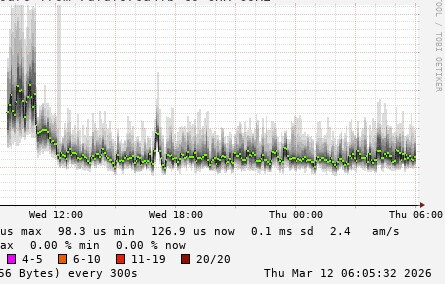
So far, so good - 7.23 is a lot more stable on CHR environment. The spike at the beginning of the graph is 7.22, and once 7.23 was installed, the graph dropped, as you can see. It spiked but then normalised again almost immediately.

Survived ± 15Hrs with no problems - Latency graph looks good.

I will marked solved in a few days just to cover testing period.