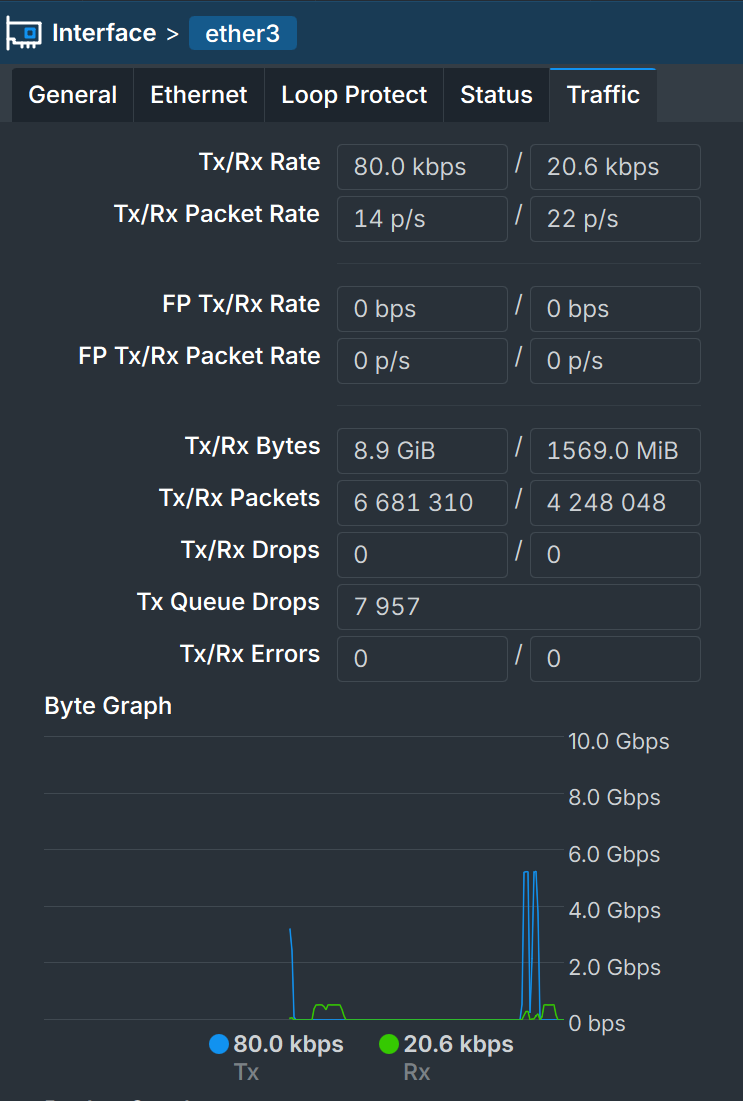
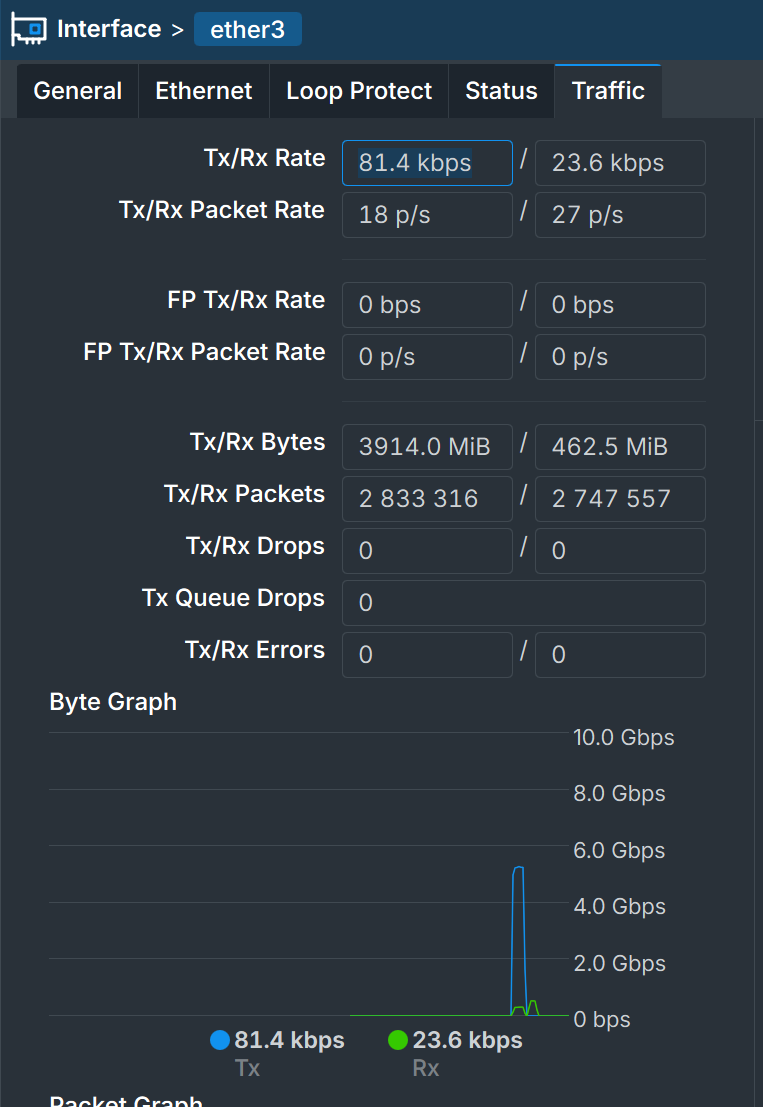
The configuration is basic and minimal - no firewall rules, fasttrack enabled, IPV6 disabled, and PPPOE is used for connecting to 5Gbps fiber service with mtu=1492.
The issue is as follows: the throughput starts high - close to 5Gbps, and after 3-4 seconds starts to drop to the range of 3-4 Gbps. I see TX queue drops in ether1 which is the LAN side. I changed the queue setting to multi-queue ethernet default but the issue is still there.
Now the weird part: if i repeat the same test where the only difference is P-Unlimited license - the issue is gone, and the performance is consistent and throughput is stable at 5Gbps.
The cumulative traffic is well below the P10 limit.
There is some amount of nastiness around chr bandwidth limitation. It has caused problems in the past that were very much like your experience (they were fixed.)
Assigning an interface queue with adequate buffers is always a good idea, so I'd attemp that. This should alleviate the tx drops. Whether pfifo or mq pfifo is better in your application may vary.
At these speeds, queues often become necessary, especially when a change of speed occurs in the bigger to smaller pipe direction.
And then... if they are two identical machines,
simply try copying 1:1 the CHR that goes fast over the CHR that goes slower, and see if it goes slow or fast,
so you can see if it depends on the hardware rather than the software....
No drops and please note the traffic which is below 6Gbps
I am just wondering whether the use of PPPOE is a contributing factor (it shouldn't) as high rate PPPOE is less common and may not have been tested.
I also tried to increase the multi-queue size from 50 to 300 and larger - made no difference. To be clear - I also tested the complete scenario above with another Proxmox host on a different hardware, the issue is the same.
I am just wondering whether the bandwidth limitation mechanism is not too “aggressive” or just isn’t implemented correctly for all scenarios.
I would send support files from both VMs to support@mikrotik.com and give them these details. Seems you have done a good job of isolating the variance between the licenses. I suspect they would be able to confirm your findings or not rather quickly.
Yes, it sounds like the licensing shaper is a little borked in recent versions.
I’ve found that bandwidth-limited CHR’s on 7.19 and 7.20 are likely to panic/reboot when I attempt to throw more bandwidth at them than their license allows. This is easy to reproduce if you start a UDP test from a beefier machine and throw 20-40G at an unlicensed or P1/P10 CHR.
7.20 did introduce improvements for VirtIO (according to support), and in those cases I’m not seeing the reboots as often. But honestly, I haven’t spent much time with VirtIO/bridged interfaces because in most of my cases I'm using passthrough for the significant performance gains.
Since you’re using Intel X550’s, check the Resource window and look to see if one of the cores is getting pegged at 100%. The Intel drivers have this nasty habit of loading up one core with all the interrupt requests. See if you can enable RPS for that card’s interfaces. That should help spread the load across more cores so the PPPoE encapsulator and the license shaper can get some CPU time.
Thanks for the feedback. Actually I did a lot more than described in the first post:
Tried different NIC: X540, X710, X550, ConnectX 3 and ConnectX 4, no significant change with respect to the issue
Tried different virtualization host - no change
Tried a different hypervisor, a platform which isn’t Linux - Bhyve which is based on FreeBSD, it is not officially supported but I managed to get it to work nicely, but the issue is still there
CPU load isn’t the issue since during the test session each core never crosses the 40% mark, and RPS is effective because the load is balanced.
So I have a “crippled “ P10 license, to be honest- I wouldn’t mind upgrading it to P-Unlimited for a nominal fee, however there is no such option because the upgrade fee is the same as a new license fee instead of some incremental fee. A bit frustrating I would say.
There is no such thing as an “upgrade,” per se. You get a new license and the old P10 goes back into your pool of available CHR licenses to be used on a different VM.
You could try an x86/ISO install instead of a CHR. You have 24 hours of use before it locks itself down. And if you do decide to license it, it’s cheaper. But the only caveat is that it’s locked to the hard drive. So if you blow away the VM’s disk image, you lose the license forever.
I did one that way and installed it to an NVMe drive, originally used to boot the host natively. I just pass the disk through to the VM and it works like an unlimited CHR license, as far as throughput is concerned.
Thanks. I have tested RouterOS on bare metal X86, the performance is good and consistent as it should be. At least the license tiers are not enforced by bandwidth limitations. RouterOS level 5 costs the same as CHR P10 which is reasonable and yes, there is the inconvenience of binding the license to the storage device instead of the MT account.
With respect to performance N300 x86 can easily handle 5Gbps traffic with fasttrack and minimal firewall rules and individual core load does not cross the 50% mark.
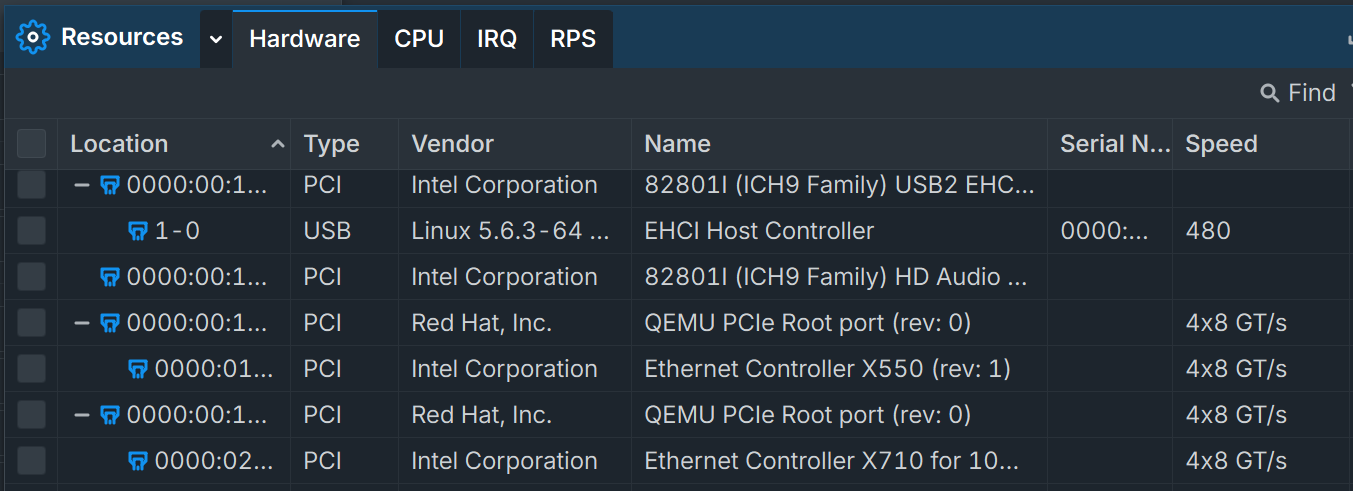
Can you show a screenshot of the System → Resources → Hardware window?
I had a problem with Proxmox and PCIE Passthrough with the Intel x553 on an Atom C3000. It was registering in CHR with only 2.5GT/S and varied on some occasions at 32x5GT/S. I swapped over to ESXi8 and CHR showed 32x5GT/s and has seem to be stable. I am not sure if it’s CHR or Proxmox or some combination of both that resulted in the PCIE speed variations.
Resource allocation for the Intel X550 shows as 4x8 GT/s which corresponds to 4 lanes of PCIe 3.0 and 8 GT/s each which is correct. I am not sure what your numbers mean (32 x 5GT/s… 32 lanes of PCIe 2.0? )
I would start with the Proxmox host to make sure that the card has enough resources to start with:
Which is correct and consistent with the allocation within the CHR VM.
During my testing I have found out that it is impossible to passthrough a Mellanox ConnectX 4 without disabling the load of the ConnectX driver on the host altogether. Without it the card would not be visible to the CHR VM although the passthrough is done properly. You can try it as well (disable ixgbe on the host and let CHR access it exclusively, search how to blacklist ixgbe ) Your problem might be also a buggy bios in combination with Proxmox.
Nevertheless, the performance issue I am experiencing has probably nothing to do with resource allocation.