 CHR using Apple Virtualization & 🐧 QEMU for Linux - Ready-to-use!

Huzzah! Just like with QEMU, two NVMe drives works. But it doesn’t see any of the NICs or USB interfaces. That would probably explain why the install kernel doesn’t see the USB drive after it takes over from UEFI. In System/Resources/PCI it lists just the NVMe drives.

I wonder what cards in Ampere systems they’re targeting with this. The onboard NXP ports aren’t available (yet).

Isn’t there some extra-nic.npk you can install – maybe already did – just a thought.


It does replicate QEMU where the CD-ROM had to be transformed into a disk image. IDK about modern bootloaders, but AFAIK EFI will mount the CD-ROM for an OS install to START. But when the “real” OS boot, it depends on its own driver for CD-ROM. But a physical disk (or emulated one) be same ID/etc in both EFI and RouterOS kernel.

The installer does iterate all devices and try to mount the is9660. It does not care about whether this is in a physical CDROM, USB drive, or NVMe drive. So, the drive with a CDROM image needs to be discoverable. Anyway, don’t expect USB drivers to work here.

All reasons why I’m pro-virtualization. Good news is seems the world is coalescing around VirtIO since Microsoft and even Apple support… since dealing with device drivers has been a PITA my entire life.

FWIW, I did see @normis report WRT to “AArch64” on the 7.15beta thread:

CHR images are coming in next betas

This be good news for Mac ARM users. I suspect if it work under Apple Virtualization on ARM Mac… it work any other KVM hypervisor using AArch64. e.g. Apple is kinda “worse case” since only supports VirtIO. KVM long offered VirtIO, but most Linux hypervisors do have other supporting functions too… but with Apple it’s 100% VirtIO drivers (and clearly a limited subset of them too).

Mac does not offer KVM. It does offer HVF and Virtualization framework. Qemu can support anything HVF.

True. I just found it telling that even Apple adopted KVM’s VirtIO in “HVF”, not their own drivers/VMXNET3/something … Even to the extent that “HVF” is likely a “even more pure” VirtIO-based hypervisor, than even KVM :wink:

More a thought that HVF kinda useful for general VM testing… if OS has poor VirtIO support, you’ll get nothing from Apple.

After messing around with it as bare metal on the Honeycomb (extra-nics was installed), I booted back into Ubuntu and got it working through QEMU/KVM. With 2 or 8 cores, I can get it to receive 1.5Gbps and transmit 700Mbps, so I’m guessing there’s a bit of optimization yet to be had. iperf3 on the host can get 8Gbps to/from my Mac Studio using the stock NXP drivers.

Looking forward to ARM64 CHR and hopefully some more optimization.

This is incorrect:

  1. The HVF.framework is similar to KVM: it provides a function to run a second-level isolated hypervisor / virtual machine. It is very bare bones and requires to handle everything. The HVF is used by QEMU to to provide isolation boundary. QEMU for connected devices, can emulate any underlying device type as long as it is programmed, this is why you can attach non-virtio emulated devices to the VM. The HVF.framework was introduced as a way to provide user-space accessible virtualization, similar to how the /dev/kvm is exposed on Linux.
  2. On MacOS there’s also Virtualization.framework. It is Apple’s own QEMU-like emulator. The Virtualization.framework does only expose VirtIO-like devices. Underneath the Virtualization.framework uses HVF.framework.

The UTM can use:

  1. QEMU that uses HVF, and does emulate various type of devices - all that are supported by the QEMU.
  2. QEMU that uses TCG, basically emulate everything, including CPU.
  3. Apple Virtualization via Virtualization.framework, very limted to only a VirtIO-like devices.

Thanks @ayufanpl. Used VMWare for decades and for a time built iOS apps. Most server/apps/OS supported VMWare, while KVM was hit/miss. Seems the reverse is happening, which is good since VMWare is now pretty expensive. While I know UNIX/Linux well enough, all the KVM/QEMU stuff I’m trying to learn. Seems complicated onion.

But I now get what you mean when you said “HVF” – that QEMU support for Apple’s Virtualization.framework. That’s nifty – I thought Virtualization.framework was only in UTM actually. But I though you made-up an weird acronym for “Apple’s Virtualization.framework” (which has not acronym AFAIK).

UTM with Apple (outside CHR image problem) “just working” got me thinking… So I did try the Virtualization.framework with Apple’s Swift sample to directly to boot CHR, which worked: https://forum.mikrotik.com/viewtopic.php?p=1061786#p1057843
I kinda liked the generic concept of have an “/Application” that put some nice SwiftUI (perhaps NOT a terminal) around some Linux thing more generically. At some point, I’ll put the “MacOS CHR” code/app on GitHub (perhaps, “AHR” :wink: ) when I have time. Hopefully Mikrotik will have a ARM64 CHR image by then too.

If you are coming from VMWare please checkout the Proxmox VE. It is brilliant. Build on top of Debian, QEMU and KVM. And Open Source. The company behind it offers paid support.

Yes, there are number of apps build on top of Virtualization.framework to provide GUI. Since, all heavy lifting is done by Apple to provide emulated hardware support so building GUI is significantly easier task. The UTM provides a GUI for both: Virtualization.framework and QEMU.

LOL. Yeah I recently just installed Proxmox VE on an old server to test it… It better from a UI POV for sure. And the disk management is just more logical too. Plus seem QEMU has come a long way since I start with VMWare in the 90s. CHR was an addition on ESXi a few years, but it super handy for dealing with all the networking stuff vSwitch can’t & avoid need the even more price vSphere stuff. e.g. RouterOS VRRP on two VMWare ESXI does similar HA things to vSphere & easier, and $100/server is a bargain. On Proxmox VE, there is all Linux newer data plane stuff. Haven’t gotten there yet with Proxmox VE.

It was the Fusion to UTM part of conversion that got me here. It was nice to be able test a VMX-based VM on Mac Fusion, and just copy files to ESXi (or vise versa). But if want to do same with Proxmox, I need KVM/QEMU on Mac…

_One note: @TomjNorthIdaho (who runs an open btest server from his ISP) is in same boat re VMWare. @ayufanpl, if you had any Proxmox advice, might want to share it here: http://forum.mikrotik.com/t/sr-iov-with-chr-what-hypervisors-are-you-using/173239/1

Not really. The disk images are transferable between Proxmox VE and UTM, since both are based on QEMU, both can boot UEFI, both use VirtIO for most of emulated devices. They are super similar on how they configure QEMU and interact with it. The problem with UTM is that it can run amd64 or arm64 natively depending on MacOS arch. The Proxmox VE at least now is only amd64. So, you can transfer UTM ↔ PVE only when running on Intel Macs. There are some GitHub repos trying to bring PVE to arm64 with mixed degree of success.

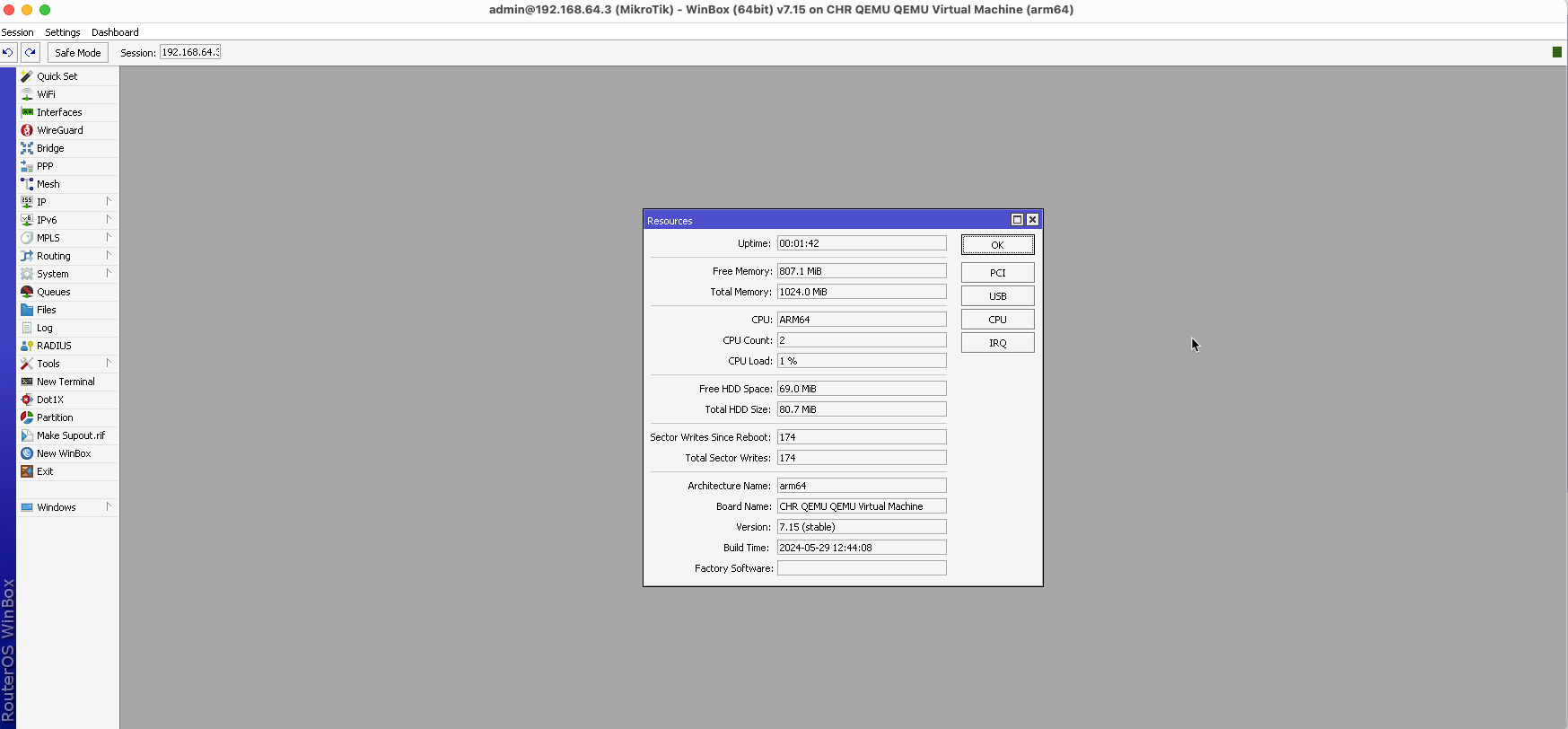
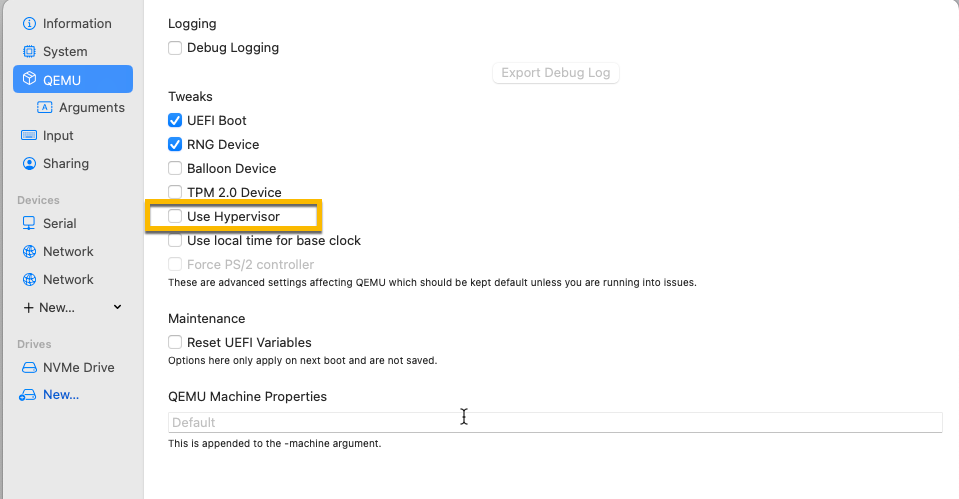
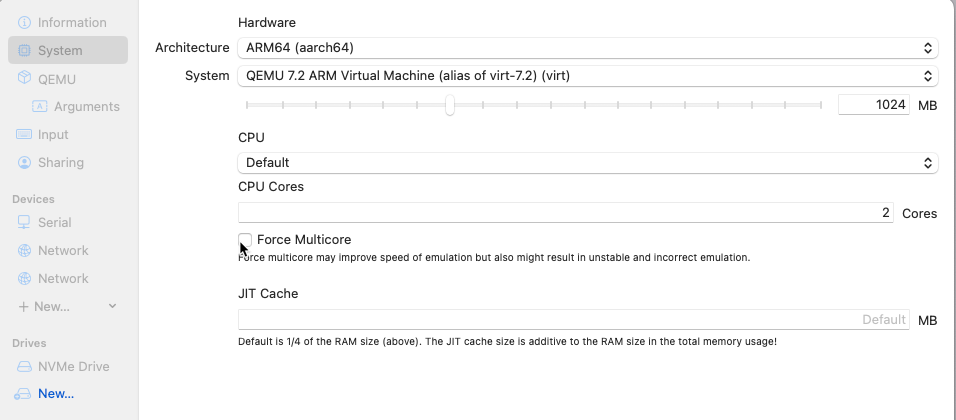
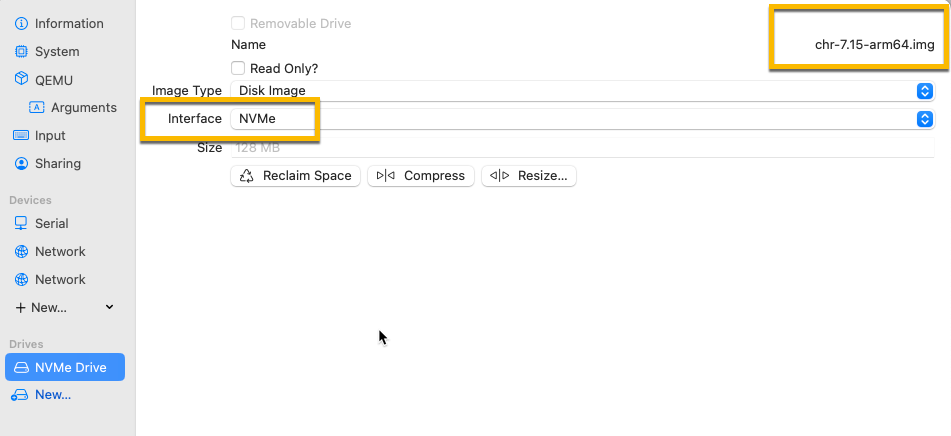
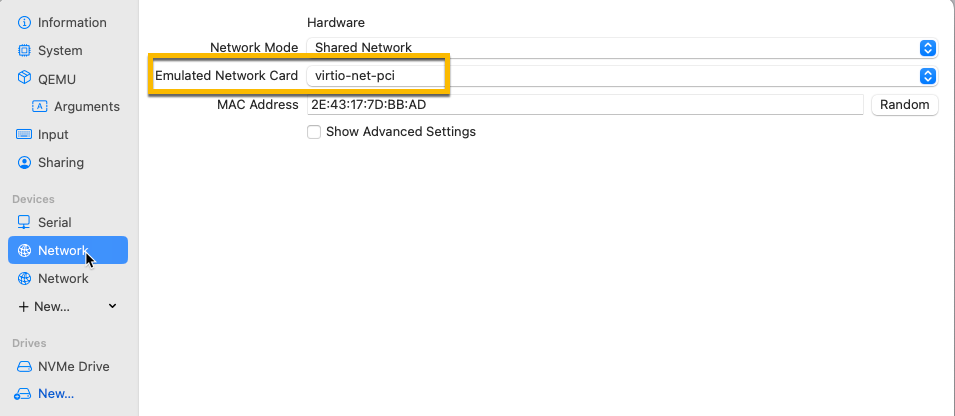
For those who, like me, struggled to have ROS running on Apple Silicon. I’m sharing the config that, for me, solved the issue:
I’m running UTM Version 4.5.3 (99) on Apple M2 Max, Sonoma 14.5.

Hope it helps.
ros_3.png
ros_1.png
ros_4.png
ros_5.png
ros_2.png

That is system emulation with QEMU, you can run any supported architecture like that on any system where you can run QEMU, this topic is related to CHR virtualization using Apple Virtualization Framework.
With Apple VF CHR arm64 raw image won’t boot, but x86_64 it does after changing FS type on ESP in image, in arm64 image ESP seeps to be ok, but it won’t boot, didn’t have time to investigate more.

Hi Kartone and others

Thanks for that! I am new on ARM and I do know there are different types of ARM Cores etc. Do we know if the AMPERE and Apple Silicon are fully compatible on CPU Level? If so, aren’t there optimizations in QEMU so that most of the code runs natively? I mean that we need to emulate the IO is not that strange.

Actually I have never used CHRx86 that much on Bare metal so I know if they supported modules with drivers for Network Cards or it was up to the user to buy NE2000, Intel exxx compatible etc?

Keep up the good work and I would LOVE to see a Youtube snippet about how it looks and runs!

/Johan Löfgren
Sweden

Given the Super Bowl in US… Amm0’s container&script superstore is now offering …

Easiest way to install a RouterOS* — via URL:

utm://downloadVM?url=https://github.com/tikoci/chr-utm/releases/download/v7.17.2/RouterOS.utm.zip

*assuming you have an Intel Mac with UTM installed — To install UTM for Mac, see https://mac.getutm.com .


On Intel macOS, just cut-and-paste URL below into Safari — including the “utm://downloadVM?” which tell UTM to start the process:

utm://downloadVM?url=https://github.com/tikoci/chr-utm/releases/download/v7.17.2/RouterOS.utm.zip

After using URL, UTM will prompt you download it, and will automatically add CHR to the virtual machine assuming you accept the download.
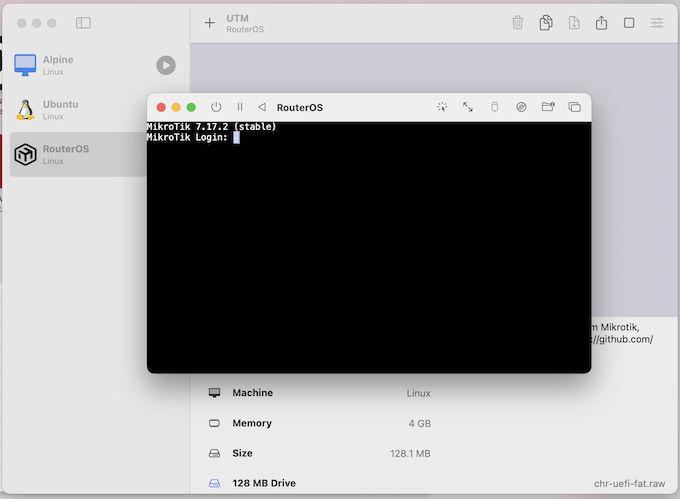
CHR started after install using serial console.png
You can also download the image directly from the “Release” section on the GitHub project that, essentially, ZIP you a directory with a .plist file and .raw image (and icon). If you expand the ZIP, UTM should see it as virtual machine then (as it will have the “.utm” ending when unzip). So same image packaged for UTM (as a ZIP) is under “Releases” from the GitHub tikoci/chr-utm repo:
https://github.com/tikoci/chr-utm/releases


In either case, you should be able to just start it once it installed in UTM — no configuration of serial ports or disks needed.
To start, click the “>” Start icon next to “RouterOS”, and a console will appear
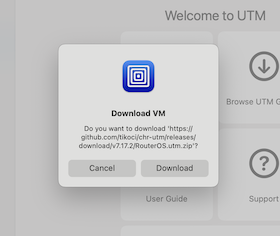
UTM prompt after utm url.png
The username is of course “admin”, and CHR still uses no password.

Note: RouterOS will use a UTM “shared” (NATed) network by default. With macOS defaults (i.e. macOS firewall enabled), no port should be available beyond you local Mac. You can feel free to adjust any networking as desired — including none if just want to test scripts or commands. But you can add multiple network adapters, or “bridge” CHR to a real interface if desired (i.e. to avoid NAT once it’s configured with passwords and a RouterOS firewall). For example, you can add a USB ethernet dongle to Mac, add that interface as “bridge” in RouterOS UTM image “Network” settings. Anyway, there are network setting to adjust in UTM to present more network (say for testing) or use multiple “shared” ones.

Above uses Apple’s “App URLs”, which get send to UTM app and is same scheme as “UTM Gallery” uses to install images. The image inside ZIP iimage based on the tikoci/fat-chr “no-gdisk” method, and the image is set to use Apple Virtualization which is super fast at bring up CHR.

Finally to use multiple CHR, you’ll need to rename any existing ones first named “RouterOS”. So if you want to add TWO CHRs, you change “RouterOS” to “RouterOS 1” and then use same URL/download to add another CHR (and perhaps rename that one to “RouterOS 2”). Basically, it won’t automatically install a CHR if same already exists.

I updated the readme on my Intel macOS CHR “automated” images for UTM. I’ve included a bit more information on setup and usage:
https://github.com/tikoci/chr-utm

Also, If anyone has a .plist file and some details on image used for ARM64 UTM that known working… I can package that up similar to Intel on same GitHub project – I’m just don’t have a ARM Mac always on hand to test, so avoid publishing anything for Apple Silicon macOS’s UTM.

I never managed to boot ARM64 ROS image using AVF, only with QEMU in UTM, same UTM QEMU setup
config.plist.zip (1.09 KB)
works on Intel and Silicon Mac with unmodified CHR image. I would also like to know if anybody succeed to boot ARM64 ROS with AVF on Silicon.

Thanks @optio. I still have not added to my project to build QEMU variants.

But did just update the Apple Intel macOS-based “UTM CHR” to 7.18:

utm://downloadVM?url=https://github.com/tikoci/chr-utm/releases/latest/download/RouterOS.utm.zip

With an update README on usage:
https://github.com/tikoci/chr-utm?tab=readme-ov-file#routeros-chr-for-utm

Since one use for CHR on Apple is testing… While not fully baked, there is an expect script that will automatically accept license and reset password. And links to UTM’s AppleScript which can control UTM (and osascript allow AppleScript to be run from bash FWIW) that can tweak machine setting, start/stop etc.

Nice work.
FWIW, ARM64 CHR can run in QEMU with image provided by MT without modifications if no additional space on it is needed.