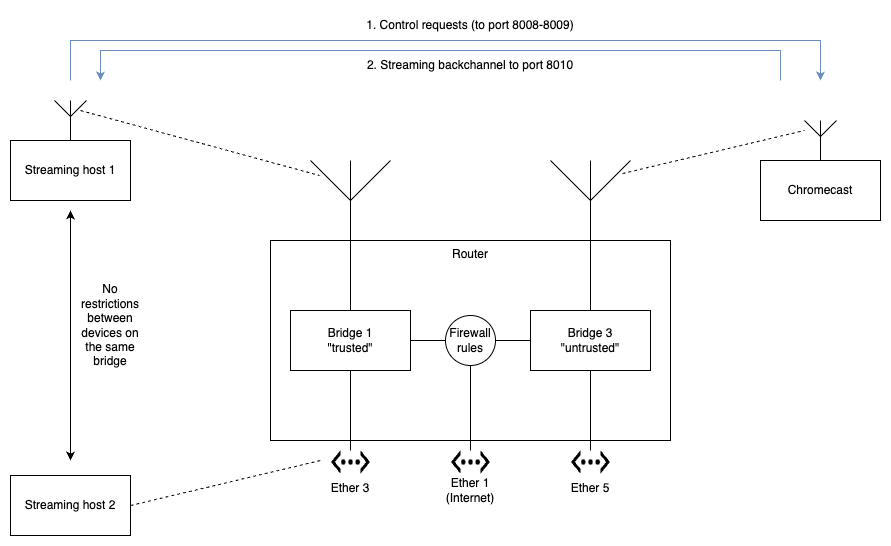
Does anyone have an idea how to handle connection tracking for Chromecast for the ip firewall?
Setup
Mikrotik Chateau series, latest ROS
Two bridges configured. Full access between all bridge ports
One bridge is for “trusted” hosts: work machines etc, other bridge is for “untrusted” hosts: appliances and Chromecast
mDNS setup and working correctly. Forwarding allowed between bridge interfaces
IP firewalls configured to allow “trusted” to connect to “untrusted” on destination port 8008-8009.
Both bridges have internet access
What’s working
Devices on “trusted” can see the Chromecast on “untrusted”
Devices can start streaming to the Chromecast in a mode where it is streaming from YouTube etc. I.e. The control message is sent via 8008/8009 and the Chromecast streams from the internet.
What’s not working
Local lan streaming (i.e. streaming from VLC)
In this mode, The streaming host opens a connection to the Chromecast control port on 8008/8009. The Chromecast then creates a return connection from the Chromecast to the streaming host on port 8010. If I allow this port back on the firewall rules, the streaming works correctly.
Firewall rules
I would like to have the router firewall rules to only allow traffic back to the streaming host if a request is made to the control port.
i.e.
Streaming host on “trusted” creates a connection to the Chromecast on port 8008/8009
Router allows Chromecast on “untrusted” traffic back only to the streaming host on port 8010
I had a few ideas, some of which might a combination, but not sure on the direction.
A connection tracking helper. This is similar to TFTP in nature. I’m not sure if it’s even possible to load a custom connection tracking helper.
Using the mangle filters to mark the connection somehow.
Putting the address in an address list using a firewall rule and then referencing that later. Only thing with this approach is that I’d like the connection close to remove the address from the address list, which doesn’t seem possible. I know a timeout is possible, but then the timeout just depends on the length of the media being watched.
Transforming the packet on via masquerade if the transformed packet matches the connection, allow the original (not sure if this is possible).
Ideally I’d like to only match the SYN packet, since after the connection is established, the normal connection tracking mechanism can handle the packets.
Hi @kanwhoa and welcome to the Mikrotik user forum!
Thanks for the detailed post but a few things are a bit unclear though:
You mention “full access between all bridge ports”, but also describe firewall filtering between trusted and untrusted bridges. That sounds contradictory unless you mean full access within each bridge only, and routing/firewall between them.
It would really help if you could clarify the setup with:
A simple network topology diagram or description (ascii, hand-drawn on a napkin etc)
A sanitized full /export (remove sensitive stuff like passwords, crypto keys, serial number public IPs etc.). Check this how-to guide.
That way it’s easier to understand exactly how traffic is flowing and where connection tracking might break down.
You will have to somehow allow the reverse connection obviously.
You can make the thing a bit more secure by using something a bit like port knocking:
add a dst-address-list criterion to your rule for port 8010
populate this address list based on packets flowing to your ChromeCast control ports 8008-8009 with action=add-src-to-address-list with some appropriate timeout (w.g. 30s)
you probably want this add-to-address list thingy to renew the timeout for each control packet (not just new connections) so you will probably want to place it before your established/related rule; also if you do this, you will probably want to selectively disable fasttrack for the control connections
Thanks, this is along the lines of what I was thinking. Will have a play to see if it works.
Btw: @Larsa The reason for not giving full access is firstly, that’s a DHCP client, and while I could statically define a client, I have used this as an example. There are many clients on the trusted network that can initiate streaming, but I’d rather not allow full access from untrusted, even if it is limited to one port. The key reason I have these devices is on untrusted because I don’t trust them. Things like set top boxes and appliances that are put into the field and are not patched/updated regularly.