[Close] NTP status Waiting but monitor-peers looks good. (An other thread....)

Dear all,

First i am not an network engineer. I have some competences in Networking but that’s not my (main) job.

So, the architecture.
I have two routers, A and B.
One is the master(connected to internet) (A), with a FIXED clock.
The other one is a slave (B), connected to the master.

Both are on 7.19.

What i want / need :
I would like to B get the time synced from A.

Things I did :

  • So i enabled the NTP server on A
    When I try to call the A NTP server with an other computer (Linux):
ntpdate -q 192.168.99.254

2025-07-09 14:52:00.472987 (+0200) +0.014606 +/- 0.000328 192.168.99.254 s6 no-leap

It looks that the A NTP server is working.
If i change my current time manually and set it as automaticaly, the time is synchronised regarding the A ntp server.
It confirme(?) that the A NTP server is working. FYI : the NTP server is provided by the dhcp as 192.168.99.254.

  • So after that, i went to the B router.
/system/clock/print       
                  time: 16:59:48    
                  date: 2025-07-09  
  time-zone-autodetect: no          
        time-zone-name: Europe/Paris
            gmt-offset: +02:00      
            dst-active: yes
system/ntp/monitor-peers
 type="ucast-client" address=192.168.99.254 refid="LOCL" stratum=6 hpoll=6 ppoll=6 root-delay=0 ms root-disp=17538.269 ms offset=-6882169.305 ms delay=0.788 ms disp=4.417 ms jitter=1.311 ms 

So for me, the time on B is not good, but it looks like B can retreive the time from A as it said that there is an offset of -6882169.305 ms.

It looks like B knows that is is not “well” sync, but it didnt sync.

That’s confirmed by :

 /system/clock> /system/ntp/client/print   
     enabled: yes           
      mode: unicast       
    servers: 192.168.99.254
        vrf: main          
  freq-drift: 0 PPM         
      status: waiting  <---- :'( 

What am i missing?

Thx

Some other things (on B) :

/system/ntp/client/servers/print  
Flags: X - disabled; D - dynamic 
0  D address=192.168.99.254 min-poll=6 max-poll=10 iburst=yes auth-key=none


 /system/ntp/server/print  
              enabled: no  
            broadcast: no  
            multicast: no  
             manycast: no  
  broadcast-addresses:     
                  vrf: main
      use-local-clock: no  
  local-clock-stratum: 5   
             auth-key: none

/system/routerboard/print  
       routerboard: yes        
        board-name: hEX        
             model: RB750Gr3   
          revision: r4         
     serial-number: !!!
     firmware-type: mt7621L    
  factory-firmware: 6.48.6     
  current-firmware: 7.19.3     
  upgrade-firmware: 7.19.3     

What you are seeing here is the NTP protection against creating “time islands”.
You need to add one or more NTP clients to A so that it is synchronized to something, before B will trust the time delivered from A and sync to it as well.

Hi,

I ve made some tests, and there is something else.
I took some other materials (lets say C & D) as C master D slave and … everything is working well.

In this case C is SYNC (and not clocked FIXED), and D is geting the time more or less instantly.

So i will try again with A & B to check it out what is going on!

I will put my conclusion next week.

Dear Pe1chI,
First, thank you for your reply.

About that, i can understand the theory of the time island but :

  • my A have multiple connections to multiple devices (Wifi, PCs, and so one), so it should be trusted/trustable ?
  • is it possible to desactivate this protection on the client B ?

Thx in advance.

It is not clear to me what you are writing and what you want to do.
You need to add client configuration to A, not add other PC’s as client to A.
You specify some external systems to be used as time source. E.g. “1.pool.ntp.org” and “2.pool.ntp.org”.

Hi Pe1chI! Sorry for that.

What i try to :
So, I have made some tests with new materials, and my conclusion is that it looks like my issue on the slave is related to the “island” behavior that you describe (if i am not wrong)

  • When A clock/ntp client is SYNC, A is configured as a NTP server, B is configured as a client of A with the IP of A defined in the DHCP. B is getting SYNCED too.
  • When A clock is “forced/manually” set, A is “not sync” (that’s normal), but B is never “trusting” A, and get never synced.

So, it looks like, if i want to set a false date time, as ntp date, i am not able to do it. (Or i dont know how)

To reply to your question I dont want (if possible) to B use an “external/remote” ntp. I would like only to use the one defined by the DHCP server (in my case A). It looks like if A is not providing a good time, B is not trusting it and will refuse it.?

You mean : to allow B to trust A, I must set more ntp client conf (as ntp servers) to A?

Hope is clearer!

Thx for your reply.

Indeed, it is not really feasible to have NTP on a fake time, certainly not with only MikroTik software.
(you could probably do it with some dedicated NTP server that you can fully tweak to send what you want)
What I mean is: have A synchronized to credible external sources, then you can synchronize B to A using only internal addresses.
But then of course the time will be true time. When you want to run the whole network using fake time, you need reference servers that provide fake time.

It is not clear why you want to do that. But in general I see many postings (also in NTP dedicated groups) from people who have the assignment to test their NTP setup, and it often includes things like “well, then we reset the time on a system, and we expect NTP to set it back to correct” and similar.
Unfortunately, NTP and its implementations have not really been designed for such test cases.
Everything works well when it is configured and operated as it should be, but pulling out parts and turning knobs is not part of its design and is often not handled the way you would expect.

I don’t really want to “tweak” NTP stuff, BUT… I am (trying to) build systems that could be disconnected from the internet sometimes (and lose NTP sync), or start without remote/WAN connectivity, so no NTP server at all (no sync on the Gateway).

In this case, I would like my local NTP server to be trusted by all devices on the network. The need is only to have synchronized logs regarding the local NTP time. If it’s not the “correct time”, it’s not a big deal because every device will have a wrong datetime, but synchronized with the local NTP.

In the networking I am currently working with, it looks like A is not syncable (don’t really know why), so my B device (the gateway of my “system”) is not trusting A as it’s not syncable, but I think(hope/need) my devices that are children of B will get the time from B, synced or not, correct time or not.

As far as I recall, Mikrotiks will function as NTP sources if “Use local clock” is enabled.

However, generally for situations that you (probably) find yourself in, the proper solution is an NTP (and usually PTP) appliance. These usually sync via GNSS and many have battery backed reference clocks. For non-metrology applications they are reasonably priced.

Then MikroTik is not the hardware to use! The MikroTik routers do not have a local clock, so once they are forced rebooted (turned off/on) they will not know local time and they will fall back to the last local time they have seen (usually a couple of hours earlier).
When rebooted by the admin (System->Reboot) it can be a bit better because they save the time just before boot and restore it after, losing a minute or so.

When you want reliable clock time even without internet, you need an independent NTP server that obtains its time from elsewhere, e.g. from GPS. You can buy “NTP time server” in several different price categories, starting at about 60-70 euros on Aliexpress. Then you can sync your routers from that.
There is also some support in RouterOS to have a USB GPS receiver connected to a router with USB port.

Another (non-precision) possibility: have a computer running a normal linux distribution. Then install one of normal NTP servers (ntpd or chrony) and configure it as client to 3 or 4 external NTP sources. Also configure it to use local clock as refrence clock but “fudge” it to low stratum (e.g. 10) so it normally won’t be used as reference clock when other time sources (e.g. external stratum 2 or 3 servers) are available. When network breaks, that system will fall back to its local clock as reference time. And that will happen also after reboot. But in contrast to ROS device, it’ll present itself as properly synchronized NTP server albeit at unusually low stratum, but clients won’t have any problem with that.

Then configure other devices in your network to use the device above as NTP server. Preferrably as the only one, configuring clients with other (external) NTP servers can cause issues after internet connectivity gets restored (clients will switch over to synchronizing to external servers of lower stratum individually and their time will get dispersed until all devices will manage to sync to correct time … which might take hours or even days depending on accumulated time drift during internet outage).

So conceptually what you were hoping to achieve using ROS device, but ROS implementation of NTP (and hardware) doesn’t offer required functionality.

Thanks, I hadn’t noticed that. I thought it was still working properly because it was powered by the mains.
In fact, when I rebooted a CRS112 that was unplugged before rebooting it from the internet, it took about 40 seconds to reboot…

The problem with MT devices and their internal time is not whether they are powered while not running or not, the problem is lack of RTC device in hardware. The only clock running in ROS is the "software" clock, provided by OS. While this one might be running more or less at the correct pace, it has to be initialized from some source. In normal machines with RTC device, software clock gets initialized from RTC upon boot (and might get adjusted to more precise time using other means of synchronization later). With MT devices, external time source is necessary for that.

The trick that MT performs to get somehow around the problem is to check timestamp of certain files on flash ... and then software clock is set to timestamp of newest file on flash. As @pe1chl explained, this will always set clock to some time in the past (depending on when those files got latest updated). E.g. if device never got time set from external source (either via NTP or by setting time manually) since installation, then software clock will start off from 1st of January 1970 (beginning of UNIX epoch) and will increase time according to actual running time (e.g. if device gets shutdown each evening and started each morning, then its time will increase roughly 12 hours a day and thus falling behind actual time more and more).

And lack of hardware time device (RTC) is most probably the reason for ROS NTP implementation lack of capability to provide time sync to clients if clock was not synchronized to external source after NTP service started.

why (=> the classic “why” from the commercial guy as : “John, this is easy & quick to do, why you are not doing that?!”) Mikrotik is not providing a small battery in the Mikrotik router (maybe it’s done in the big ones et and not the small one) to keep the clock ? It’s about cost ? It’s useless ? All replies are acceptable :wink:

This is actually a long-standing huge question on my part. Primarily because cryptographic exchanges are a key part of many applications for Mikrotiks specifically and for the internet in general. Without knowing at least an approximate wall clock time many things become impossible: certificates cannot be validated, IPSec exchanges fail, TLS connections fail, even Wireguard handshakes fail.

It’s especially hard to understand because many (most) of the SoCs used in the products support 32kHz (watch/clock) crystal oscillators and also battery backup, so basically only software support and a cr2032 socket is needed. Shipping these batteries generally doesn’t cause problems, but if it does, it can be supplied by the distributor or the end-user.

For using something as an NTP source, generally a fairly precise clock is expected. Really: for these uses consider something that has at least a TXCO caliber oscillator. The appliances referenced in this thread are perfectly suitable.

Only as a passing-by note, now that (Arduino) RTC modules with battery can be found for $5 or less, how much would it cost in future Mikrotik devices add somehow a compatible connector and have RouterOS detect and use it?
Another 5-10$ added to the device cost?
I am pretty sure that most customers would happily pay those to be able - if needed - to add the RTC feature.

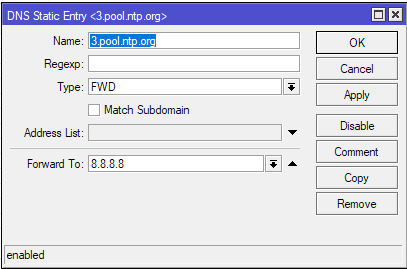
Exactly for this reason I need to have the following DNS static FWD entry on all of my routers:

The devices all have DoH with “Verify DoH Certificate” enabled, so they need to have a way to first synchronize the time without contacting the DoH servers.

Yep. This is not a “nice to have” or “enables some additional things” type of feature any more like having a beeper or an SD-card slot (or USB for that matter). This is needed for basic functionality.

EDIT: I personally think that even basic home devices need this, but I would be totally satisfied if an arbitrary line was drawn, e.g. from the rb5009 up, that would have this.

Well, I can understand that for a $59 router every penny saved is welcome.
But it is a bit disappointing indeed that the higher-end models also do not have an RTC…
Fortunately for the TLS connections mentioned by @lurker888 there usually is no problem because the latest retrieved time is stored as the access time of a configuration file, so it usually is within ~8 hours of current time, and that normally is enough for certificate validation.
However, there can be a bootstrap problem when a fresh router is connected using some complicated method. Of course an RTC would only solve that when set to correct time in the factory.

I am doing a config export/import between two routers to have a standby router at an important site. I export the config and modify it a little to have a different IP on the standby router, and some config elements in disabled state. In that modification script I also add a “/system clock set” command at the top of the file. This guarantees the standby router has approximately correct time.