/certificate settings
set builtin-trust-anchors=trusted
/ip dns
set allow-remote-requests=yes servers=1.1.1.1 use-doh-server=https://1.1.1.1/dns-query verify-doh-cert=yes
Option 2 : Cloudfare DoH DNS 1.1.1.2 with malware protection
/certificate settings
set builtin-trust-anchors=trusted
/ip dns
set allow-remote-requests=yes servers=1.1.1.2 use-doh-server=https://security.cloudflare-dns.com/dns-query verify-doh-cert=yes
Option 3: Cloudfare DoH DNS 1.1.1.3 with malware protection and adult content
/certificate settings
set builtin-trust-anchors=trusted
/ip dns
set allow-remote-requests=yes servers=1.1.1.3 use-doh-server=https://family.cloudflare-dns.com/dns-query verify-doh-cert=yes
Here you can check if you are conected to Cloudfare DNS via DoH : Check
Here you can check if you are under 1.1.1.2 protection, you should not see any www page but I had to reset my router to make it work: check
Check the traffic in terminal
/tool/sniffer/quick port=443 ip-address=1.1.1.2
Please any advice to improve the guide are welcome…
Since recent RouterOS versions, installing third-party certificates is not required because it has built-in trusted CAs. As the documentation states: “RouterOS comes with a pre-installed list of trusted CAs.”
According to the documentation, if DoH is used, then regular DNS servers are not used for general queries, even if they are configured: “If use-doh-server is set, router will ignore servers values for domain name resolving and only use the DoH server.” But I don’t know the details, for example, if regular DNS will be used if DoH fails.
Additionally, since the use-doh-server URL in the examples uses an IP address instead of a hostname, no initial bootstrap DNS lookup is required. This is another reason the servers list can be empty.
Configuration examples:
/certificate settings
set builtin-trust-anchors=trusted
/ip dns
set allow-remote-requests=yes servers=1.1.1.1 use-doh-server=https://1.1.1.1/dns-query verify-doh-cert=yes
/certificate settings
set builtin-trust-anchors=trusted
/ip dns
set allow-remote-requests=yes servers=1.1.1.2 use-doh-server=https://1.1.1.2/dns-query verify-doh-cert=yes
/certificate settings
set builtin-trust-anchors=trusted
/ip dns
set allow-remote-requests=yes servers=1.1.1.3 use-doh-server=https://1.1.1.3/dns-query verify-doh-cert=yes
Yes, using the IP address directly (e.g., https://1.1.1.2/dns-query) is correct. Both Cloudflare and Google support this method.
The reason is to avoid the initial bootstrap problem, where the router would first need to resolve the DoH server’s hostname using another DNS service. Using the IP address directly removes this requirement.
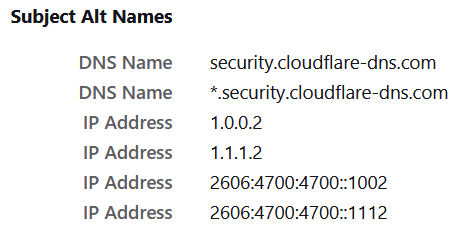
If you open https://security.cloudflare-dns.com/dns-query in a browser and inspect the website certificate, you’ll find that both the DNS name and the IP address are listed in Subject Alt Names section, so both will work just fine with verify-doh-cert=yes option:
No. But if you set the use-doh-server= RouterOS uses that, and the DNS server listed only resolve any DNS names in the doh-server address itself – so in that sense it’s secondary DNS.
Personally, I’d leave a DNS server set. More pointing out for discussion it is not strictly needed. But I’m of that thought that preventing outages from DNS not working is more important than DNS potentially going out plain UDP.
So how exactly can a backup DNS server from another provider be setup, when using DoH? Even if the backup would only be plain DNS…
During the Cloudflare global outage a few hours ago I tried to add another DNS server, applied the settings but it still did not work, seems like it was still trying to use DoH server exclusively. Is there another easy way?
Thanks, I suspected it might be somehow doable via script, but I was hoping for some easier hidden way I maybe did not notice. It is even not quite clear for me from that thread how the final script should look like.
this makes no sence…so if DoH will be down it means that router wil not use another DNS providers? I think this could be specify as Mikrotik BUG, no? So if cloufare is down I will have no internet?
I prefer this behavior and hope that MikroTik doesn’t change it. I live in a country where the government has many restrictions on which sites and services people are allowed to access. The ISPs “enforce” that by DNS for most of the cases. Since a couple of years they have started to catch and redirect all DNS 53 to their resolvers, even if you specify servers like 8.8.8.8 or 1.1.1.1. Fortunately, they have not blocked DoH yet, and I rely on DoH to be sure my government is not manipulating the DNS responses.
So I definitely hope that MikroTik never automatically falls back to DNS 53 when for some reason the configured DoH is not reachable. I need secure DNS, I do not want that my ISP only has to block access to the IP addresses of known DoH services for my router to silently switch to unsecured DNS that is being redirected, monitored, and manipulated without my knowledge. I rather be notified immediately that DoH has failed (all DNS queries fail) so that I can investigate and maybe switch DoH provider. This is an important security issue!
sorry but this is nonsence… if I set only DoH then use only DoH as you wish…but If I set up primary and secondary DNS so when primary DoH is down then use secondary DNS…
People put may fill their Servers entries under IP → DNS to bootstrap the initial look up of the DoH domain name because they don’t want to manually maintain static DNS records for that domain. That doesn’t mean the router should silently switch to those unencrypted servers for all requests, fully unbeknownst to the users.
You should instead petition MikroTik to allow multiple DoH endpoints that will be used in a failover way.
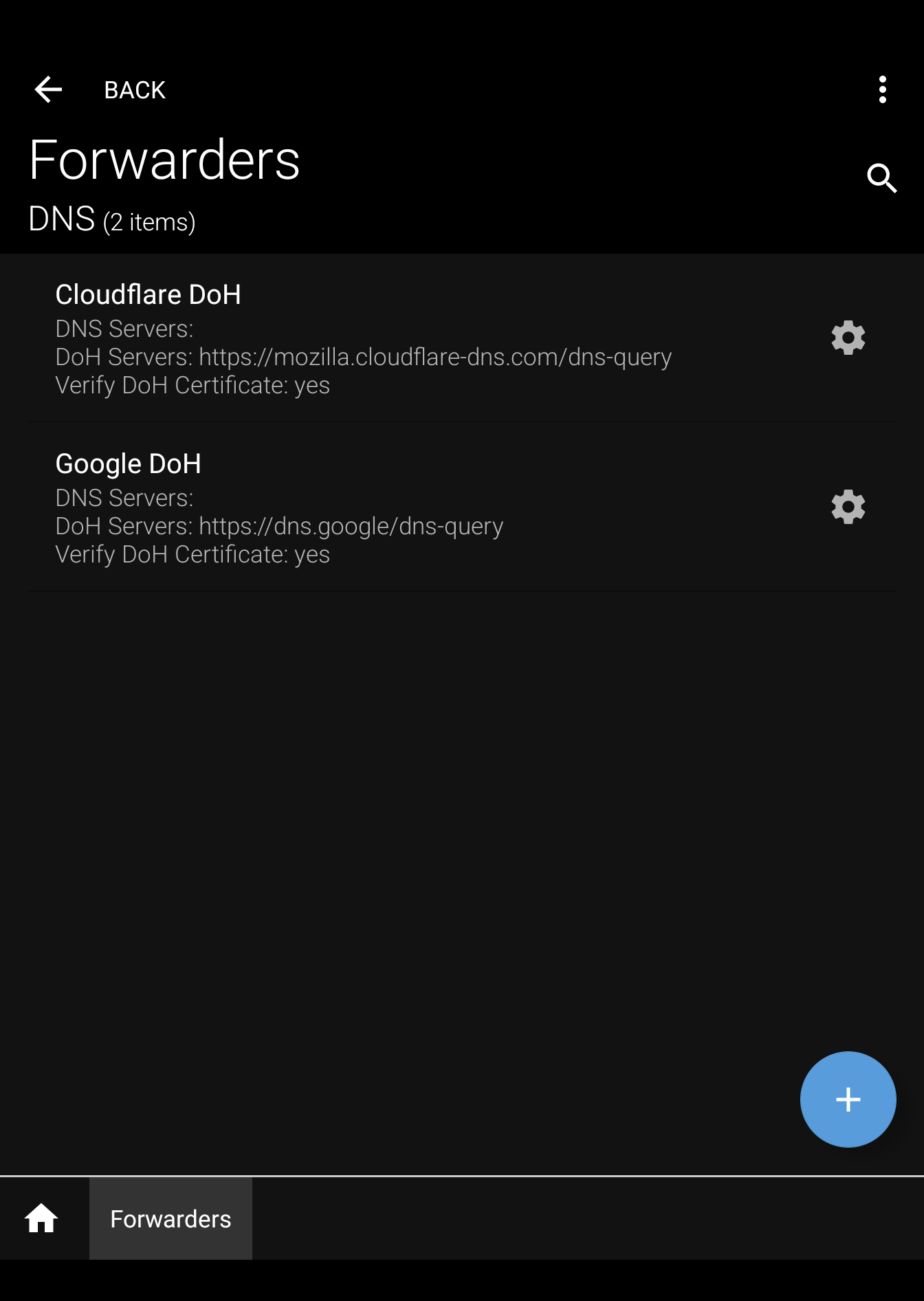
It actually currently already possible to have RouterOS maintain multiple connections to different DoH servers and use them at the same time, though unfortunately only in the context of FWD static records. Multiple Forwarders, each pointing to a different DoH URL are already possible and 100% working. Which means the backend is ready. MikroTik just needs to modify the main URL field to accept a comma separated list of URLs instead of just a single one.
Mikrotik forwarder works only with static DNS FWD entry???
Configure/add a statis DNS FWD entry:
/ip dns static add forward-to=forwarder1 name=mikrotik.com type=FWD
Now each time when a router will receive request to resolve mikrotik.com, request using round-robin algorithm will be forwarded to 1.1.1.1, local.dns or Google DoH server.
Currently you can only use the defined forwarders in the static FWD entries. But as you can see, multiple DoH URLs can be defined for each forwarder, as well as multiple DNS 53 servers. The docs says that they will rotate between the entries with round-robin, but I understand (although not stated in the docs) that if you specify DoH URLs they will be prioritized and will probably only rotates between those DoH entries. I have only defined forwarders with DoH until now, leaving the Servers field empty.
And no, the round-robin will not use local.dns, it only strictly uses the server/DoH entries that you entered in that particular forwarder1 configuration from your example for mikrotik.com.
Like I wrote above, currently forwarders are only available to static FWD records. But they prove that RouterOS already has the capability to use multiple DoH URLs. They just need to update the OS to be able to also do that for normal lookups (outside of the FWD context), modifying the main settings to allow /ip dns set use-doh-servers=<comma-separated-list-of-urls> instead of the currently more limited /ip dns set use-doh-server=<single-url>.
Good idea. It’ll even be more flexible, if Mikrotik introduces a separate DoH servers table with all related parameters (verify certificate, max connections, max concurrent queries, timeout) and then adds two lookup fields to IP/DNS for primary and secondary DoH. The lookup field can also be used for DoH server selection in FWD entries.
And in the CLI of IP/DNS the profiles will be listed instead of URLs