Communication between 2 networks

Hi everyone,

It’s the first time I’m using Microtik CRS309-G-8S Router, my problem is very basic, I have two networks 192.168.250.0/24 on sfp-port1 and 192.168.37.0/24 on sfp-port2 and I want to access .37 machines from .250 network and vice versa.

If needed, gateway on each side would be 192.168.X.254.

On each LAN network every machine has a static IP adress.

Thanks for your help

Might be useful to know what you have between the sfp-ports and their respective networks.

On the Mikrotik, using Webfig or WinBox, you can go to IP -> Routes and add routes to 192.168.[37 or 250].0/24 via sfp-port[1 or 2].

On 192.168.X.254 you set a route to 192.188.[287-X].0/24 via whatever port is connected to sfp-port[1 or 2]

  1. Desktop switch with one Gigabit Ethernet port and eight SFP+ 10Gbps ports, not a router.
  2. Provide a network diagram including ISP modem or modem/router equipment you are using.

Devices in both subnets either have to use your switch CRS309 as their default gateway ... or they need additional route towards the other subnet via CRS using its appropritate IP.

Well, it sports on the case "Cloud Router Switch", so, while these devices tend to be good switches and bad routers, it is still a router.

From test results (for 512 byte packet size), bridging (fast path) is 946.6 Mbps while routing (fast path) is 891.3 Mbps, if it is used as a router between two networks (without firewall rules) shouldn't be too bad.

my 1. and has nothing to do with my 2.

Thank you for your answers,

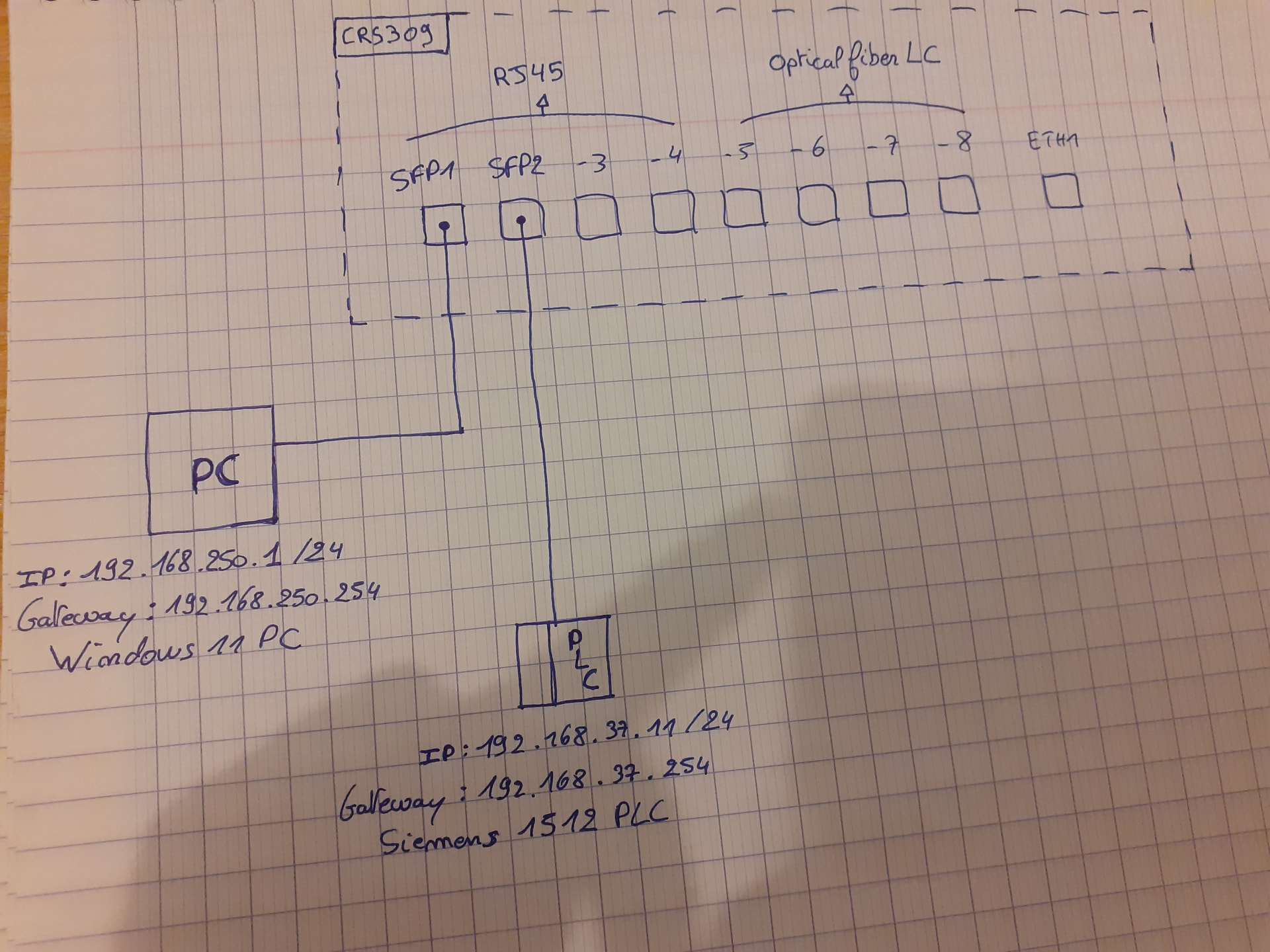
For the moment, the topology is the folowing :

Gateway is already configured on the PC and PLC.

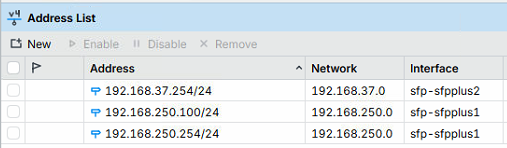
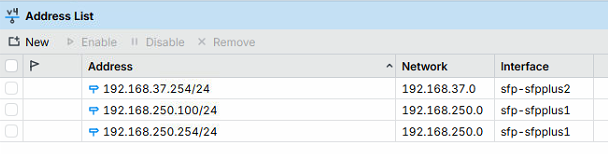
My IP Adress list in the Mikrotik : (250.100 is the mikrotik adress, 37.254 and 250.254 are gateways on each port)

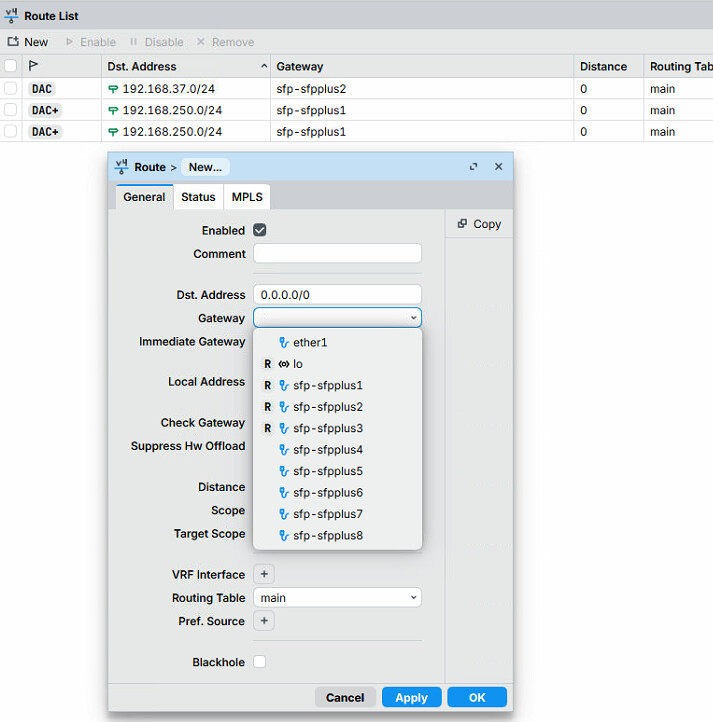
My Route list with 3 routes automatically created when I add the IP Adresses :

How can I fill this to do what DuctView said?

Do I have to bridge port 1 and 2 to have a communication between this two ports or maybe it’s not necessary with the ip route?

In theory, you should have enough connectivity to work.
If it does not work:

Can you ping the plc from your PC?

  • If no, can you ping the plc from the router?
  • If no from PC and no from Router, perhaps it doesn't answer pings (unlikely), otherwise not sure.
  • If no from PC but yes from Router, the PLC likely wants to see source device on same subnet as itself.
  • You can fudge this by adding a src-nat rule onto the router.
  • From webfig
  • ip firewall nat
  • new (top left)
  • chain srcnat
  • out. interface sfp-sfpplus2
  • action masquerade
  • drag to top (if you have other nat rules)
  • Test

what is the 192.168.250.100/24 address for? (in addition to the one listed as gateway 192.168.250.254/24)?

I can’t ping the PLC from the PC.

I can ping the PC from the router.

I can ping the PLC from the router.

I tried to add the following rule but I have the same result :

The bytes is 0, which seems to indicate nothing is hitting it.

Do you have L3 HW offload enabled?
If enabled, trial it with L3 HW offload disabled.

If that works you will need to rejig the L3 HW offload to use fasttrack offload.

There is a bit of reading here,
You will need to add some firewall rules, including a fasttrack rule.

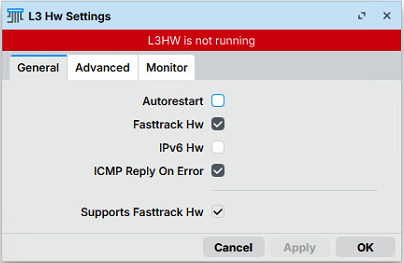
Ok, my L3 Hw Settings look like this :

What you have on your router should be sufficient. Before jumping in and playing with fast track, you need to check that you have return routes on the PC and the PLC. ie 192.168.[X ].~ must have a route to 192.168.[287-X].~ - are wither of the PLC and PC geting their IP addresses by DHCP from your CRS309?

No DHCP, ip adresses are static.

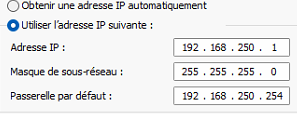
PC (in french sorry) :

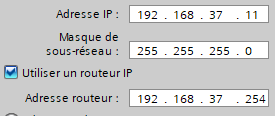
PLC :

OK, the Addresse router and Passerelle par default [excuse the French as we say in the UK :laughing:] should be set to the respective IP addresses of sfp1&2. And sfp1&2 should be set to addresses within the respective subnets of the PC and the PLC as defined by the Adresse IP and Masque de sous-resau.

Yes this is ok :

Time to ping test this to and from peripherals and to both interfaces on the pouter from each peripheral.

Ping from the mikrotik to the PC, PLC and respective gateways : OK

Ping from PC to 192.168.250.254 gateway : OK

Ping from PC to 192.168.37.254 gateway : Not ok

Ping from PC to PLC : Not ok

I don’t have any terminal interface to ping from PLC.

How are routes configured on PC? If PC is only configured with default route via some router which is not your CRS and that router in turn doesn't know anything about 192.168.37.0/24 (and requirement of using your CRS as gateway), then things can't work ...
I was hinting at this in my post above Communication between 2 networks - #4 by mkx ...

Assuming you have no existing firewall filter rules I would add the following rules.

/ip firewall filter
add action=fasttrack-connection chain=forward comment="defconf: fasttrack" \
    connection-state=established,related hw-offload=yes
add action=accept chain=forward comment=\
    "defconf: accept established,related, untracked" connection-state=\
    established,related,untracked

If you do have a bunch of firewall rules, perhaps you should export your entire config for us...

I think it needs the fasttrack rule at a minimum for l3hw fasttrack to work. (Fasttrack needed for NAT)

Then turn off l3hw offload, you should ensure it works correctly in software before attempting to use the l3hw version.

/interface ethernet switch
set 0 l3-hw-offloading=no

Then see if you can ping the 192.168.37.254 IP address, and the PLC.
(Maybe reboot)

I think that you then need to disable l3hw offload on the WAN port (in this case
sfp-sfpplus2) and then enable l3hw offload as per:

enable hw offload fasttrack

With luck, it might then work in hardware.