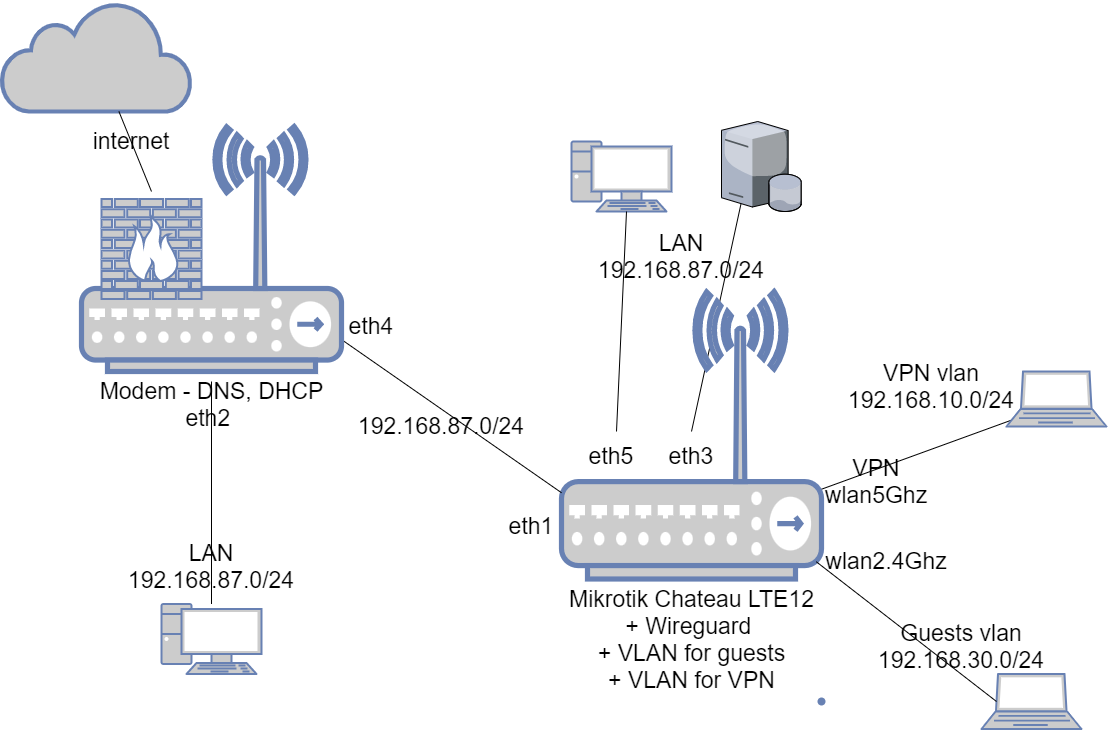
I have a Mikrotik Chateau LTE12 which is behind another router that has access to internet and is configured as DHCP server
I want to have Mikrotik on the same LAN with the main one with three main things:
on mikrotik I have a Wireguard VPN setup and it’s connected and from mikrotik I can ping the VPN gateway which is per say 10.10.10.1 How can I set all traffic coming from VPN vlan to go through it?
on ether1 I have the connection to the main router and I have setup the static address from main router’s lan, I want in case main router dies the internet to go through the LTE modem how?
I have VLANS which are configured and ping-able from each other but there is no internet nor access to the main lan WHY? I need access from at least VPN vlan to the main LAN
Firewall is disabled for now but I guess it will be enabled once more things are set up
on ether1 I have the connection to the main router and I have setup the static address from main router’s lan, I want in case main router dies the internet to go through the LTE modem how?
First you want the same LAN on Main router and Chateau, and still you want two LAN segments with failover WAN. Select one.
I have VLANS which are configured and ping-able from each other but there is no internet nor access to the main lan WHY? I need access from at least VPN vlan to the main LAN
Probably you not do a SNAT/Masq from that “VLANS” per eth1 ?
or your Main Router not have a static IP of your “VLANS” addressation are in nexthop (IP from Chateau eth1) ?
I assume you currently have a static default route pointing to the router on the LAN. You need to replace this with a “recursive” route as follows …
(a) Create a static route to a host which will always be reachable via the main router, ideally choose something specific to that ISP like their NTP server or one of their DNS servers. Something like this, assuming your router is 192.168.87.1 ..
add check-gateway=ping comment="*** Remote Gateway - Three DNS ***" distance=1 dst-address=83.136.47.249/32 gateway=192.168.87.1 scope=10
Then add a default route but via this host rather than direct to the router. This route will stay active as long as that host is reachable, but go inactive if the main Internet is down ..
Now you need a backup default route via LTE, with a higher distance so that it is not used when the main Internet route is active, something like this if the Chateau configuration is done the same way as my SXT
add apn=3internet default-route-distance=5
Before you do that last bit, make sure you have the firewall enabled and active on the LTE interface.
Looking at your diagram, you probably want to move DHCP and DNS to the Chateau.
Hey thanks for your replay could you please elaborate a bit I am new to mikrotik ecosystem so learning quite a lot of stuff and how it work internally { LOVE IT } But I need more examples how to do that. I’ve tried setting snat/mask for all that goes out eth1 but it complains that it’s part of bridge so I changed the out interface to bridge but still no ping so far
So the main problem now is HOW TO access the main lan from VPN vlan for eg @SIB your help is much appreciated!
@OP
But you know that you should re-think that “One LAN” or Two routers with own Network.
Then, when you select this, we can say and help you with config.
For now, for teaching purpose read a Kirk PDF/MUM Video what is here: MiltiWan.
As always, RouterOS is not easy.. and even after years I still have what to learn about new feature what I never use… We love that
 } But I need more examples how to do that. I’ve tried setting snat/mask for all that goes out eth1 but it complains that it’s part of bridge so I changed the out interface to bridge but still no ping so far