Configure a Single Switch (CRS305-1G-4S+) and ISP Router

Let me condense 3 weeks of torment and failure after re-reading the documentation, searching this forum, YouTube videos, 10s of re-configurations, and frankensteining examples (such as http://forum.mikrotik.com/t/using-routeros-to-vlan-your-network/126489/1). Please help.

GOAL
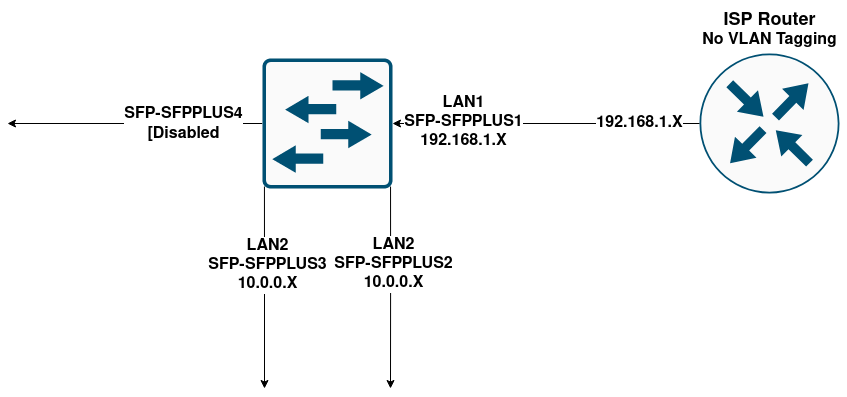
Trying to configure a single CRS305 to place a PC and NAS on a separate LAN via VLANs/Inter-VLAN Routing. The devices will have access to the internet via the ISP router/AP and the VLAN will have MAC filtering for select devices on the ISP router subnet to have access to the NAS.

Can this be done? If so how?

TOPOLOGY
SwitchLAN-Diagram.drawio.png
CONFIGURATION COMPACT

# 2024-10-06 02:20:09 by RouterOS 7.16
# software id = 42IK-6SGP
#
# model = CRS305-1G-4S+
# serial number = ****
/interface bridge
add frame-types=admit-only-vlan-tagged name=bridge1 vlan-filtering=yes
/interface vlan
add interface=bridge1 name=vlan1 vlan-id=1
add interface=bridge1 name=vlan100 vlan-id=100
/interface wireless security-profiles
set [ find default=yes ] supplicant-identity=MikroTik
/ip pool
add name=dhcp_pool0 ranges=10.0.0.50-10.0.0.200
/ip dhcp-server
add address-pool=dhcp_pool0 interface=vlan100 name=dhcp1
/interface bridge port
add bridge=bridge1 frame-types=admit-only-untagged-and-priority-tagged \
    interface=sfp-sfpplus2 pvid=100
add bridge=bridge1 frame-types=admit-only-untagged-and-priority-tagged \
    interface=sfp-sfpplus3 pvid=100
add bridge=bridge1 frame-types=admit-only-untagged-and-priority-tagged \
    interface=sfp-sfpplus1
/interface bridge vlan
add bridge=bridge1 tagged=bridge1 untagged=sfp-sfpplus1 vlan-ids=100
add bridge=bridge1 tagged=bridge1 untagged=sfp-sfpplus2,sfp-sfpplus3 vlan-ids=\
    1
/ip address
add address=10.0.0.1/24 interface=vlan100 network=10.0.0.0
/ip dhcp-client
add interface=vlan1
/ip dhcp-server network
add address=10.0.0.0/24 dns-server=1.1.1.1 gateway=10.0.0.1

Read and digest this excellent guide:
http://forum.mikrotik.com/t/using-routeros-to-vlan-your-network/126489/1

Then come back with your questions.

This looks like you are routing more rather than switching so the device won’t have a lot of horsepower.

If you are connecting directly using PVID than frames are effectively untagged so configured falls apart at line 6.

If I understand you network correctly you want your switch to act on L3 capabilities, then why are you messing with VLAN. You have described on each port a different subnet!

No, you’re absolutely correct and I think Steveocee also pointed out the issue; I want to avoid using this switch completely like a router. I do want 3 ports to utilize L3Hardware Offloading to handle Inter-VLAN routing, and one port to act as a gateway to my router. More specifically, VLANs across sfp-sfpplus2-4 with sfp-sfpplus1 acting as a gateway.

The export config I shared recreates an example from the documenation (https://help.mikrotik.com/docs/display/ROS/Bridging+and+Switching#BridgingandSwitching-VLANExample-InterVLANRoutingbyBridge) with some frankenstein tinkering.

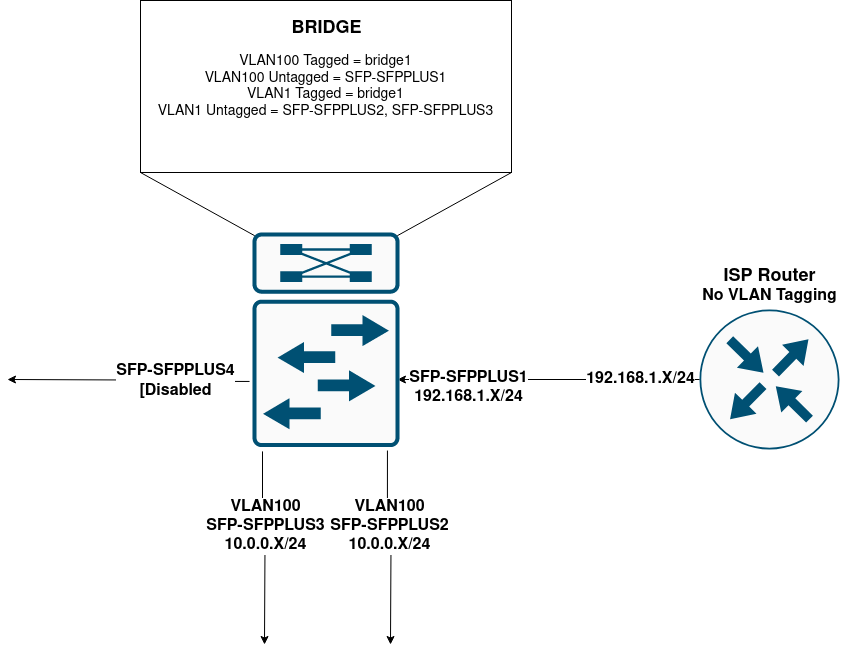
VLAN Diagram
SwitchLAN-Diagram.drawio(1).png
The Idea was that VLAN100 traffic would be untagged for egress out port sfp-sfpplus1 while tagged by bridge1. VLAN1 gets automatically assigned, so I wanted it to untag VLAN1 towards sfp-sfpplus2 and sfp-sfpplus3. NOTE: Reading outloud I see that this VLAN1 untagging makes no sense. Still there is more to realize.


…What? Please read the first sentence of this thread where I link that exact post. If you see something helpful I missed in that post or on any page of the documentation (e.g. https://help.mikrotik.com/docs/display/ROS/Bridging+and+Switching) please let me know.

Maybe you read that guide, you certainly did not digest it, I think.

The only thing I know about VLANs is Rules #1 and #2 of the Mikrotik Club, which may or may not be useful in your case, still I would respect them, to avoid possible issues:
http://forum.mikrotik.com/t/network-traffic-gets-slower-when-adding-vlans/178615/1
One explanation:
http://forum.mikrotik.com/t/vlan-configuration/176351/1

I’ve re-read your OP.

Long story short - lan or vlan going to different network requires routing not switching so you aren’t going to achieve what you want.

You could “just” switch your devices onto the ISP LAN and apply a Mac filter if your needs can be stretched slightly?

I think this might be basically doable, so long as the ISP router can be configured with static routes on it.

ie. 10.0.0.x/24 via 192.168.1.2 (the IP address I have assigned to the CRS)

If a device on the main ISP LAN wants to connect to a device on your new LAN, it will send the packet to the ISP router.
The ISP router will hopefully forward (some) of these packets to the new VLAN, and also send redirect icmp packet(s) saying use 192.168.1.2
to get the device to send further packets direct to the Switch.

The device on the main ISP LAN needs to accept these redirect messages. (Not sure but windows may need to trust the network)

Your filtering options for traffic between ISP main LAN and the new LAN are quite limited when using L3HW offload, e.g. no stateful firewall. (though it looks like mac address filtering might be possible)

You need to carefully review your original config, some of the pvid’s look wrong, and there may be other issues.
I guess you can set it up and get it working without L3HW offload, with virtually no enabled firewall rules, then enable the offload.