Hi everybody,
I’ve bought a MikroTik device in order to provide wireless like an AP to my clients.
It has got only an ethernet port and a wifi anthenna.
There are a cupple of SSID I want to broadcast, each one depends on different vlans.
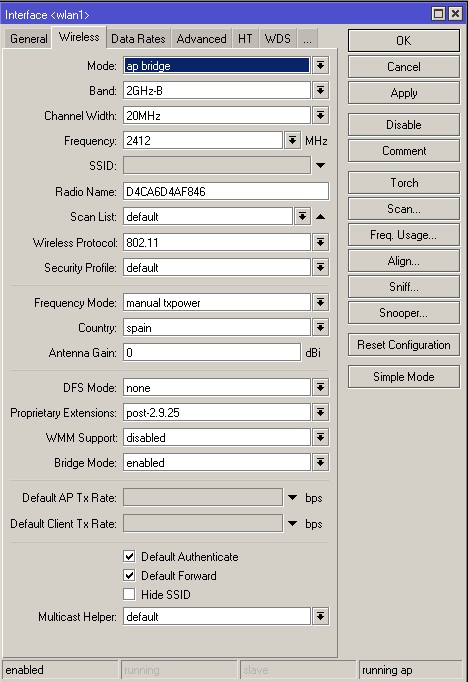
I’ve configured an IP address for the ethernet port and configured wifi interface like AP-Bridge mode.
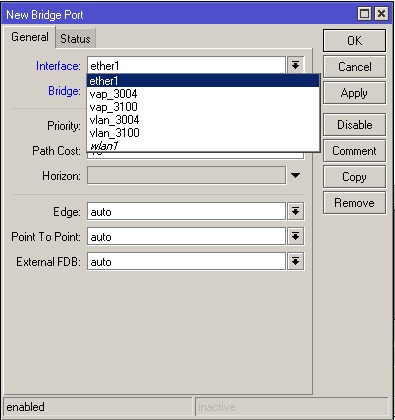
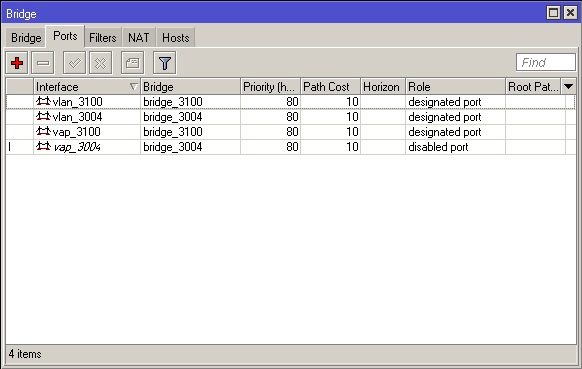
I’ve created two vLAN and two bridges. Each bridge has got his vlan port assigned.
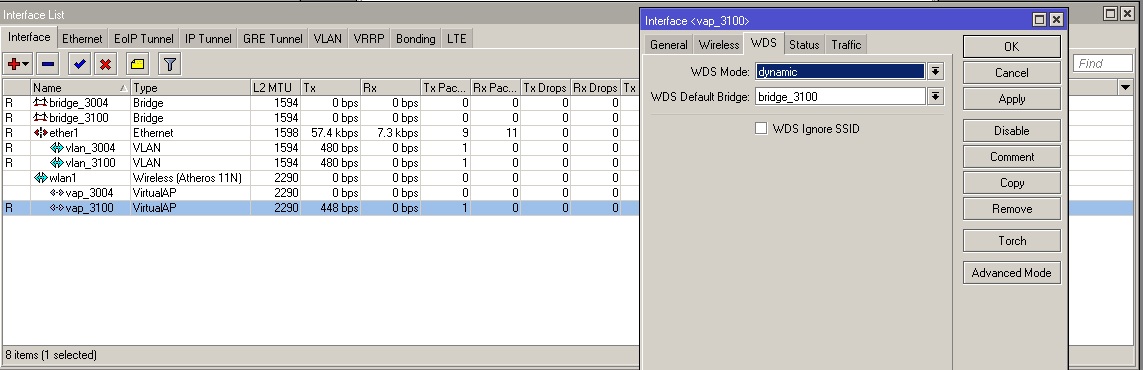
To provide wireless through multiple SSID I’ve configured two vAP one for each vlan, and put WDS in dynamic mode with the bridge that belongs to this vlan.
Despite this I can’t connect to my SSIDs with my laptop. I see traffic on the vAP where I’m connecting like you can see in the attachment but it doesn’t route me to my network.
I don’t know what I’m doing wrong… I would appreciate any help!
There is no way to do a TRUNK with native VLAN on mikrotik. All VLAN must be tagged. Directive use-service-tag is for tagging VLAN in VLAN I think you don’t want to use it.
I see, the VLANs are not terminated on this device, so there can be also problem on device terminating the VLANs.
Yes C.Brown, Mikrotik is connected to one of my Cisco switches on vlan3200.
interface GigabitEthernet4/10
 description *** Mikrotik AP ***
 switchport access vlan 3200
 switchport mode access
 spanning-tree portfast
 spanning-tree bpduguard disable
end
I’ve got many Cisco AP on the same network working with the same port config. This vLAN has access to all other vLANs on the network, so if I configure a vAP in vLAN 3004 for example, I think that traffic should route well… But it doesn’t.
I’ve got all Cisco APs configured on that way, but it seems to be different in Mikrotik.
Thank you savage, I had a trunk port configured the first day I power on my Mikrotik device, but I desperately change it a cupple of times in order to see if works on some way, but it doesn’t work in any way.
I’ve now my mikrotik device configured on trunk port without STP (I’ve also tried with STP) and still the same…
interface GigabitEthernet4/10
 description *** Mikrotik AP ***
 switchport trunk native vlan 3200
 switchport trunk allowed vlan 3004,3008,3009,3012,3016,3200
 switchport mode trunk
 power inline never
 spanning-tree portfast
 spanning-tree bpduguard disable
If you look at the bridge hosts, and get the MAC addresses for the VLAN interfaces on the switch on MT, then the VLAN’s aren’t your problem… What you are trying to do definitely works - I do the same for some APs…
EDIT: Had a look at some of my configurations now, and your MTU and l2MTU settings are completely whacked. I suggest you remove the bridge & vlan interfaces and recreate them with the default settings.
Thank you savage, but if I don’t configure native vlan on my switchport I cannot reach Mikrotik on the network. I can’t reach it neither ping tests reply.
Maybe I have to create vlan 3200 on Mikrotik and use as service tag?
You must assign the IP address to the bridge, not to the interface. STP is irrelevant on this arrangement. STP must be on, if there is on can be circle.
I haven’t change MTU settings, I think these are my default settings… I’ll remove vlan and bridges and compare values and I’ll try then. Thank you savage.
Thank you fxx, I’m trying to assing the IP address to the bridge and I’ve done, but I cannot reach mikrotik through ping test.
The old ethernet interface IP address (172.30.0.160) belongs to VLAN 3200 so I’ve created a new bridge_3200 and assign it the IP address 172.30.0.160. I’ve also created a new VLAN 3200 on Mikrotik.
In this VLAN I’ve configured bridge_3200 as interface and haven’t check “use service tag”.
OK, I have check your config once again. Disable the WDS mode on all VAP, don’t setup WDS. WDS mode is not for clients. wlan1 is italic because you setup both SSID on VAP. If you move one SSID to wlan1, it come normal (R).
 I think you don’t want to use it.