We have a network of “SXTsq 5 ac” configured in pairs: the master is in “PTP bridge AP“ mode with nv2, the slave is in “PTP bridge CPE“ mode with nv2. They are on the long term channel of version 7, with routeros and wireless are sole packages. All is well with them.
We purchased two “SXTsq 5 ax” and want to configure them in the same way. They come pre-configured in AP mode, with routeros and a different wireless package.
I would like to know why it is impossible to set them in PTP bridge mode from the WinBox, and what I need to know to set them as wanted.
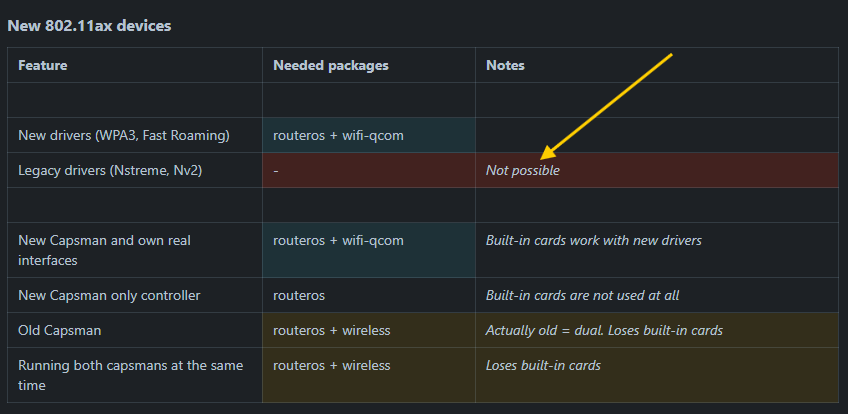
Nv2 is only available with the old wireless package. You ax devices use the new wifi-qcom package and for that Nv2 is not possible. It's in the documentation:
Just to clarify a bit. There are at least three different aspects to your question.
First of all, PTP mode is simply missing because that Quickset mode was removed (never got around to writing it, forgot about it, etc - take yout pick.) The functionality is there, it just has to be configured manually.
Nv2 mode is gone. None of the ax things support it. The longer explanation is that nv2 used a sort of TDMA, which is pretty much incompatible with ax. Ax, however, handles links much better than the old n standard. What this means for your links will only become fully clear if/when you try it. If the links are not at the limits of what's possible, my guess is that they'll work fine.
Some people expressed misgiving with the new AX ptp series of products. But that's true about almost every product. I have no opinion on this, others may chime in with their experience.
If you want to try it, what you'll need is to simply set (or leave, if you will) one of the devices in "ap" mode, and set the other one up as "station bridge".
In case of need, rextended posted here: PtP with LHG XL 5 and WiFi package - #24 by rextended
an example of basic configuration for a master/slave (please read as ap/station-bridge) with the wifi drivers that could be a base reference.
Did MT publish a report on AX PTP, where devices were deployed in a controlled environment, with results that support selling the devices as reliable commercial products for enterprise customers?
I'm not aware of such a report. Mikrotik, in general, doesn't publish a whole lot of marketing literature. Some case studies are available, but not an awful lot.
PtP configurations and the client side in PtMP setups are the intended usage of these products, so it is quite certain that they are considered suitable for this purpose by the manufacturer.
The only two changes are:
AX made the vendor-specific protocols (of which NV2 is one) basically redundant. Whether this is for the better or for worse, everyone can decide for themselves. (At least there is standardization across different vendors. That's definitely a plus.)
The Quickset (wizardy) mode for setting this up is no longer available. I guess the assumption is that this is usually not set up by home users, but by professionals, who would apply custom configurations anyway. I always had a bit of hate for the Quickset feature, so I don't think it's a huge loss.