We are using a RouterOS (v6.38.3) firewall (hAP lite) with a basic ISP/LAN configuration for a branch office. It is working great, but we would like to configure a second device with an identical configuration as a backup they could swap out very easily (by non-technical staff).
Of course we could just configure a second firewall with an identical configuration that they could just plug in when needed, but what we would really like to do is have both firewalls online, and on-site staff could just swap the cables and be back up and running again in the event of a configuration problem or hardware failure.
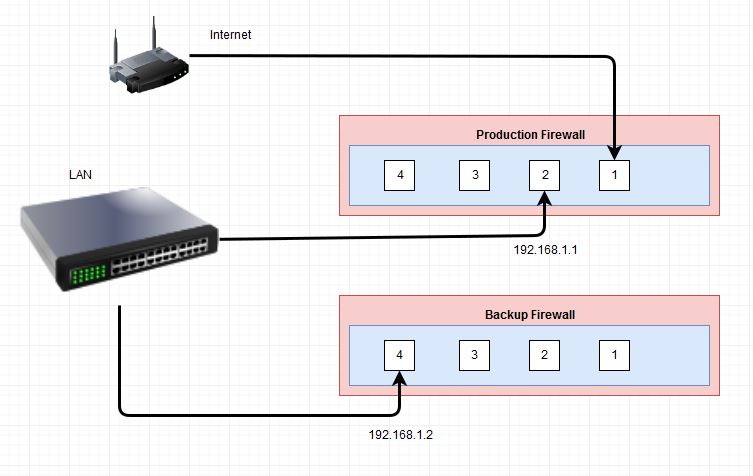
This “warm standby” approach gives us some key advantages:
- Allows identical configuration on both firewalls
- Changes to both firewalls can be configured/upgraded remotely to keep them current
- The production device can be accessed on x.x.x.1 and the backup on x.x.x.2
- In the event of a failure, the cables can simply be swapped to the other device
- Simpler in setup and maintenance than complex live failover configurations
The Question
What is the best way to accomplish this? My initial attempt was to simply create two interfaces with IPs on the same subnet, but this didn’t seem to work. Further research on various postings led to various methods of using routing marks or load balancing concepts, but I was hoping it might be something simple… Essentially, I just want to connect to 192.168.1.2 and be able to configure the backup router, when all the other ports are unplugged. On the production router, nothing will be plugged into port 4, so I want this to be simply ignored. By swapping the cables between the devices, the backup becomes the gateway for the network, and the production is accessible on x.x.x.2.
Am I missing something simple here? What would you recommend for reaching our goal of a simple backup device that we can maintain remotely? (I can provide more details on routing and such, but we are essentially just talking a basic setup.)
Thanks in advance!!!
