I confess to being a VPN newbie. I’ve got a home office network, and I also take care of the home network for my non-tech-savvy parents a few miles away. Both sites have high-speed 5G wireless Internet through T-Mobile, using FX2000 wireless modems. Both connections have static IPs, with IP passthrough to the router immediately downstream of the cell modem: An RB4011 at my home office, and an hAP-AC2 at the folks’ house.
For their benefit, I’ve subscribed to a streaming service which I watch very rarely (2-3 hours a month) but which they watch almost constantly. While we’re within the streaming company’s Terms Of Service parameters on number of screens and number of viewers, they want to limit our streaming to a single WAN IP. I’d prefer that it be mine since that makes it simpler to manage other network stuff. So, what I’m looking for is a way to connect our two sites with a VPN link, preferably Wireguard, so that the Roku box at Mom & Dad’s house sees my WAN IP connection. It’s okay if the computers and other equipment there see their (the remote site) WAN link, although I’d also want for several of them to see the VPN link as well for access to NAS devices and similar on my home office network.
I’ve drawn up a basic diagram of the configuration I’m looking for, here:
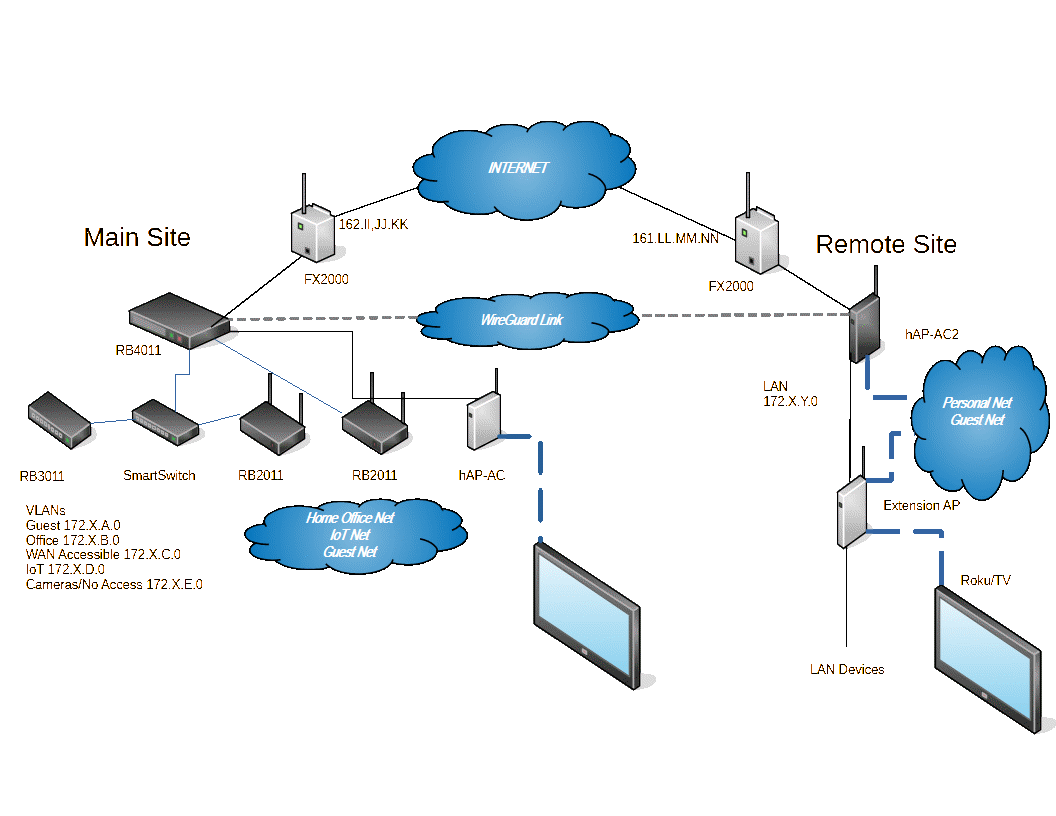
Again, I’m very new at VPN and VLAN setup, so any help or pointers to help is appreciated. One specific question I have from looking at the Mikrotik Docs: Where does that address ‘10.255.255.1/30’ come from? It seems to show up out of the clear blue without explanation. I’m assuming I’ll need to do some DNS configuration for the Wireguard network, is that in the documentation anywhere?