Hello.
What is the preferred scenario for connecting MikroTiks connected by MLAG to two other switches that also support MLAG?
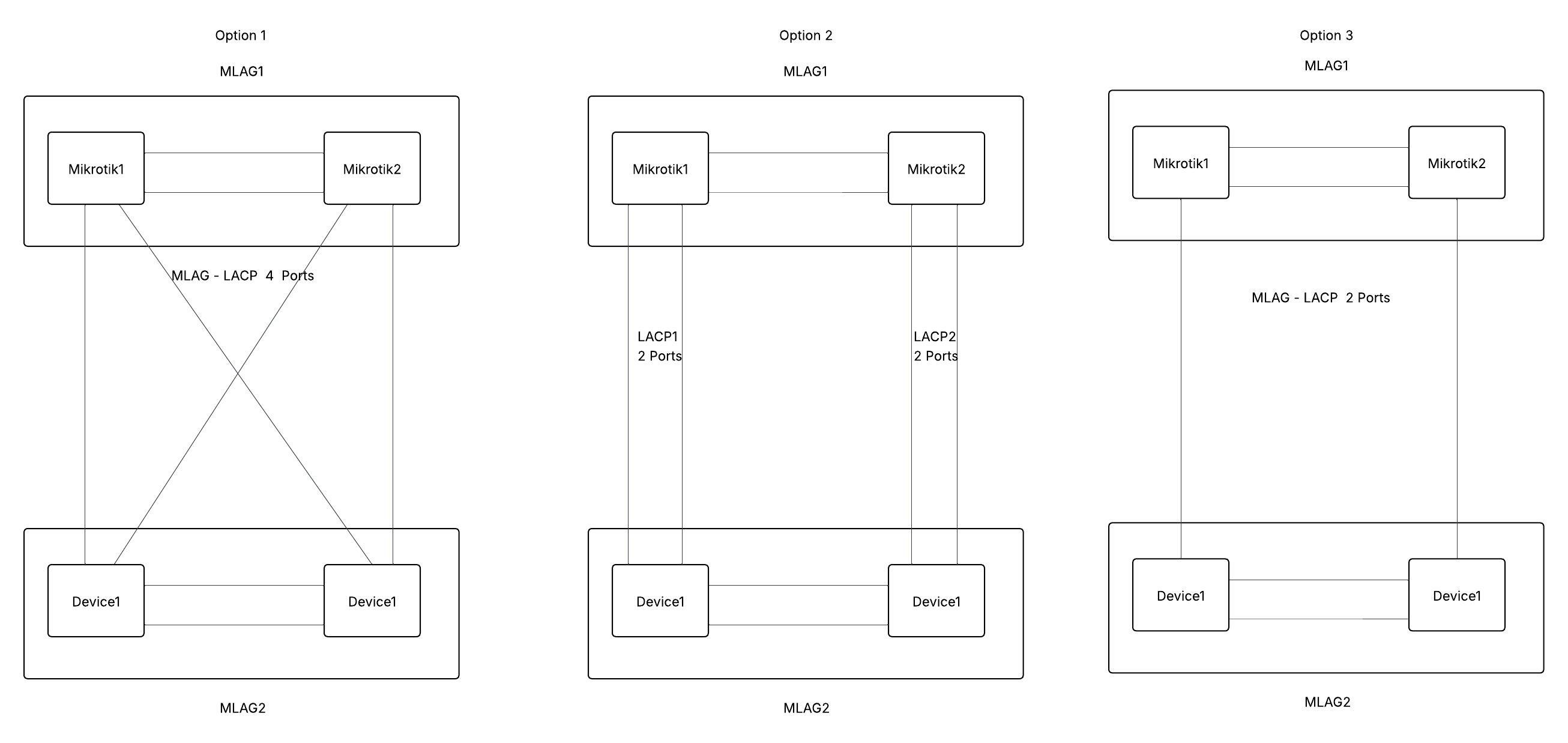
As LACP using MLAG consisting of 4 ports so that each device is connected to each other, or maybe some other combination?
I can see two other ones, but they seem less correct to me. Where I have two aggregations between nodes1 and nodes2, or aggregations where nodes are connected by 1 port. This can be seen much better in the attached image.
Connecting two MLAGs to each other is done with a normal LACP LAG, as if you were connecting another switch, router, or server. Both sides just think the other side is an LACP connection.
I’ve got a couple of these in place and it works fine.
You can do as many as you want. I have four links from my RDS2216 into a pair of CRS326-24S+2Q+RM’s, two per switch, and it works well (closest to your Option 2, but all four cables coming from one Device).
I did find that there’s a bug in software versions above 7.15.3 that any LACP link with more than one link per MLAG switch starts to see really bad packet loss. So in my example of an RDS2216 to the switches, I was only able to get two links (one per switch) to work (your Option 3). (I tested it in 7.16-7.18; haven’t tried 7.19 yet.)
All of your options would work, with Option 1 being the most redundant.
I’d strongly suggest to use Option 1. After testing various failover scenarios (combinations of rebooting all the switches) I discovered that the downtime (accompanied by MAC flapping) is much shorter while using full-mesh topology.