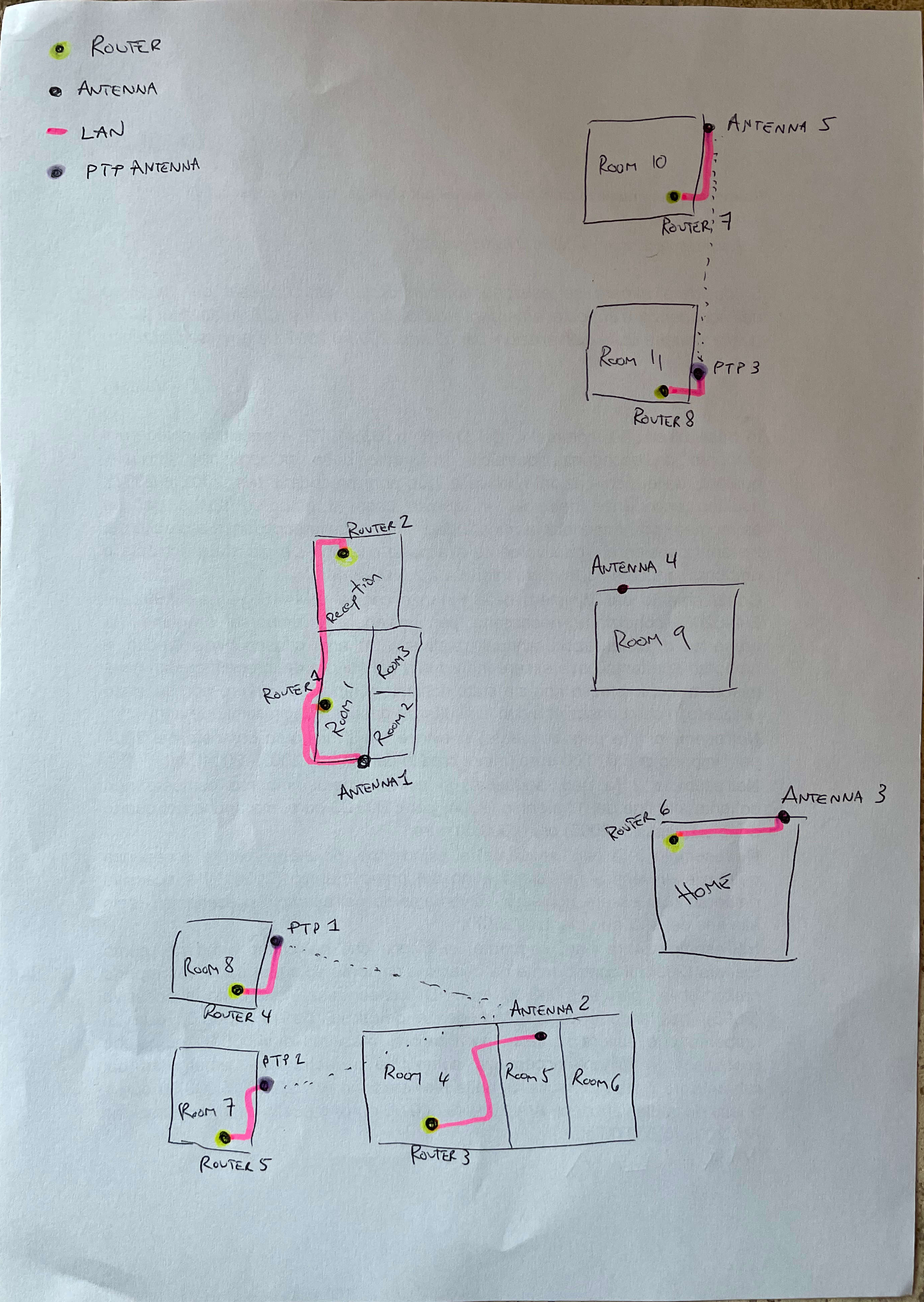
I’ve been reading around on the forums and struggling to get the setup I desire to work.
We have recently installed 5 Mikrotik LTE external antennas on our property. They are all working fine at the moment, but as the IT person, I would like to be able to connect to each Mikrotik antenna separately remotely. Idea being that if I am not onsite at the property, I can still help troubleshoot/resolve issues remotely.
The LTE provider is WindTre (in Italy) for the SIM card. However, the antenna and data plan were provided by a more local smaller company called WiPlanet who have their own access to the Mikrotik routers via a PPTP client connection that they created.
I have attempted a few different things:
Remote www “specific IP” access
IP → Services → www: specify specific IP addresses. I have a VM in the cloud that I thought I could give direct access. (currently still have 0.0.0.0 allowed while I test but know I’ll need to remove it)
I was gonna add firewall rules to accept but noticed that the default configuration provided by WiPlanet didn’t have any rules (no rejects), so my assumption is all traffic is accepted
But when I try to connect from my remote cloud VM, I can’t figure out what external IP to use…
VPN access via Quick Set
I read a post that described turning on “VPN access” on Quick Set.
In doing so, I was provided with a “VPN address”, a “VPN user” and gave a password for authentication
Then went into Webfig → PPP → Profiles, found an existing profile “default-encryption”.
I gave “Local address”, the IP of the router. “Remote address” as “vpn”. “DNS Server”, I tried 8.8.8.8 and 192.168.5.1 (the local devices IP range)
But when I try to connect from my remote cloud VM, it fails to connect to the vpn server name with the error “The remote connection was not made because the attempted VPN tunnels failed. The VPN server might be unreachable. If this connection is attempting to use an L2TP/IPsec tunnel, the security parameters required for IPsec negotiation might not be configured properly.?”
Please find attached an export of the config for any suggestions that I can apply to get this to work.
Thank you! mikrotik-config.rtf (16.3 KB)
Unfortunately, they are a small local provider and don’t offer much in terms of services / support. However, given I’m the “tech guy” for our bed and breakfast, I would want to be able to process things remotely if I happen to be away. If I don’t impact their connectivity aspects, I’d like to have my own separate connection ability.
I agree with anav. If those devices are not yours, you should not be tinkering with them.
Having said that…
LTE devices are typically used with CGNAT-setup. Meaning, there is no way you can access them remotely unless they first get out themselves to a device having a fixed IP (can also be dynamic dns but that complicates things a bit more). And then you can go back through the tunnel created first by the LTE device.
Your requirements however are not very clear (and I am frankly hugely disappointed anav did not bring it up ).
If you are not going to address any of the connectivity aspects, what do you need access to those devices for then ? To do what ?
Or is the true requirement something else behind those LTE’s you need to access /control ?
What IT things are you looking to do with the antennas?
What do the antennas connect to, how is setup, what is the configuration, why are there 5 of them?
Thanks folks for the additional comments and questions. A bit more info on our property, La Piantata:
It is a hotel in the country side of Italy, there’s no good internet providers, or even cell reception, except for ONE provider in the area.
This implies that all the guests that come to visit have no reception or connectivity, so we wanted to offer connectivity
The 12 rooms within the property are spread out across a few hectares of very country side land.
Originally, I had worked with a local technician to get a LAN cable put between 3 of the different structures that are within reach, but within a year, one of those cables got damaged (mice, rain, lightening, uncertain)
So decided given the connectivity provided anyway (30-50MB download max), it’s not worth it. So we’ve gone for 5 antennas that cover the different structures with minimal additional connections between them (I’ll provide a diagram below with more details - each square, subdivided or not - is a separate building).
In terms of my requirements:
Given the 12 rooms, we have about 10 different WiFi connections.
Everyone else in the family / that works at the business doesn’t really understand anything more than the fact that there’s a wireless connection
I tend to travel for work as Technical Presales in a tech start up, but need to be able to help with any issues that might come up
When I say issues/tech stuff, it can be the simplest of “a customer can’t connect to the wifi”, “connected to the wifi but there’s no internet connection”… from those two, I might be able to explain to others which router to restart or if it’s an antenna that needs to be restarted or if they need to contact the installer or the provider directly… or for example i’d like to be able to regularly run speed tests to get an idea of the connectivity speeds of the 5 different antennas to understand if we can optimise the location of any of them
In terms of your explanation @holvoetn, I’m guessing this section from the config is the VPN connection to the carrier’s external server. I could try creating a Google Cloud VM in the cloud to which I could create a separate pptp-client connection that I can then use for my own purposes?
 ).
).