Connected to internet on WAN but not on LAN

Hello I’ve a Mikrotik RB4011iGS+5HacQ2HnD-IN that i connect to my French ISP “Box” to replace the router functions.

The setup is like this:

French ISP box (Freebox) in bridge mode → RB4011iGS+5HacQ2HnD-IN > My home equipments (like PCs and Phones via wifi) on RouterOS i get the connection from the ISP (Public IP + DNS Servers) but on the LAN side i can’t connect to internet.

I also tried to ping 8.8.8.8 from the routerOS interface and it says timeout.

What i’m missing here ?

Hard to say without knowing your configuration.
It could be a mis-configuration of NAT or firewall filters, but also any issue with routes and/or missing/conflicting IP addresses.

Follow the instructions here:
http://forum.mikrotik.com/t/forum-rules/173010/1
and post your configuration.

Hello so i tried to connect the router without my french isp box being in Bridge mode and i have internet connectivity (i also can ping now) so what’s the problem when i’m in bridge mode ?

this is my config (actually not in bridge mode):

# sep/19/2024 19:35:46 by RouterOS 7.6
# software id = RNQD-AAZC
#
# model = RB4011iGS+5HacQ2HnD
# serial number = HE308T8VPYN
/interface bridge
add admin-mac=48:A9:8A:54:22:21 auto-mac=no comment=defconf name=bridge
/interface wireless
set [ find default-name=wlan1 ] band=5ghz-a/n/ac channel-width=\
    20/40/80mhz-XXXX disabled=no distance=indoors frequency=auto \
    installation=indoor mode=ap-bridge secondary-frequency=auto ssid=\
    MikroTik-54222B wireless-protocol=802.11
set [ find default-name=wlan2 ] band=2ghz-b/g/n channel-width=20/40mhz-XX \
    disabled=no distance=indoors frequency=auto installation=indoor mode=\
    ap-bridge ssid=MikroTik-D0DF17 wireless-protocol=802.11
/interface list
add comment=defconf name=WAN
add comment=defconf name=LAN
/interface wireless security-profiles
set [ find default=yes ] authentication-types=wpa-psk,wpa2-psk comment=\
    defconf disable-pmkid=yes mode=dynamic-keys supplicant-identity=MikroTik
/ip pool
add name=dhcp ranges=192.168.88.10-192.168.88.254
/ip dhcp-server
add address-pool=dhcp interface=bridge name=defconf
/port
set 0 name=serial0
set 1 name=serial1
/interface bridge port
add bridge=bridge comment=defconf interface=ether2
add bridge=bridge comment=defconf interface=ether3
add bridge=bridge comment=defconf interface=ether4
add bridge=bridge comment=defconf interface=ether5
add bridge=bridge comment=defconf interface=ether6
add bridge=bridge comment=defconf interface=ether7
add bridge=bridge comment=defconf interface=ether8
add bridge=bridge comment=defconf interface=ether9
add bridge=bridge comment=defconf interface=ether10
add bridge=bridge comment=defconf interface=sfp-sfpplus1
add bridge=bridge comment=defconf interface=wlan1
add bridge=bridge comment=defconf interface=wlan2
/ip neighbor discovery-settings
set discover-interface-list=LAN
/interface list member
add comment=defconf interface=bridge list=LAN
add comment=defconf interface=ether1 list=WAN
/ip address
add address=192.168.88.1/24 comment=defconf interface=bridge network=\
    192.168.88.0
/ip dhcp-client
add comment=defconf interface=ether1
/ip dhcp-server network
add address=192.168.88.0/24 comment=defconf dns-server=192.168.88.1 gateway=\
    192.168.88.1
/ip dns
set allow-remote-requests=yes
/ip dns static
add address=192.168.88.1 comment=defconf name=router.lan
/ip firewall filter
add action=accept chain=input comment=\
    "defconf: accept established,related,untracked" connection-state=\
    established,related,untracked
add action=drop chain=input comment="defconf: drop invalid" connection-state=\
    invalid
add action=accept chain=input comment="defconf: accept ICMP" protocol=icmp
add action=accept chain=input comment=\
    "defconf: accept to local loopback (for CAPsMAN)" dst-address=127.0.0.1
add action=drop chain=input comment="defconf: drop all not coming from LAN" \
    in-interface-list=!LAN
add action=accept chain=forward comment="defconf: accept in ipsec policy" \
    ipsec-policy=in,ipsec
add action=accept chain=forward comment="defconf: accept out ipsec policy" \
    ipsec-policy=out,ipsec
add action=fasttrack-connection chain=forward comment="defconf: fasttrack" \
    connection-state=established,related hw-offload=yes
add action=accept chain=forward comment=\
    "defconf: accept established,related, untracked" connection-state=\
    established,related,untracked
add action=drop chain=forward comment="defconf: drop invalid" \
    connection-state=invalid
add action=drop chain=forward comment=\
    "defconf: drop all from WAN not DSTNATed" connection-nat-state=!dstnat \
    connection-state=new in-interface-list=WAN
/ip firewall nat
add action=masquerade chain=srcnat comment="defconf: masquerade" \
    ipsec-policy=out,none out-interface-list=WAN
/ipv6 firewall address-list
add address=::/128 comment="defconf: unspecified address" list=bad_ipv6
add address=::1/128 comment="defconf: lo" list=bad_ipv6
add address=fec0::/10 comment="defconf: site-local" list=bad_ipv6
add address=::ffff:0.0.0.0/96 comment="defconf: ipv4-mapped" list=bad_ipv6
add address=::/96 comment="defconf: ipv4 compat" list=bad_ipv6
add address=100::/64 comment="defconf: discard only " list=bad_ipv6
add address=2001:db8::/32 comment="defconf: documentation" list=bad_ipv6
add address=2001:10::/28 comment="defconf: ORCHID" list=bad_ipv6
add address=3ffe::/16 comment="defconf: 6bone" list=bad_ipv6
/ipv6 firewall filter
add action=accept chain=input comment=\
    "defconf: accept established,related,untracked" connection-state=\
    established,related,untracked
add action=drop chain=input comment="defconf: drop invalid" connection-state=\
    invalid
add action=accept chain=input comment="defconf: accept ICMPv6" protocol=\
    icmpv6
add action=accept chain=input comment="defconf: accept UDP traceroute" port=\
    33434-33534 protocol=udp
add action=accept chain=input comment=\
    "defconf: accept DHCPv6-Client prefix delegation." dst-port=546 protocol=\
    udp src-address=fe80::/10
add action=accept chain=input comment="defconf: accept IKE" dst-port=500,4500 \
    protocol=udp
add action=accept chain=input comment="defconf: accept ipsec AH" protocol=\
    ipsec-ah
add action=accept chain=input comment="defconf: accept ipsec ESP" protocol=\
    ipsec-esp
add action=accept chain=input comment=\
    "defconf: accept all that matches ipsec policy" ipsec-policy=in,ipsec
add action=drop chain=input comment=\
    "defconf: drop everything else not coming from LAN" in-interface-list=\
    !LAN
add action=accept chain=forward comment=\
    "defconf: accept established,related,untracked" connection-state=\
    established,related,untracked
add action=drop chain=forward comment="defconf: drop invalid" \
    connection-state=invalid
add action=drop chain=forward comment=\
    "defconf: drop packets with bad src ipv6" src-address-list=bad_ipv6
add action=drop chain=forward comment=\
    "defconf: drop packets with bad dst ipv6" dst-address-list=bad_ipv6
add action=drop chain=forward comment="defconf: rfc4890 drop hop-limit=1" \
    hop-limit=equal:1 protocol=icmpv6
add action=accept chain=forward comment="defconf: accept ICMPv6" protocol=\
    icmpv6
add action=accept chain=forward comment="defconf: accept HIP" protocol=139
add action=accept chain=forward comment="defconf: accept IKE" dst-port=\
    500,4500 protocol=udp
add action=accept chain=forward comment="defconf: accept ipsec AH" protocol=\
    ipsec-ah
add action=accept chain=forward comment="defconf: accept ipsec ESP" protocol=\
    ipsec-esp
add action=accept chain=forward comment=\
    "defconf: accept all that matches ipsec policy" ipsec-policy=in,ipsec
add action=drop chain=forward comment=\
    "defconf: drop everything else not coming from LAN" in-interface-list=\
    !LAN
/system clock
set time-zone-name=Europe/Paris
/system leds
add interface=wlan2 leds="wlan2_signal1-led,wlan2_signal2-led,wlan2_signal3-le\
    d,wlan2_signal4-led,wlan2_signal5-led" type=wireless-signal-strength
add interface=wlan2 leds=wlan2_tx-led type=interface-transmit
add interface=wlan2 leds=wlan2_rx-led type=interface-receive
/system routerboard settings
set enter-setup-on=delete-key
/tool mac-server
set allowed-interface-list=LAN
/tool mac-server mac-winbox
set allowed-interface-list=LAN

Your configuration seems just fine to me.

Since the ether1 is getting its IP from the ISP router/modem (and consequently routes), it is likely to be an issue with what your ISP provides.

Your case seems very similar to this one, same Freebox and same issues with bridge vs. router mode:
http://forum.mikrotik.com/t/isp-bridge-mode-cause-issue-on-rb5009/176634/1

Even if it is not clear (to me) what exactly is the " IPv4 full stack" that solved it, you should try to get it from Freebox.

I also found a related (French) tutorial:
https://bouchecousue.com/blog/free-ip-publique-v4-full-stack/
so it must be a common issue with Freebox.

I’ve asked à full stack IPv4 (it means that you ask a single IPv4 that is not shared with other clients (normally one public ip is shared with 4 clients)

I’ll come back to say if it worked or not :slight_smile:

It works now with IPv4 Fullstack ! Thanks for the help.

Good. :slight_smile:

I still wonder how the “IP sharing” works when the ISP router is set as router.
Maybe they do some kind of remapping of ports, assigning one fourth of them to each of the four co-users? :confused:

Yes it’s exactly that, they share 1/4 of ports for each client.

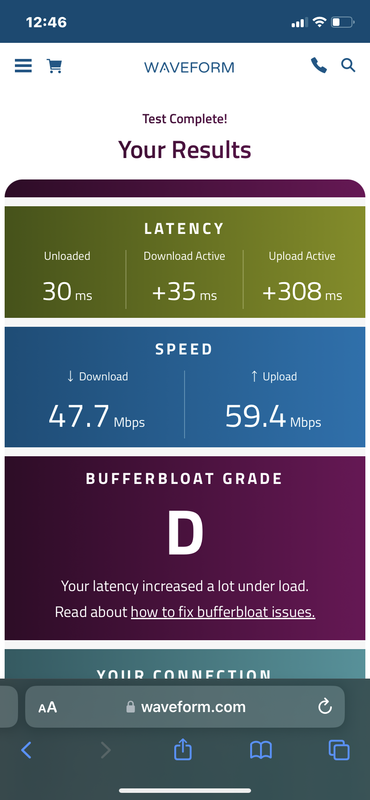
So it’s working just fine I’m on a 1gbp/s symmetric connection, I’ve run a bufferbloat test from waveform and im having issues with upload that is +400ms under load. Any ideas how can i fix that ?

Bufferbloat test from iphone 11 (wifi):

It should be avoided by using fasttrack, but you seem like having it enabled alright.

Maybe it is an artifact of the test, or of the device used for it, see this thread (where another possible cure, queues, seems to come out like being often worse than the illness):
http://forum.mikrotik.com/t/i-cant-solve-bufferbloat-issue-with-my-hap-ac2-router/175583/1
and particularly this post by mkx:
http://forum.mikrotik.com/t/i-cant-solve-bufferbloat-issue-with-my-hap-ac2-router/175583/1

Is there a command to enable fast track only to devices that i choose ? Like can i use the mac address of the device to enable fast track just for that mac address ?

Thanks

Bufferbloat is not something fasttrack can solve, it’s something that queues can solve (some are designed with this problem in mind). The basic idea is to proritize packets which don’t belong to high-volume connections (and this classification is the hard part). In this case: there’s a connection (or a few of them) with many MTU-sized packets and due to upstream bottleneck they get buffered. Without any prioritization, all other packets (e.g. ping packets) enter the same buffer at the tail of waiting packets and have to wait for those high-volume MTU-sized packets to get transmitted. If there’s some good queuing algorithm running, then those small un-related packets get priority (they bypass the low-priority buffer).

Very good example of the problem: bi-directional TCP speed test on asymmetrical lines[*] … where small ACK packets of traffic in fast direction get stuck in Tx buffer of slow direction … and due to TCP windowing and ACK/NACK mechanizms the throughput in fast direction drops to crawling speeds. If TCP ACK packets get prioritized, then buffering in one direction doesn’t have much effect on throughput in the other direction. UDP inherently doesn’t suffer of the duplex speed drop, but if communication is bi-directional, then it’s affected by bufferbloat anyway (because packets get stuck behind the buffered packets of that high-volume connection).

[*]This isn’t limited to asymmetticsl lines, but gets more pronounced … ACKs udually account for around 1% of traffic in the other direction … and if the speed of slow direction is only a fraction of speed of fast direction, then ACK throughput can be a relevant portion of slow direction capacity … emphasising effect of Tx buffer being full even more because pressure on Tx buffer will be higher due to “smooth ACKs flow” in the other direction and traffic sender in slower direction will send out new packets more often.

Mind that bufferbloat problem only occurs when bottleneck actually gets choked … which in a small IT environment (i.e. household) can be managed without sophisticated algorithms … e.g. by telling teenage son (or the nerdy husband) to limit torrent client to using only a fair portion of subscribed line speed (yeah, this means underutilization of the ISP line when the boss doesn’t use internet). This wouldn’t solve the test results problem, but in real life actual problems would hardly ever happen.

Ok i got it. But from what i understand fast track bypasses packet treatements so it helps reduce latency ? It is possible to activate fast track by mac address ?

The choke point is WAN interface (e.g. ethernet port) and buffering is done after all of firewall processing is already finished. Fasttrack only reduces amount of processing time of packets, but the speedup is systematic … up to the point where firewall packet processing is not a choke point any more.


In case of subscribed speeds which are lower that physical line speeds (e.g. 200Mbps/30Mbps, used over 1Gbps ethernet), the choke point is not router’s interface, it’s rather beyond your own equipment (could be inside ONT if WAN infrastructure is xGPON … could be traffic shaper in core network of your ISP to limit your sctual throughput stays around subscribed throughput) and in that case you don’t even have possibility to affect the queuing strategies … unless you move the choke point into your own router by (artificially) limiting speed on WAN side … which then moves buffering into your device and you can control the queuing strategies.

I see ! Thanks for the explanations :slight_smile: