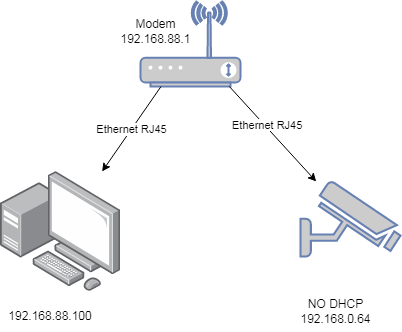
I connect the camera to the modem via a regular Ethernet RJ45 wire, but I can’t get into the interior of the camera because it doesn’t have DHCP enabled. it is hard to specify an IP address not from my subnet.
how do I connect to the camera? what do I need to change in the modem settings?
You must change the IP on your PC,
after that, change the IP inside the Hikvision with DHCP client, and restore DHCP client on PC.
After that you can see inside WinBox what lease give your camera (and change it to static for other use) and access the camera with the PC.
Or directly use NVR or SADP to change the camera config.
This is a complex method, you need to make it simpler as the method below.
I did everything, but nothing works. maybe you forgot something or did it wrong?
icmp packets do not pass.
open the address in the browser http://192.168.0.64 / I can't
in the logs I see only broadcast messages from this address.
no, the problem is not solved. I don't want my network IP address because it greatly breaks the firewall and traffic movement. I need to make minimal changes to the settings to solve the problem.
do you know how to solve the problem? can you help me?
connect camera directly to computer which should be set to 192.168.0.2/24 netowrk settings. Access camera with 192.168.0.64. Reconfigure it to DHCP. Done.
There is no simpler way to have your camera accessible from your 88 network.
Unless there’s some major obstacle, you should probably consider to go with what others are saying and do the “direct cable & reconfigure” method. The point of my method was that it’s actually faster and more convenient (even if you just want to access the device temporarily and reconfigure it anyway), because it can be done in ten seconds and you don’t have to touch any cables. Only reason to spend significantly more time on it, is if for some reason the camera can’t be reconfigured and must keep current address. In that case, try if camera responds at all (use ping or arping from router), make sure that communication is not blocked by firewall, etc.
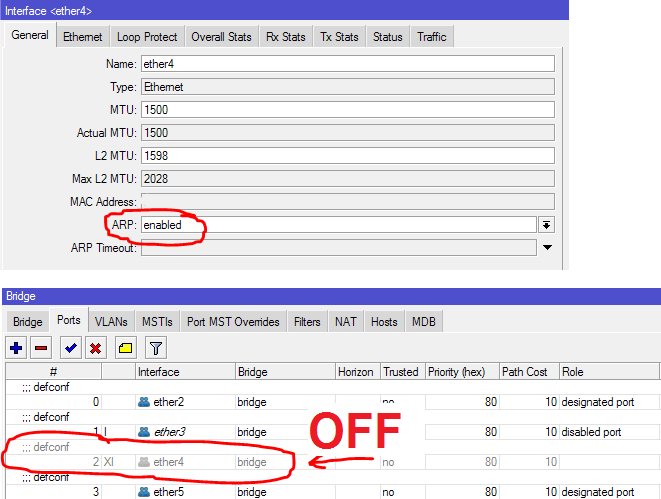
but I also need to remove the interface from the bridge and enable ARP:
thanks for the tips.
P.S. it is impossible to connect the camera directly to the computer because the camera and the computer are far from each other. the cable cannot be stretched between them
the value of the camera address you may have is different for example not 192.168.0.64 but for example 192.168.1.64
If it’s solved, good. Enabled ARP is needed, that’s true. But it should work the same with address on bridge and ether4 as active bridge port (in this case, ARP would need to be enabled on bridge; or you’d have to add manual ARP record for camera).
Right, or that. If there’s bridge/switch without any filtering, just changing PC’s address, in order to reach camera and reconfigure it, would work. But changing PC’s address is still annoying, all your other connections break, you can’t browse internet for a while, etc..