I’m a total noob with networking.
I have managed to set up a static IP on my win10 laptop of:
IP address 192.168.88.2
Subnet mask 255.255.255.0
Gateway 192.168.88.1
DNS 192.168.88.1
When I run winbox I can connect to the groove only if I click the neighbours tab then click on the connection in the window below until I get the Mac address in the “connect to” box at the top. If I try the 192.168.88.2 (or .1) it wont connect. Once I’m in using the Mac address I can open up the quickset window and I get a list of the available wifi networks. I selected the network here at home and put in the password. I’m then told I’m connected but don’t have any internet connection.
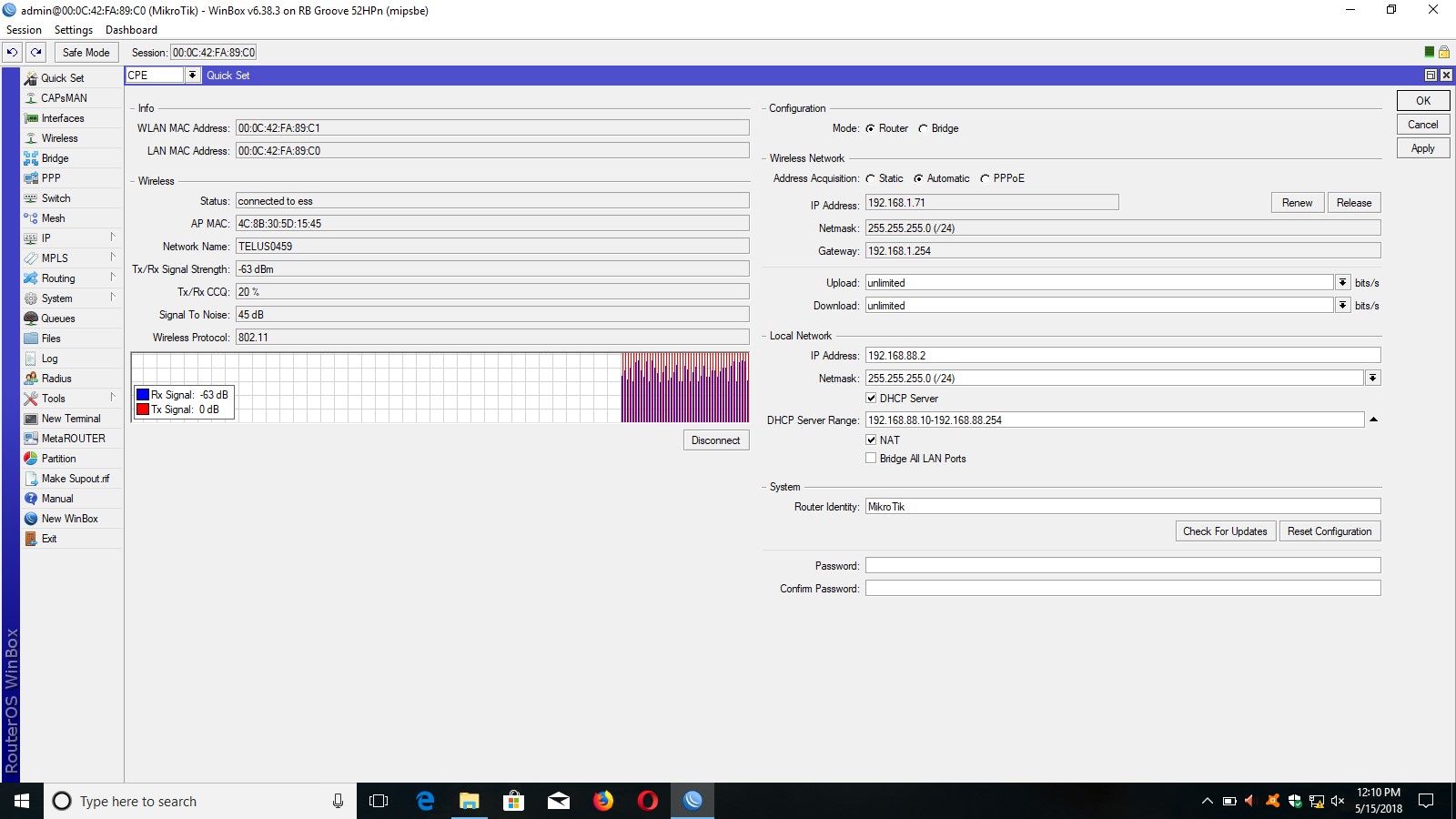
I’m sure this is something I’ve set wrong but not sure what it is. I’ve tried to attach a screen grab of the quickset window to help.
Yes. If your PC has 192.168.88.2, you can’t connect to 192.168.88.2 on router, because PC will try to connect to itself. And you can’t connect to 192.168.88.1, because nothing has this address. And same problem with internet, you have 192.168.88.1 as gateway, but it doesn’t exist.
Change 192.168.88.2 on router to 192.168.88.1 and it should fix things. On your screenhot, it’s on right side, Local Network, IP Address.
OK, I tried changing the IP address on the right hand side of the quickset screen to 192.168.88.1 and hit the apply button.
The only change I get is that after connecting to the wifi network for about 10 secs it disconnects, searches and reconnects only to disconnect after 10 secs again and so on.
The network icon at bottom right of screen says I still have no internet.
If you only changed IP address for LAN, it doesn’t have to do anything with wifi, so I don’t see how that could influence it.
I’m not sure what to suggest. You can try variant of the famous “turn it off and on again”, i.e. disconnect from wifi and connect again, but whether it will help, that’s a question.
One step back, what exactly are you trying to do anyway? Why the static address? Didn’t automatic address acquisition work? It should, dhcp server is enabled in your screenshot…
I can try rebooting everything and see if that helps.
What I’m trying to accomplish is to set up the Groove as a wifi extender for my boat. I thought I would try at home first before installing.
What I would really like is to have the Groove connected to the RPi boat computer which would act as a router for onboard tablets and phones.
I figured I would try a direct connection to my win10 laptop first then maybe move on from there.
Unfortunately I know nothing about networking and all the online info seems either confusing or contradictory.
OK I tried rebooting the groove and initially it was doing the same thing connecting and disconnecting then I disconnected from the wifi and reconnected and then it stayed connected without dropping the connection and finally after about 30-40 secs the internet connection icon showed. I checked and voila I have internet, so thank you for the support.
The next question is whether to try and get it working through the raspberry pi or not worry about it. What would I have to change to alter the setup for it to work via the Pi.
I tried connecting the groove to RPi with the same settings and amazingly it worked first time. I was able to connect to the in house wifi and get internet.
Thanks a ton for the help.