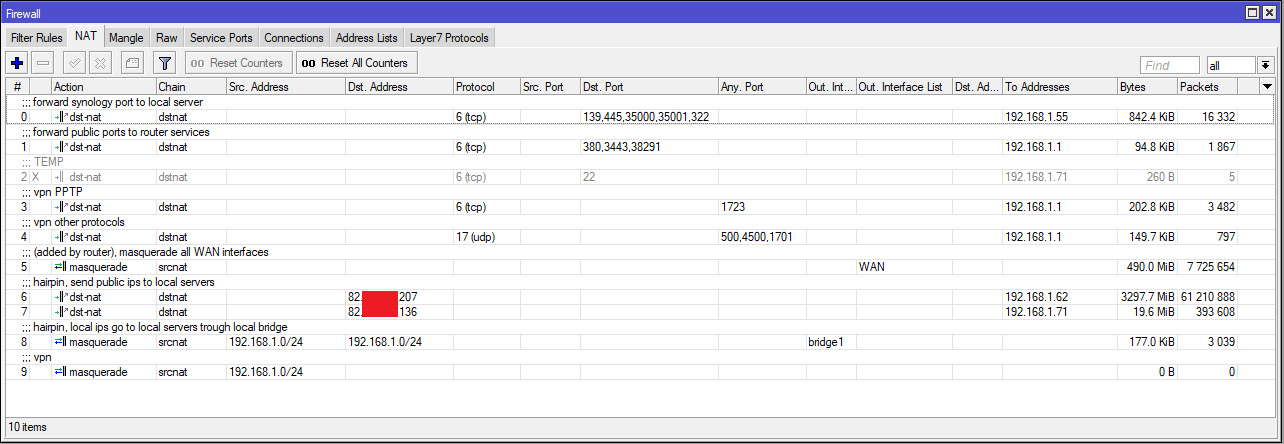
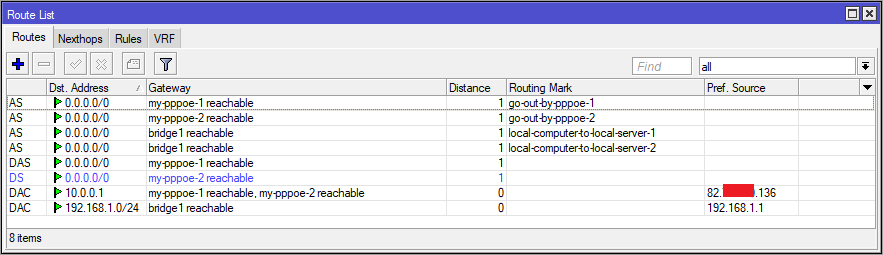
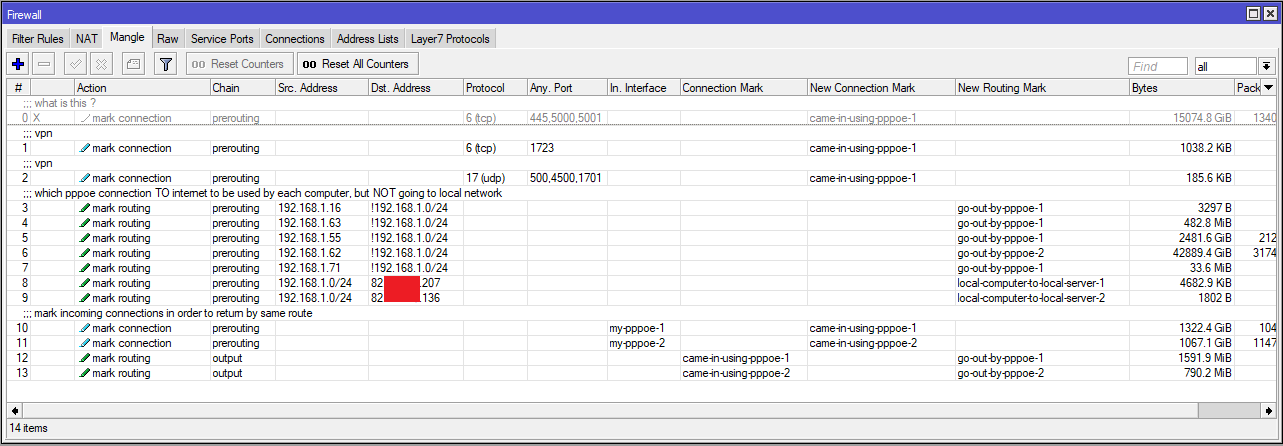
I have the attached setup, maybe is a bit complicated but the problem is related to more simple connections.
Setup is: I have 2 pppoe connections on same router (the pppoe is made by router under interfaces)
pppoe-1 (82.x.x.136) is local computer 192.168.1.71
pppoe-2 (82.x.x.207) is local computer 192.168.1.62
and local computer 192.168.1.55 which is my samba/cifs server
192.168.1.62 connects to 192.168.1.55 samba share by local IP (connection using //192.168.1.55/my_path)
And it connects OK
But an additional computer like 192.168.1.71 cannot connect by same mean anymore, and I think it is because if I login to the x.55 samba server, I see the connection as coming from router (192.168.1.1) and not from connected computer (192.168.1.62).
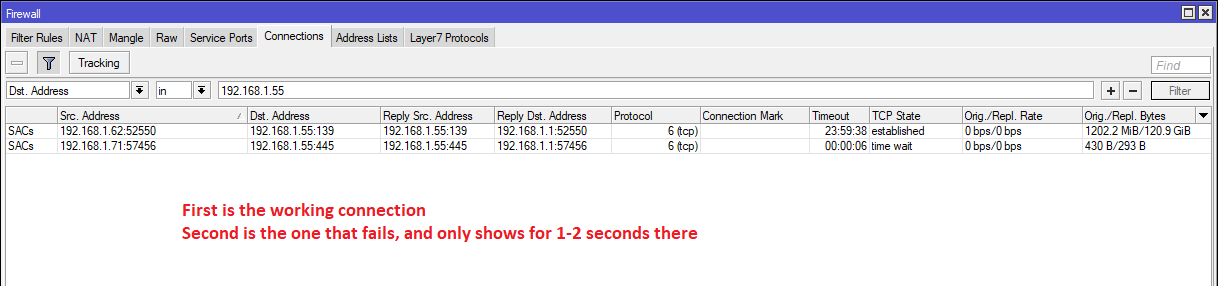
Under router connections tab, I see it used port 139 to connect, which is an alternative to default 445.
Under router connections tab, I see the additional computer trying to connect and it gets a timeout, this one is shown to try port 445
I assume there is an issue with the local rules in my setup, and maybe something like traffic not returning back on port 445 and it makes/confirms the connection by using the alternative 139, then the additional computer cannot use the same routes ? And/OR because file sharing server thinks it is already connected to the 192.168.1.1, because that is the IP it sees as connected.
Connections from device in 192.168.1.0/24 to device in same 192.168.1.0/24 have no reason to go through router. They can go physically through router if you use it as switch (bridge), but IP firewall (and NAT) would not touch them. Unless you played with bridge’s use-ip-firewall option.
Select Bridge in left menu, then first Bridge tab and there’s Settings button, and finally Use IP Firewall option, which is disabled (unchecked) by default and you most likely want to keep it that way.
Your first dst nat rule is the reason why you see the address 192.168.1.1 in your device…
So my guess is that it has nothing to do with your other computer and probably you cant access your samba device through that computer for some other reason…
Because Src. Addr. looks ok there, just the Reply Dst. Add. is 192.168.1.1 , not sure if that part is wrong, that is what NAT does, right ?
AND I do see 192.168.1.1 as client ip on my file/samba server (for both connected users 192.168.1.71 and 192.168.1.62 , that part seems wrong.
Yes, that’s srcnat in action. And since you don’t have many, it’s clearly rule #8 (hairpin). The problem is, it shouldn’t touch these connections, because they should not be routed through RB, only bridged. And if it’s not caused by bridge-ip-firewall option, there’s not much left. Wrong ARP config could possibly cause it. Or devices themselves could have wrong netmask. Or maybe something else I can’t think of right now. Post the config, if you want..
Sob that source is because of his first nat rule…he got a dst nat to his samba device from external connections… so isnt it notmal to be the source the routers IP?
Maybe I missed something in description, but I see 192.168.1.55, 192.168.1.62 and 192.168.1.71 all as local addresses. And if they are all in same /24 subnet, all communication between them will be direct, router’s firewall shouldn’t be involved at all.
You lost me. Original question was why 192.168.1.62 connecting to 192.168.1.55 shows as 192.168.1.1. So why srcnat touches it at all, when communication between these two addresses should be direct. If the router is between them, then it should only act as transparent switch.