Container: Ubuntu server on your CHR

Hello,
I created a simple ubuntu server image with just ssh server running on it. It is for CHR.

URL for image repo https://hub.docker.com/r/okazdal/ubuntu-ssh-server
After properly enabling container and setting up veth interfaces and disks, you can use it like this:

/container config
set registry-url=https://registry-1.docker.io tmpdir=disk1/tmp
/container add remote-image=okazdal/ubuntu-ssh-server interface=veth1

Default user/pass is sekuritim/tester

Initial dockerfile I used to create it is below, so you can use it to install packages and other software and create your own images:

FROM ubuntu:latest

RUN apt update && apt install  openssh-server sudo -y

RUN useradd -rm -d /home/ubuntu -s /bin/bash -g root -G sudo -u 1000 sekuritim 

RUN  echo 'sekuritim:tester' | chpasswd

RUN service ssh start

EXPOSE 22

CMD ["/usr/sbin/sshd","-D"]
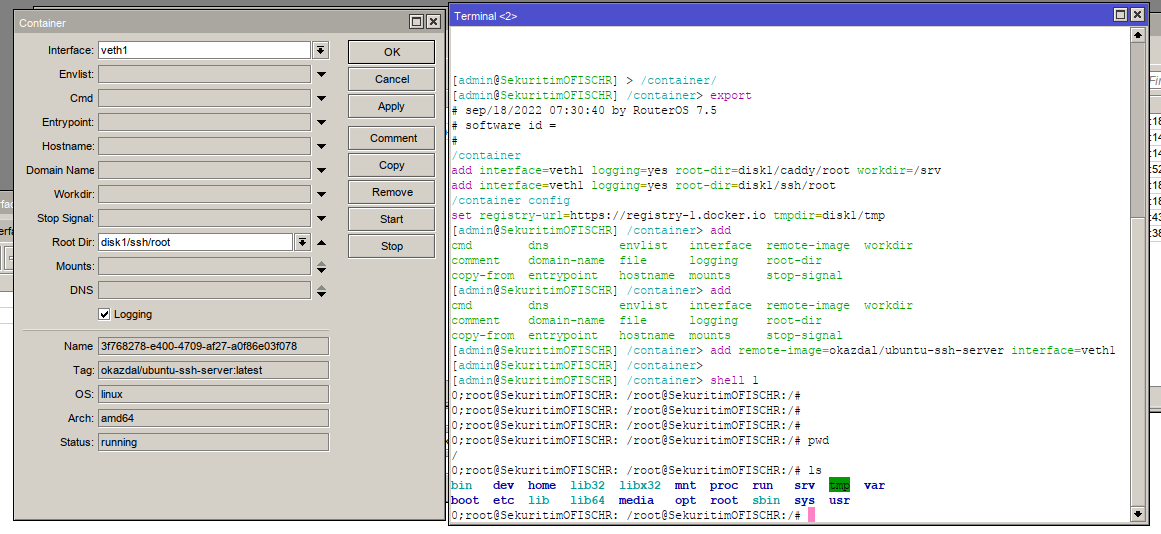
Screenshot_2022-09-18_10-44-06.png
Cheers,
okazdal

Thank you for sharing your setup.

Thanks for this I’ve been wanting to set up the same, you saved us some time :slightly_smiling_face:

Hello, Thanks very útil.

I am trying to install some tools and I am getting the following error: any ideas

System has not been booted with systemd as init system (PID 1). Can’t operate. Failed to connect to bus: Host is down

Help

Hi friend. I’m trying to set it up, but something is wrong. Does it need some more magic with the firewall or something like that? The container is working, but all my attempts to connect to it via ssh lead to nothing (there is no responce at all). I'm not an expert at Linux at all, so any help is welcomed.

Remember to create a container network along with masquerade rule. To access the container you will need to port forward to the container to access it.