Containerized SNMP monitoring (short term) - a step above built-in graphs

Thank you Tangent.

I hear what you are saying, but there is a portion that does not make sense to me. (More than likely my fault - but willing to learn)

Let’s say I create an entry as below.

/container/envs/add name=crazymonkey key=TZ value=“Europe/Riga”

How will LibreNMS know how to read the variables in “Crazymonkey” to get the Timezone?
In other words, how are they mapped to each other (the container and variables)?
The only thing that would make sense to me is the software in the container looks for all the variables under cetrain names (eg, librenms_var, mariadb_envs, etc etc)

For instance - look at the below list.
https://github.com/jochristian/librenms-docker/blob/master/doc/docker/environment-variables.md

There are sections called General, (Distributed) Poller, etc.

Do I create the lists under General and (Distributed) Poller, etc?

Via “/container/add remote-image=whatever/librenms envlist=crazymonkey”.

I think you’re confusing “/container/add envlist” with “/container/envs/add”. Not the same thing. The first adds a container with a given environment list, and the second adds a variable to an environment list for consumption by the first.

As to that list of environment variables you pointed to, they’re giving you multiple examples. Follow the one that does the thing you want to do and use that one envlist.

Thanks a million Tangent.

That makes sense and clears it up.

I will post back with progress / issues.
Perhaps we can help someone else with similar needs.

Some updates and challenges

I decided to proceed as follows:
Approach:
Create a container for MariaDB (This is a workable db for LibreNMS, and from initial reading seems to be faster and more efficient than mySQL at present)
Create a container for LibreNMS. My thinking in this regard is that a) I can use MariaDB for something else should I choose to, and b) should LibreNMS not be the soution I am looking for, I do not have to redo everything as long as whatever I choose support MariaDB. If any other components in this design is required, I can set up a container for that component (Possibly a “collector”)

  1. Created a 20 Gb disk for LibreNMS (disk4). Formatted to ext4
  2. Created a 20 Gb disk for MariaDB (disk5). Formatted to ext4
    status below…

/disk print
;;; LibreNMS
4 BMp disk4 @60’000’108’544-80’000’108’544 20 000 000 000
;;; MariaDB
5 BMp disk5 @80’000’122’880-100’000’122’880 20 000 000 000

  1. Created the virtual interfaces

/interface/veth/print
Flags: X - disabled; R - running
3 R name=“veth4-librenms” address=172.x.1.6/24 gateway=172.x.1.2 gateway6=::
4 R name=“veth5-mariadb” address=172.x.1.7/24 gateway=172.x.1.2 gateway6=“”

Created environment variables (Allowing empty passw for time being while testing). Passwords changed to xxxxx

/container/envs/print
3 name=“librenms_envs” key=“TZ” value=“Africa/Johannesburg”
4 name=“librenms_envs” key=“MYSQL_ALLOW_EMPTY_PASSWORD” value=“yes”
5 name=“librenms_envs” key=“MYSQL_DATABASE” value=“librenmsdb”
6 name=“librenms_envs” key=“MYSQL_USER” value=“root”
7 name=“librenms_envs” key=“MYSQL_PASSWORD” value=“xxxxx”
9 name=“mariadb_envs” key=“MARIADB_USER” value=“librenms”
10 name=“mariadb_envs” key=“MARIADB_PASSWORD” value=“xxxxx”
11 name=“mariadb_envs” key=“MARIADB_DATABASE” value=“librenmsdb”
12 name=“mariadb_envs” key=“MARIADB_ROOT_PASSWORD” value=“xxxxx”

Created mountpoints- just focussing on MariaDB now. (Here I am a bit lost, but followed/adapted the logic in this article I found - https://mikrotik.xyz/mikrotik/mikrotik-hosting-docker/

/container/mounts/print
4 name=“mariadb_data” src=“/disk5/mariadb/data” dst=“/var/lib/mariadb”
5 name=“mariadb_dump” src=“/disk5/mariadb/dump” dst=“/docker-entrypoint-initdb.d”

Created the container

container/print
2 name=“b5eb5528-4119-4698-83b1-xxxxxxxx” tag=“library/mariadb:latest” os=“linux” arch=“arm64” interface=veth5-mariadb
envlist=“mariadb_envs” root-dir=disk5/mariadb/MariaDB mounts=mariadb_data,mariadb_dump dns=“” hostname=“mariadb”
logging=yes start-on-boot=yes status=running

The container is running, but:

  1. I cannot ping it - (veth interface is added to the correct bridge, and I can ping the other veth “neighbours”.
  2. Cannot telnet to it on port 3306 to see if MariaDB is acutally running.
  3. The 2 databases (librenmsdb and dump) that were supposed to be created, seems to empty.

I suspect this might be an issue in the container definition (root-dir=disk5/mariadb/MariaDB), almost as if it were supposed to load onta an existing installation.
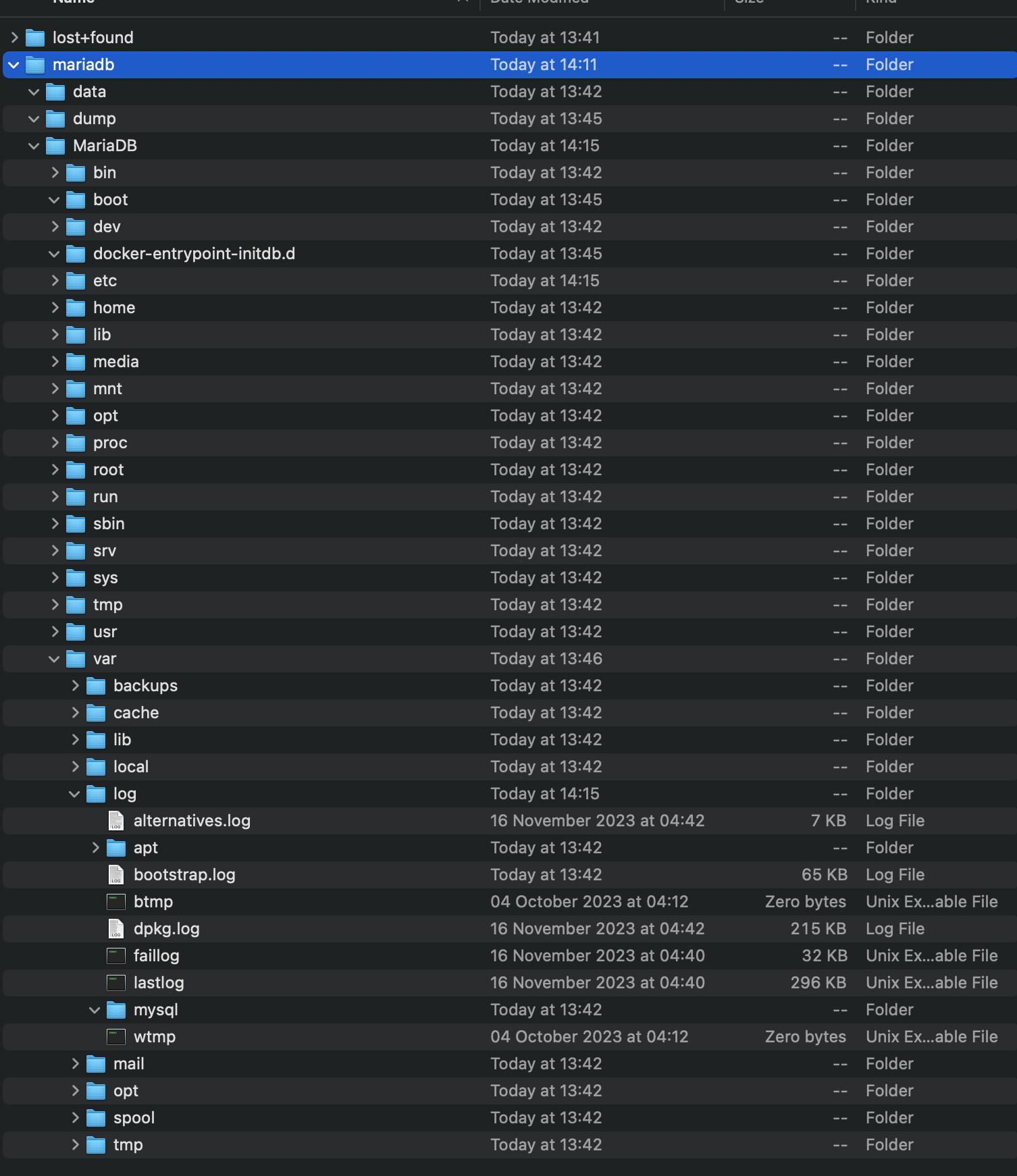
File structure not as expected either - see below.
Screenshot 2023-11-21 at 14.15.39.png
Any help at this stage is welcome.

Update.

I change the root-dir to just /disk5
I also double checked the bridge setup, and found I placed the port on the main bridge, not the docker bridge.

I can now ping the host (172.x.1.7) and will do some tests later and update here.

I have no idea why mikrotik shows an docs/example show a VETH inside new docker bridge since that add even more complexity. Although you have to be careful with putting VETH in main bridge since VETH subnet becomes a connected route and other artifacts of bridging.

You can also use a new subnet for VETH in NO bridge, and just add it to the LAN interface list. This is the safest approach. But add to existing LAN bridge should be okay, just a bridge interface is a complex beast.

Thank you for the input Amm0.

With documentation being a bit scarce (specific to Mikrotik), I followed along the guidelines in the Mikroik Help example for Pihole.
https://help.mikrotik.com/docs/display/ROS/Container
But I will try your method as well.

OK - Herewith some updates, and a request for advice.

So, as the project currently stand, I have loaded a mySQL client, tested access to the MariaDB install, and everything is working on that side of it.
Thus, it is time to get Librenms installed, and try to to get it to communicate with MariaDB.
(Just an observation for others - the MariaDB is using approx 100 Mb RAM (freshly “installed”)

The problem I am having with the LibreNMS (upfront) is defining the mounts.
But, let’s start at environment variables.

container/envs/print
3 name=“librenms_envs” key=“TZ” value=“Africa/Johannesburg”
4 name=“librenms_envs” key=“MYSQL_ALLOW_EMPTY_PASSWORD” value=“yes”
5 name=“librenms_envs” key=“DB_NAME” value=“librenmsdb”
6 name=“librenms_envs” key=“DB_PASSWORD” value=“xxxxx”
8 name=“mariadb_envs” key=“MARIADB_USER” value=“librenms”
9 name=“mariadb_envs” key=“MARIADB_PASSWORD” value=“xxxxx”
10 name=“mariadb_envs” key=“MARIADB_DATABASE” value=“librenmsdb”
11 name=“mariadb_envs” key=“MARIADB_ROOT_PASSWORD” value=“xxxxx”
12 name=“librenms_envs” key=“DB_HOST” value=“172.xxx.1.7”
13 name=“librenms_envs” key=“DB_USER” value=“librenms”
14 name=“librenms_envs” key=“DB_PORT” value=“3306”

Interface:

/interface/veth/print
Flags: X - disabled; R - running
3 R name=“veth4-librenms” address=172.xxx.1.6/24 gateway=172.xxx.1.2 gateway6=::

After first time extraction / run, I see it entered the following work directory in the container setup. “/opt/librenms”
It starts (and remains running), but I cannot ping it or access the web interface (which should according to me be on 172.xxx.2.6:8000
I double checked the veth network & bridge settings - and this time they are correct.

I delete the instance, and make some changes to my mount points as below as it seems to be looking for /opt :

/container/mounts/print
4 name=“mariadb_data” src=“/disk5/mariadb/data” dst=“/var/lib/mariadb”
5 name=“mariadb_dump” src=“/disk5/mariadb/dump” dst=“/docker-entrypoint-initdb.d”
6 name=“librenms” src=“/disk4/opt/librenms/data” dst=“/data”
7 name=“opt_librenms” src=“/disk4/opt” dst=“/opt/librenms”

My container definition below

container/print
4 name=“b7a9f255-7bf9-481a-85da-5xxxxxxxxxx” tag=“librenms/librenms:latest” os=“linux” arch=“arm64”
interface=veth4-librenms envlist=“librenms_envs” root-dir=/disk4 mounts=librenms,opt_librenms dns=“”
workdir=“/opt/librenms” logging=yes status=stopped

However, now the librenms extracts, and when I start it, it runs for a few seconds and stop. With continuous ping, the IP 172.xxx.1.6 never once responded.

Any ideas on:

  1. How the mounts work? A link that can point me in the right direction will be great.
  2. How I can check from here what the problem might be.

Make sure logging in enabled, and when it tries to start…there should be some message as to why it didn’t in logs. Since you have a mounts, you can look at /var/log… too

You may have to use the “cmd” in /container for librenms to run some one-time commands like “generate_key”. But seem like there some of the one-time initialization stuff that needs to happen in my quick read (all rather convoluted for a Docker image IMO).

I think you mean “/container/shell” here. “cmd” is a parameter to “/container/add”, and while you can make persistent changes to the content of the bind mounted directories in this way, recreating the container to make each change is hunting butterflies with a sledgehammer.

That a good point, but if you run a command once with mount, it do same as /container/shell - for that one command… I really didn’t study the instructions but I think some cmd= may need to be define for the service to stay running.

But since it doesn’t stay running, a “tail -f /dev/null” as the cmd= may be need to even use /container/shell. But using the RouterOS “shell” is likely a good idea to setup/test this.

There are two other differences between the methods you’re disregarding/unaware of.

First, if you create a new container for each command you run, you then have to go back and clean them all up again. Even if RouterOS is smart enough to share container storage layers (I kinda doubt it) it creates a mess in “/container/print” output.

Second, there’s a messy split between CMD and ENTRYPOINT in Docker for historical reasons, and different containers make use of the complications arising from it differently. On some, passing a random command as “CMD” will do what you want, while with others you’d have to override ENTRYPOINT instead, and with still others, you’d have to override both.

The new official use for CMD is actually for parameters to ENTRYPOINT, which remains fixed in normal use. My iperf3 container is a good example: ENTRYPOINT is “/bin/iperf3” and the default “-s” bit to run as a server is in CMD so you can override it easily.

Hi Amm0 and Tangent. Once again, excellent feedback.

How would I go about to run the cmd or shell options?
I see the cmd option at the container specification option, but now sure what to put in there?
I am stuck

Herewith the latest update, setup and status. With the below, the container is running (stays running), but I am still unable to ping it / access it. I think it is in effect “working”, but just unable to initialize the network portion…

container/envs/print
3 name=“librenms_envs” key=“TZ” value=“Africa/Johannesburg”
4 name=“librenms_envs” key=“MYSQL_ALLOW_EMPTY_PASSWORD” value=“yes”
5 name=“librenms_envs” key=“DB_NAME” value=“librenmsdb”
6 name=“librenms_envs” key=“DB_PASSWORD” value=“xxxxx”
8 name=“mariadb_envs” key=“MARIADB_USER” value=“librenms”
9 name=“mariadb_envs” key=“MARIADB_PASSWORD” value=“xxxxx”
10 name=“mariadb_envs” key=“MARIADB_DATABASE” value=“librenmsdb”
11 name=“mariadb_envs” key=“MARIADB_ROOT_PASSWORD” value=“xxxxx”
12 name=“librenms_envs” key=“DB_HOST” value=“172.xxx.1.7”
13 name=“librenms_envs” key=“DB_USER” value=“librenms”
14 name=“librenms_envs” key=“DB_PORT” value=“3306”

container/mounts/print
4 name=“mariadb_data” src=“/disk5/mariadb/data” dst=“/var/lib/mariadb”
5 name=“mariadb_dump” src=“/disk5/mariadb/dump” dst=“/docker-entrypoint-initdb.d”
6 name=“librenms” src=“/disk4/opt/librenms/data” dst=“/data”
7 name=“opt_librenms” src=“/disk4/opt” dst=“/opt”

container/print
2 name=“c5c14144-2312-445f-86ef-10e74f6a5aa3” tag=“library/mariadb:latest” os=“linux” arch=“arm64” interface=veth5-mariadb
envlist=“mariadb_envs” root-dir=/disk5 mounts=mariadb_data,mariadb_dump dns=“” hostname=“MariaDB” logging=yes
status=running
3 name=“12c5b838-4813-4194-9ed2-ae6c7b444e06” tag=“librenms/librenms:latest” os=“linux” arch=“arm64” interface=veth4-librenms
envlist=“librenms_envs” root-dir=/disk4 mounts=librenms,opt_librenms dns=“” workdir=“/opt/librenms” status=running

The log file from completed import as below. It seems to go through all the steps, and in the bold section below, has a chown error.
However, it seems to continue until it tries to contact the MariaDB server, which, if the network is not working, it will abviously not be able to do…


09:34:28 container,info,debug import successful, container b3e55268-3527-4573-81e3-6c20de4eb91d
09:34:41 container,info,debug [s6-init] making user provided files available at /var/run/s6/etc…exited 0.
09:34:41 container,info,debug [s6-init] ensuring user provided files have correct perms…exited 0.
09:34:41 container,info,debug [fix-attrs.d] applying ownership & permissions fixes…
09:34:41 container,info,debug [fix-attrs.d] done.
09:34:41 container,info,debug [cont-init.d] executing container initialization scripts…
09:34:41 container,info,debug [cont-init.d] 00-fix-logs.sh: executing…
09:34:41 container,info,debug chown: changing ownership of ‘/proc/self/fd/1’: Operation not permitted
09:34:41 container,info,debug chown: changing ownership of ‘/proc/self/fd/2’: Operation not permitted

09:34:41 container,info,debug [cont-init.d] 00-fix-logs.sh: exited 0.
09:34:41 container,info,debug [cont-init.d] 01-fix-uidgid.sh: executing…
09:34:42 container,info,debug [cont-init.d] 01-fix-uidgid.sh: exited 0.
09:34:42 container,info,debug [cont-init.d] 02-fix-perms.sh: executing…
09:34:42 container,info,debug Fixing perms…
09:34:42 container,info,debug [cont-init.d] 02-fix-perms.sh: exited 0.
09:34:42 container,info,debug [cont-init.d] 03-config.sh: executing…
09:34:42 container,info,debug Setting timezone to Africa/Johannesburg…
09:34:42 container,info,debug Setting PHP-FPM configuration…
09:34:42 container,info,debug Setting PHP INI configuration…
09:34:42 container,info,debug Setting OpCache configuration…
09:34:42 container,info,debug Setting Nginx configuration…
09:34:42 container,info,debug Updating SNMP community…
09:34:42 container,info,debug Initializing LibreNMS files / folders…
09:34:42 container,info,debug Setting LibreNMS configuration…
09:34:42 container,info,debug Checking LibreNMS plugins…
09:34:42 container,info,debug Fixing perms…
09:34:42 container,info,debug Checking additional Monitoring plugins…
09:34:42 container,info,debug Checking alert templates…
09:34:42 container,info,debug [cont-init.d] 03-config.sh: exited 0.
09:34:42 container,info,debug [cont-init.d] 04-svc-main.sh: executing…
09:34:42 container,info,debug Generating APP_KEY and unique NODE_ID
09:35:34 container,info,debug Waiting 60s for database to be ready…
09:38:41 container,info,debug ERROR: Failed to connect to database on 172.xxx.1.7

09:38:41 container,info,debug [cont-init.d] 04-svc-main.sh: exited 1.
09:38:41 container,info,debug [cont-finish.d] executing container finish scripts…
09:38:41 container,info,debug [cont-finish.d] done.
09:38:41 container,info,debug [s6-finish] waiting for services.
09:38:42 container,info,debug [s6-finish] sending all processes the TERM signal.
09:38:45 container,info,debug [s6-finish] sending all processes the KILL signal and exiting.

Also below is the contents of /var/log folder. There are files, but all 0 bytes…

Screenshot 2023-11-22 at 09.48.29.png

“/container/shell 0”

:police_car_light: Warning, warning: we are approaching the spoon-feeding event horizon… Woop, woop, woop! :police_car_light:

Haha - indeed Tangent - I was just getting lost there, and did not know what else to try.

So, I went back to the drawing board, deleted all aspects, and restarted.
That is when I saw that the bridge entry has become “unknown”

Once i recreated that the server came up, was pinagable and I could access the web portal.

Some great news, system resources on the RB5009 seems to idle, as I still have plenty of RAM left (more than 200 Mb left), and the CPU is idling below 10%.

Just for those wanting to try this project as well, I ran into another small issue once the server was up. It was supposed to prompt me to create and admin user, but somehow skipped that step.
It asked for a unsername and password, and checking in the DB, there was no users.

So, the command function gave me an idea, and I stopped the container, and added “lnms user:add --password=foo --role=admin myadminuser” (obviously use your own values) to the command section on the container setup.
I started it again, stopped it, and removed the “lnms user:add --password=foo --role=admin myadminuser” from the command section.
After starting the container again, I could now login to LibreNMS with the above specified details.

Next step is to set up LibreNMS, and I suspect a poller as well. It is a new product for me, so it will go slow.

I will however report back here, in case anyone else is interested in doing the same.

@PappaB did you managed to make it work?

Hi Elico,

My free time is a bit limited this time of the year, so I decided not to go through the learning for LibreNMS.

Instead, I focused on getting Grafana, Prometheus and SNMP-Explorer going.

So, last night, I installed these 3, did some config and tweaking, and lo and behold, I have a working system.

Memory and CPU usage is not bad, and so far (less than 24 hours) it seems very stable.

As I get a bit more time I will share more in detail what I did.

Some more detail as promised.

Three different partitions (20 Gb each) were set up and formatted to host each of the containers (formatted as disks 7,8 and 9)
Three different VETH interfaces created, each with their own IP and same common default gateway (docker bridge IP)

Environment variable for the Grafana logins were set
Screenshot 2023-12-11 at 13.23.29.png
Mountpoints defined as below.
Screenshot 2023-12-11 at 13.24.05.png
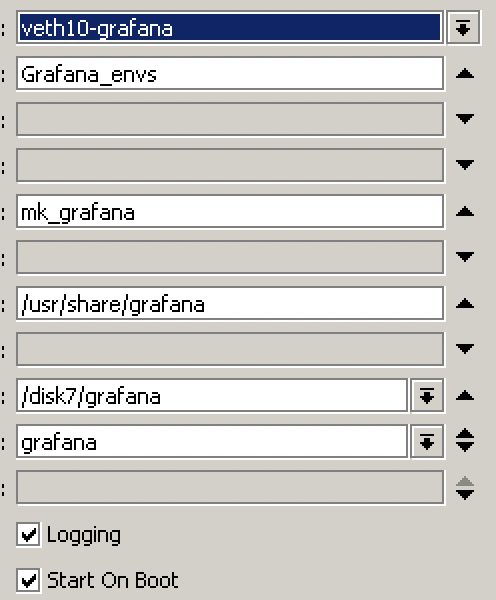
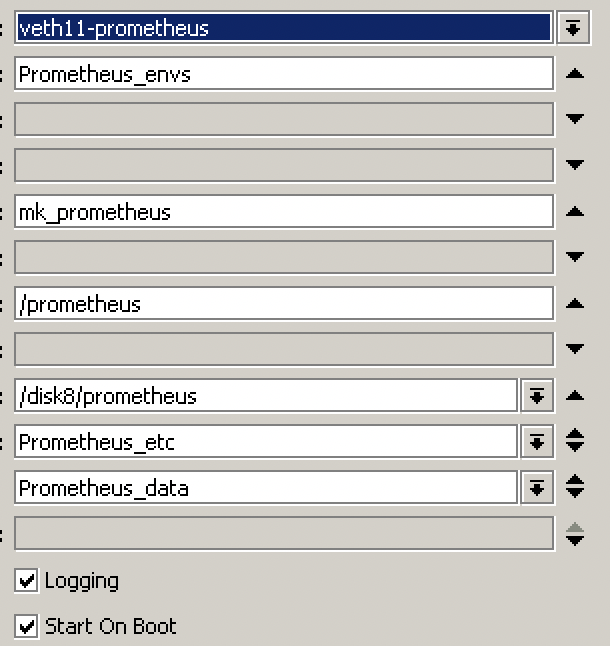
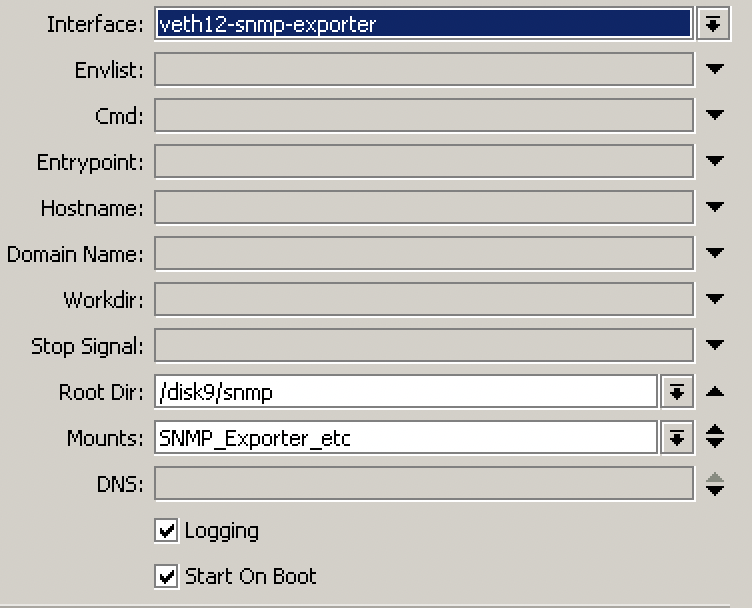
Containers defined as below:

  1. grafana/grafana:9.0.5
    Screenshot 2023-12-11 at 13.24.26.png
  2. prom/prometheus:latest
    Screenshot 2023-12-11 at 13.24.54.png
  3. prom/snmp-exporter:latest
    Screenshot 2023-12-11 at 13.25.10.png
    Once all were installed and activated, I could start the setup of hving them all communicate to each other and the destination router(s) being monitored via SNMP
    I also had to upload a recent snmp.yaml (Mikrotik specific) to the snmp-exporter, as the functionaliy to probe the OIDs for the Mikrotiks were not working

On Grafana, I installed desktop 14420 and voila, I could monitor my edge router (RB5009 - this one also hosts the containers) and my Wifi Router (RB4011).

It is working fantastic, and I can report that after 5 days, it is stable.

However, one little bit that needs attention.

The Grafana desktop (14420) works well with Mikrotiks not running WifiWave2. The OIDs maps well, and the desktop is populated with a host of very useful info,
However, on routers running WifiWave2, the Wireless section of Desktop 14420 is not populated.

I have not had time to look into this, but the initial info I got is that the OID system works a little differently on routers with WifiWave2.
http://forum.mikrotik.com/t/wifiwave2-snmp-metrics-missing-hap-ax2/162297/1

If anyone has found a solution for this, please feel free to share.

Hi @PappaB,

Thank you for so detailed information. Your post helped me a lot!!! I think is missing the “Prometheus_envs” variables. Can you share please?

How are you even starting Prometheus with a mounted storage folder? Mine keeps complaining it doesn’t have the permissions to work in there