The BOM, Byte Order Mark for UTF-8 is 0xEF 0xBB 0xBF
http://forum.mikrotik.com/t/rextended-fragments-of-snippets/151033/1
I just mentioned it in 2022 because all these functions assume that the source is already in the correct format.
The UCS-2 is obsolete, so in the end it’s only found in the PDU of the SMS sent with that encoding, and it doesn’t have the BOM there.
In ASCII-7bit the BOM is not used, nor on GSM-7 and the various CP437, 850, 1252, etc.
It is only used by UTF-8 (and others not covered here).
It is only useful if UTF-8 must be stored in a file, so that the program that opens the file recognizes that it is written either in UTF-8 or must use the CodePage to interpret what is written (other BOM also say if it’s in UTF-16 and others, but we don’t cover it here now).
These functions that I wrote, however, were not designed to work directly on files, but if they were used,
it would be up to the part of the script that deals with loading or saving the file to apply it and remove it if needed.
There is no point in adding it if you already know the content of the readed value
This is one example of a file on ANSI (my PC have CP1252 / Windows-1252) and € is 0x80, UTF-8 and UTF-8 with BOM on both € is 0xE2 0x82 0xAC.
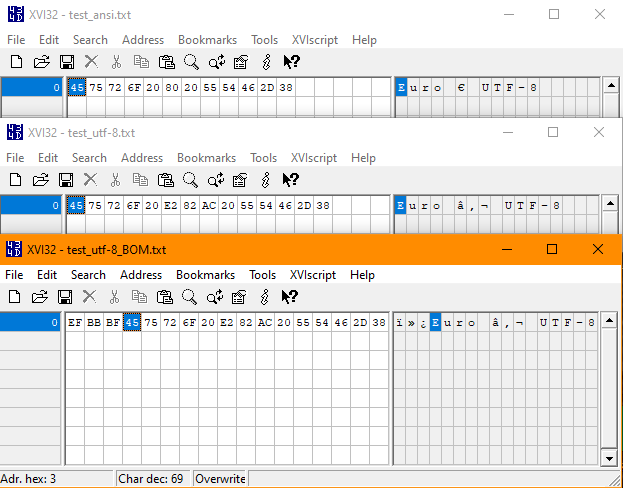
Simply Windows Notepad understand perfectly to open the UTF-8 version also if BOM is not present.
P.S.: On UTF-16 and UTC-2 is 0x20 0xAC and on UTF-32 is 0x00 0x00 0x20 0xAC