are there any plans/options for giving a little more flexibility for snmp readings? My CSS326 posts it's temperature as three digit value without decimals. Also the value type matching, if i change it from text to number it just adds ".00". So i can have 570°C or 570.00°C.
I have it now running on my RDS2216 courtesy of the docker config files. It took a little bit of manual configuration, but it seems to be running smoothly and putting no load on the host (only polling 6 devices).
This looks like it could run just fine on a 5009, or a 2004, or even a hAP AX3 if somebody just wanted to watch a few devices at home or in a small office. The only limitation would be disk storage space.
For those interested in testing this on a container in RouterOS, here’s the configs (sanitized). I pulled most of the information from the docker-compose.yml file.
# This is on my RDS2216 running 7.21rcX
# I already have containers deployed from the /app menu, so the IP's, veth bridge,
# and some of the directories were set up by that, and are only included to show
# relationships with the container config. Adjust IP space and directories accordingly.

/interface veth
add address=172.18.0.4/24 dhcp=no gateway=172.18.0.1 name=veth-corebit-app
add address=172.18.0.5/24 dhcp=no gateway=172.18.0.1 name=veth-corebit-db

# Set your mount and layer (7.21?) directories according to your disks; I have an
# NVME drive in slot 12 that I'm using for everything under RouterOS's /app as well
# as these two containers (layer dirs aren't an option on earlier versions of RouterOS).
/container
# This is for the app container
add envlists=corebit-db,corebit-app interface=veth-corebit-app layer-dir=/nvme12/apps/layers mount=/nvme12/apps/corebit/corebit-data:/app/data:rw,/nvme12/apps/corebit/corebit-backups:/app/backups:rw name=corebit-app remote-image=ghcr.io/cis2131/corebit-docker root-dir=/nvme12/apps/corebit start-on-boot=yes workdir=/app
# This is for the Postgres container
add envlists=corebit-db interface=veth-corebit-db layer-dir=/nvme12/apps/layers mount=/nvme12/apps/corebit-db/corebit-db:/var/lib/postgresql/data:rw name=corebit-db remote-image=postgres:16-alpine root-dir=/nvme12/apps/corebit-db start-on-boot=yes workdir=/

# Set your tmpdir according to your drives; I have two M.2 Sata disks in the 2216 RAID'd together
/container config
set registry-url=https://registry-1.docker.io tmpdir=/sata-raid/tmp

# These environment variables come from the defaults in the docker-compose file.
# You need to create your own session secret. Your DATABASE_URL will depend on the
# IP address you set for your server, as well as any changes you've made to the
# username and password for postgres. I've chosen not to included the default
# credentialss here; you'll need to see the docker-compose.yml file from the github
# repository for those.

# Also, the docker-compose file creates a NAT rule from port 5432 to 5433; I'm not
# doing that here because there are no other PGSQL instances on this host.

/container envs
# DB ENVS
add key=DATABASE_URL list=corebit-app value=postgresql://username:password@serverip:5432/database_name
add key=HOST list=corebit-app value=0.0.0.0
add key=NODE_ENV list=corebit-app value=production
add key=PORT list=corebit-app value=3000
add key=SESSION_SECRET list=corebit-app value="SETTHISYOURSELF"

# App ENVs; You may need to change APP_PORT if you have anything else on port 3000
add key=APP_PORT list=corebit-db value=3000
add key=PGPORT list=corebit-db value=5432
add key=POSTGRES_DB list=corebit-db value=database_name
add key=POSTGRES_PASSWORD list=corebit-db value=password
add key=POSTGRES_USER list=corebit-db value=username
add key=SESSION_SECRET list=corebit-db value="SETTHISYOURSELF="
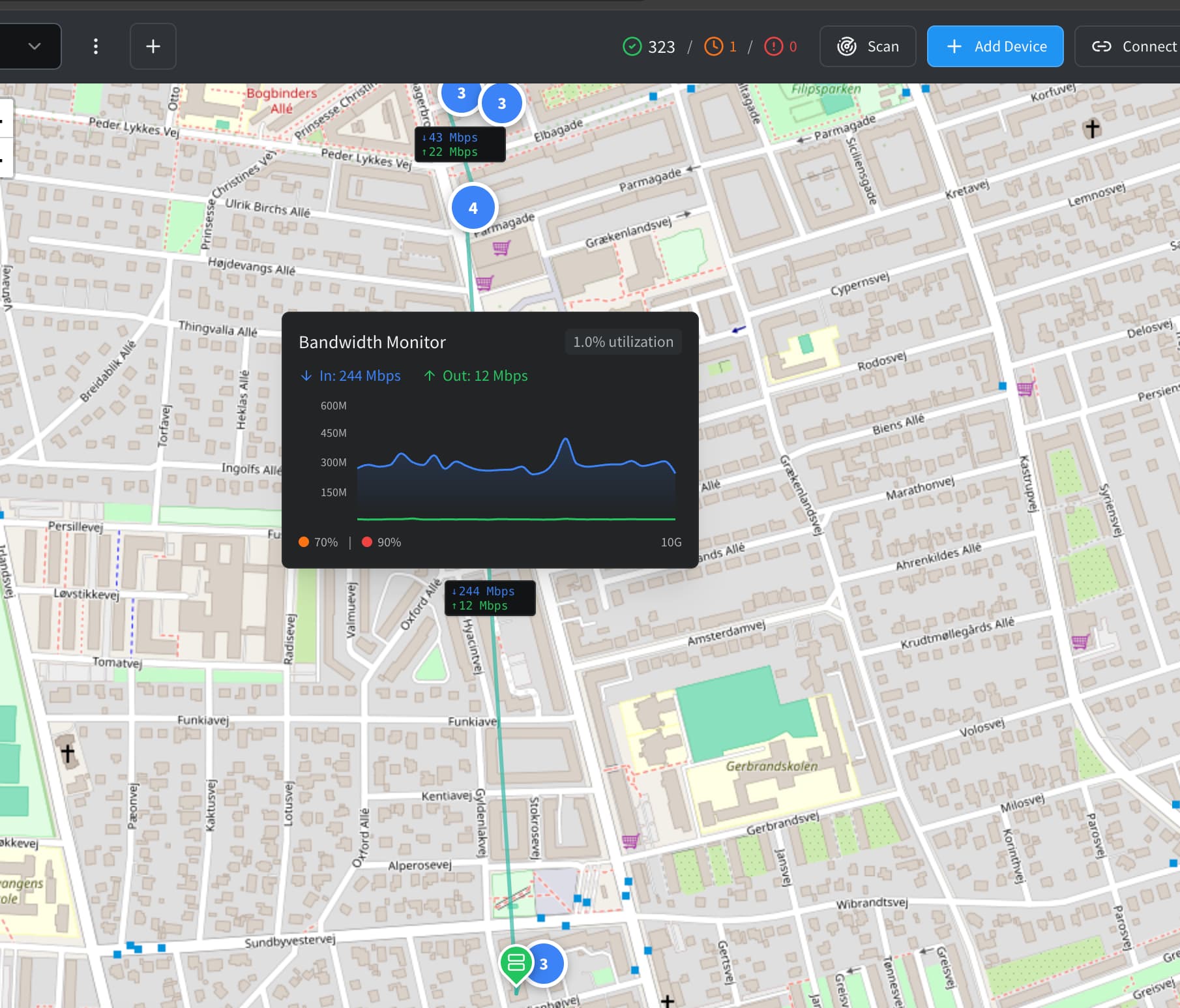
Can we extend the placeholder object (or create a new one) on the geomap layout such that when it represents another map, it shows any alarms from devices belonging to that map? Or have a way to assign monitored items to the placeholder, so it knows when to indicate an alarm?
I’m thinking of sites where I have more than 3-4 items (usually 10-20), like routers, switches, radios, etc. and if you’re looking at the geomap, you see the location icon blinking. You click on it and it takes you to that canvas map (or a pop-up of that map) where you can then identify which item is actually in alarm.
Sure that makes sense, it was in the plan, just needed to solve one questions.
I will make it look at all devices in the linked map, so it follows how other maps handle it. But when zoomed out, devices are grouped together.
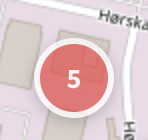
Currently if any device is down in the icon will flash red:
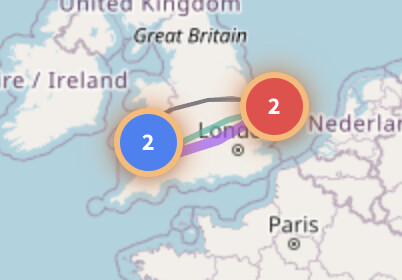
But if one of the devices is a placeholder, or a device linking to a map with devices that are down, should it just do the same?. Or maybe i could do this:
If a device in a submap is down, the surrounding circle around the group flashes orange?
Personally I think it’s fine if the circle blinks the same, regardless of it being actual devices or placeholders.
On another note, the only negative thing about changing maps right now is the geo-maps keep recentering. If I’m hopping back and forth between locations with lots of items, I’d like the “parent” map I just came from to be where it was when I go back. Perhaps save state for the duration of the visit but recenter if they’re logging back in.
Also, I just grabbed the latest update and I have to say I prefer the green/red arrows/pins to the labels on the satellite map. It makes for a much tidier map, particularly if you just want to see what’s up vs. down. (At some point I imagine adding all my customers to a satellite map.)
You could have it so the label shows up if they mouse over a red item, or if the item goes red and it’s not in a group, its name and/or alarm comes up.
As I’m building out another map of gear in the data center, I’m noticing a couple things:
When I’m connecting interfaces, like SFP+ ports, it shows in the drop-down that they’re 10Gbps, but it sets them as 1G links. It would be nice if it automatically set them based on the PHY that you get from polling
It would be nice if the custom line appearance option wasn’t limited to custom bandwidths, and if the custom bandwidth didn’t default to red dashes (I have a lot of 2G and 20G bonds).
Excited to see all the tinkering you’re doing as I build out my network.
I expect the ability to import devices from a CSV or JSON file is somewhere on the to-do list? For me, fields like name, IP address, SNMP credentials, latitude, and longitude would be sufficient (since you can get the rest via SNMP).
It was not on my list, as my basic idea was to only have devices, that I can talk to, this making a single source of truth system.
I have added it to the wishlist, then we can discus the need for this.
I have a lot of 1G links, and in some cases a lot of parallel 1G links. I’d like to differentiate them by vendor, or frequency (11GHz, 60GHz, 80GHz), or by primary vs. secondary, wireless vs. fiber, etc. Being able to customize the look of any of those links would help.
Likewise, if a link becomes congested or goes into alarm, being able to it’s alarm state (yellow, orange, red, dashed, dotted, flashing) would make it stand out.
We have a lot of “multi-gig” links, ranging from 1Gbps to 10Gbps, and a lot of 10+10 bonds. And yet other links that are “1G” technically max out at around 800-900Mbps. And if I decide to add customer links to the mix, we have plans ranging from 100-500Mbps. So yes, the ability to add custom link types would check all those boxes.
Regarding your first request for link vendor / frequency etc, My opinion is that that functionality is better living in Netbox. I suppose its a valid question as to have everything in one system versus disparate ones, but one for source of truth (Netbox) and one for monitoring (Corebit) is how I would approach this. Ideally then Netbox should be able to read in from Corebit, and netbox could populate corebit when a new device is added to netbox…. Ansible and all that.
Anyway, thats my view….. What do you reckon?
(EDIT: Just reading back up a bit, For me a Source of truth is of no use unless you can query it from other tools.)
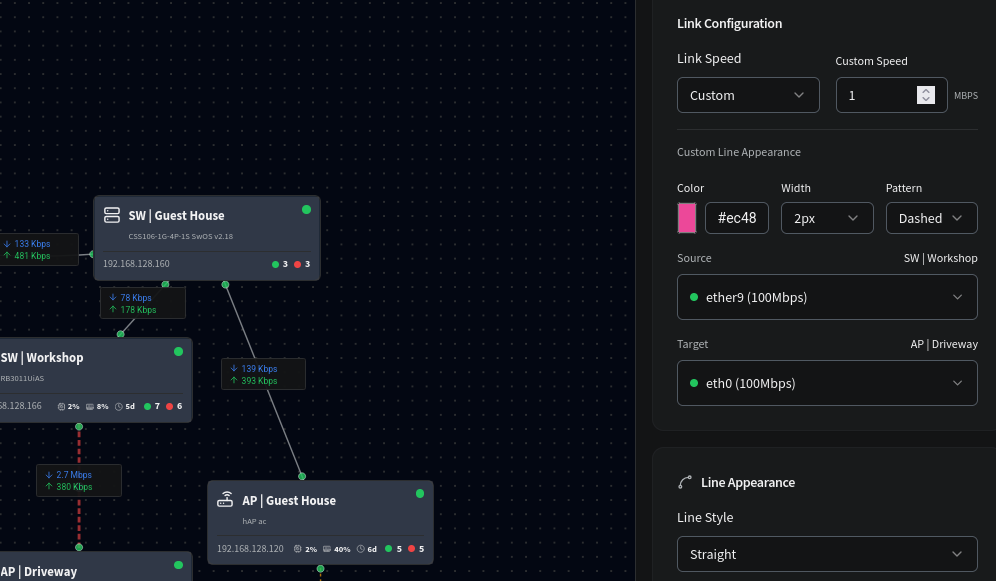
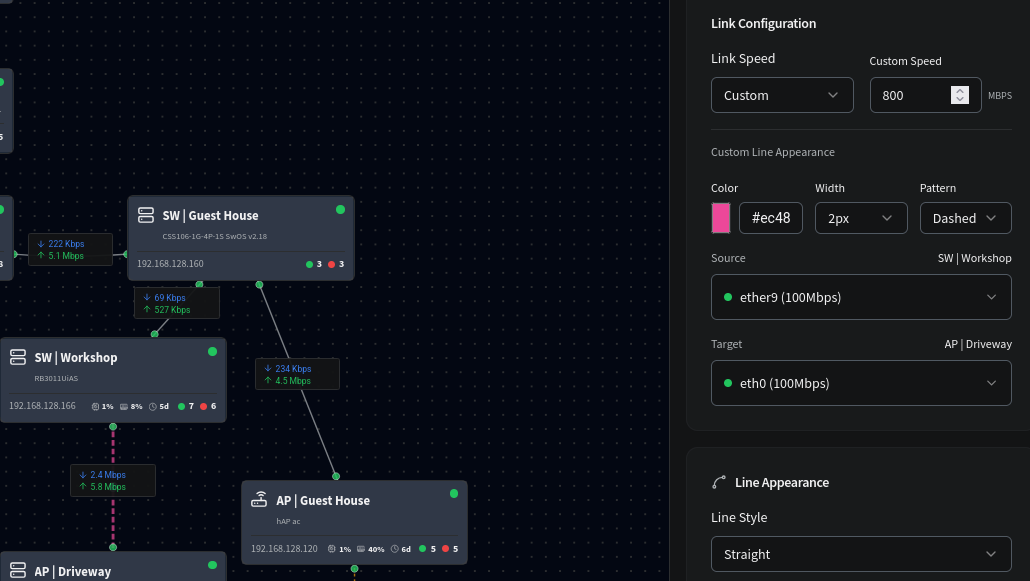
The links already change colour if saturated. Screen shot below shows this. I made a custom link speed of 1mbps to prove this, but it works for all.
The link has turned red (defined colour was pink) and is pulsing. look at the SW | Workshop to AP | Driveway link
Also the metrics graph shows an alarm at 70% and 90% thresholds.
I was talking about the option to customize the color and pattern of a link in such a way that conveys whatever meaning I want to associate with it, and to be able to associate one or more states with those colors. Different operators are going to want to categorize their links in different ways, and I cited frequencies or vendors as an example. You could also categorize them by technology (fiber vs. wireless) or service provider (multiple paths in and out of an area).
More specifically, I have several parallel paths with a 5 or 6GHz low-frequency radio running alongside a 60/70/80GHz radio. The longer 60-80GHz links rain fade to the 5/6 backups. During normal use, the 60GHz links might be a Ubiquiti blue, whereas the Siklu 80GHz links might be a gray or green. The backup Ubiquiti 5/6GHz radios could be the stock white or gray that he has already assigned to 1G.
Seeing any link turn into an “alarm” color (different than a congestion/full color) when it’s down/disconnected, along with visible indicators of traffic flow (like animated arrows) would give the operator a quick idea of exactly what’s going on with just a glance at the map.
At the end of the day, I’d like to run this thing on a monitor on the wall 24/7. Anyone would then be able to walk into my office, look at the monitor and see X-number of links are down (or not), the backups are working (or aren’t) and traffic is going around the ring like it should (or isn’t), and be able to make decisions accordingly.
I do recall the congestion colors getting discussed earlier in the thread. I don’t have any links that are near saturation, so I haven’t observed that piece yet.
I created a more complete script to bring up CoreBit as /container from a clean CHR, since I did want to test OP's project – although prefer CoreBit offered sqlite as DB, than Postgres, since the fact Dude run on router make it convenient for cloud-less/internet-less monitoring.
My script should do all the work, prompting for IP and disk to use. Script requires RouterOS 7.21 or greater (and container.npk installed with device-mode's container=yes set). Like @sirbryan example, it uses the new /app directory structure when creating CoreBit and its DB containers, but uses a seperate bridge and NAT rules to expose the services.
:global corebitinstall do={
    # container network defaults
    :local corebitserverippre "169.254.123"
    :local dockerbridge corebit

    # database defaults
    :local corebituser corebit
    :local corebitpassword [:rndstr length=16]
    :local corebitdbname corebit
    :local dbport 5432

    # app defaults
    :local corebitsecret [:rndstr length=32]
    :local appport 3000

    # calculated later, NAT address and root disk placeholder
    :local approuterip
    :local appdisk

    # check for 7.21 /app support and new container CLI
    :local hasappsupport false
    :if ([:len [/console/inspect path=app request=child as-value]]>0) do={ :set hasappsupport true }
    :if ($hasappsupport=false) do={ :put "FAILURE: RouterOS no /container with /app support, cannot setup corebit" }
    :if [/system/device-mode/get container] do={} else={ :error "FAILURE: device-mode must allow /container, cannot setup containers" }

    # figure out router's management address using /app/settings
    :set approuterip [/app settings get router-ip]
    :if ([:typeof $approuterip]="nil") do={
        :set approuterip [/app settings get assumed-router-ip]
    }
    :if ([:typeof $approuterip]="nil") do={
        :put "WARNING: No management 'router-ip' set in /app/settings, using default"
        :set approuterip 192.168.88.1
    }
    :set approuterip [/terminal/ask preinput=$approuterip prompt="Please provide the router's management IP address:"]
    :if ([:typeof [:toip $approuterip]]="ip") do={} else={ :error "Install failed - invalid management IP ($approuterip)" }

    # determine root disk path
    :set appdisk [/app settings get disk]
    :if ([:typeof $appdisk]="nil" || $appdisk="none") do={
        :local firstdisk [/disk get [find mounted=yes fs~"(btrfs|ext4)" disabled=no] slot]
        :set appdisk [/terminal/ask preinput=$firstdisk prompt="No 'disk' set in /app/settings\r\nPlease provide the root disk's 'slot' (without starting /):"]
    }
    :if ([:len [/disk/find slot=$appdisk]]=0) do={ :error "Install failed - Run /app/setup to configure disk,\r\n or provide a valid disk 'slot' name, then re-run this script."}

    # remove any existing
    :put "Removing any existing corebit containers..."
    /container
    :foreach cid in=[find name~"corebit-"] do={
        stop $cid
        :while ([get $cid stopped]!=true) do={:delay 1s }
    }
    /interface bridge port remove [find bridge=$dockerbridge interface~"veth-corebit"]
    /ip address remove [find interface~"veth-corebit-"]
    /ip address remove [find comment~"corebit" or address="$corebitserverippre.1/24"]
    /interface veth remove [find name~"veth-corebit"]
    /container remove [find name~"corebit-"]
    /container envs remove [find list~"corebit-"]
    /ip firewall nat remove [find comment~"corebit-"]
    /interface bridge remove [find name="$dockerbridge" or comment~"corebit"]

    # check for /app internal bridge otherwise create a new bridge
    :put "Starting configuration of networking..."
    /interface bridge
    add name=$dockerbridge comment="corebit container bridge"
    /ip/address
    add address="$corebitserverippre.1/24" interface=$dockerbridge
    /ip firewall nat
    add comment=corebit-bridge chain=srcnat action=masquerade in-interface=$dockerbridge
    # not cannot use place-before=0 if none

    # configure network interfaces and NAT access
    /interface veth
    add address="$corebitserverippre.2/24" dhcp=no gateway="$corebitserverippre.1" name=veth-corebit-app
    add address="$corebitserverippre.3/24" dhcp=no gateway="$corebitserverippre.1" name=veth-corebit-db
    /ip firewall nat
    add comment=corebit-app chain=dstnat action=dst-nat to-addresses="$corebitserverippre.2" to-ports=$appport protocol=tcp dst-address=$approuterip dst-port=$appport
    # optionally, dstnat db for external access
    add comment=corebit-db chain=dstnat action=dst-nat to-addresses="$corebitserverippre.3" to-ports=$dbport protocol=tcp dst-address=$approuterip dst-port=$dbport
    /interface bridge port
    add interface=veth-corebit-app bridge=$dockerbridge
    add interface=veth-corebit-db bridge=$dockerbridge

    # add envs needed for corebit
    :put "Adding env variables..."
    /container envs
    add key=DATABASE_URL list=corebit-app value="postgresql://$corebituser:$corebitpassword@$corebitserverippre.3:$dbport/$corebitdbname"
    add key=HOST list=corebit-app value=0.0.0.0
    add key=NODE_ENV list=corebit-app value=production
    add key=PORT list=corebit-app value=$appport
    add key=SESSION_SECRET list=corebit-app value=$corebitsecret
    # App ENVs; You may need to change APP_PORT if you have anything else on port 3000
    add key=APP_PORT list=corebit-db value=$appport
    add key=PGPORT list=corebit-db value=$dbport
    add key=POSTGRES_DB list=corebit-db value=$corebitdbname
    add key=POSTGRES_PASSWORD list=corebit-db value=$corebitpassword
    add key=POSTGRES_USER list=corebit-db value=$corebituser
    add key=SESSION_SECRET list=corebit-db value=$corebitsecret

    # ensure a temp direcotry
    :put "Setting container directory to use $appdisk per /app scheme"
    /container config
    set tmpdir="/$appdisk/tmp" layer-dir="/$appdisk/apps/layers"

    # add mounts for config file
    :if $hasappsupport do={
        :put "Running on 7.21, using mounts on container"
        /container
        :put "Adding corebit-app container..."
        add envlists=corebit-db,corebit-app interface=veth-corebit-app mount="/$appdisk/apps/corebit/corebit-data:/app/data:rw,/$appdisk/apps/corebit/corebit-backups:/app/backups:rw"  name=corebit-app remote-image=ghcr.io/cis2131/corebit-docker root-dir="/$appdisk/apps/corebit" logging=yes start-on-boot=yes workdir=/app
        :put "Adding corebit-db container..."
        add envlists=corebit-db interface=veth-corebit-db mount="/$appdisk/apps/corebit-db/corebit-db:/var/lib/postgresql/data:rw" name=corebit-db remote-image=registry-1.docker.io/library/postgres:16-alpine root-dir="/$appdisk/apps/corebit-db" logging=yes start-on-boot=yes workdir=/
    } else={
        :error "$0 Script requires RouterOS 7.21 or greater"
    }

    # start containers
    /container
    :delay 5s
    :foreach cid in=[find name~"corebit-"] do={
        :put "Queue start of $[get $cid name]..."
        start $cid
    }
    :put "Waiting for container setup..."
    :while (!([get corebit-app running] && [get corebit-db running])) do={
        :put "corebit-app - $[get corebit-app about]"
        :put "corebit-db - $[get corebit-db about]"
        /terminal/cuu
        /terminal/cuu
        :delay 2s
    }
    :put "\r\n\r\n\rDONE\n\tUse http://$approuterip:$appport then provide 'admin' as both username and password"
    # /container/print where name~"corebit-"
}

$corebitinstall
Was going to post a script that work in both 7.20 and 7.21, but recent /container changes make that nearly impossible without complex scripting. And wish MikroTik allow adding "custom /app" in 7.21 since those model Docker compose.